Reviewing a Run
This page is for whoever checks what an agent did. After reading it you can find a finished run, judge its changes, accept or reject them, read the merge-readiness pack a verifier leaves, see what the run used, and read the project's Factory metrics page.
What happens when a run finishes
A run that left changes marks the task Needs your review. This is a flag on the task, separate from your board columns. The board and the list show it. It clears when you press Accept or Reject on the attempt. The task's status does not change: its column is yours, and you move the card when you want to.
Open the task and go to its Execution tab. Chips pick the run, each with its state; the run you picked reads from the top down, in the same order every time: the verdict first, then why, then the raw detail.
- The verdict. The run's state, the verifier's recommendation and risk as two chips when a verifier
ran, the tokens it used against its limit, how long it took, and whether it was merged ("Not merged: no
branch was pushed", or "Works in a folder: nothing to merge" for a team that has no repository). One
button is filled, for what to do next: Accept while the run waits for your verdict (when the verifier
left a pack, a reason is required and is saved with the verdict on the checks; without a pack,
Reject… asks for a note, which is optional), Merge once it is accepted, Run again when nothing else is left.
Under it, Why it stopped for a run that did not finish and What the agent concluded, the agent's
report read as a page (headings, lists, tables and links), clipped to its top until Read full report.
A Researcher's report is also kept as a file,
report.md: Open report shows it in a window of its own and Download report.md saves it. - Needs you, only while the agent waits for an answer: the question, the options and the decision token field. A run that asked nothing has no such field.
- Checks. The criteria as a checklist: ✓ passed, ✗ failed, ◐ needs a person, with the kind of check and its evidence beneath. The task's Done when ticks and the verifier's criteria are one list, each saying where it comes from. The verify command and its output are folded.
- Changes. How many files changed and how many lines were added and removed. Open diff shows what changed; Open folder (or Copy path, when you are not in the desktop app) shows where the work is on this computer; Copy branch copies the branch name, when the agent worked on a branch.
- Steps, in four parts.
- The team's steps, when the run's team reports them: a track of steps in order, each marked Done,
Running or Waiting as the run goes, with what checks it in words ("checked by a command", "a reviewer
can send it back, up to 2 times", "asks you", "checked outside the team") and, once the run has ended, the
model and verdict of the role that did it. A step sent back shows as Running again and the steps after
it wait again. A step that no one on the team does (a command, a question, a wait) is listed in its
place with no mark, because nothing in the run says where it stands. When the team or its agent reports
no steps, the tab says "
<Agent>does not report its steps in advance" and the track is made of the steps the run took. - What each step ran lists each step in order: who did it (Lead, Implementer, Reviewer, or the name of a role your team gave), the model it used (with "a small model" or "a strong model" when the team said which), its verdict when it gave one, how long it took when docket records when its work began and ended ("Took 4m 55s"; a row of alike steps shows their total, and a step that did no agent work shows nothing), and, under it, what the agent assumed and what it asked when it said any. Steps that came out alike one after another are one row with a count, such as "Implementer ×3". The prompts a step read are folded under Prompts used, each with its name and version and where it came from: built in, the team's own, this repository's, your settings or this task. The verifier's evidence names the model's family and the steps that produced the change.
- What the team recorded shows the rows the team wrote during the run, one small table for each kind of record; when a table was cut short, it says the rest are kept by the team in docket. A team that works in a folder rather than a repository says so in the verdict: there is nothing to merge, and what it did is the last step's summary.
- Activity, folded while the run is over and open while it goes, holds What the agent did, two ways. By tool groups its steps by the tool it used, with how many times, and shows the files and commands it worked on as chips. Timeline lists the run's events as they happened and fills while the run is going: each call to the model, each tool it ran (a shell command is shown as the command), each call a docket team refused and each question docket opened, who answered it and whether it expired. Only the Claude Code log names its steps by tool; for any other agent By tool is disabled and says why, and the timeline is what there is. Only docket reports its steps while the run works.
- The team's steps, when the run's team reports them: a track of steps in order, each marked Done,
Running or Waiting as the run goes, with what checks it in words ("checked by a command", "a reviewer
can send it back, up to 2 times", "asks you", "checked outside the team") and, once the run has ended, the
model and verdict of the role that did it. A step sent back shows as Running again and the steps after
it wait again. A step that no one on the team does (a command, a question, a wait) is listed in its
place with no mark, because nothing in the run says where it stands. When the team or its agent reports
no steps, the tab says "
- Files from this run, one row for each with View and Download; a Markdown file such as
report.mdis viewed as a page. - Technical: the request, attempt and runner ids (each copies with one press), what the agent got (whether it ran in an isolated sandbox, the names of its environment variables when it had any, where it worked, and the exact prompt it read), the Usage in full (see Usage), the Raw log and whether the verifier signed its pack. On the item's own page these sit in a side column.
Every path on the tab is relative to the project, not to the working folder the agent was given on the computer that ran it.
Sections 5 to 7 are folds: a header you press (with a chevron) that says in one line what is inside while it is shut. A run that is still going, or that did not succeed, shows its Steps open; a run that finished well shows Steps, Files and Technical shut, and Activity shut once the run is over. When the agent waits for an answer, Activity says "a question needs you" in its header and opens by itself. The browser remembers whether you opened or shut each kind of section, and your choice wins over these defaults.
Succeeded is green only when the changes were captured. It is amber when a run that was not meant to change files changed nothing, or when the changes could not be read. A run is meant to change files when its tools include one that writes, or, when its tools are all tools, unless its profile is a Reviewer, Researcher or Planner. (A Planner's or Researcher's write tool is for the plan file, so it does not count.) A run that was meant to change files and changed nothing is shown as Failed, with the reason "The agent reported success but delivered no change to review", and the number of files the agent left uncommitted when there were any. A failed run leads with why it failed.
A run that was turned away before the agent did anything (the computer refused it, or the team's level ceiling is below the level the run asked for) is shown as Not started, in a neutral grey, not as Failed, on the board's cards, the strip's counts and the List as well as here: it used nothing and changed nothing, so it shows no tokens or duration, its reason stands as plain text, and the one button is Run again. A run that ended asking for a person offers Open the question and Run again at L3, not a third Run again.
A step can also run out of its own budget — the rounds, tool calls or time it was allowed to take, as against the tokens limit above — instead of finishing cleanly. Its sentence names the limit that stopped it and where to raise it. When that step had already written something, the run keeps its branch, so Changes still shows the diff even though the run stays Failed: nothing after that step verified, published or merged it. Two new choices follow, each shown even when it does not apply right now, with the reason why: Continue picks the very step back up, in the same session it was already in, when docket can; Start over from this run's work starts a fresh run from the branch the stopped one kept (doubling the token limit in its place, when tokens were what ran out). A step that changed nothing offers neither — there is nothing of its own to continue or start from, so reword the task and run it again clean.
A team that proposes items and ends with proposals Tack cannot use (for example, one names a parent that is not an earlier row in the file) is shown as Finished — proposals could not be used, not as a plain success, with the reason in words and docket's own line on hover.
When the verifier recommends rejecting a run, the run's line on the item says "the verifier says reject" beside "needs your review", and the verdict opens with its reason ("The verifier recommends rejecting this run: …"); the run is still yours to accept or reject. The questions an agent lists at the end of a step are notes, not a form: Tack cannot send an answer to them, so put the answer in the task and run it again. A question the agent stopped to ask is answered under Needs you.
The verifier's recommendation, the reasons for its risk and its next steps are written as sentences; the verifier's own line is what shows when you hover over one.
What you see on the board
After a run, the task's card on the board carries these marks. The list carries the merge and automation badges and shows the run's state in its own column.
| Badge | Meaning |
|---|---|
| A state chip on the card's second line (Queued, Running, Needs you, Ready for review, Finished, Failed, Cancelled, Not started) | Where the latest run is. Press it to open the task's Execution tab; for a run that needs you, it opens that run with its question open. A run that needs you or failed also puts a bar on the card's left edge |
| Ready for review | The latest run left changes and nobody has accepted or rejected them. When the verifier recommends rejecting them the chip says so, Ready for review · verifier says reject; the decision is still yours |
| Waiting for CI to merge, Not merged: … | Tack tried to merge the change and could not. Press the badge for the reason and what to do |
| Started by itself | The project started the run, not a person |
| The team's name, with its initials | The team the run's profile named |
| Merged by itself | Tack merged the change automatically |
| Repeats | The task is set to repeat when closed |
The badges that start with Started, Team and Merged are explained in Automating a Project.
When an agent proposes changes
An agent does not edit your board on its own. What it wants to change, it proposes as a change set: a list of changes with the reason it gives, where it came from (a run, a thread or a call to a tool) and who proposed it, by the name of its credential. A change can be a new item, who does an item, its priority, a move to another status, a dependency, a comment or a due date. How many of them apply by themselves is your choice, under Agents on the board.
One panel for every change set
Every change set opens in the same panel, whoever proposed it. New items are a tree, with one row per item and a line that counts them: items, sub-items and dependencies. An item that belongs under another is nested beneath it, and it is unticked when its parent is unticked. Every other change is a line in a list under the tree, with the item it is about named by its title. Each row has a checkbox, and each can be edited:
- An item's Title, Description, Done when lines (one per line, and they become the item's Done when checks), its Type and Role, and Who does it, which names the team that will do it once it exists; each field is named above it. A type the project does not have is said so under the row: the item is created with its parent's type, or the project's default work type when its parent holds work. Waits on lists the titles of the items it must wait for, each with a × to remove it, and a menu to add another.
- A change of who does an item, its role and team; a priority; the status to move to; the text of a comment; a due date. A dependency has nothing to edit: untick it to leave it out.
Select all and Select none tick every change that still waits. Then choose:
- Apply 3 changes applies the ticked ones, with your edits. Apply all applies everything that waits.
- Reject… asks why and turns down what still waits. The proposer can read the reason.
- Save edits keeps your edits without applying, to come back to them.
A change set applies as one: if the board cannot take it, nothing is applied, and the panel lists every reason, one line each ("operation 2: the status Ready is full"). Fix what the reasons name, or untick the changes that cause them, and apply again. After it applies, the panel says what it could not fill: a role or a type the project does not have, or a team that no single profile names. Such an item is created without that part. A change set that applied only in part says Partly applied, and the rest still waits.
Where they wait for you
Change sets that wait appear in Waiting for you in the sidebar, under Changes to apply, and in its count. Review the changes opens the project's Change sets page, which lists them by status: waiting for you, applied, turned down, or all. A decided change set folds into one line. When agents may only read in a project, and nothing is waiting, the Change sets entry in the sidebar is greyed out and says why.
A run that proposes items
A run with the Planner profile changes no project files and can end with a list of items it proposes.
The Planner and the Researcher write one file only, the plan file tack-plan.json. A run of either that
also changes any other file ends Failed with the reason "This run was meant only to write a plan, but it
also changed:" and the names of the files, so a change nobody asked for is never accepted by default; the
changes are still there to look at. The attempt shows The Planner proposes N items, in the panel
described above, and nothing is created until you press the button, which says how many it will create
(Create 3 items).
To propose items from a file, open the item and choose Propose items from a file in its ⋯ menu.
Choose a tack-plan.json, or drop it on the section. Tack checks it and names the first entry that does not
fit, and why. A file that fits opens the same list.
After you create the items, they appear as links. Under them, Tack says what it could not fill: a role or a type the project does not have, or a team that no single profile names. Such an item is created without that part.
How far an agent may go
In Settings → Automation, the Agents section has the setting Agents on the board. It has four levels, and the one in use says Set here:
| Level | What an agent may do |
|---|---|
| Read | Read the board and talk. It changes nothing, and proposes nothing. |
| Propose | Every change waits for you to apply it. This is the level a project starts at. |
| Act | Everything but new items applies by itself: who does an item, priority, moves, dependencies, comments and due dates. New items wait for you. |
| Create | New items apply by themselves too, up to two limits you set, New items per change set and New items per day (a day counts in UTC). Both are 0 until you set them, so Create is off by default and behaves like Act until you raise them. |
The stricter of this setting and the agent's own credential wins: a credential that may only propose never goes beyond Propose, whatever the setting says. See Agent credentials.
Merging a reviewed run
When the run's branch was pushed and its pull request is open, press Merge on the run. See Merging from Tack.
Reviewing a merge-readiness pack
When a verifier checks an attempt, it leaves a merge-readiness pack. Its parts are spread through the run, each where it is read: the recommendation and risk in the verdict, the criteria and the rest of what the verifier ran under Checks, and whether it was signed under Technical.
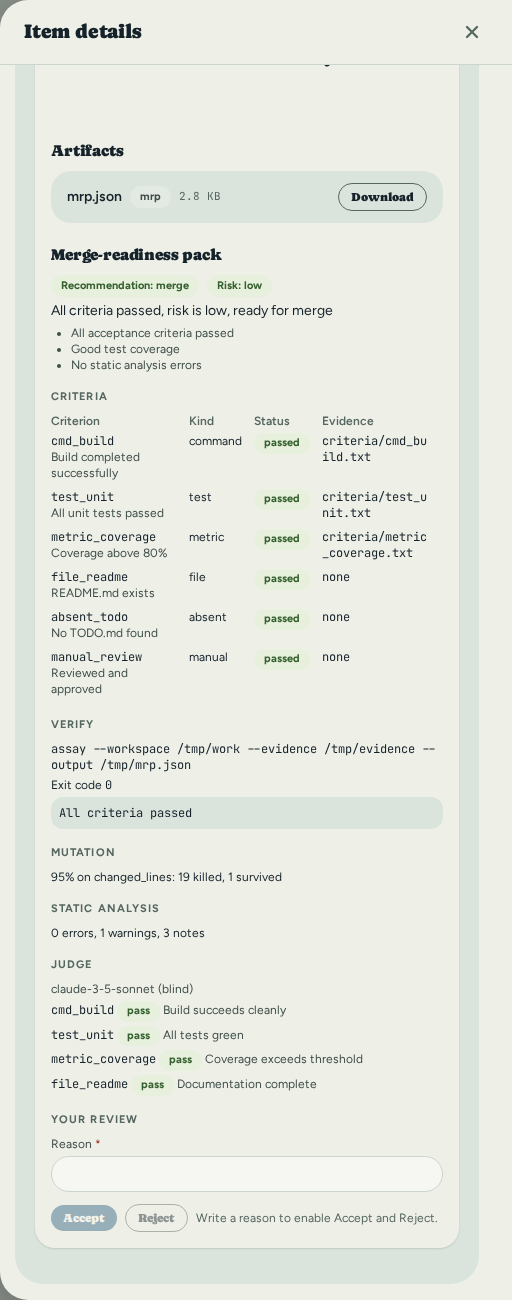
It shows:
- The verifier's recommendation and the risk level, in the verdict; the risk's reasons are under Checks.
- Whether the change was merged and by whom: "Merged by you", or "Merged by Tack" with the level and domain, or "Not merged:" with the reason, also in the verdict.
- Under Checks, one line for each criterion from the task's brief, with its status and evidence, joined to the task's Done when list.
- Next steps, when the verifier lists what to fix.
- Verify: the check command with its exit code and output, folded.
- What else the verifier ran, folded: Mutation and Static analysis, what the verifier measured, and Judge, a verdict on each criterion, where a judge ran.
- Your review.
A section the verifier did not run says Not run. That is not a pass: nothing was checked.
To record your verdict, choose Accept or Reject. A rejection needs a reason: Reject stays disabled until the reason has text, and the line "Write a reason to enable Reject" says so. An acceptance may carry one too. The first review is final; a second one is refused. A run has one review, which covers the pack as well: while the run waits for your verdict, it is the one block at the top of the run, and giving it clears Needs your review. Once it is given, Your review shows it here.
When the verifier rejects a change, a project can send it back to the agent with the list of what to fix; see Sending a rejected change back to the agent.
Usage
The verdict gives the tokens a finished attempt counted, as a bar against its limit when it has one, and how long it ran. The full Usage panel is under Technical. It leads with tokens, because that is what the agent measured:
- The tokens counted, the figure every limit uses, with the tokens in and out beside it, and the part of the input that was read from the agent's cache (not counted) or written to it. Hover a figure for the exact count.
- The models the run used, and, where it matters, whether the agent named the model that answered or Tack only knows the one you requested.
- Model calls and how long the run took.
If an agent does not report tokens, the panel says Tokens: Not measured. The task's summary of its latest run gives the counted tokens, with what the cache served beside them, and the run's token limit with who applies it; see Token limits.
The Factory metrics page, below, adds up the tokens of every run for a whole project.
Factory metrics
Factory metrics is in a project's sidebar. It summarises all the runs, questions and verification in a project, as one card per measure. Period at the top reads it over all time or the last 7, 28 or 90 days. Each card shows a figure, or Not measured with its reason when there is nothing to measure.
| Card | What it tells you |
|---|---|
| Escalation rate | How often a run needed you: questions asked divided by runs |
| Human minutes per decision | The median and the slowest tenth of the time a question waited for your answer, counted from when someone first opened it (or from when it was asked, if nobody opened it first) |
| Decided alone | Runs in which the agent's own policy settled at least one question without asking you, divided by runs; they are not counted in the escalation rate or the human minutes |
| Human minutes per pack review | The same wait for a merge-readiness pack and its verdict |
| Pack acceptance rate | Accepted packs divided by reviewed packs, with how many are still unreviewed |
| Verification tax (tokens) | Tokens spent on verification and rework, divided by tokens spent on first attempts |
| Outcomes | Pull requests opened, merged, closed and reverted, and how many were merged and not reverted |
| Quality | The figures the verifier reports for each repository. Tack shows them and does not compute them. Where the verifier cannot answer, the card says why |
When a card has nothing to count, it says Not measured and why, never 0.
Quality of the work
Under the cards, the folded section Quality of the work reads the period's runs as rates, each with the counts behind it, and opens into small tables:
- how often a run succeeded (a run turned away before it started is left out);
- how often the first run of a task was accepted, and how many extra runs a task needed;
- how often a merged pull request was reverted;
- how often each verifier's word agreed with what happened to the work (work you rejected, or whose pull request was reverted, is bad; work you accepted and kept is good);
- for a task that repeats, how often any three of its runs all succeed;
- the questions each agent asked you per hundred steps and how often you allowed them, and why runs stopped;
- the same rates cut by profile, agent, model, team and prompt fingerprint.
Every figure counts runs or tokens, and a figure with nothing to count says Not measured.
Verifier agreement has a row for each verifier: the pack the verifier leaves, and the Reviewer profile. The Reviewer ends its report with a line Verdict: merge, Verdict: review or Verdict: reject. When a Reviewer run is started from another run's work (Start over from this run's work with the Reviewer profile chosen), Tack keeps that word with the run it reviewed, and a later Reviewer run on the same run replaces it. A Reviewer run started from no run, or one whose report has no such line, is not counted. Each row shows how often the verifier approved bad work and rejected good work, how many it got right, how many it left to you, and how many judged runs it said nothing about.
Tokens by model and by team
Under the cards, Tokens by model lists, for each model, the counted tokens in and out, the tokens the cache served (shown, not counted) and the number of attempts. A run that named no model and whose agent reported none appears as No model named. By team appears when at least one run went to a team, and groups the same figures by team.