Tack

A project board that can hand its own items to an AI coding agent — Claude Code, Codex, docket, or opencode — and track the run as part of the item's history. Self-hosted, one binary, no cloud account.
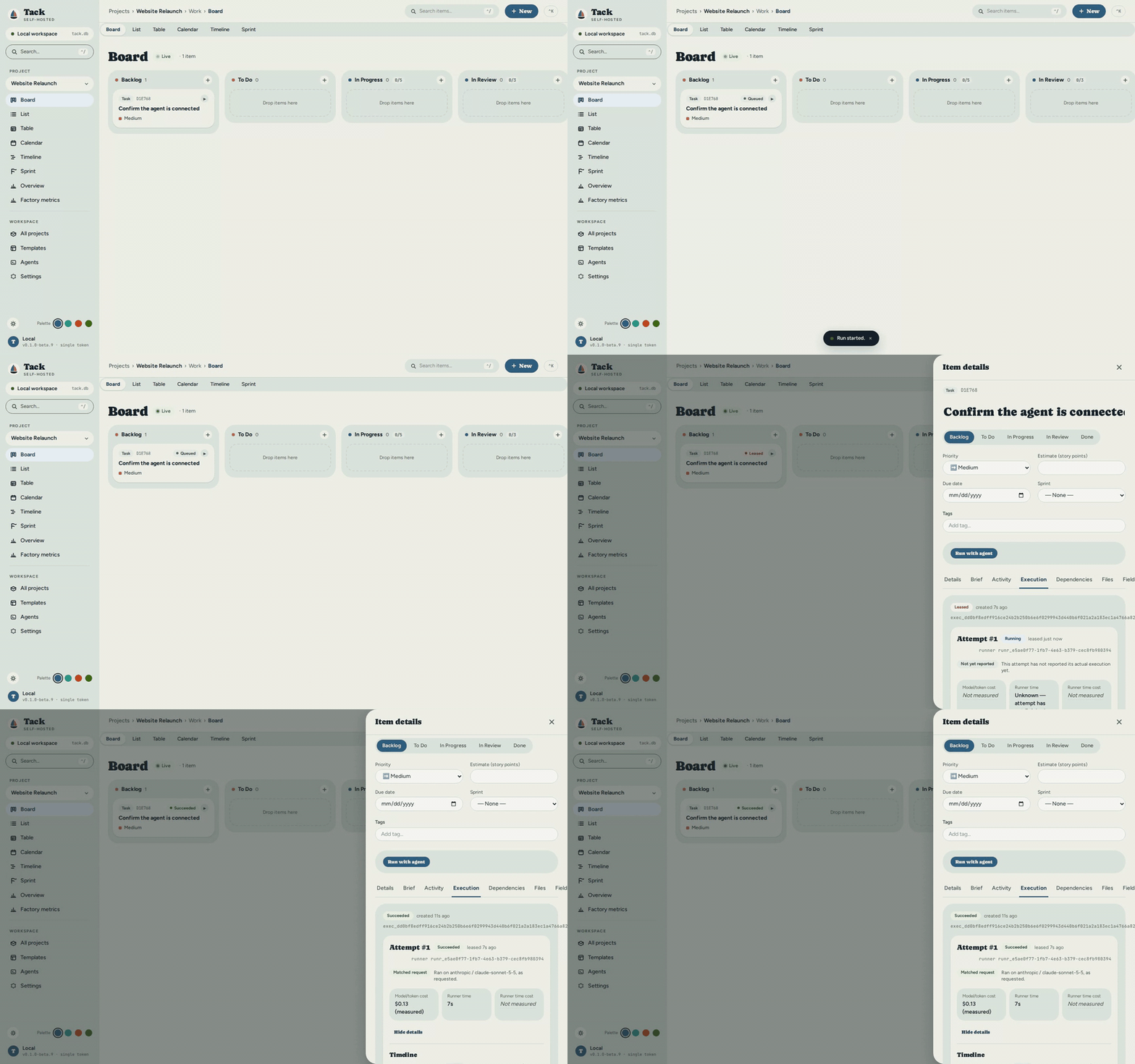
Tack tracks work for any domain — software sprints, a kitchen renovation, thesis chapters, a maintenance schedule — through fully configurable vocabulary and workflow columns, and can hand any item that's agent-eligible to a real coding-agent run instead of just tracking it. No accounts. No cloud. No subscriptions. One binary, one SQLite file.
The board and the runner
Under the hood, Tack is two components, built to be one product.
The board is the project manager: workflows, timelines, dependencies, per-project vocabulary — one binary, one SQLite file, no accounts, no cloud. It is the plan, the policy and the record. It decides what runs, when, under which limits, and it keeps the durable history of every run: events, decisions, artifacts, and what it measurably cost. It never executes code and never holds a model credential.
The runner is a small worker that lives where the code and the credentials already are — a laptop, a CI box, a machine with a GPU. It pulls work from the board, checks out an isolated workspace, launches the coding agent you already use — Claude Code, Codex, docket, or opencode — and reports back. It holds the keys; the board never sees them.
They are separate because they scale and fail differently. One board, many runners: a board on a small VPS dispatches to runners on ten developers' machines, each with its own agent, model and capacity. A runner that dies mid-run cannot corrupt the board — its lease expires and its fencing token stops writing. A board that restarts cannot lose a run — the runner's journal knows what it started. One developer runs both in one process with one command, on the same contract, with the same recovery.

Core concepts
Six terms recur throughout this documentation:
| Term | What it means |
|---|---|
| Item | The basic unit of work. One Item model backs everything — a task, bug, feature, epic, building, work order, assignment — and your project's vocabulary decides how it's labeled. |
| Workflow | The set of named status columns an item moves through (e.g. To Do → Doing → Done), each with a category and an optional WIP limit. See Workflows & Statuses. |
| Project type | A template chosen at creation that pre-loads a matching workflow and vocabulary (software, construction, legal, …). Everything stays editable afterward. |
| Vocabulary | Per-project label overrides that rename built-in terms to your domain — "Task" → "Work Order", "Sprint" → "Phase". The UI, CLI, and API all follow your terms. See Vocabulary. |
| Runner | A small worker process that lives where your code and credentials already are, pulls eligible items from the board, launches a coding-agent harness, and reports back. See Agent Runners. |
| Run (attempt) | One execution of an item by a runner — leased under a fencing token so at most one attempt is ever active, and recorded as durable history: events, decisions, artifacts, and measured cost. |
How this documentation is organized
| Section | For whom |
|---|---|
| User Guide | Anyone running Tack: setup, views, CLI, configuration |
| Developer Guide | Contributors and people extending the codebase |
| Learning Path | Developers new to Rust, Axum, or SolidJS; explains the stack with analogies |
| Roadmap | What each development phase set out to do, and what came of it |
Quick links
- Agent Runners & Fleet Execution — handing a board item to Claude Code, Codex, docket, or opencode
- Quick Start — up and running in five minutes
- Architecture Overview — the mental model behind the codebase
- Frontend & Design System — tokens, palettes, and the UI kit
- Rust Primer — start here if Rust is new to you
- API Reference — every REST endpoint (see
docs/openapi.jsonfor the exact, generated count)
Keeping docs current
These docs live alongside the code in docs/book/src/. Every push to develop runs
mdbook build in CI (with a broken-link check). If the book fails to build, CI fails,
so structural drift is caught before it merges.
For prose changes (user-facing descriptions, learning explanations), update the relevant
.md file in the same PR as your code change. The "Edit this page" link at the top of each
page opens the file directly on GitHub.
docs/book/src/
├── user-guide/        ← user-facing docs
├── developer/         ← contributor docs
│   └── learning/      ← stack explanation with analogies
└── roadmap.md
Quick Start
Two ways to get Tack running: install the binary (the fast path — no build tools, you just want to use Tack) or run from source in development mode (for contributors and people who want hot reload). Pick the one that matches you.
Prefer pictures? The Step-by-Step Tutorial walks this same page's install → project → tasks → agent-run path once, end to end, with a real screenshot at every step.
Install
Tack is a single self-contained binary — the web UI, REST API, and SQLite engine are all inside one file. No runtime, database server, or container required. Pick any one method.
| Platform | Install → first agent attempt |
|---|---|
| Linux | measured |
| macOS | not_measured |
| Windows | not_measured |
One line (Linux / macOS):
curl -fsSL https://raw.githubusercontent.com/yielab/tack/main/install.sh | sh
Verifies the download against that release's SHA256SUMS and refuses to install on a mismatch. Pin a version with TACK_VERSION=v0.1.0-beta.10; choose the install directory with TACK_INSTALL_DIR (default ~/.local/bin).
Homebrew (macOS and Linux):
brew install yielab/tap/tack
Windows:
irm https://raw.githubusercontent.com/yielab/tack/main/install.ps1 | iex
Same TACK_VERSION and TACK_SKIP_CHECKSUM env vars as above, plus TACK_INSTALL_DIR (default %LOCALAPPDATA%\Programs\tack); it verifies SHA256SUMS and adds the install directory to your user PATH — open a new terminal afterwards. Or install with Scoop:
scoop install https://raw.githubusercontent.com/yielab/tack/main/packaging/scoop/tack.json
Or download the .msi from the releases page.
Desktop app. Download it from the releases page — the .AppImage or .deb on Linux, the .msi on Windows, or the .dmg on macOS (built separately for Apple Silicon and Intel). Opening it starts the same server this page describes, inside its own window, with an icon in your system tray: closing the window leaves it running, and the tray's Quit is what actually stops it. If the server it started stops on its own, the tray tells you once — the status line reads "Server stopped" with the exit reason, and reopening the app starts it again; if the app is instead pointed at a server it did not start and that server goes quiet, the tray says so after a few seconds rather than staying silent. Skip to First use once it's open.
Docker: the ghcr.io/yielab/tack image isn't publicly pullable yet — build it yourself from the repo's Dockerfile instead:
git clone https://github.com/yielab/tack.git && cd tack
docker build -t tack:latest .
docker run -d --name tack -p 3210:3210 -v tack-data:/data tack:latest
See Deployment → Docker for the compose file and configuration.
Manual download. Grab the archive for your platform and SHA256SUMS from the releases page, verify, then run:
# Linux / macOS
sha256sum -c --ignore-missing SHA256SUMS   # macOS: shasum -a 256 -c --ignore-missing SHA256SUMS
tar xzf tack-*.tar.gz && cd tack-*/
./tack
On Windows, extract the zip and double-click tack.exe.
From source. No cargo install path exists yet — see Development mode (run from source) below.
First-run note (unsigned binary). The binaries are not code-signed yet. On macOS, right-click → Open the first time (or run
xattr -d com.apple.quarantine tack). On Windows, click More info → Run anyway if SmartScreen appears.
Start
tack # starts the server + web UI at http://localhost:3210
Or start it with the embedded agent runner in one step — see Run an item with an agent below for what that adds:
tack serve --with-runner
Then open http://localhost:3210 in your browser. On first start, Tack creates tack.db and a storage/ folder next to the binary and runs the schema migrations automatically. Those two paths are your data — back them up and you've backed up everything.
Verify the server is up:
curl http://localhost:3210/api/health
# {"status":"ok","version":"0.1.0-beta.7","migrations_applied":62}
migrations_applied is how many migrations this build actually ran — trust that field over any number quoted here; it only grows as the schema does.
If this fails, see Troubleshooting.
First use
-
Create a project. Click New Project on the Projects page, or press
Ctrl+Kand type "new project". Choose a project type — a template that pre-loads a matching workflow and vocabulary you can customize later. -
Add an item. On the Board, click the + inside any column, or the + New toolbar button. Give it a title and press Enter. An item is the basic unit of work — a task, bug, building, assignment, or whatever your vocabulary calls it.
-
Move it. Drag the card to another column. Status changes save immediately with optimistic UI (the card moves before the server confirms).
-
Open the detail drawer. Click the card body (not the drag handle) to see all fields, dependencies, comments, attachments, and custom fields. See Working with Items.
-
Find your way around. Press
Ctrl+Kfor the command palette (jump to any view, run an action) orCtrl+/to search items. Switch theme and palette from the sidebar footer — see Appearance.
Ready to put it on a network or add a token? See Administration & Security.
Run an item with an agent
By default, nothing here executes anything: the server you started above is a full
project manager with agent execution off, and clicking an item's Run with agent
button shows "Agent execution is off" instead of a form. Run with agent (the
button) and --with-runner (a boot flag, further down) are two different things —
the button needs some runner active to do anything, and --with-runner is one way
to get one. The two paths below are alternatives, not sequential steps: pick the UI
path if a server is already running (no restart needed), or the CLI path if you're
starting fresh from a terminal.
The UI-first path. Open the Agents page from the sidebar (/agents). Four
steps, top to bottom, each one a switch or a form field — no terminal, no id to copy:
- "Agent execution on this machine" — click Turn on. This is the one switch
ADR 0061 decision 6 exists for: it starts an embedded runner in this same process,
on this loopback bind, with no restart and no second binary. (A remote runner on a
different machine still needs
tack-runnerstarted there — see Enrolling a runner — but nothing on this page requires that.) - "Agents on this machine" — once execution is on, this section reports what it
found:
codexand/orclaude-code, present or not, and whether either one's own vendor login (Claude Max,codex login, ...) already works. Nothing to configure here if a harness is already installed and logged in. - "Vercel AI Gateway key" — paste a gateway key here if you don't want to rely on
a harness's own subscription login. It is stored in the runner's own local secret
store (the platform keychain where one exists, an owner-only file otherwise) —
never in
tack.db, never in a log, never echoed back by the API. Saving it immediately re-checks the gateway's model catalog; a real key shows real models below. If execution is already on, saving also restarts the embedded runner with the key, so the next run uses it — no "Re-check" needed in between. - "Default model" — pick a model from that catalog (or from whatever the target harness itself declares) and save it as this project's default. This is what lets the next step submit with zero hand-typed identifiers.
Now open any item and click Run with agent. With a runner active and a default model configured, the dialog's defaults are already correct — confirm and click Run. The item's own Execution tab shows the attempt's state, its requested-vs-actual model, and its usage economics as they land.
The CLI path — scriptable, and what to reach for outside a browser. Every step below is a real command against a real server, copied from an actual run; the fewest steps from the binary you already have to a completed attempt, no second process and no operator-issued token.
Start the server with the embedded runner instead of plain tack (it self-provisions
on first start — see Standalone mode;
this is the console-command equivalent of step 1 above, not a second thing to do on top
of it):
tack serve --with-runner
In another terminal, create an agent profile — its instructions travel with every request created against it:
tack agent-profile create "release-notes" \
  --instructions "Summarize the diff and write docs/CHANGELOG entries."
Created agent profile: release-notes (ap_91b4e)
  id: ap_91b4ea76-9f1a-4725-8a58-21a57d92572c
Find the runner id — the embedded runner enrolled itself under it:
curl -s http://127.0.0.1:3210/api/runners | jq -r '.data[].runner_id'
Using the item id from First use above, create the execution request
(swap in your own harness — codex or claude-code — and whichever model
it accepts; see Choosing a model and a
provider if unsure):
tack execution create <ITEM_ID> \
  --runner <RUNNER_ID> \
  --agent-profile ap_91b4ea76-9f1a-4725-8a58-21a57d92572c \
  --harness claude-code --model-provider anthropic --model-id claude-sonnet-4-5 \
  --agent-profile-snapshot '{"name":"release-notes","instructions":"Summarize the diff and write docs/CHANGELOG entries.","tool_policy":{},"timeout_seconds":600,"budgets":{}}' \
  --repository '{"kind":"git","remote":"/path/to/your/repo","base_revision":"<COMMIT_SHA>","subdirectory":null}' \
  --permission-policy '{"tools":[],"network":false}' \
  --timeout-seconds 600
Created execution request: exec_0fe
  state: queued
  id:    exec_0fe7252989f5f3d40a056c1da45b035039e4a8247ad89e5222cf9280134ec5d1
tack execution get exec_0fe7252989f5f3d40a056c1da45b035039e4a8247ad89e5222cf9280134ec5d1
Execution request exec_0fe7252989f5f3d40a056c1da45b035039e4a8247ad89e5222cf9280134ec5d1
  state:   succeeded (done)
That is a completed attempt, reached either way. See Running an item with an agent for all four ways to create a request and the full field-by-field reference.
Development mode (run from source)
For contributing to Tack or running with hot reload. The API server and Vite dev server run as separate processes.
Prerequisites:
- Rust toolchain via rustup (stable, 1.94+)
- Node.js 22+ and npm
rustc --version
node --version
Terminal 1 — API server:
git clone https://github.com/yielab/tack.git
cd tack
cargo run -p tack-cli -- serve
The server binds to http://127.0.0.1:3210 and runs migrations on first start.
Terminal 2 — frontend dev server:
cd frontend
npm install
npm run dev
Vite starts at http://localhost:5173 and proxies all /api/* requests to the API server. Open that URL in a browser.
Build the single binary yourself
One process that serves both the API and the SPA — what the release archives ship:
# 1. Build the frontend
cd frontend && npm run build && cd ..

# 2. Build the API with the embedded SPA
cargo build --release --features embed-spa -p tack-cli

# 3. Run it
./target/release/tack
# open http://127.0.0.1:3210
Without --features embed-spa the binary serves only the API; use the Vite dev server or any static file host for the frontend.
Environment variables
| Variable | Default | Description |
|---|---|---|
TACK_PORT | 3210 | Listen port |
TACK_DATABASE_URL | sqlite:tack.db?mode=rwc | SQLite file path |
TACK_LOG_LEVEL | info | trace · debug · info · warn · error |
TACK_API_TOKEN | (none) | When set, all API calls need Authorization: Bearer <token> |
See Configuration for the full reference and tack.toml format, and Administration & Security for tokens, CORS, webhooks, and cloud backup.
Step-by-Step Tutorial
From a fresh machine to a finished agent run: install Tack, create a project, add
tasks, say what "done" means for one of them, set up the agent that will work on it,
hand the task to Claude Code, watch it run, and download the result. Every screenshot below is a real capture from one live session
against a clean database — including the run itself, which is a real model call, not
a mock. (The capture recipe lives in frontend/e2e/tutorial-assets.spec.ts; see
Regenerating these screenshots.)
This page walks one path: the release binary, the web UI, and the embedded runner. The Quick Start covers the alternatives — desktop app, CLI-only agent runs, building from source.
1. Install and start Tack
Tack is a single self-contained binary — web UI, REST API, and SQLite engine in one file. One line installs it:
curl -fsSL https://raw.githubusercontent.com/yielab/tack/main/install.sh | sh
tack            # starts the server + web UI at http://localhost:3210
Verify it's up:
curl http://localhost:3210/api/health
# {"migrations_applied":81,"status":"ok","version":"0.1.0-beta.10"}
migrations_applied is how many migrations this build actually ran — trust that
field over the number above, which is what the build this tutorial was captured on
reported. If this fails, see Troubleshooting.
Homebrew, Windows, and the other install methods are in the [Quic## 2. First open
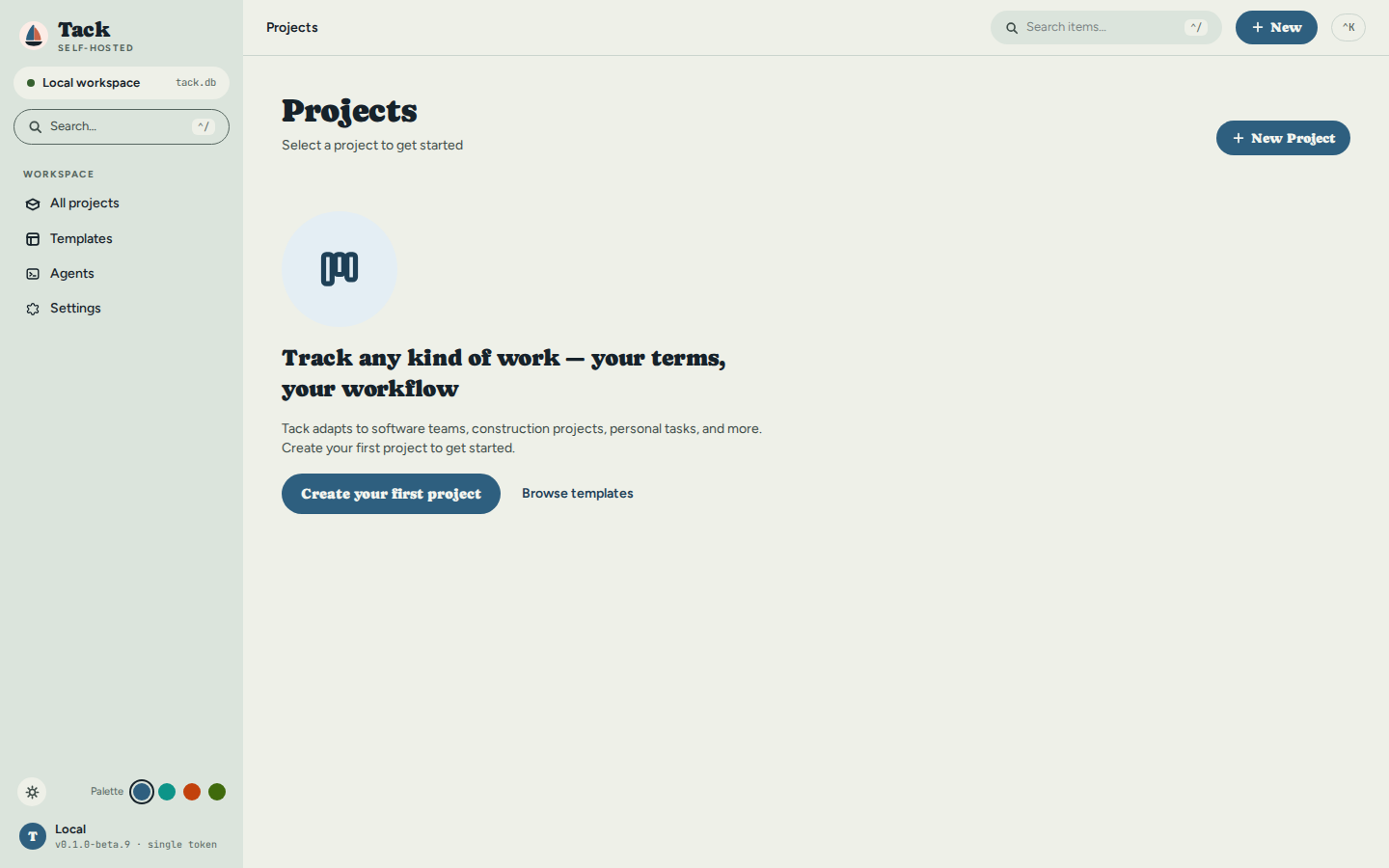
Open http://localhost:3210 in a browser. On a fresh database there is nothing
yet — just the invitation to create a project:
3. Create a project
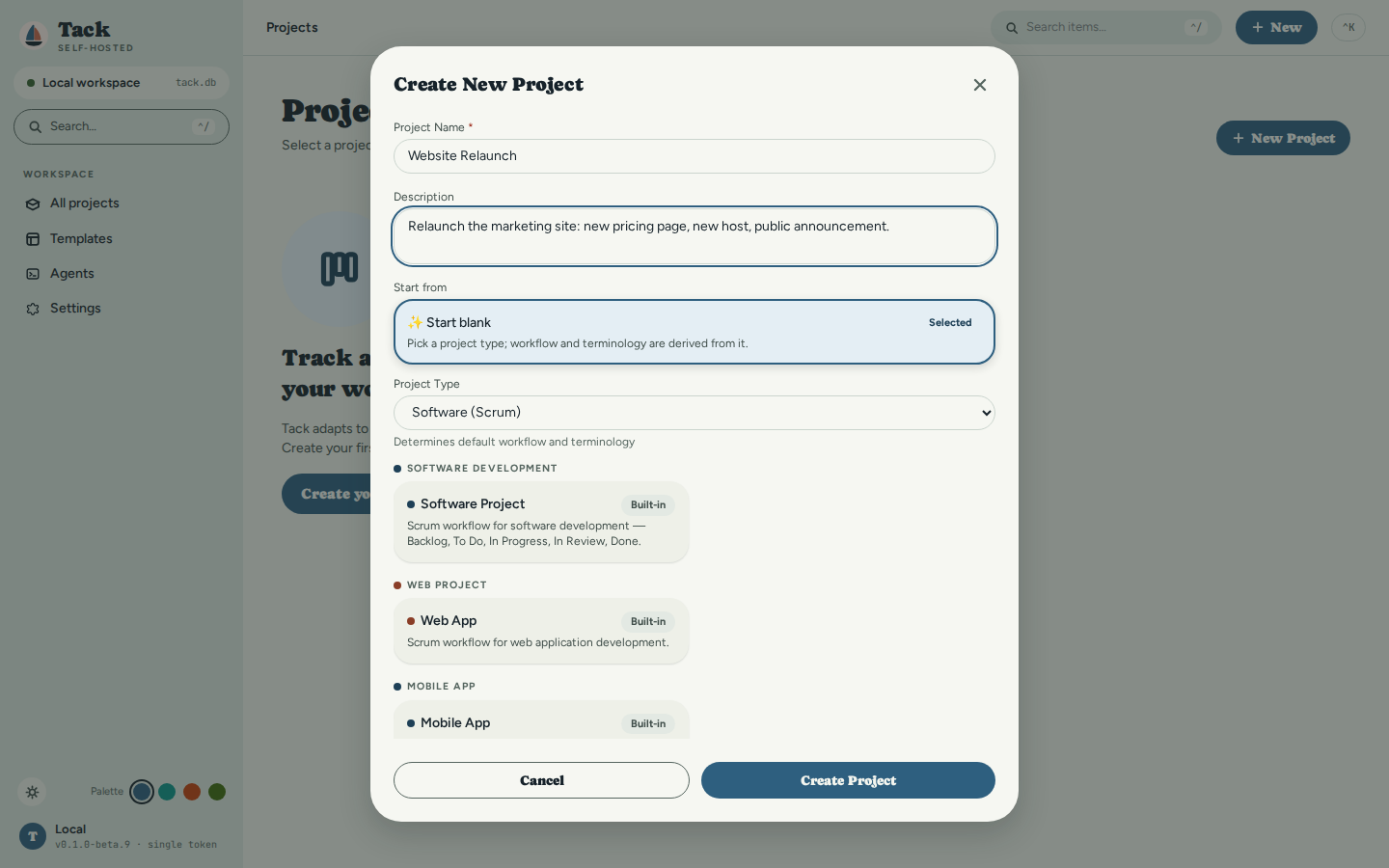
Click New Project (or Create your first project). Give it a name, optionally a description, and pick a project type — the type is a template that pre-loads a matching workflow and vocabulary you can change later. This tutorial creates Website Relaunch as a Software (Scrum) project:
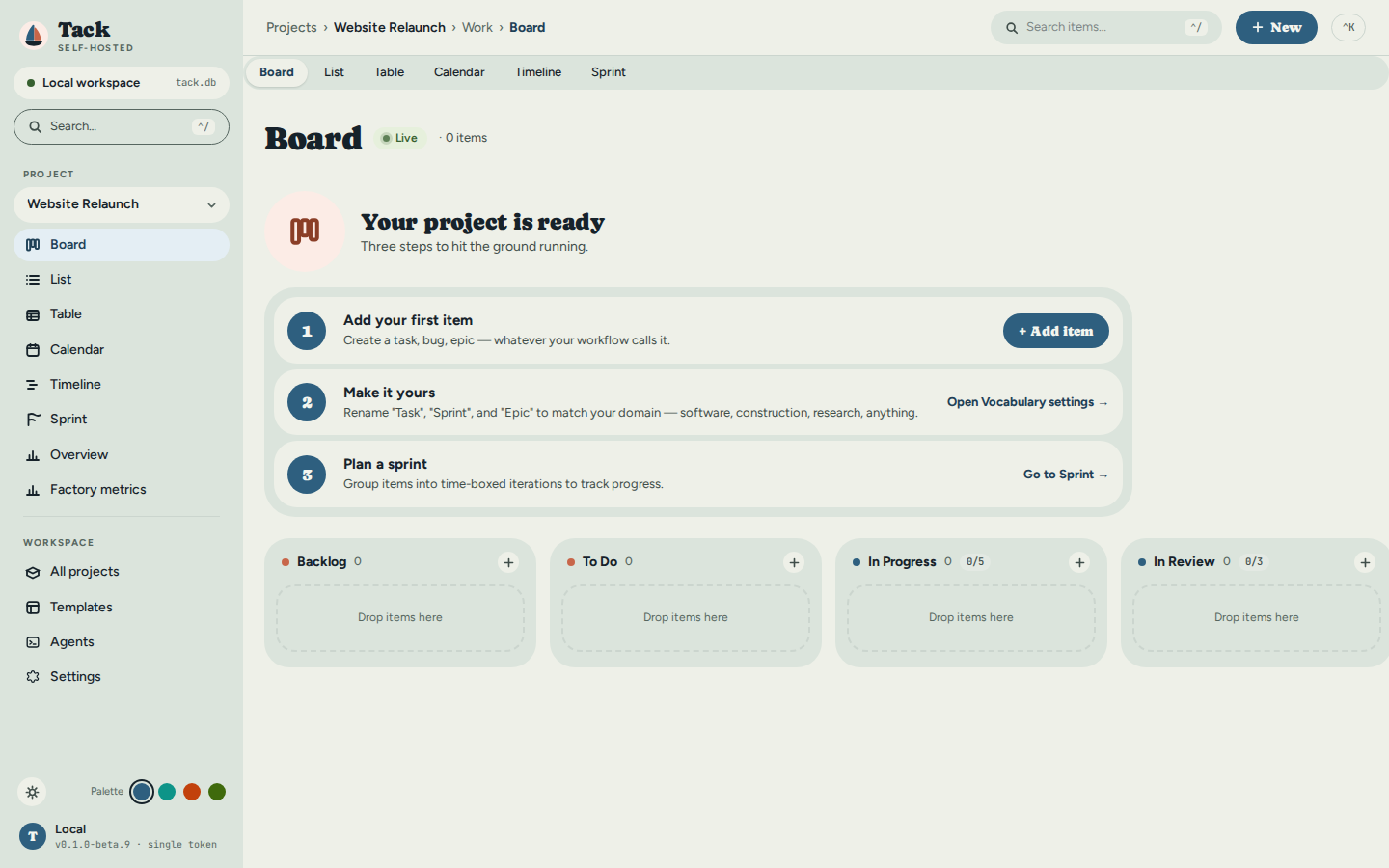
Click Create Project and the new board opens — empty columns from the Scrum workflow, plus a three-step onboarding card:
4. Add tasks
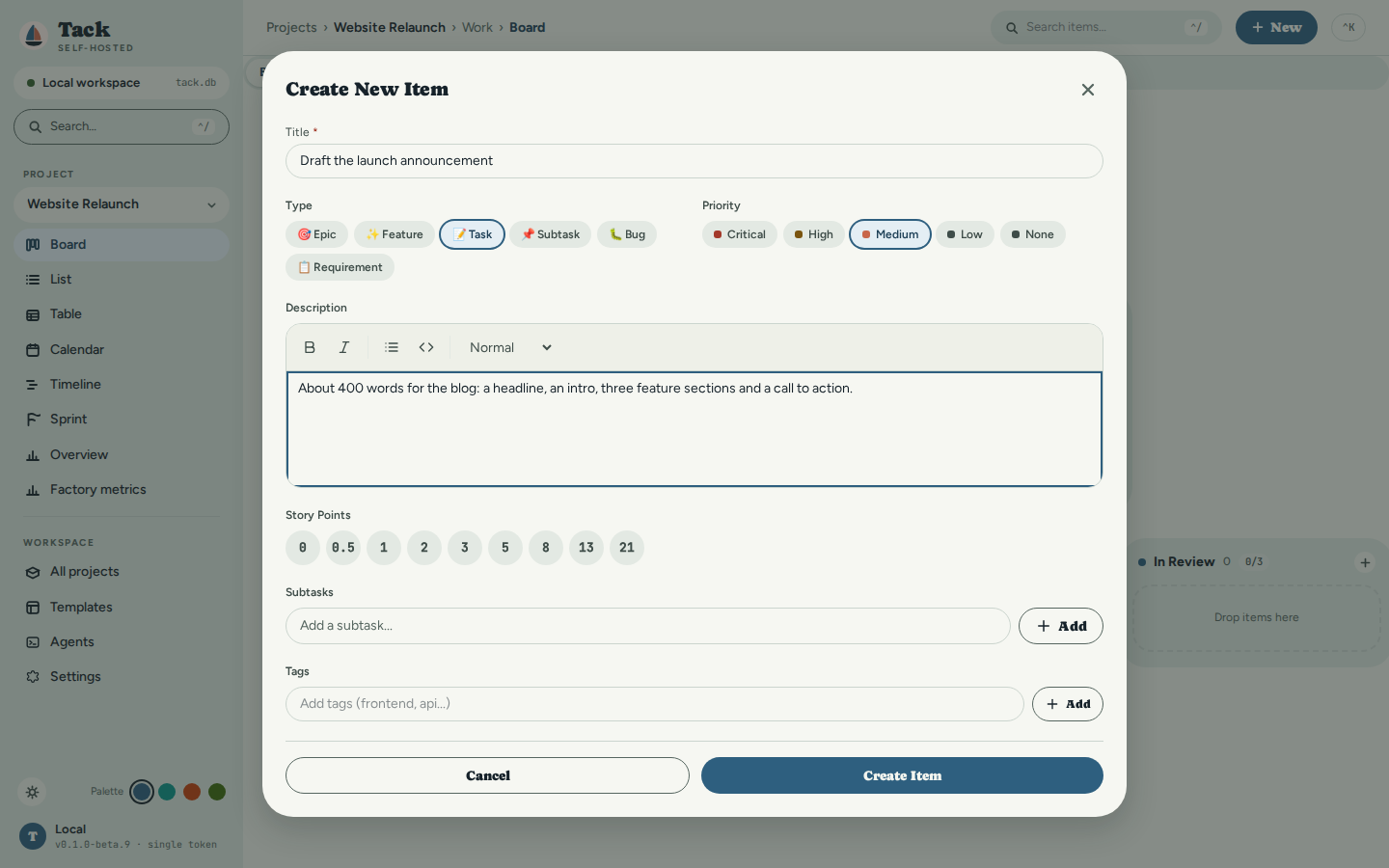
Click the + in any column (or the onboarding card's + Add Item). Only the title is required; type, priority, description, story points, subtasks and tags are there when you want them. The first task is the one an agent will write:
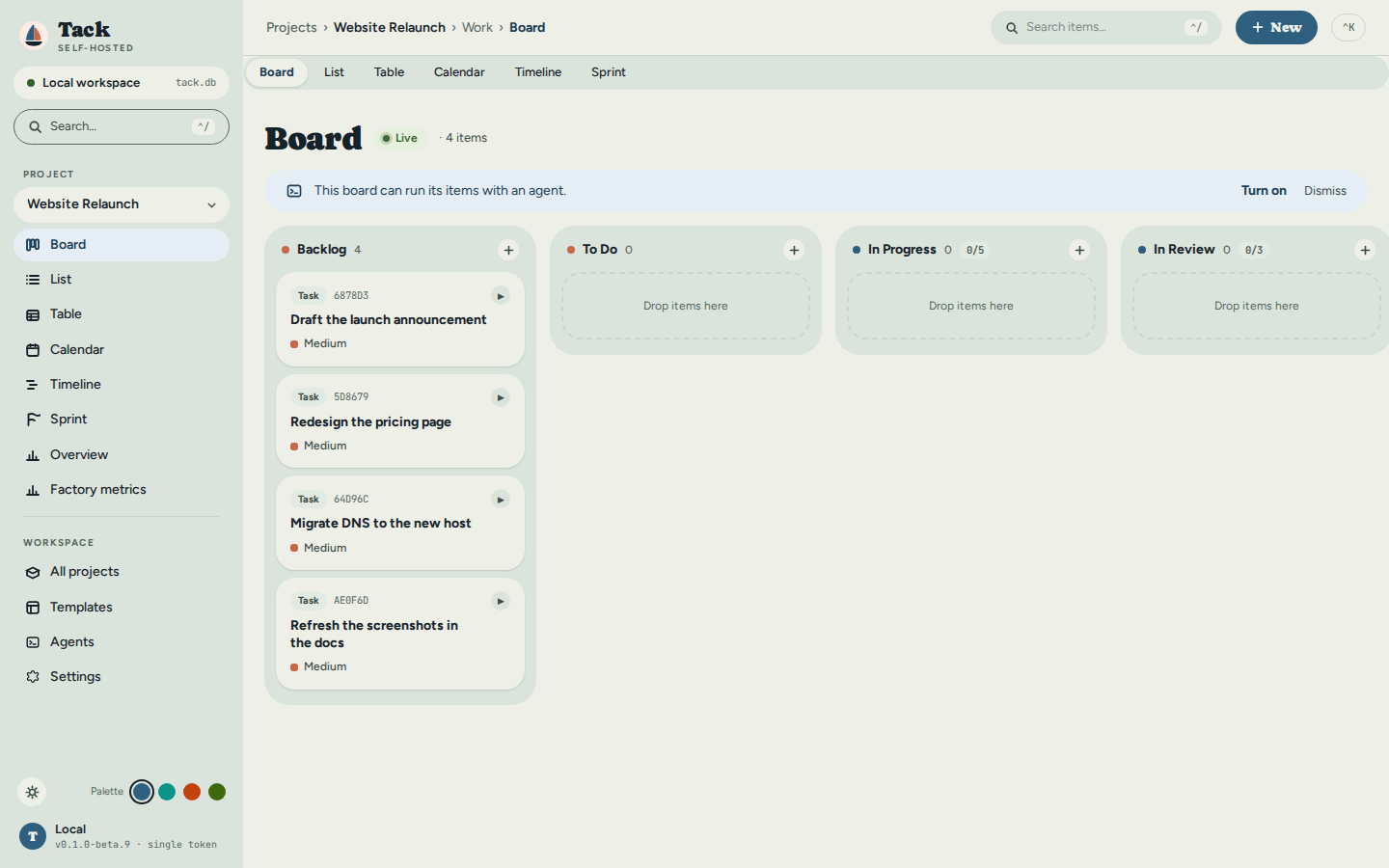
A few tasks later the board is a board. The banner on top offers to let this board run its items with an agent; this tutorial gets there in step 6:
5. Say what "done" means: the brief
Click the task to open its drawer, then the Brief tab. A brief is the definition of done that travels with the task: acceptance criteria, constraints, a definition of done in your own words, and a risk level. Each criterion has a kind — a command, a test, a metric, a file that must or must not exist, or a check a person makes. Prefer a kind a machine can run; this announcement has nothing to run, so both criteria are Manual and the tab marks them as costing a person's time. Save brief stores it:
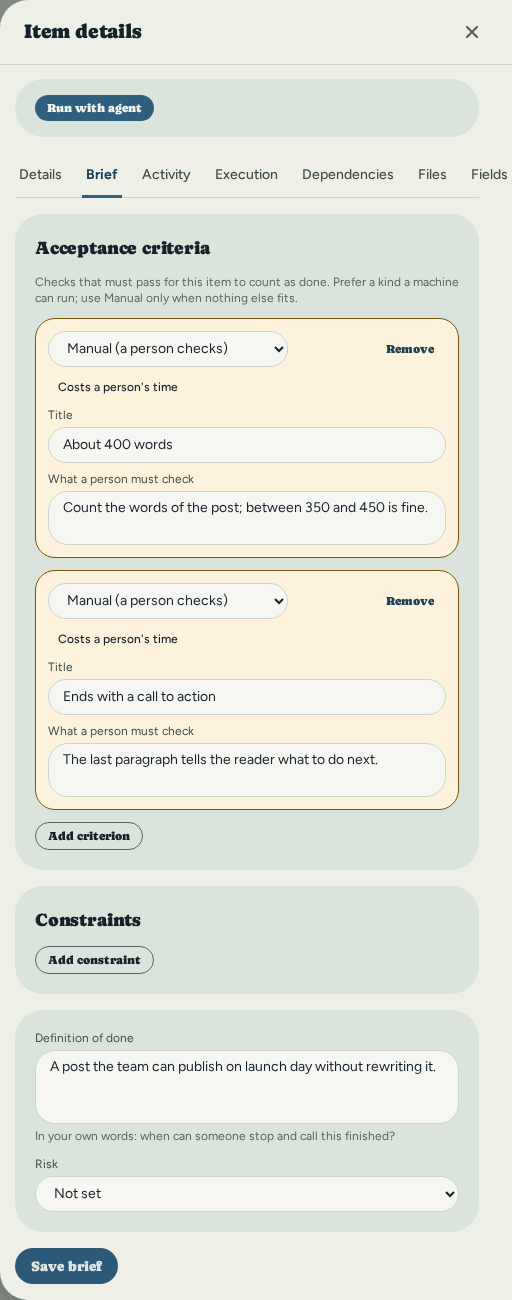
The agent receives the brief with the task's title and description, and the run keeps a copy of it. See Brief tab for every kind of criterion.
6. Set up the harness: turn agent execution on
A harness is the coding agent that does the work — Claude Code here. Tack does not
install it or sign you in to it: install Claude Code and sign in once with its own
claude command, exactly as you would to use it by hand. Tack then finds it.
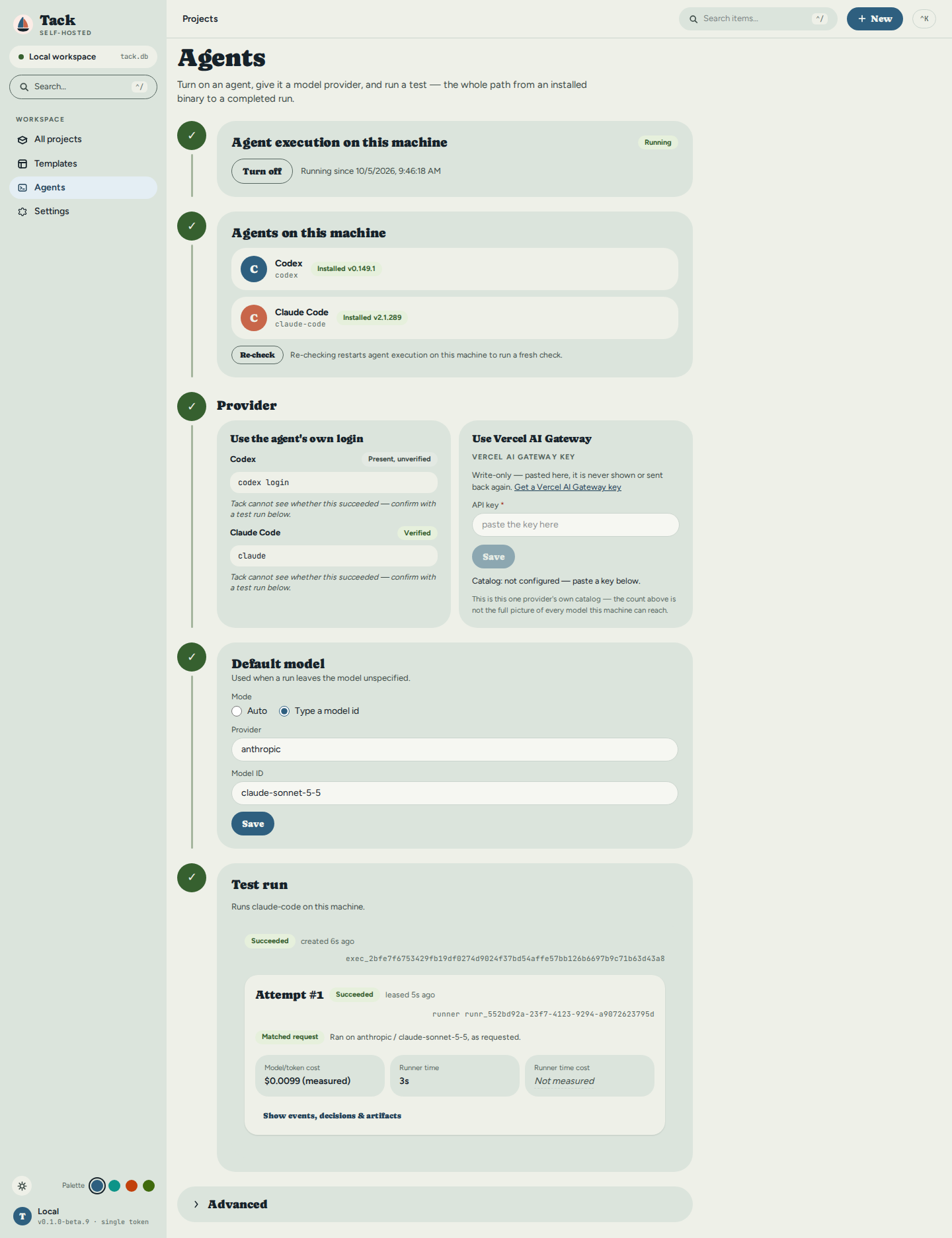
By default nothing here executes anything — the server is a full project manager with agent execution off. Open the Agents page from the sidebar. Step 1 is the one switch that matters:
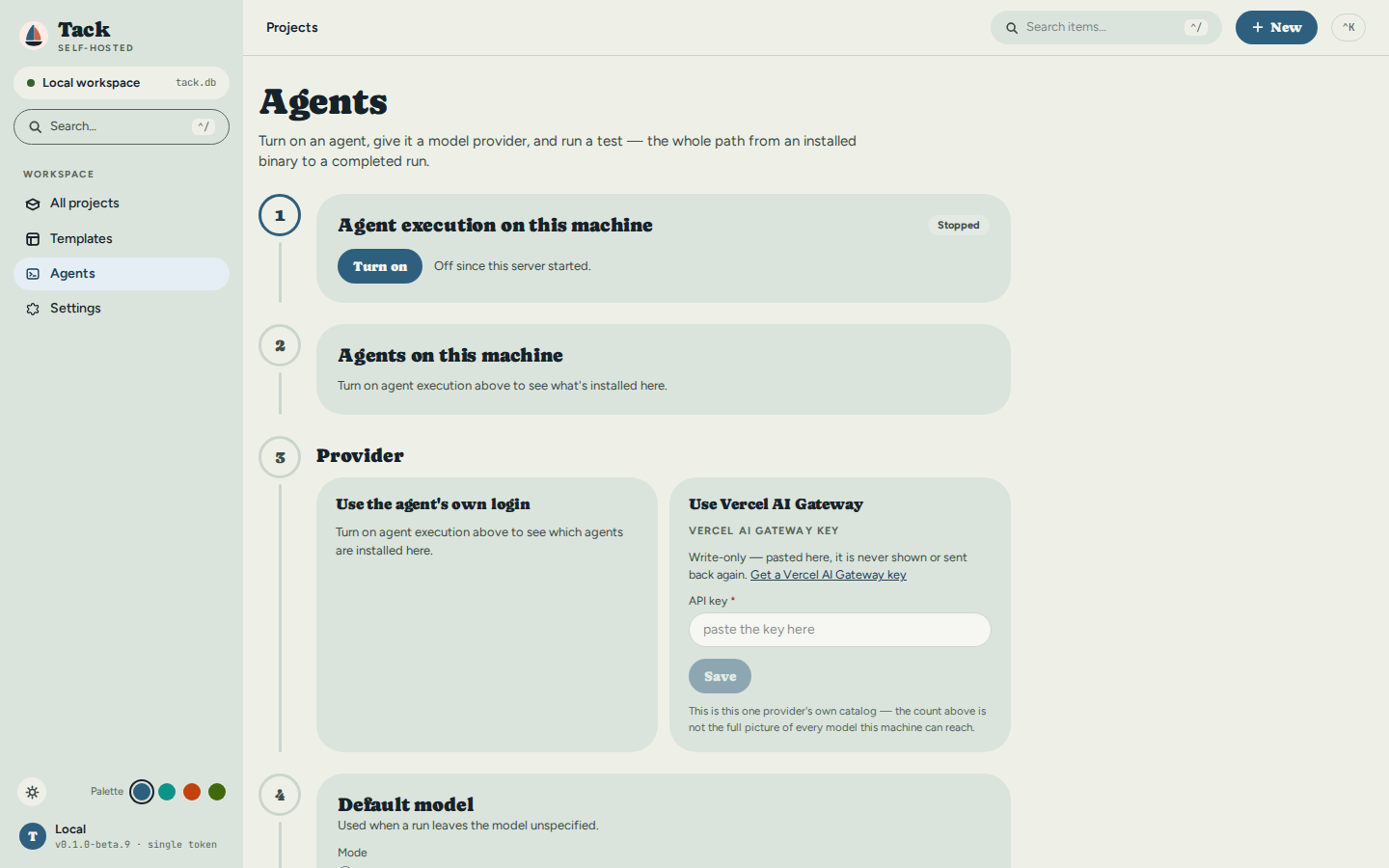
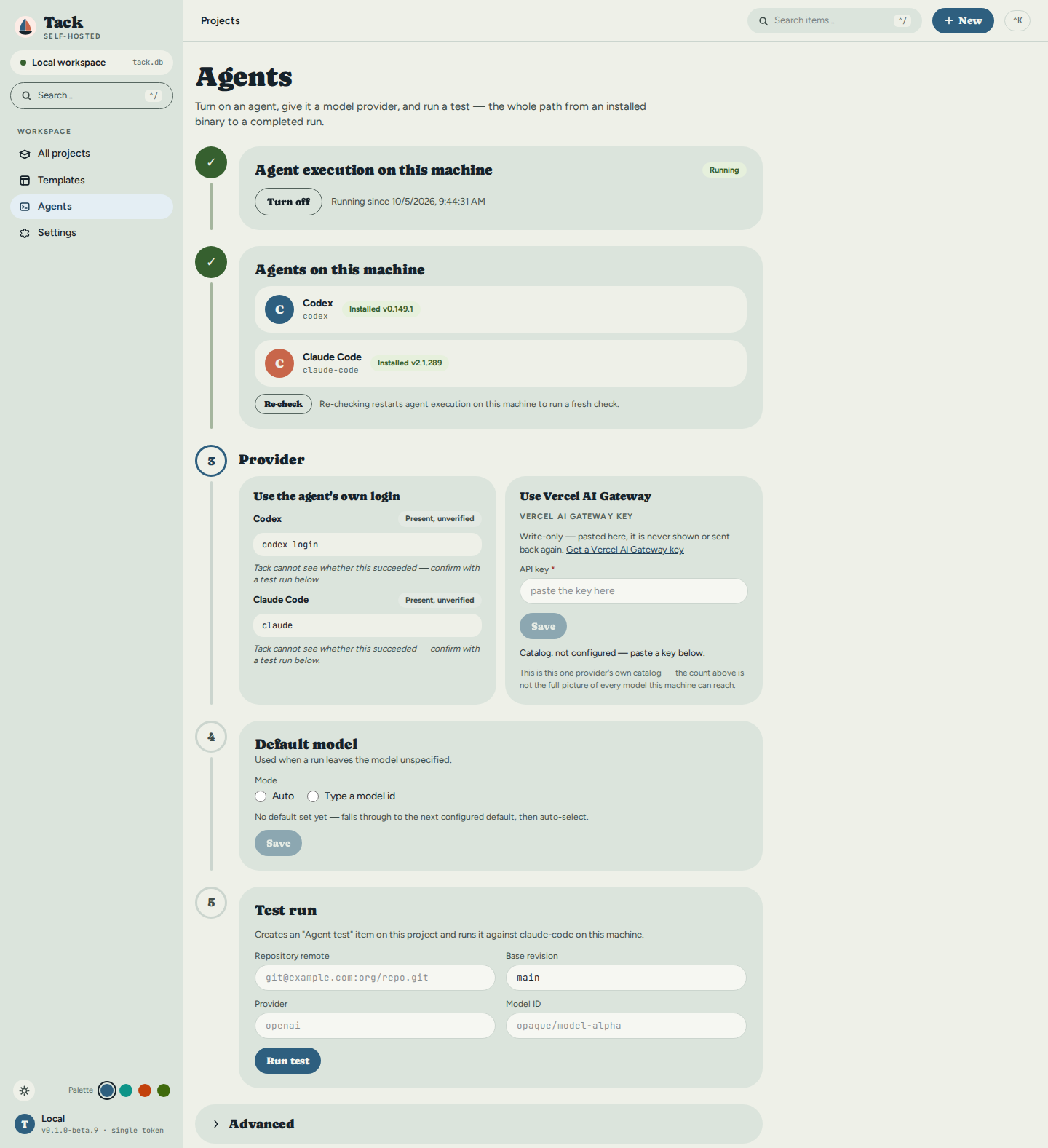
Click Turn on. This starts an embedded runner inside the same server process — no restart, no second binary. Step 2 lists the harnesses it found on this machine, with their installed versions; this machine has Codex and Claude Code, and the tutorial uses Claude Code. Step 3 shows each one's sign-in command and says plainly that Tack cannot see whether that sign-in worked — the run in step 9 is what proves it. If you'd rather not use the harness's own subscription, paste a Vercel AI Gateway key there instead:
7. Set up the agent: a default model and a profile
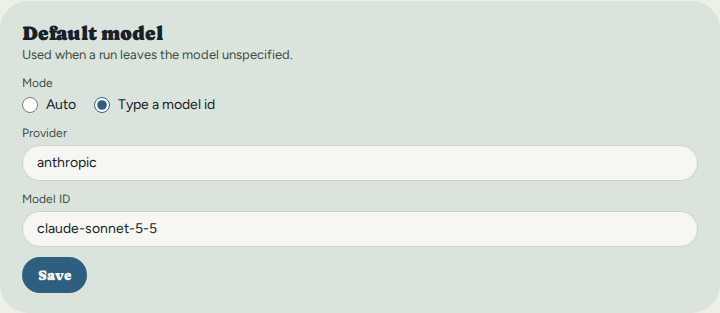
Step 4 on the same page sets the project's default model, so the run dialog needs no hand-typed identifiers. Pick Type a model id, enter the provider and a model your harness accepts, and Save:
An agent profile is the agent's standing orders: a name and the instructions sent with every run that uses it, plus an optional tool policy and limits. Open Advanced at the bottom of the Agents page, then Agent profiles, and + Create agent profile. This one writes announcements and is told not to call any tool:
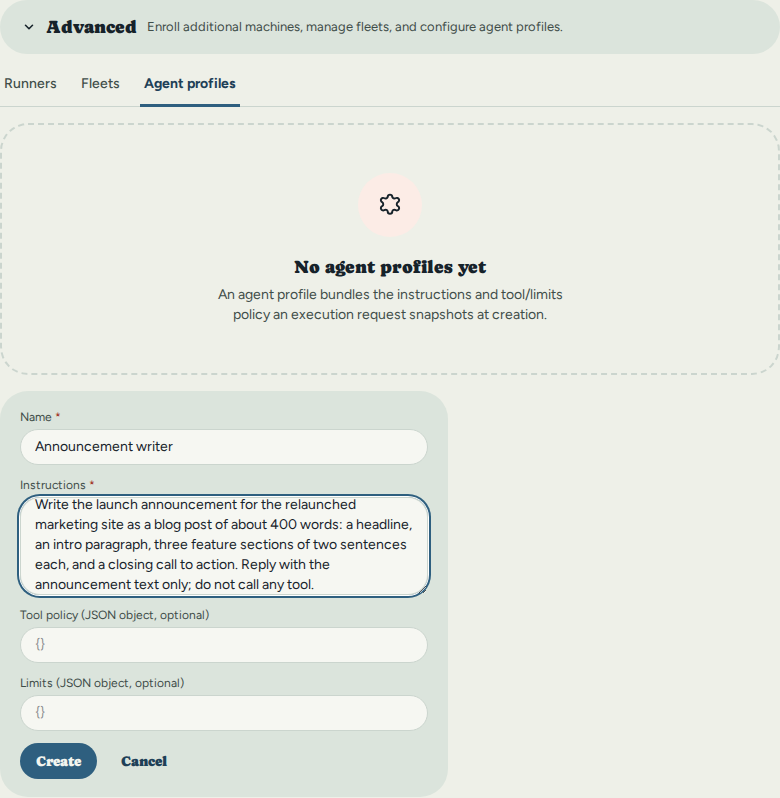
Click Create. With one profile, the run dialog selects it on its own.
8. Assign the task to an agent
Back on the board, every card carries a Run with agent button (the ▶ on the card, or the same button in the item's drawer). The dialog reads top to bottom as the whole run, and every row says Ready or what is missing:
- Who runs it — this machine's runner, the Announcement writer profile, the harness (choose Claude Code) and the model, already on Project default. The dialog states why this pairing is allowed: the runner reports that the harness passes the chosen model through as given.
- What it gets — the task and its brief, and the repository the agent works in (Change for this run to point it at one; here a local demo repository).
- How far it may go — Automatic lets the agent decide on its own; Ask me pauses it before each tool call until you answer in the task's decision inbox. Claude Code's tools are a checklist; none is ticked, matching the profile.
- What happens after — verifying the result, pushing a branch and opening a pull request. This runner has none of them set up, so each is shown disabled with the reason and the config that turns it on (see After a succeeded attempt).
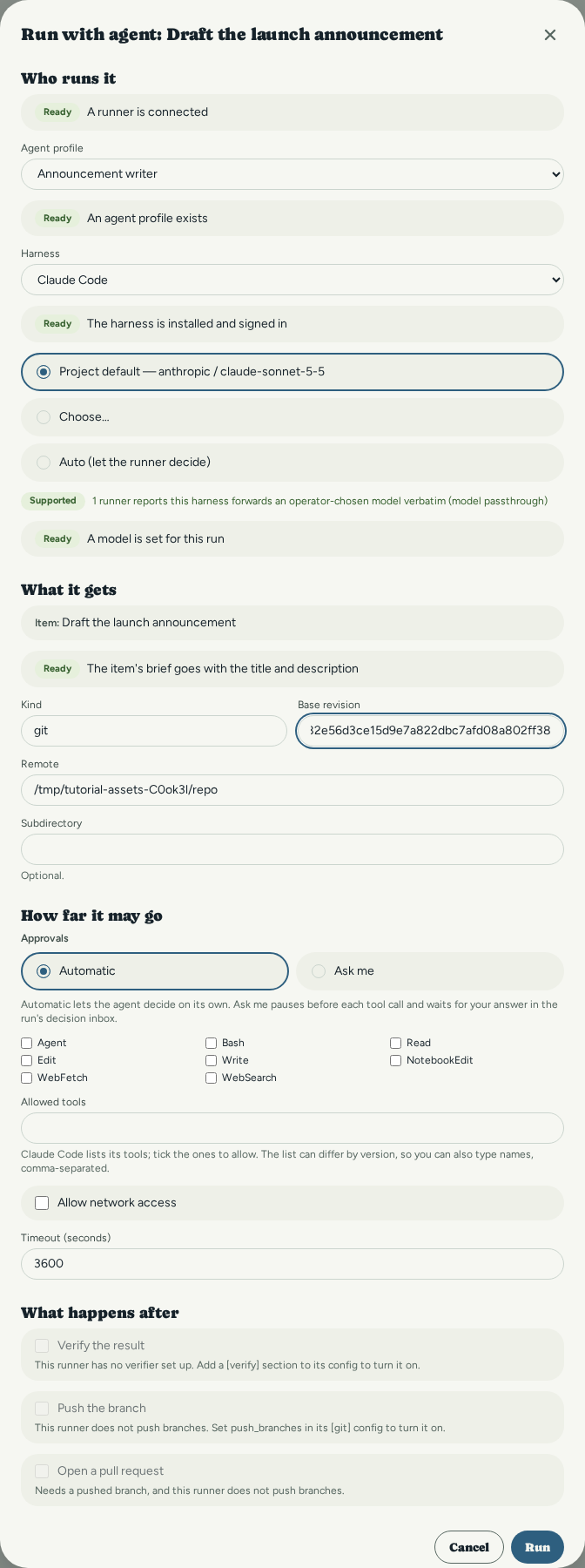
9. Run it and track it
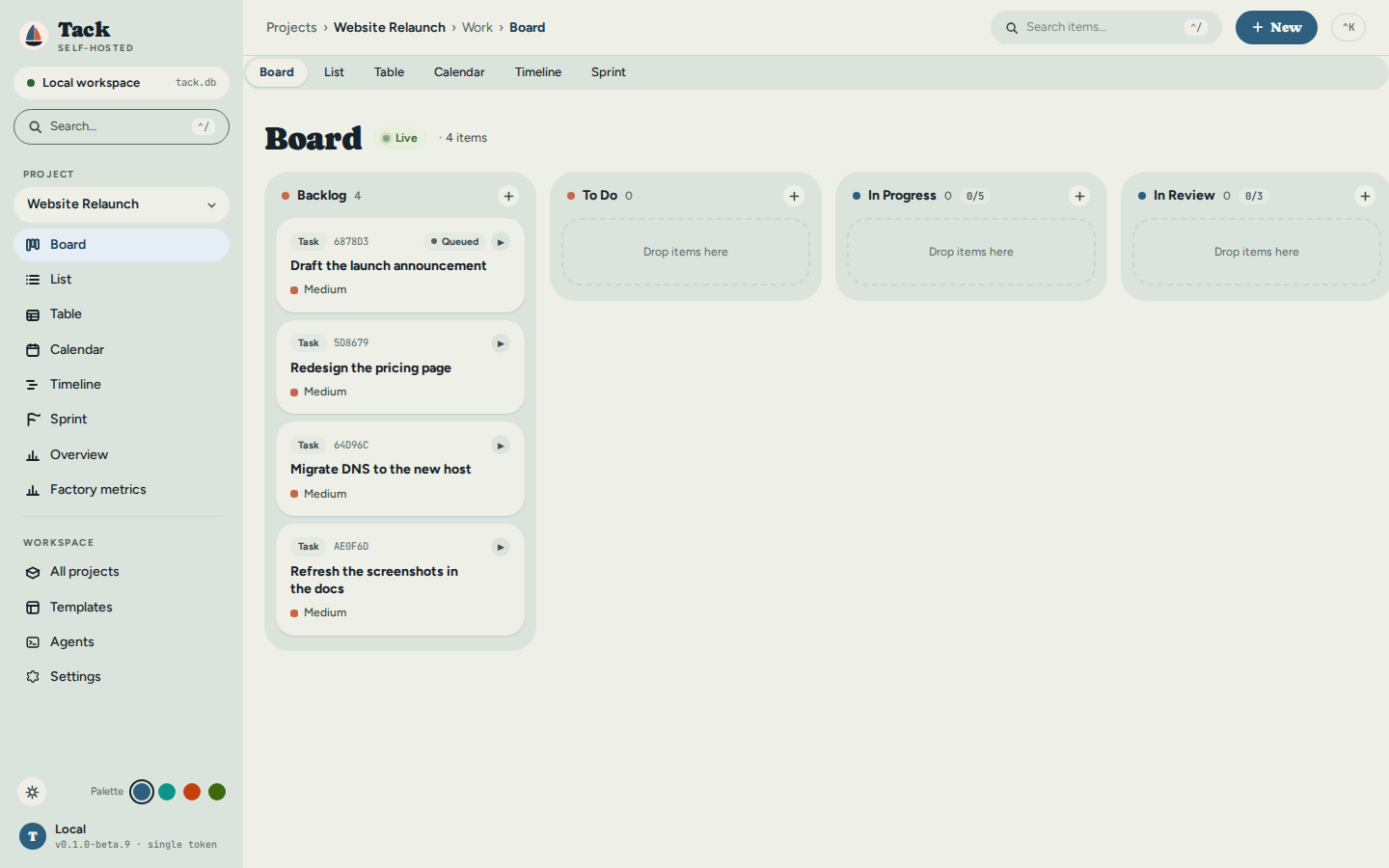
Click Run. The request queues, the runner leases it and the attempt starts — and the board says so without being asked: the card carries a live state chip, here still Queued. Clicking the chip opens the task's Execution tab:
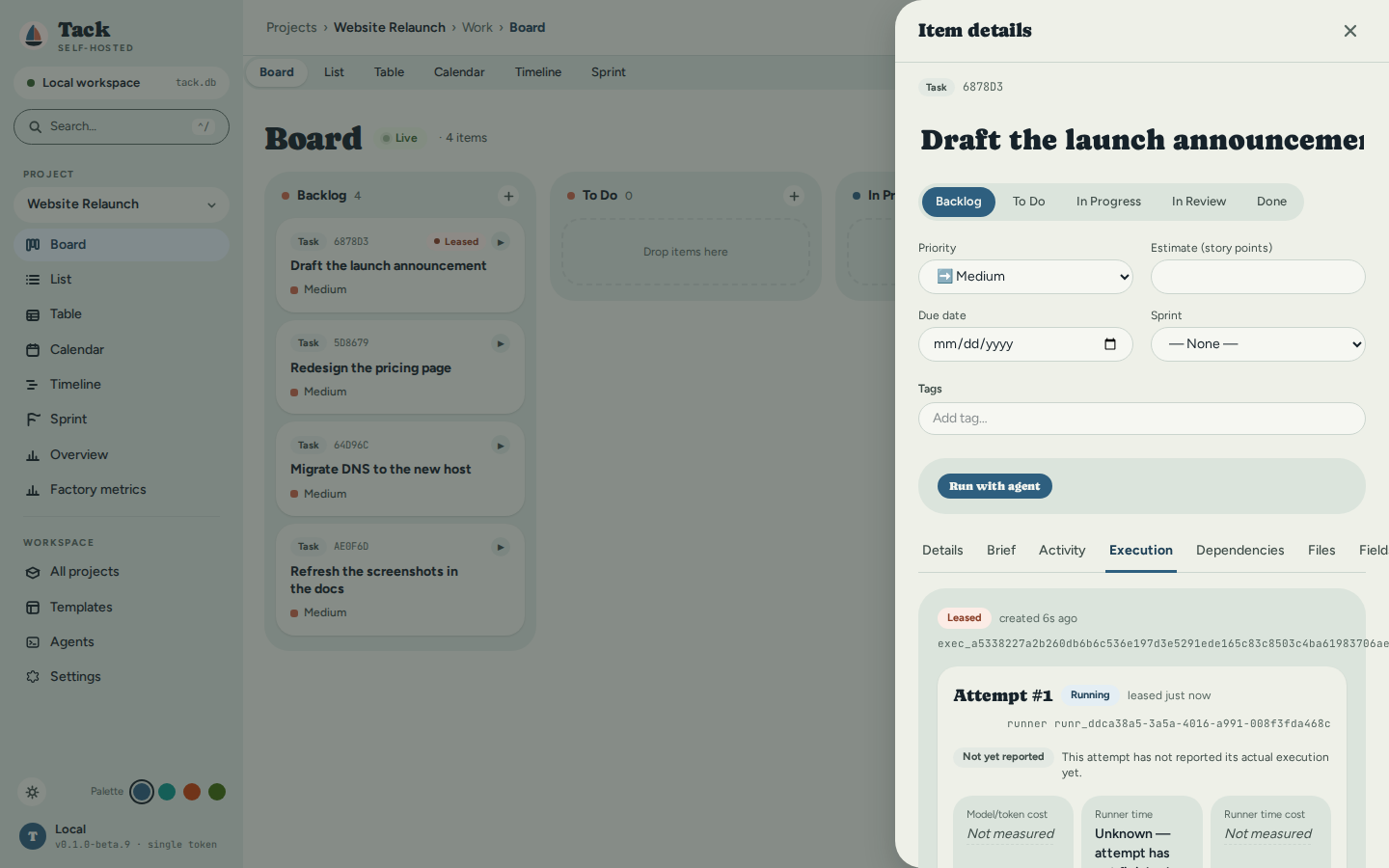
The Execution tab shows the attempt as it happens: the request Leased, the attempt Running on this machine's runner, and cost tiles that read Not measured until the attempt reports real numbers:
10. See the result
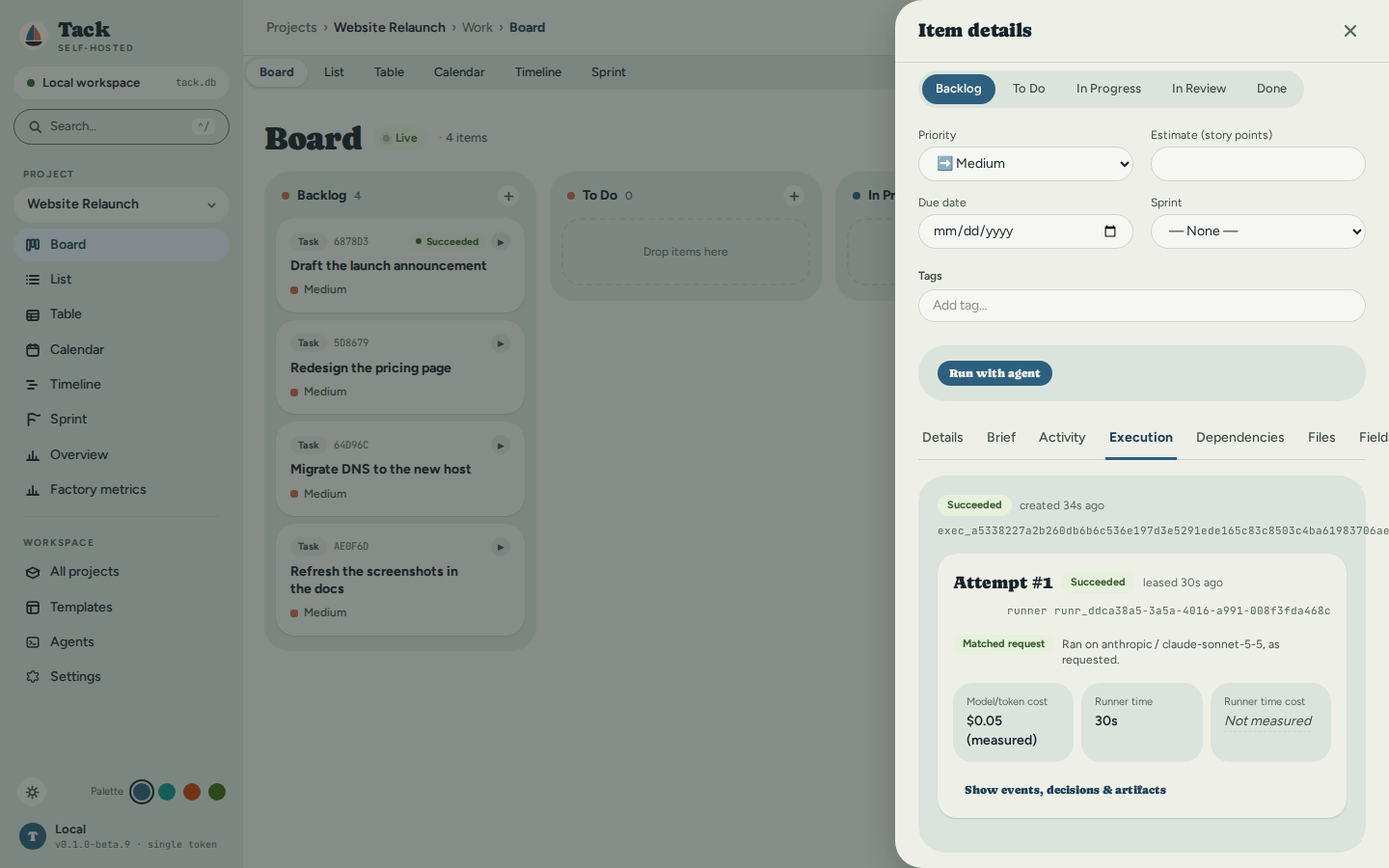
When the attempt finishes, the same tab is the record of what happened: the state, whether the model that ran matched the one requested (reported by the harness, not assumed), and what it cost — measured figures labelled as measured, unmeasured ones saying so. This run took 30 seconds and $0.05:
Show events, decisions & artifacts expands the attempt's full record. Its Artifacts
are what the run produced, each one click from download: the harness's own run log
(the announcement is in it), and the record of the change — changes.patch (empty
here: this agent only wrote text), files.json, the brief.json it was given, and the
evidence.json manifest that ties them together:
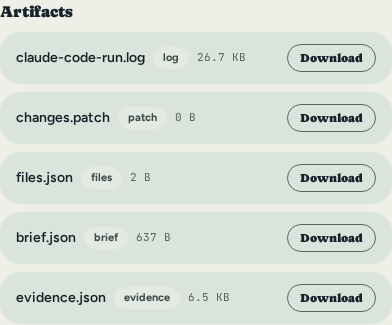
That's the whole loop: a task on a board with its definition of done, handed to a real agent, tracked live, and closed with a result you can check. From here:
- Agent Runners & Fleet Execution — remote runners on other machines, selectors, budgets, decisions, verification, branch push and pull requests.
- Quick Start — Run an item with an agent — the same flow driven entirely from the CLI.
- Workflows & Statuses and Vocabulary — make the board speak your domain's language.
make the board speak your domain's language.
Regenerating these screenshots
Every image on this page comes from frontend/e2e/tutorial-assets.spec.ts, driven
against an already-running release build (--features embed-spa) of this checkout
on a fresh database, with a real, signed-in claude on PATH. There is no make
target for it on purpose: the run in steps 9–10 is a real, live, billed model call.
The config file, frontend/playwright.tutorial-assets.config.ts, carries the exact
recipe.
Views
Tack has six work tabs — Board, List, Table, Calendar, Timeline, Sprint — all showing the same item set. Switching between tabs never re-fetches data; an item created on the Board appears immediately in every other view. Two more screens, Overview (Dashboard) and Factory metrics, are accessible from the sidebar and show project statistics.
Every view shares the same shell: a sidebar to switch project and view, a top bar with item
search and a + New button, and the command palette
on Ctrl+K. Theme and accent palette are set from the sidebar footer — see
Appearance.
Board
Kanban columns driven by the project's workflow statuses.
- Each column corresponds to one workflow status. Names, order, and WIP limits come from Settings → Workflow. Columns derive directly from the workflow — no "create a board" step is needed.
- Drag and drop a card to change its status. Changes save immediately with optimistic UI.
- WIP limit is shown in the column header when set. Dragging a card into a full column is blocked.
- Click a card to open the item detail drawer (Details, Fields, Dependencies, Activity, Files tabs).
- Add an item via the
+button inside a column header (pre-sets the status) or the toolbar + New button. - Board state syncs in real time via WebSocket — changes in one browser tab appear in another.
- Empty projects show a three-step onboarding checklist until the first item is created.
List
Sortable, flat or hierarchical table of all items.
- Flat mode (default): items sorted by creation date; use the sort dropdown to reorder by priority, status, or type.
- Hierarchy toggle: enable in the toolbar to indent items by
parent_id. Expand/collapse with the ▸ arrow. When every child of an item reaches a Done status, the parent auto-moves to Done — cascading up the hierarchy. - Inline create: click
+at any level to create a new item at that position. - Inline edit: click any field (title, type, priority, status) in the row to edit it.
- Bulk operations: check multiple rows, then use the bulk action bar to move all to a new status or delete them.
- Filter by status, priority, and type using the toolbar dropdowns.
Table
A dense spreadsheet view of every item — title, type, status, priority, assignee, and due date in sortable columns.
- Click a column header to sort by it; click again to reverse. Title, status, priority, assignee, and due date are all sortable.
- Filter with the search box — matches across title, assignee, and status as you type.
- Inline edit: click an editable cell (title, status, priority, assignee, due date) to change it in place; the edit saves immediately.
- Best for scanning or bulk-triaging a large backlog where the card layout is too tall.
Calendar
Monthly grid positioned by due date. Drag to reschedule.
- Items appear on the day matching their
due_date. Items without a due date appear in the No Date tray at the bottom. - Drag an item from one day cell to another to change its
due_date. Drag from the No Date tray onto a day to schedule it. - Navigate months with
←/→or jump to today. - Click an item to open the detail drawer.
Timeline
Gantt-style horizontal bar chart. Drag to reschedule.
- Each item with a
started_atand/ordue_dateis rendered as a bar spanning its date range. - Drag a bar horizontally to shift the date range. Drag either edge to resize (set
started_atordue_dateindependently). Changes snap to the active grid. - View modes: Week, Month, Quarter — toggle in the toolbar.
- Dependency overlay: items blocked by another item are marked with an indicator from the dependency graph.
- Scroll horizontally to see longer projects. Click a bar to open the detail drawer.
Sprint
Two-pane sprint planning surface.
- Left pane (Backlog): items not assigned to any sprint, sorted by priority.
- Right pane (Sprint lanes): one lane per sprint in Planning or Active state, showing capacity vs. commitment (story points), item count, and a done/total progress bar.
- Drag from the Backlog into a sprint lane to assign
sprint_id. Drag between sprint lanes to reassign. Drag back to the Backlog to unassign. - The server enforces the rule that items can only join sprints in Planning or Active state.
- Sprints move through four states:
Planning → Active → Review → Closed. Advance the lifecycle with the status buttons on each sprint lane header.
Overview (Dashboard)
Read-only project statistics — accessible from the sidebar.
- Throughput chart: items completed per time period.
- Status breakdown: item counts per workflow column with colour-coded category bars.
- Priority breakdown: counts by priority level.
- All statistics are computed live from the item set — no aggregation job.
Factory metrics
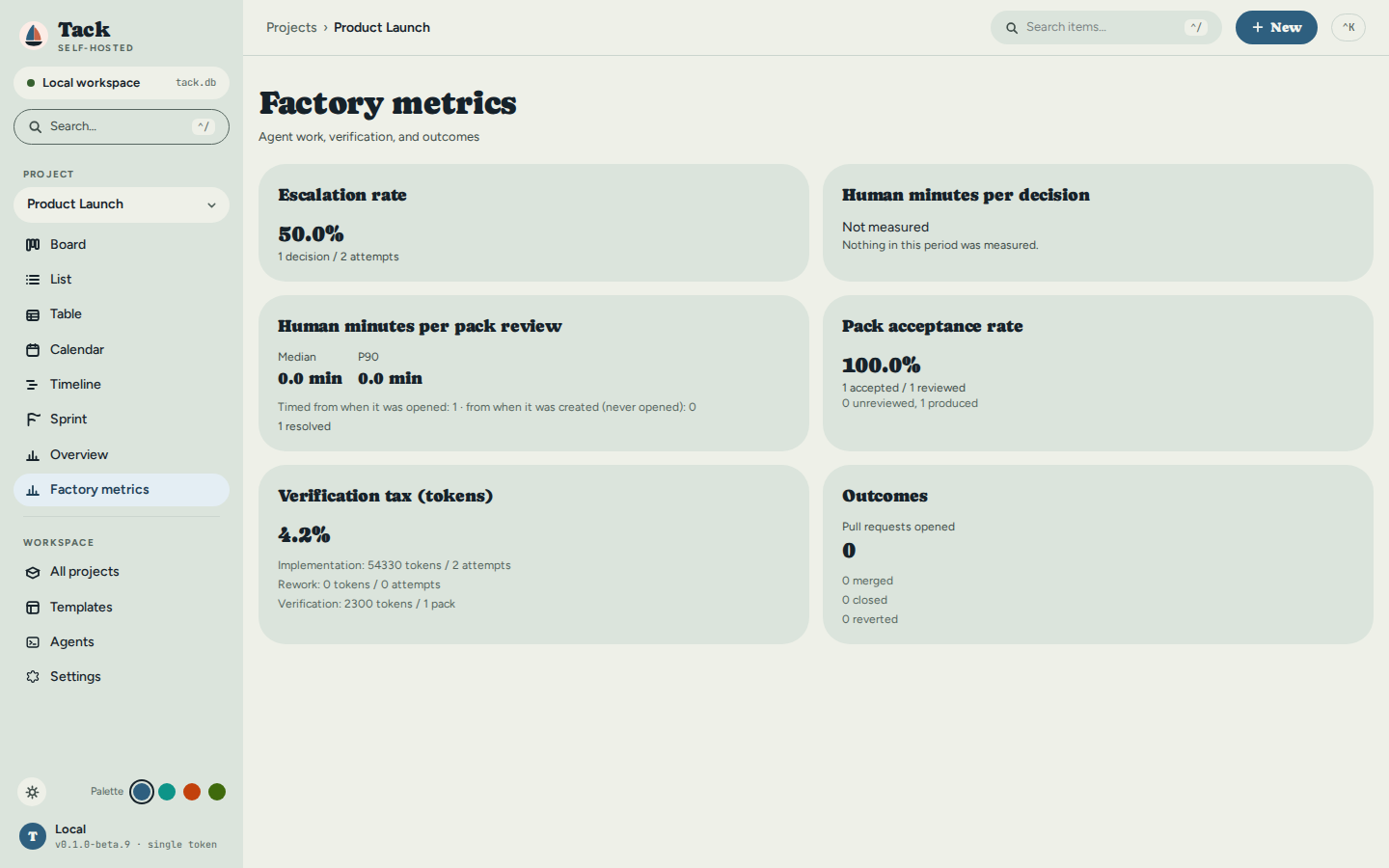
Read-only, per project — Factory metrics in the sidebar. It answers how well agent work is
going on this project: how often a run needed a person, how long the person took, what verification
cost in tokens, how often a merge-readiness pack was accepted, and how many pull requests agents
opened, merged, closed or had reverted. A card whose input does not exist yet says Not measured
and why, never 0; no card shows money. Every number, its definition and the counts behind it are in
Factory metrics in the Agent Runners chapter.
Working with Items
Every piece of work in Tack — a task, bug, feature, building, work order, or whatever your project's vocabulary calls it — is an item. You inspect and edit an item through the item detail drawer, a panel with inline header editing and tabs for Details, Brief, Activity, Execution, Dependencies, Files, and Fields.
Opening an item
The drawer opens whenever the ?item=<id> query parameter is present in the URL. You open it by:
- Clicking a card on the Board, a row in the List or Table, or a search result.
- Navigating directly to a link such as
https://tack.test/board?item=<id>.
Because the open item lives in the URL, item links are deep-linkable and shareable — paste the link to a teammate and the same drawer opens for them. Press Esc or use the close control to dismiss the drawer; focus returns to where you were.
At the top of the drawer, the header shows:
- A type badge (labeled with your project's vocabulary, e.g. "Task" or "Work Order") and the item's short id — the first six characters of the id, uppercased.
- The editable title. Edit it inline; the change commits when you blur the field or press
Enter. - A row of status pills, one per workflow status. Click any inactive pill to transition the item to that status. The transition is validated by the project workflow (allowed transitions and WIP limits are enforced server-side); if it is rejected the item reverts and an error toast appears.
- Priority, Estimate, Due date, and Sprint controls.
- Tags — type a tag and press
Enterto add; click the×on a tag to remove it.
All header edits save immediately (optimistic update: applied locally first, then persisted).
Details tab
The Details tab holds the item description, edited with the rich-text editor. Use it for details, acceptance criteria, or notes.
The description autosaves — edits are debounced and persisted automatically a short pause (about 0.6 seconds) after you stop typing. There is no save button.
Core metadata — assignee, priority, estimate, sprint, due date, and labels (tags) — lives in the header above the tabs (see Opening an item), so it is always visible regardless of which tab is active.
Brief tab
The Brief says what "done" means for an item, in a form a person or a program can check. It has four parts, and Save brief writes them all at once.
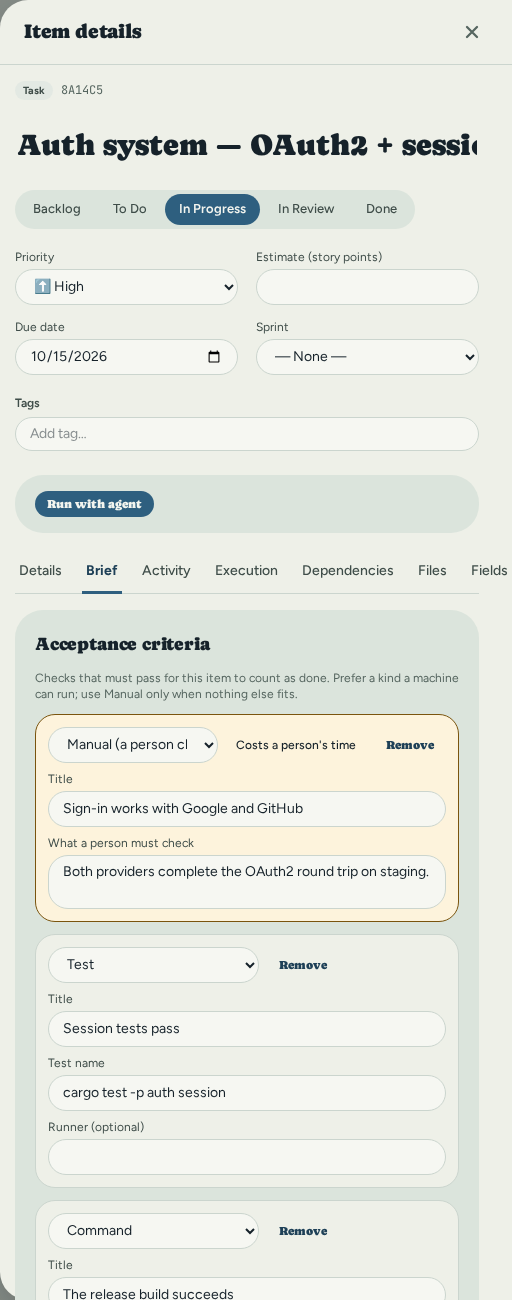
Acceptance criteria are the checks that must pass. Each has a title and one of six kinds:
- Command — a shell command and the exit code it must return (0 by default), with an optional working directory.
- Test — a named test, with an optional runner such as
pytest. - Metric — a named measurement compared to a threshold: at most, at least, or exactly, with an optional unit.
- File exists — a path that must be present.
- File is absent — a path that must not be present.
- Manual — something a person has to check by hand.
Use Manual as a last resort. Every other kind can be checked without anyone's time, so a Manual criterion is marked as one that costs a person. Reach for it only when nothing else can express the check.
Constraints limit how the work is done: a path that must not change, a dependency that is allowed, a maximum number of changed files, or a free-form note.
Definition of done is a few plain sentences on when someone can stop and call the item finished. It covers what the criteria cannot, and it is the first thing a reviewer reads.
Risk is low, medium or high. Leave it unset if you are not sure.
A brief holds up to 50 criteria and 100 constraints, and each criterion needs an id that is unique within the brief (the editor chooses one for you). If the server rejects a save, the reason appears next to the part it concerns.
Fields tab (custom fields)
Custom fields capture project-specific data that the built-in fields don't cover — a vendor name, a budget figure, a compliance flag, and so on. They are defined per project (in project settings); the Fields tab shows every field defined for the item's project, plus role assignment.
Set a value by typing or selecting in the control next to the field name. Each change is saved as you commit it; clearing a text-like field removes its value. Values are validated on save against the field's type — an invalid value is rejected and shown as an error toast, not stored.
Field types
| Type | Accepts | Example |
|---|---|---|
| Text | Any string | Acme Corp |
| Long text | Any string (multi-line textarea) | Multi-paragraph notes… |
| A string | info@yielab.com | |
| URL | A string starting with http:// or https:// | https://example.com/spec |
| Number | A numeric value | 42 |
| Boolean | A checkbox (true/false) | true |
| Date | An ISO 8601 date — YYYY-MM-DD or RFC 3339 | 2026-06-30 |
| Select | One value chosen from the field's defined options | In review |
| Multi-select | An array of values, each from the field's options | ["frontend","urgent"] |
A field definition may also carry extra validation rules that apply on top of the type check: a regex pattern and min_length/max_length for strings, min/max for numbers, and max_items for multi-select. Values that violate these rules are rejected with a descriptive message.
If a project has no custom fields, the tab shows "No custom fields — define fields in project settings."
Execution tab
The record of every time an agent was handed this item. Each request lists its attempts, with the state, the runner, the model that ran against the one requested, and what it cost (or Not measured). When the attempt's branch became a pull request, a PR #n link and a badge (open, merged, closed or reverted) sit on the attempt. Show events, decisions & artifacts opens its timeline, the questions the agent asked, the files it produced, and, when a verifier ran, the merge-readiness pack to accept or reject. A question that is still waiting appears in the decision inbox on the same tab, with the options, their risks and the agent's recommendation. Everything on this tab, and how to start a run, is in Agent Runners; the item's Brief is what the agent is given as the definition of done. An item that was never run shows an empty tab, not a hidden one.
Dependencies tab
Use this tab to record how an item relates to others in the same project. Two directions are supported:
- Blocks — this item must be done before the linked item can proceed.
- Blocked by — the linked item must be done before this one can proceed.
The tab lists current Blocks and Blocked by links. Click a linked item's title to open its drawer. Click the × to remove a link.
To add a dependency, pick a direction, choose the other item from the picker, and select Add.
Tack's dependency graph is a DAG (directed acyclic graph), so:
- Cycles are rejected. If adding a link would create a loop (A blocks B, B blocks A), the server refuses it and the error is shown inline beneath the form.
- Self-references are rejected — an item cannot depend on itself. The picker only offers other items in the project.
Activity tab
The Activity tab is the item's comment timeline. Comments are listed oldest-first, each showing the author (or "Anonymous" when none is recorded) and a relative timestamp (just now, 5m ago, 3h ago, 2d ago, then a calendar date for older entries).
To add a comment, type in the box at the bottom and select Comment. Posting is optimistic — your comment appears immediately and is rolled back with an error toast if the server rejects it.
Files tab (attachments)
Attach files to an item from the Files tab:
- Drag and drop files onto the drop zone, or click it to browse. Multiple files at once are supported.
- The maximum file size is 50 MB per file. A larger file is skipped with an error toast and the rest continue uploading.
Each uploaded file is listed with its size and MIME type. Click a filename to download it (served with the original filename); use Delete to remove it.
On the server, the file bytes are written under the configured storage directory (TACK_STORAGE_DIR, default ./storage), organized by item id under a collision-proof generated filename, while the metadata (filename, MIME type, size, storage path) is recorded in the database. Deleting an attachment removes both the file on disk and its database record.
API note. Uploads use
multipart/form-datawith afilefield:POST http://127.0.0.1:3210/api/items/<item-id>/attachmentsThe 50 MB limit is enforced server-side; oversize uploads return
400 Bad Request.
Comments
Comments live in the Activity tab (see above) — that tab is the item's discussion thread. Open the item, switch to Activity, write in the comment box, and select Comment to post.
Command Palette & Search
Tack has two keyboard-first ways to get around: a command palette for jumping to views and running actions, and a search bar for finding items by text.
Command palette — Ctrl+K
Press Ctrl+K (or ⌘K) anywhere to open the command palette. It opens centered,
focused, and ready for input.
- Type to filter. Results are grouped into sections — Actions (New Item, New Project) and Go to (Board, List, Table, Calendar, Timeline, Sprint, Overview, Project Settings) and Workspace (All Projects, Templates, Global Settings). The available commands depend on context — item/view commands appear only while you're inside a project.
- Navigate with
↑/↓, run the highlighted command with↵, and dismiss withesc. - The palette is also reachable from the Search… button in the sidebar and the
⌃Kbutton in the top bar.
Search — Ctrl+/
Press Ctrl+/ (or ⌘/), or click the Search items… field in the top bar, to
search items by text.
- Searches run as you type (debounced) against the project you're in, or across the whole workspace when you're not scoped to a project.
- Each result shows the item's type badge, priority, and current status.
↑/↓to move through results,↵to open the highlighted item — this deep-links straight to its detail drawer over the project board.esccloses the results.
Search matches item titles (and other indexed fields) via the backend's full-text search index, so it scales to large projects.
Appearance
Tack ships a two-axis theme system: a mode (light or dark) and a palette (the accent + surface colour family). Both are controlled from the bottom of the sidebar and take effect instantly across the whole app.
The controls live in the sidebar footer: a sun/moon button toggles the mode, and four coloured dots switch the palette.
Mode — light / dark
Click the sun/moon button in the sidebar footer to flip between light and dark.
Until you pick one explicitly, Tack follows your operating system's
prefers-color-scheme setting. The first toggle pins an explicit choice that
overrides the OS preference from then on.
Palette
Four palettes ship, each available in light and dark:
| Palette | Accent | Feel |
|---|---|---|
| Harbor (default) | harbor blue, with coral | soft, nautical, the default brand |
| Teal | teal | calm |
| Clay | warm terracotta | warm, earthy |
| Graphite | lime on neutral grey | high-contrast, understated |
Click a swatch in the sidebar footer to switch. Every surface, accent, badge, and chart re-colours immediately — there is no reload and no per-view setting.
How it's stored
Both choices are saved in the browser's localStorage:
tack_theme→light|dark|systemtack_palette→harbor|teal|clay|graphite
Because Tack is local-first and single-user, appearance is per browser — it is not stored in the database and not synced between machines. Clearing site data resets both to their defaults (system mode, Harbor palette).
Accessibility
All palette/mode combinations are tuned to meet WCAG 2.1 AA contrast (4.5:1 for text), and the choice is verified automatically by an axe accessibility scan in CI. If you fork Tack and change the colour tokens, keep that bar in mind — see Frontend & Design System for where the tokens live.
Workflows
A workflow is the set of named status columns that items move through in a project. Each column has:
- Name — the label shown on the board (e.g., "In Progress")
- Category —
todo,in_progress, ordone - WIP limit — optional cap on how many items can be in this column at once
- Order — left-to-right position on the board
Every project stores exactly one WorkflowConfig as JSON — no schema migration needed to change it.
Built-in Project Types
When you create a project, its type determines the starting workflow. Everything can be changed afterwards.
| Type | Style | Default Columns |
|---|---|---|
software, web, mobile | Scrum | Backlog → To Do → In Progress → In Review → Done |
construction | Phase-based, strict | Permit → Procurement → Build → Inspect → Handover |
legal | Phase-based | Intake → Discovery → Drafting → Review → Closed |
research | Kanban | Hypothesis → Design → Experiment → Analysis → Published |
event | Phase-based | Ideas → Booked → In Progress → Confirmed → Done |
personal, homework | Simple | To Do → Doing → Done |
maintenance | Kanban | Backlog → In Progress → Done (no sprints) |
custom | Simple | To Do → Doing → Done (fully editable) |
Strict Transitions (Construction Workflow)
Most workflows let you move an item to any column. The construction workflow enforces strict linear transitions: items must move through columns in order.
| From | Only allowed next step |
|---|---|
| Permit | Procurement |
| Procurement | Build |
| Build | Inspect |
| Inspect | Handover |
Attempting to move a "Build" item directly to "Handover" is rejected by the API (422 Unprocessable Entity). This prevents accidentally skipping required phases — regulatory sign-offs, physical dependencies, multi-party hand-offs.
Enable or disable strict transitions on any workflow from Settings → Workflow → Strict transitions toggle.
Changing a Workflow After Creation
In the UI: Settings → Workflow → add/remove/rename columns, set WIP limits, toggle strict transitions → Save.
Existing items keep their current status name. If you rename a column, items in the old status are not migrated automatically — update them via the board or the API.
Via API:
curl -X PATCH http://localhost:3210/api/projects/{id} \
  -H "Content-Type: application/json" \
  -d '{
    "workflow": {
      "columns": [
        {"name":"Permit",      "category":"todo",        "wip_limit":null, "order":0},
        {"name":"Procurement", "category":"in_progress", "wip_limit":2,    "order":1},
        {"name":"Build",       "category":"in_progress", "wip_limit":3,    "order":2},
        {"name":"Inspect",     "category":"in_progress", "wip_limit":1,    "order":3},
        {"name":"Handover",    "category":"done",        "wip_limit":null, "order":4}
      ],
      "strict_transitions": true
    }
  }'
WIP Limits
A WIP limit caps the number of items in a column. Adding a card beyond the limit is blocked in the UI (the card snaps back) and rejected by the API.
WIP limits are enforced on new moves, not retroactively. If you set a limit of 3 on a column that already has 5 items, the existing 5 are unaffected — but no more can enter until the count drops below 3.
Set limits on bottleneck stages (code review, inspection, QA) to surface overload before it compounds.
Status Categories
Every column belongs to one category:
| Category | Meaning | Side effects |
|---|---|---|
todo | Not started | Items default here on creation |
in_progress | Being worked on | Sets started_at on first move in |
done | Complete | Sets completed_at; triggers auto-complete check on parent |
Categories drive reporting (cycle time, throughput) and auto-complete logic. Only column names are shown in the UI.
Auto-Complete (Parent Rollup)
When an item moves to a done column, Tack checks whether all siblings under the same parent are also done. If they are, the parent auto-moves to its own done column. This cascades up the hierarchy.
Example:
- Epic "User Auth" has three tasks: Register, Login, Logout.
- Complete Register → epic unchanged (Login and Logout still open).
- Complete Login → epic unchanged.
- Complete Logout → all children done → epic auto-completes. ✓
Auto-complete is best-effort: errors (e.g., parent has no done column) are silently ignored and do not block the child update.
Vocabulary
Each project has a VocabularyMap: 16 configurable label keys that rename terms throughout the UI. Two projects can use completely different language while running on the same underlying system.
The 16 Keys
| Key | Default | Construction example | Homework example |
|---|---|---|---|
epic | Epic | Building | Course |
feature | Feature | Section | Module |
task | Task | Work Order | Assignment |
subtask | Subtask | Activity | Question |
bug | Bug | Defect | Correction |
requirement | Requirement | Specification | Rubric Item |
sprint | Sprint | Phase | Week |
backlog | Backlog | Pending Work | Upcoming |
board | Board | Project Board | Planner |
blocker | Blocker | Hold | Dependency |
story_points | Story Points | Effort Hours | Effort |
assignee | Assignee | Responsible | Student |
deliverable | Deliverable | Deliverable | Submission |
phase | Phase | Phase | Term |
milestone | Milestone | Inspection Point | Exam |
release | Release | Handover | Graduation |
All keys are optional. Omitted keys fall back to the default label.
Changing Vocabulary
In the UI: Settings → Vocabulary → edit fields → Save. Changes take effect immediately across all views for that project.
Via API:
curl -X PATCH http://localhost:3210/api/projects/{id} \
  -H "Content-Type: application/json" \
  -d '{"vocabulary":{"task":"Work Order","sprint":"Phase","epic":"Building"}}'
Only include the keys you want to change; omitted keys are left as-is.
Vocabulary is Per-Project
A "Sprint" in a software project and a "Phase" in a construction project are the same underlying concept — only the label differs. Vocabulary is scoped entirely to the project and does not affect other projects.
CLI Behavior
The CLI displays vocabulary-mapped labels in human-readable mode. Use --json to bypass labels and get raw field names:
tack list --project <id>          # shows "Work Order" instead of "Task"
tack list --project <id> --json   # returns {"item_type":"task", ...}
Practical Tip
Set vocabulary before adding items. Labels appear in the item creation form, board column headers, filter dropdowns, and export files. Changing vocabulary mid-project is safe (purely cosmetic) but can cause confusion in shared contexts.
Starter vocabulary for a construction project:
{
  "task":      "Work Order",
  "epic":      "Building",
  "sprint":    "Phase",
  "requirement": "Specification",
  "assignee":  "Responsible",
  "blocker":   "Hold",
  "release":   "Handover",
  "milestone": "Inspection Point"
}
Import and Export
Tack can pull issues in from GitHub and Linear, keep linked GitHub issues in sync both ways, and export an entire project to JSON, YAML, or CSV. All import and export operations are exposed over the HTTP API; there is no dedicated CLI subcommand for them.
The examples below use a base URL of http://127.0.0.1:3210 and assume a server started with tack serve. If you set TACK_API_TOKEN, add -H "Authorization: Bearer <token>" to every request.
How do I import GitHub issues?
POST /api/projects/{id}/import-github fetches the issues from a repository and creates one Tack item per issue in the target project. Pull requests are skipped automatically. Each created item is recorded in the github_links table so its status and comments can later sync with GitHub (see GitHub sync).
Via API:
curl -X POST http://127.0.0.1:3210/api/projects/3f1c2b9a-8d4e-4a77-9b21-0c5e6f7a8b90/import-github \
  -H "Content-Type: application/json" \
  -d '{
    "repo": "rust-lang/rust",
    "token": "ghp_yourPersonalAccessToken",
    "import_closed": false,
    "label_filter": ["bug", "good first issue"]
  }'
Request fields:
| Field | Required | Default | Description |
|---|---|---|---|
repo | yes | — | Repository as owner/repo or a full URL (https://github.com/owner/repo, with or without a .git suffix or trailing slash). |
token | no | none | GitHub personal access token. Unauthenticated calls work but are limited to 60 requests/hour; a token raises this to 5,000/hour. A token with repo scope is required to read private repositories. |
import_closed | no | false | When false, only open issues are imported. When true, both open and closed issues are imported. |
label_filter | no | [] | When non-empty, only issues carrying at least one of these labels are imported (case-insensitive). All others are skipped. |
Tack pages through the repository 100 issues at a time until every matching issue has been processed, so a single call imports the whole repo.
Field mapping:
| GitHub | Tack item |
|---|---|
number + title | Title, formatted as [#123] Issue title |
body | Description, prefixed with a GitHub Issue: <url> line |
labels | Tags (one tag per label) |
state (open / closed) | Status — the first workflow status by order for open issues, the first Done-category status for closed issues |
assignee.login | Assignee |
Every imported item is created as a Task. The response reports counts:
{ "created": 42, "skipped": 3, "rate_limit_remaining": 4958 }
skipped covers pull requests, issues filtered out by label_filter, and any rows that failed to create.
How do I import Linear issues?
POST /api/projects/{id}/import-linear fetches issues from Linear's GraphQL API and creates Tack items. Pagination is cursor-based (50 issues per page) and runs until all matching issues are imported.
Via API:
curl -X POST http://127.0.0.1:3210/api/projects/3f1c2b9a-8d4e-4a77-9b21-0c5e6f7a8b90/import-linear \
  -H "Content-Type: application/json" \
  -d '{
    "api_key": "lin_api_yourKeyHere",
    "team_id": "ENG",
    "import_completed": false,
    "label_filter": ["frontend"]
  }'
Request fields:
| Field | Required | Default | Description |
|---|---|---|---|
api_key | yes | — | Linear personal API key. Create one at https://linear.app/settings/api. |
team_id | no | none | Import only issues from this team. Accepts the team key/slug (for example ENG). |
project_id | no | none | Import only issues from this Linear project ID. Takes precedence over team_id when both are set. |
import_completed | no | false | When false, completed and cancelled issues are skipped. When true, they are imported. |
label_filter | no | [] | When non-empty, only issues carrying at least one matching label are imported (case-insensitive). |
When neither team_id nor project_id is given, every issue accessible to the API key is fetched.
Field mapping:
| Linear | Tack item |
|---|---|
identifier + title | Title, formatted as [ENG-123] Issue title |
description | Description, prefixed with a Linear Issue: <url> line |
labels | Tags (one tag per label) |
state.type (completed / cancelled) | Status — first Done-category status; all other states map to the first workflow status by order |
assignee.name | Assignee |
priority | Priority (see below) |
Priority mapping:
| Linear priority | Tack priority |
|---|---|
| 1 (Urgent) | Critical |
| 2 (High) | High |
| 3 (Medium) | Medium |
| 4 (Low) | Low |
| 0 (No priority) | unset |
The response reports { "created": N, "skipped": N }.
How do I keep GitHub issues in sync after import?
Items imported from GitHub stay linked to their source issue, and any other item can be linked by hand — the Link GitHub issue row in the item's side panel, or PUT /api/items/{id}/github-link with {"repo": "owner/name", "issue_number": 42} (DELETE unlinks). When TACK_GITHUB_TOKEN is set, the link carries state and comments in both directions:
- Out, on every change: moving a linked item into a Done-category status closes its GitHub issue; moving it back out of Done reopens it. A comment posted on the item is posted onto the issue.
- In, on a poll (
TACK_GITHUB_POLL_SECONDS, off at0): a closed issue moves its item to the workflow's first Done-category status, a reopened one to the first Todo-category status, and a new comment on the issue appears on the item, attributed to its GitHub login.
Both directions are best-effort — failures are logged but never block or fail the item update or the comment — and neither echoes: a change that came in never triggers a push back out. Title edits and same-category status moves trigger no GitHub call; labels and assignees are not mirrored. There is no webhook receiver: Tack listens on loopback by default, so GitHub could not reach it.
The feature is off by default and configured through environment variables. A project can also carry its own token as a secret reference (PATCH /api/projects/{id} with {"github_token_ref": "store:<name>"}), resolved before the global one and never returned by any route:
| Variable | Default | Description |
|---|---|---|
TACK_GITHUB_TOKEN | none | PAT with repo scope. Enables both directions; never logged. Without it, the link is inert. |
TACK_GITHUB_API_BASE | https://api.github.com | API root override for GitHub Enterprise or testing. |
TACK_GITHUB_POLL_SECONDS | 0 | Inbound poll interval in seconds; 0 is off. Needs the token too. |
For full details, see GitHub Sync.
How do I export a project to JSON?
GET /api/projects/{id}/export?format=json returns a complete, downloadable snapshot of the project as an attachment named <project-name>-export.json.
Via API:
curl -OJ "http://127.0.0.1:3210/api/projects/3f1c2b9a-8d4e-4a77-9b21-0c5e6f7a8b90/export?format=json"
The snapshot contains:
project— full project record including workflow and vocabularyitems— every item in the projectsprints— all sprintsdependencies— all dependency edgesbriefs— every item's brief (acceptance criteria, constraints, definition of done, risk)metadata—exported_attimestamp, the exporting Tackversion, and totals for items, sprints, and dependencies
format defaults to json, so omitting the query parameter produces the same result. A format=yaml variant is also available and produces the identical structure as YAML.
This snapshot is the same shape accepted by POST /api/projects/import, so an exported JSON or YAML file can be re-imported to recreate the project (items, sprints, parent links, dependencies and briefs are all restored into a brand-new project). A brief in the file is checked by the same rules as a save from the Brief tab, and the import is refused if one breaks them, since an export file can be edited by hand. The response counts briefs_imported beside the other totals.
How do I export a project to CSV?
GET /api/projects/{id}/export?format=csv returns a flat, spreadsheet-friendly item list as an attachment named <project-name>-export.csv.
Via API:
curl -OJ "http://127.0.0.1:3210/api/projects/3f1c2b9a-8d4e-4a77-9b21-0c5e6f7a8b90/export?format=csv"
The CSV has one row per item with these columns:
| Column | Description |
|---|---|
id | Item UUID |
title | Item title (commas replaced with spaces) |
type | Item type (task, bug, epic, etc.) |
status | Current workflow status |
priority | Item priority |
assignee | Assignee, or empty if unassigned |
parent_id | Parent item UUID, or empty if top-level |
created_at | Creation timestamp (RFC 3339) |
CSV export covers items only — it does not include sprints, dependencies, briefs, or workflow configuration. Use JSON or YAML export for a full, re-importable backup.
Which should I use?
Use GitHub or Linear import to seed a Tack project from work already tracked elsewhere; choose GitHub import (with TACK_GITHUB_TOKEN set) if you also want completed Tack items to close their upstream issues. Use JSON (or YAML) export for a complete, re-importable backup or to move a project between Tack instances, since it preserves workflow, sprints, dependencies, and hierarchy. Use CSV export when you only need a quick item list for a spreadsheet or report.
Backup and Restore
Tack offers three data-protection mechanisms: hot backup (a database-only SQLite copy), remote/cloud backup (a full bundle including on-disk files), and JSON export (a human-readable per-project snapshot). All three can be triggered via the API or the CLI.
Hot Backup
Uses SQLite's VACUUM INTO to produce a clean, consistent copy of the database while the
server is running. No downtime required.
Via CLI:
tack backup                        # timestamped file in current directory
tack backup --path /backups/tack.db
Via API:
curl -O -J http://127.0.0.1:3210/api/backup
# With token:
curl -O -J -H "Authorization: Bearer <token>" http://127.0.0.1:3210/api/backup
What the backup includes:
- All projects, items, sprints, roles, comments, dependencies
- Attachment metadata (filenames, sizes, MIME types)
- Workflow configs and vocabulary maps
- Migration history
What it does NOT include:
- Attachment files and execution artifacts — both stored under
TACK_STORAGE_DIR(default./storage; execution artifacts specifically inTACK_STORAGE_DIR/execution-artifacts). Back that directory up separately, or use Remote/Cloud Backup below, which includes it automatically.
Staged Restore
Restore does not replace the live database while the server runs. You stage a file; the swap happens on the next startup.
Steps:
- Upload the backup:
tack restore /backups/tack.db
or via API:
curl -X POST http://127.0.0.1:3210/api/restore \
  -F "file=@/backups/tack.db"
# → {"status":"staged","message":"Restart the server to apply."}
- Restart the server. On startup, Tack:
- Moves
tack.db→tack.db.bak - Moves the staged file →
tack.db - Runs any pending migrations
- Moves
The previous database is kept as tack.db.bak. Delete it once you've verified the restore.
Remote/Cloud Backup
Unlike the hot backup above, a remote backup bundle includes the database and every
file under TACK_STORAGE_DIR — item attachments and, since Part III,
execution-artifacts/ (artifacts a runner uploaded for an execution attempt — logs,
diffs, generated files; see Agent Runners).
This is the one backup mechanism that captures artifacts without a separate rsync
step. It requires cloud object storage to be configured — see
Cloud Backup for the S3-compatible
setup — and is otherwise inert.
tack backup --remote                 # push a bundle now
tack backups                         # list bundles in the bucket
The bundle is a zstd-compressed tar (database.db, the recursively-walked storage
tree, and a manifest.json with a sha256 of the database and an item count). Secrets
are scrubbed from the embedded database snapshot before it's bundled — see
scrub_snapshot_secrets in crates/tack-api/src/remote_backup.rs, kept in sync with
every secret-bearing column in the same commit that adds one.
Restore is staged the same way as local restore — download, stage, restart:
tack restore --remote --key <object-key> # omit --key to restore the latest bundle
On the next startup, the staged database swaps in and the staged storage tree is
merged into TACK_STORAGE_DIR — so a remote restore recovers execution artifacts and
attachments together with the database, in one step, unlike the local hot-backup path
below.
JSON Export (Project Snapshot)
A human-readable snapshot of a single project. Not a substitute for a full backup, but useful for archiving completed projects or migrating between instances.
# Full project snapshot (all items, sprints, roles, comments, dependencies)
curl "http://127.0.0.1:3210/api/projects/{id}/export?format=json" -o project.json

# Item list as CSV (for spreadsheets)
curl "http://127.0.0.1:3210/api/projects/{id}/export?format=csv" -o items.csv
Attachment Files
Attachment files live in TACK_STORAGE_DIR (default ./storage) and are not part of the database backup. Back them up separately:
rsync -a ./storage/ /backups/tack/storage/
For a complete restore you need both the database backup and the storage directory snapshot taken at approximately the same time.
Recommended Frequency
| Situation | Action |
|---|---|
| Before a server upgrade | Full backup first |
| Before bulk import or schema changes | Full backup first |
| Routine protection | Daily cron (see below) |
| Completing a project phase | JSON export for archival |
Daily cron example:
0 2 * * * curl -s -O -J \
  -H "Authorization: Bearer $TACK_TOKEN" \
  http://127.0.0.1:3210/api/backup \
  --output-dir /backups/tack/
CLI Reference
tack is a single binary that is both the server and the CLI client.
Run tack with no arguments (or tack serve) to start the server + web UI;
run tack <command> to use the CLI.
The CLI is an alternative to the web UI — reach for it when you want to script
Tack, wire it into automation or CI, or work without leaving the terminal. It is
also how you create a git branch straight from an item (tack branch) and run the
MCP server for AI agents.
The CLI commands below talk to a running server over HTTP, so start the server
first (tack serve) — all client commands require it to be reachable.
Configuration
# Set URL and token (saved to ~/.config/tack/config.toml)
tack config --url http://127.0.0.1:3210 --token your-token

# Print current config
tack config --show

# Or use environment variables
export TACK_API_URL=http://127.0.0.1:3210
export TACK_API_TOKEN=your-token
Shell completions:
tack completions bash  >> ~/.bashrc
tack completions zsh   >> ~/.zshrc
tack completions fish  > ~/.config/fish/completions/tack.fish
Projects
# Create a project
tack init "Kitchen Reno" --type construction

# Types: software · web · mobile · construction · personal · homework · maintenance · legal · research · event · custom
Items
# List items in a project
tack list --project <id>

# Add an item
tack add "Design login page" \
  --project <id> \
  --type task \
  --priority high

# Priorities: high · medium · low
# Types: task · epic · story · bug · feature · subtask · milestone (or vocabulary-mapped)

# Move an item to a different status column
tack move <item-id> "In Progress"
# The status name must exactly match the column name (case-sensitive)

# Derive a git branch name from an item
tack branch <item-id>
# → prints: git checkout -b feat/<short-id>-<title-slug>

# Create and switch to the branch in one step
tack branch <item-id> --checkout

# Override the type-derived prefix (default maps feature→feat, bug→fix, …)
tack branch <item-id> --prefix hotfix
tack branch reads the item over the API and builds a conventional branch name
of the form <prefix>/<short-id>-<title-slug>. Without --checkout it prints
the git checkout -b … command (handy to eval or copy-paste); with
--checkout it runs it. Add --json for { branch, item_id, checked_out }.
# Move an item to the first in-progress status and check out its branch
tack start <item-id>

# Print an item's web URL (and open it in $BROWSER when set)
tack open <item-id>
tack start moves the item to the first status of the workflow's in-progress
category (the same PATCH /items/{id} path tack move uses), then does what
tack branch <id> --checkout does. If the workflow refuses the status change,
the server's error is reported and no branch is created. Add --json for
{ item_id, status, branch }.
tack open prints the item's web URL. With $BROWSER set, it also opens the
URL with that command. Add --json for { item_id, url }.
Sprints
tack sprint create --project <id> --name "Sprint 1"
tack sprint start  <sprint-id>    # Planning → Active
tack sprint close  <sprint-id>    # Active → Closed
Only one sprint can be Active per project at a time.
Templates
# List available templates (built-in + user-created)
tack template list
tack template list --type construction   # filter by project type

# Show a template's full details
tack template show <template-id>

# Create a new project from a template
tack template create-from <template-id> "My New Project"
tack template create-from <template-id> "My New Project" --description "Optional description"
Roles
Roles represent specialties or disciplines (Designer, Engineer, Reviewer, …) that can be assigned to items for tracking who is responsible.
# List roles in a project
tack role list --project <project-id>

# Create a role
tack role create "Designer" --project <project-id>
tack role create "Engineer" --project <project-id> --color "#4A90D9"

# Assign / unassign a role on an item
tack role assign  <item-id> <role-id>
tack role unassign <item-id> <role-id>

# Delete a role (removes all its item assignments)
tack role delete <role-id>
Comments
# List comments on an item
tack comment list <item-id>

# Add a comment
tack comment add <item-id> "Looks good to merge"
tack comment add <item-id> "Blocked on client sign-off" --author "Alice"
Custom Fields
Custom fields extend items with project-specific metadata.
# List field definitions for a project
tack field list --project <project-id>

# Create a field definition
tack field create "Client Name"   --project <project-id> --type text
tack field create "Story Points"  --project <project-id> --type number --required
tack field create "Phase"         --project <project-id> --type select \
    --options "Design,Development,QA,Done"

# Types: text · long_text · number · date · boolean · select · multi_select · url · email

# List all custom field values set on an item
tack field values <item-id>

# Set a value (parsed as JSON if valid, otherwise treated as a string)
tack field set <item-id> <field-id> "Acme Corp"
tack field set <item-id> <field-id> 8          # number
tack field set <item-id> <field-id> true        # boolean
tack field set <item-id> <field-id> '"Design"'  # string that looks like JSON — quote it

# Remove a value
tack field unset <item-id> <field-id>

# Delete a field definition (also removes all item values for that field)
tack field delete <field-id>
Backup and Restore
# Download backup to current directory (timestamped filename)
tack backup

# Download to a specific path
tack backup --path /safe/place/tack.db

# Stage a restore (applied on next server startup)
tack restore /safe/place/tack.db
Execution
Create, inspect, cancel and recover agent-fleet execution requests — the CLI form of
POST /api/executions and friends. See Running an item with an
agent for a full worked example
reaching a completed attempt, and Choosing a model and a
provider for what belongs in
--model-provider/--model-id (they may be omitted; see that section for what fills
them in when you do).
$ tack execution --help
Create/list/cancel/reconcile agent-fleet execution requests

Commands:
  create     Create (or idempotently replay) an execution request
  list       List execution requests (newest first)
  get        Get one execution request's current lifecycle state
  cancel     Request cancellation of an execution (recorded as a request only — the runner observes and reports the actual outcome)
  reconcile  Requeue a needs_operator execution after an audited recovery decision
tack execution list
ID        ITEM                              STATE         CREATED
────────  ────────────  ────────────  ────────────
exec_9b3  691e721e                          queued        2026-09-03
exec_1ec  1bb00bc7                          succeeded (…  2026-09-03
exec_0fe  e1d5e03d                          succeeded (…  2026-09-03
exec_14a  e4e3e686                          succeeded (…  2026-09-03
tack execution get exec_0fe7252989f5f3d40a056c1da45b035039e4a8247ad89e5222cf9280134ec5d1
Execution request exec_0fe7252989f5f3d40a056c1da45b035039e4a8247ad89e5222cf9280134ec5d1
  item:    e1d5e03d-4610-45c2-b5f1-835e69f148a7
  state:   succeeded (done)
  created: 2026-09-03T19:00:16.697646760+00:00
tack execution create also takes --status-map-policy done_on_success|done_on_mrp_accepted
to move the item to its workflow's first Done status when the attempt succeeds, or when its
merge-readiness pack is accepted; without it the item's status is never touched (see
After a succeeded attempt).
tack execution cancel <ID> only records the request — the runner observes it and
reports the actual outcome (cancellation is advisory for every harness but docket on its
newer contract, which can be held to stopping what it started; see the
capability matrix). tack execution reconcile <ID> --recovery-key <KEY> --reason "..." requeues a needs_operator request after an
audited decision; see the Recovery Runbook.
Runner
Enroll, revoke, and — for the runner side of the fence — actually run the runner role
or check what this machine can do. tack runner enroll / revoke / revoke-token are
the operator surface, covered in full in Enrolling a
runner; this section covers the other
subcommands, which act on the local machine rather than the operator's server.
tack runner doctor needs no server and enrolls nothing — it runs the same
discovery/capability probe as runner start, read-only, so you can check what a
machine can do before enrolling it:
tack runner doctor
Tack runner doctor — harness discovery for this machine

codex
  status:      present
  version:     0.149.1
  credentials: Codex authenticates itself (its own CLI login flow or an API key it reads from its own environment/config — see `codex --help`). Tack never reads, stores, or forwards it. This adapter forwards no ambient host environment into an actual run: only entries explicitly set on the execution request's own `environment` field ever reach the codex process.
  model_combinations: (none reported)
  model_passthrough: supported — the adapter forwards requested_model_id verbatim via --model and rejects specs without an explicit model pre-spawn; model validity is established by the Codex CLI at run time, so operator-specified opaque models are accepted without the probe claiming any model list

claude-code
  status:      present
  version:     2.1.252
  credentials: Claude Code authenticates itself: typically an OAuth session under $HOME/.claude established by its own login flow, or an API key it reads from its own environment. Tack never reads, stores, or forwards it. This adapter forwards only HOME and PATH from the runner process's own environment, so the installed CLI can find its existing session; anything else must come through the execution request's own `environment` field.
  model_combinations: (none reported)
  model_passthrough: supported — the adapter forwards requested_model_id verbatim via --model; the CLI validates it at run time (an invalid model returns is_error:true), so operator-specified opaque models are accepted without the probe claiming any model list

Runner-wide capabilities (apply identically to every harness above):
  cancel     advisory    — a process-group signal cannot reach a detached descendant unless the harness reports its process groups; see each harness's own cancel capability
  resume     unsupported — no resumable session contract
  decisions  supported   — at least one harness adapter opens a decision; see each harness's own decisions capability for which one
  artifacts  advisory    — uploaded when an adapter stages one; best-effort, not replayed on restart
  usage      advisory    — usage is reported only when a harness emits it

Tack does not proxy model providers. Each harness above authenticates itself using its own login/credential mechanism; Tack never reads, stores, or forwards what it finds. See docs/adr/0050-runner-control-plane.md and docs/adr/0058-standalone-single-binary-runner.md.

verify: disabled
The last line is the runner's [verify] table as this machine would read it: disabled, or
enabled with the program, its arguments and timeout, and whether the program was found on
PATH (see Runner verifier).
tack runner start runs the runner role in the current process, speaking runner-v1
over HTTP against a Tack server — the same composition root the standalone
tack-runner binary and tack serve --with-runner both use:
$ tack runner start --help
Usage: tack runner start [OPTIONS]

Options:
      --config <CONFIG>                    Optional TOML configuration file
      --api-url <API_URL>                  Runner protocol endpoint. Overrides file and environment configuration
      --runner-id <RUNNER_ID>               Stable identifier sent to the control plane
      --state-dir <STATE_DIR>               Local directory for runner state. Overrides file and environment configuration
      --enrollment-token <ENROLLMENT_TOKEN>  Enrollment credential. Prefer TACK_RUNNER_ENROLLMENT_TOKEN so it is not visible in shell history
tack runner secret set|list|remove manages this machine's runner-local secret
store — the provider keys a harness's environment can reference via
secret_reference (see Choosing a model and a
provider). It needs no server and
enrolls nothing; it reads and writes the same on-disk/keychain state a real
tack-runner process would.
tack runner secret set vercel-ai-gateway/default   # value read from stdin or TACK_RUNNER_SECRET_VALUE
tack runner secret list
tack runner secret remove vercel-ai-gateway/default
set never accepts the value as a command-line argument — only from
TACK_RUNNER_SECRET_VALUE or, if that is unset, from stdin — so it never lands in
shell history or a process listing. list prints entry names only, never values.
The secret lives only in this store, local to the runner: the board and its
database never receive it, at set time or any time after.
Service
Run tack as a background service that outlives the terminal — a systemd user unit on
Linux, a launchd agent on macOS. This is the terminal-user equivalent of the desktop
app's window: install it once and tack serve --with-runner keeps running after you
close the shell, log back in, and reboot. Not supported on Windows; use the desktop app
there instead.
The service always uses this OS's own per-user application-data folder (for example
~/.local/share/tack on Linux) for the database, storage, runner state, and log file —
never the current directory, and never a tack.toml from wherever you happened to run
the command.
tack service install
Created symlink /home/ox/.config/systemd/user/default.target.wants/tack.service → /home/ox/.config/systemd/user/tack.service.
Installed and started the tack user service.
  Unit file: /home/ox/.config/systemd/user/tack.service
  Data root: /home/ox/.local/share/tack
  Health:    http://127.0.0.1:3210/api/health
tack service status
State:  active
Health: http://127.0.0.1:3210/api/health
tack service uninstall
Removed "/home/ox/.config/systemd/user/default.target.wants/tack.service".
Removed the tack user service. The data root was left untouched.
uninstall stops the service and removes its unit file; it never touches the data root,
so a later tack service install picks the same database back up. For a shared,
root-owned deployment instead of a per-user one, see the systemd unit in
the deployment guide.
Fleet
Manage runner fleets — a named group of runners sharing an optional concurrency limit
and a default model policy (see Choosing a model and a
provider). Adding a runner to a
fleet has no CLI subcommand yet. Do it from the Agents page in the web UI (each fleet's
roster has an add/remove control), or directly against the API: POST /api/runner-fleets/{fleet_id}/members adds a runner, DELETE /api/runner-fleets/{fleet_id}/members/{runner_id} removes one.
tack fleet create "opus-fleet" \
  --policy '{"default_model":{"provider":"anthropic","model_id":"claude-opus-4-1"}}'
Created fleet: opus-fleet (fleet_64)
  id: fleet_64ab2a19-9e38-4820-a8c7-1fa78e435767
tack fleet list --json
[
  {
    "concurrency_limit": null,
    "default_policy": { "default_model": { "model_id": "claude-opus-4-1", "provider": "anthropic" } },
    "fleet_id": "fleet_64ab2a19-9e38-4820-a8c7-1fa78e435767",
    "name": "opus-fleet"
  }
]
Agent Profiles
Reusable instructions, tool policy and limits, snapshotted into an execution request at
creation time — later edits to the profile never change history already recorded. A
{"default_model": {...}} object inside --limits is the second tier of the model
precedence; see Choosing a model and a
provider.
tack agent-profile create "sonnet-profile" \
  --instructions "Print the single word DONE and exit. Do not modify any files." \
  --limits '{"default_model":{"provider":"anthropic","model_id":"claude-sonnet-4-5"}}'
Created agent profile: sonnet-profile (ap_6e564)
  id: ap_6e5649b8-1844-473b-ba36-2a8da37a8256
tack agent-profile list
ID        NAME
────────  ────────────────────────────────
ap_91b4e  demo-profile
ap_6e564  sonnet-profile
MCP Server (AI agents)
tack mcp runs a Model Context Protocol server
over stdio so AI agents (Claude Code, Codex, …) can drive the board: list/search/read
items and create/update/move them or add comments. Writes go through the API, so
workflow rules still apply.
# Reads JSON-RPC on stdin, writes responses on stdout — wire it into an MCP client,
# don't run it interactively. Honors TACK_API_URL / TACK_API_TOKEN.
tack mcp
See the MCP guide for the Claude Code .mcp.json snippet and the
full tool reference.
Machine-Readable Output
All commands accept --json for raw JSON output:
tack list --project <id> --json | jq '.[] | select(.priority == "high")'
With --json, vocabulary mappings are bypassed and raw field names are returned.
Exit Codes
| Code | Meaning |
|---|---|
0 | Success |
1 | General error (see stderr) |
2 | Configuration error (no URL, bad token) |
3 | API error (server returned 4xx/5xx) |
Configuration
Configuration is loaded from tack.toml in the working directory. Environment variables
override TOML values. Both are optional — all settings have built-in defaults.
The complete, authoritative table of every TACK_* variable — server, embedded
runner, standalone runner, backup, orchestration, and the execution domain — is
docs/CONFIG.md. That file is updated the moment a variable is
added; this page is not a second copy of it. What follows here is the loading order and
one worked example.
Example tack.toml
host         = "127.0.0.1"
port         = 3210
database_url = "sqlite:/var/data/tack.db?mode=rwc"
log_level    = "info"
log_json     = false
log_file     = "/var/log/tack/api.log"
storage_dir  = "/var/data/tack-storage"
# api_token  = "change-me"
allowed_origins = "https://pm.example.com"
max_body_size   = 4194304   # 4 MB
API Token
When api_token is set, every request to /api/* must include:
Authorization: Bearer <token>
Requests without a valid token receive 401 Unauthorized. The /api/health endpoint is always public.
Frontend: The bundled SPA reads the token from VITE_API_TOKEN in frontend/.env:
# frontend/.env
VITE_API_URL=http://127.0.0.1:3210
VITE_API_TOKEN=change-me
Rebuild the frontend after changing .env.
Logging
Development — plain text at debug level:
TACK_LOG_LEVEL=debug cargo run -p tack-cli -- serve
Trace all SQL queries:
RUST_LOG=tack_db=trace,tack_api=debug cargo run -p tack-cli -- serve
Production — JSON logs to a file:
log_level = "info"
log_json  = true
log_file  = "/var/log/tack/api.log"
Precedence
- Environment variables ← highest priority
tack.tomlin the current directory- Built-in defaults ← lowest priority
Administration and Security
Tack has no identity model: there are no user accounts, no sessions, and no per-user permissions. assignee is a free-text label on an item, not an account — anyone can type any name into it. Every request that authenticates at all authenticates as the same single operator, via one shared TACK_API_TOKEN. Tack is built for one operator (or a small team willing to share that one secret), not for telling users apart; see ADR 0059 for the reasoning and what was deliberately left out.
Tack is local-first by default: it binds to 127.0.0.1, requires no authentication, and stores everything in a single SQLite file. This page covers the configuration you apply when you move beyond a single-machine setup — locking down the API, controlling network exposure, enabling cloud backups, wiring up webhooks, and tuning logs. Every setting below is read from tack.toml or environment variables at startup; see Configuration for how those are loaded.
All examples assume the default base URL http://127.0.0.1:3210.
Authentication
By default Tack accepts every request — appropriate for a pure-local install. To require a token, set TACK_API_TOKEN and restart the server. Once set, every /api/* route requires an Authorization: Bearer <token> header. One endpoint is exempt:
GET /api/health— liveness/readiness probe, always open.
Start the server with a token:
TACK_API_TOKEN='a-long-random-secret' tack serve
Requests without (or with a wrong) token receive 401 Unauthorized. Supply the token on every call:
# Rejected — no token
curl -s -o /dev/null -w '%{http_code}\n' http://127.0.0.1:3210/api/projects
# → 401

# Accepted
curl -s http://127.0.0.1:3210/api/projects \
  -H 'Authorization: Bearer a-long-random-secret'
The token value is never written to logs. Use a long, random string and rotate it by restarting with a new value.
CORS
Browsers block cross-origin API calls unless the server explicitly allows the page's origin. Tack's allow-list is TACK_ALLOWED_ORIGINS, a comma-separated list of exact origins (scheme + host + port). The default is:
http://localhost:8080,http://127.0.0.1:8080,http://localhost:3210,http://127.0.0.1:3210,https://tack.test
Change it when the browser loads the UI from a different origin than the API — for example a reverse-proxy hostname or a separate frontend dev server:
TACK_ALLOWED_ORIGINS='https://tack.example.com,https://app.example.com' tack serve
List every origin you serve the UI from; entries are matched exactly, with no wildcards. The bundled SPA served by the same process needs no extra entry.
Network exposure and TLS
Tack binds to TACK_HOST (default 127.0.0.1) on TACK_PORT (default 3210), so out of the box it is reachable only from the local machine. Because Tack has no per-user accounts (see above), a bind reachable from beyond the local machine with no TACK_API_TOKEN configured hands full read/write access — the board, and the runner-scheduling surface — to anyone who can reach the port. Tack refuses to start in that configuration:
TACK_HOST=0.0.0.0 TACK_PORT=3210 tack serve
# Error: refusing to bind 0.0.0.0 without TACK_API_TOKEN; bind to loopback,
# set TACK_API_TOKEN, or set TACK_API_ALLOW_UNAUTHENTICATED_NONLOOPBACK=1
# to accept the risk
To serve it on a LAN, set a token alongside the routable bind:
TACK_HOST=0.0.0.0 TACK_PORT=3210 TACK_API_TOKEN='a-long-random-secret' tack serve
If a token genuinely cannot be configured — for example a container reachable only on a
network you already trust — set TACK_API_ALLOW_UNAUTHENTICATED_NONLOOPBACK=1 to
start anyway. This is an explicit acceptance of the risk above, not a default; leave it
unset unless you have a specific reason to widen the bind without a credential.
Tack does not terminate TLS itself. For any non-localhost deployment, place it behind a reverse proxy (Caddy, nginx, Traefik) that handles HTTPS and forwards to the local port. Keep TACK_HOST=127.0.0.1 and let only the proxy reach it. See Deployment for full proxy and TLS setup.
Request limits
Non-attachment requests are capped by TACK_MAX_BODY_SIZE (bytes, default 2097152 = 2 MB). This protects the JSON API from oversized payloads:
TACK_MAX_BODY_SIZE=5242880 tack serve # raise to 5 MB
The file-upload endpoint (POST /api/items/{id}/attachments) is exempt from this limit and is always capped at 50 MB, regardless of TACK_MAX_BODY_SIZE.
Cloud backup (S3-compatible)
Tack can push database snapshots to any S3-compatible object store — AWS S3, Cloudflare R2, Backblaze B2, or MinIO. Remote backup is enabled only when a bucket, an access key, and a secret key are all present. For local snapshot/restore, see Backup and Restore.
Configuration sources
Two layers feed the effective config:
- Environment defaults (
TACK_BACKUP_*), applied at startup. - UI overrides (Settings → Cloud Backup), persisted in the
app_metatable.
The UI values override the environment for these fields: endpoint, bucket, region, access key, secret key, prefix, retention. A blank UI field clears the override and falls back to the environment default. The one exception is the auto-backup interval, which is environment-only (TACK_BACKUP_INTERVAL_SECS) and applied at startup — it is not editable from the UI.
| Variable | Default | Purpose |
|---|---|---|
TACK_BACKUP_ENDPOINT | (none) | S3-compatible endpoint URL. Omit for AWS S3; set for R2/B2/MinIO (e.g. https://<account>.r2.cloudflarestorage.com) |
TACK_BACKUP_BUCKET | (none) | Bucket name. Required to enable remote backup |
TACK_BACKUP_REGION | auto | Region. AWS needs the real region; Cloudflare R2 uses auto |
TACK_BACKUP_ACCESS_KEY | (none) | S3 access key ID. Required to enable remote backup |
TACK_BACKUP_SECRET_KEY | (none) | S3 secret access key. Required; never logged |
TACK_BACKUP_PREFIX | tack | Object key prefix inside the bucket |
TACK_BACKUP_INTERVAL_SECS | (none) | Auto-backup interval in seconds; omit for manual-only. Env-only, applied at startup |
TACK_BACKUP_RETENTION | 10 | Number of remote backups to keep after each upload |
Example (Cloudflare R2):
TACK_BACKUP_ENDPOINT='https://<account>.r2.cloudflarestorage.com' \
TACK_BACKUP_BUCKET='tack-backups' \
TACK_BACKUP_REGION='auto' \
TACK_BACKUP_ACCESS_KEY='...' \
TACK_BACKUP_SECRET_KEY='...' \
TACK_BACKUP_INTERVAL_SECS=86400 \
tack serve
Reading and writing settings via the API
GET /api/settings/backup returns the effective config. The secret key is never sent to clients — it is replaced by a boolean secret_key_set:
curl http://127.0.0.1:3210/api/settings/backup
{
  "configured": true,
  "endpoint": "https://<account>.r2.cloudflarestorage.com",
  "bucket": "tack-backups",
  "region": "auto",
  "access_key": "...",
  "secret_key_set": true,
  "prefix": "tack",
  "retention": 10
}
PUT /api/settings/backup saves overrides. Sending a blank secret_key keeps the stored secret (so the masked UI field can be left untouched); any other blank string field clears that override and reverts to the environment default.
Manual backup endpoints
When remote backup is configured, these endpoints operate on demand. If it is not configured they return 409 Conflict.
| Method & path | Action |
|---|---|
POST /api/backup/remote | Create a bundle and upload it; prunes to retention afterward |
GET /api/backup/remote | List remote backups, newest first |
POST /api/backup/remote/restore | Download a bundle and stage it for the next restart |
Restore is staged, not live — restart the server to apply it. Omit the body (or key) to restore the latest backup, or target a specific object:
# Upload now
curl -X POST http://127.0.0.1:3210/api/backup/remote

# Restore a specific object (then restart the server)
curl -X POST http://127.0.0.1:3210/api/backup/remote/restore \
  -H 'Content-Type: application/json' \
  -d '{"key":"tack/2026-06-26T12-00-00Z.tackbundle"}'
Webhooks
Set TACK_WEBHOOK_URL to receive an HTTP POST whenever work changes. Delivery is fire-and-forget: each event is sent on a background task with a 10-second timeout, and failures are logged but never block the originating request.
TACK_WEBHOOK_URL='https://hooks.example.com/tack' tack serve
Event types
The event name is sent both as the X-Tack-Event request header and as the event field in the JSON body.
| Event | When it fires |
|---|---|
item.created | An item is created |
item.updated | An item is updated (including status changes) |
item.deleted | An item is deleted |
sprint.started | A sprint transitions to Active |
sprint.completed | A sprint transitions to Closed |
sprint.updated | Any other sprint status change |
item.due_soon | An item is due within the next hour (background check runs hourly) |
Payload shapes
Every payload carries event, an RFC 3339 timestamp, and project_id. The remaining fields depend on the event:
// item.created / item.updated / item.due_soon
{
  "event": "item.updated",
  "timestamp": "2026-06-26T12:00:00+00:00",
  "project_id": "1f0c…",
  "item": { /* full item object */ }
}
// item.deleted — carries the id only, since the item is gone
{
  "event": "item.deleted",
  "timestamp": "2026-06-26T12:00:00+00:00",
  "project_id": "1f0c…",
  "item_id": "9ab3…"
}
// sprint.started / sprint.completed / sprint.updated
{
  "event": "sprint.started",
  "timestamp": "2026-06-26T12:00:00+00:00",
  "project_id": "1f0c…",
  "sprint_id": "44de…",
  "sprint_name": "Sprint 7",
  "status": "active"
}
Signing
Set TACK_WEBHOOK_SECRET to sign every delivery. Tack computes an HMAC-SHA256 over the exact request body and sends it as:
X-Tack-Signature: sha256=<hex>
Verify it on the receiver by recomputing the HMAC of the raw body with the same secret and comparing (constant-time) against the header value. Reject any request whose signature does not match.
TACK_WEBHOOK_URL='https://hooks.example.com/tack' \
TACK_WEBHOOK_SECRET='shared-signing-secret' \
tack serve
Logging
Logging is controlled by three variables. Secrets — the API token, the webhook secret, the backup secret key, and the GitHub token — are never written to logs at any level.
| Variable | Default | Purpose |
|---|---|---|
TACK_LOG_LEVEL | info | Verbosity: trace, debug, info, warn, error |
TACK_LOG_JSON | false | Emit structured JSON lines (for log aggregators) when true/1 |
TACK_LOG_FILE | (none) | Write logs to this file path instead of (or in addition to) stderr |
TACK_LOG_LEVEL=debug TACK_LOG_JSON=true TACK_LOG_FILE=/var/log/tack.log tack serve
Environment variable reference
Security- and administration-relevant settings, as read by the server at startup. Values can also be set in tack.toml; see Configuration.
| Variable | Default | Purpose |
|---|---|---|
TACK_HOST | 127.0.0.1 | Bind address. Set to 0.0.0.0 to expose on a LAN (front with a TLS proxy). Requires TACK_API_TOKEN (or the opt-out below) once set to anything non-loopback — see Network exposure and TLS |
TACK_PORT | 3210 | Listen port |
TACK_DATABASE_URL | sqlite:tack.db?mode=rwc | SQLite database location |
TACK_API_TOKEN | (none) | When set, requires Authorization: Bearer <token> on all /api/* routes except /api/health. Never logged |
TACK_API_ALLOW_UNAUTHENTICATED_NONLOOPBACK | false | Explicit opt-out for the non-loopback-without-token startup refusal (see ADR 0059). Off by default — set only when a TACK_HOST reachable beyond the local machine is intentional and a token genuinely cannot be configured |
TACK_ALLOWED_ORIGINS | see docs/CONFIG.md | Comma-separated CORS allow-list of exact origins |
TACK_MAX_BODY_SIZE | 2097152 | Max body size in bytes for non-attachment requests (2 MB). Uploads are always capped at 50 MB |
TACK_STORAGE_DIR | ./storage | Attachment storage directory |
TACK_WEBHOOK_URL | (none) | Outbound webhook URL; enables event POSTs |
TACK_WEBHOOK_SECRET | (none) | HMAC-SHA256 signing secret; adds X-Tack-Signature: sha256=<hex>. Never logged |
TACK_GITHUB_TOKEN | (none) | GitHub PAT (repo scope); status and comments sync out to linked issues, and the poll below may start. Never logged |
TACK_GITHUB_API_BASE | https://api.github.com | GitHub API root (override for GitHub Enterprise) |
TACK_GITHUB_POLL_SECONDS | 0 | Inbound poll interval for linked issues; 0 is off |
TACK_BACKUP_ENDPOINT | (none) | S3-compatible endpoint URL; omit for AWS S3 |
TACK_BACKUP_BUCKET | (none) | Bucket name — required to enable remote backup |
TACK_BACKUP_REGION | auto | S3 region (auto for Cloudflare R2) |
TACK_BACKUP_ACCESS_KEY | (none) | S3 access key ID — required to enable remote backup |
TACK_BACKUP_SECRET_KEY | (none) | S3 secret access key — required; never logged |
TACK_BACKUP_PREFIX | tack | Object key prefix inside the bucket |
TACK_BACKUP_INTERVAL_SECS | (none) | Auto-backup interval in seconds; env-only, applied at startup |
TACK_BACKUP_RETENTION | 10 | Remote backups to retain after each upload |
TACK_LOG_LEVEL | info | Log verbosity |
TACK_LOG_JSON | false | Structured JSON logging |
TACK_LOG_FILE | (none) | Optional log file path |
For the workflow-facing side of these features, see Backup and Restore; for proxy and TLS setup, see Deployment.
Agent Runners & Fleet Execution
Tack can hand a board item to a coding agent — codex, Claude Code, docket or
opencode — and track what it did as first-class project history: requested vs. actual
harness/model, a fenced execution attempt, an event timeline, decisions the agent needs
answered, and verified artifacts it produced. This page is the operator's guide to that
surface: which harness to pick, running the tack-runner binary, enrolling and revoking
runners, where credentials and workspaces live, what a runner can honestly promise (the
capability matrix), and how version compatibility and network exposure work.
The question every new user asks first — which harness, which model, from which provider, and where do I put the key — has a direct answer below, not a negation: see Choosing a harness and Choosing a model and a provider. The four ways to turn a board item into a completed attempt are in Running an item with an agent, before the operational detail (enrollment, credentials, recovery) that follows it.
Docket's own control-plane history — retired, and what replaced it — is in Docket compatibility below.
Read this before you rely on it in production: the last section, What actually runs today, states plainly which parts of this pipeline are proven end-to-end against a real router and which parts stop at the enrollment step in the current build. Every claim on this page cites the test that proves it.
Do you need a runner?
Only if you want an item's Run with agent button to do something. Tack is two things bundled into one binary: a project manager that always runs, and an agent executor that is off until something turns it on. Nothing below requires a runner:
| Works with zero runners | |
|---|---|
| Board, timeline, dashboard, list, calendar views | ✅ |
| Creating, moving, commenting on, searching items | ✅ |
The CLI, REST API, and tack mcp for everything above | ✅ |
| Webhooks, GitHub sync, backups | ✅ |
| Needs an active runner (embedded or remote) | |
|---|---|
| Clicking Run with agent on an item | ❌ shows "Agent execution is off" instead of a form |
| A harness (Claude Code, Codex, docket or opencode) actually running against your code | ❌ nothing to run it |
Nothing silently queues forever: the button tells you there's no runner to give the request to, rather than accepting one that no runner will ever claim.
The analogy, if you've used a CI runner (GitHub Actions, GitLab): the board is the pipeline definition and its history — it always exists, whether or not anything is attached to run it. The runner is the runner — a separate worker that polls for eligible work, executes it near your own code and credentials, and reports back. Zero runners attached is a normal, fully working state: the board just has nothing to hand work to yet.
Three ways to attach one, in order of effort:
| How | When | |
|---|---|---|
| Embedded, from the first second | tack serve --with-runner | One developer, one machine — the fastest path to a completed attempt. |
| Embedded, turned on later, no restart | Agents page (/agents) → Turn on | You started plain tack serve and changed your mind. Same runner as above, same process, flipped on live — a flag and this toggle are two doors to the identical on/off switch. |
A separate tack-runner process, enrolled against this board | Enrolling a runner below | Required for a shared or production deployment not bound to 127.0.0.1 — an embedded runner refuses to start there on purpose. Executing arbitrary agent processes on a machine reachable from outside the loopback interface is the one thing this product refuses to do silently; see Non-loopback and security posture. |
"Run with agent" (the button on an item) and --with-runner (the boot flag) are
two different things that happen to sound alike: the button always exists; the flag —
or the Agents-page toggle, or a separate tack-runner — is what gives it something to
run against.
Concepts
| Term | What it is |
|---|---|
| Execution request | A durable, idempotent record: "run this item through this harness, on this runner or fleet, with this agent profile." Created via POST /api/executions. |
| Execution attempt | One numbered try at a request. Owns a fencing token, a lease, and an isolated workspace. A request can have more than one attempt over its life (retries, recovery). |
| Runner | A tack-runner process, identified by a durable runner_id, enrolled once and then polling for work. |
| Runner fleet | A named group of runners sharing an optional concurrency limit and default policy. An execution request targets either one exact runner or a fleet. |
| Agent profile | Reusable instructions + tool policy + limits, snapshotted into the request at creation time so later edits to the profile never change history. |
| Harness | The coding-agent CLI a runner can launch: codex, claude-code, docket or opencode — see Choosing a harness. The wire value is an opaque string, so a runner may report a kind this build has no bundled adapter for. |
Harness ≠ ModelProvider ≠ ModelId, and Item ≠ ExecutionRequest ≠
ExecutionAttempt — these stay distinct on the wire and in the database on purpose;
see docs/contracts/runner-v1/protocol.json.
What the harness receives
Whoever creates the request, the server writes the instructions the harness is given: the
agent profile's own text, then the item's title and description, then the item's brief
(its definition of done, acceptance criteria and constraints) when it has one. The title
and description are labelled with where they came from and marked as data to work from, not
as instructions that change the agent's rules, because an imported item's text was written
by someone else. The brief is also saved with the request, and the attempt keeps a copy of
it as brief.json beside its evidence.json. An item without a brief still reaches the
harness with its title and description.
Choosing a harness
Tack drives a coding-agent CLI — it never runs a model itself. Four are supported today:
codex, claude-code, docket and opencode. Pick one by what it needs installed, how
it reaches a model, and how far it lets Tack steer it — the rest of this page assumes
you've already picked one.
| Harness | Install | Reaches a model through | What it measures | Pauses to ask you | Honours the permission policy | Can't |
|---|---|---|---|---|---|---|
codex | The official Codex CLI, e.g. npm install -g @openai/codex | Its own login (ChatGPT/API-key session) needs no Tack configuration. A Tack-configured Vercel AI Gateway key also reaches it, over the OpenAI Responses wire — Anthropic's own API doesn't serve that wire, so it's never an option here. | Tokens, read from the run's own terminal line (exec --json's turn.completed). Cost is never measured: no such field exists in the output. The model that actually served the request is never confirmed — Tack records the one you requested, tagged requested_not_confirmed. | Yes — over codex app-server, and only when the request's permission policy sets approvals to ask and a command needs to escalate beyond the sandbox | Advisory — your tool list picks codex's sandbox mode (a write-capable tool grants --sandbox workspace-write, otherwise --sandbox read-only); your network flag and budget never reach it | Resume a session, report a cost, confirm which model served a request, or honour a network deny or a budget |
claude-code | npm install -g @anthropic-ai/claude-code | Its own login (a Claude subscription or its own API key) needs no Tack configuration. A Tack-configured endpoint can be Anthropic's own API directly, or the Vercel AI Gateway — both over the Anthropic Messages wire. | Tokens and cost, from the run's own result line — advisory, because an auxiliary model's cost is folded into the total while token counts were only confirmed to cover the primary turn. The served model is confirmed from its own session-start line on a direct connection; routed through the gateway, it's recorded requested_not_confirmed instead, since a gateway can still substitute a model underneath it. | Yes — before every tool call, when the request's permission policy sets approvals to ask | Advisory — the tool list and a cost budget are enforced through its own flags; a network deny only blocks the WebFetch/WebSearch tools by name | Reattach to an already-running attempt (--resume starts a new process against stored history, not the in-flight one), or guarantee a network deny holds against everything it runs |
docket | From the docket project, following its own install instructions | Always needs a Tack-configured endpoint — the Vercel AI Gateway, over the OpenAI Chat Completions wire; Anthropic's own API doesn't serve that wire either. It has no login of its own that this adapter uses. | Tokens, genuinely read from its result line, and a served model that's a real observation of the endpoint's own response — never downgraded to requested_not_confirmed, even behind a gateway. Cost is never measured: the installed version always reports it null. A recipe run has no single turn to read a served model from, so none is recorded for it. When the installed docket reports the files a run wrote, they appear in the attempt's result (paths under .tack-runner/ are left out). | Yes, when the installed docket accepts answers — tack runner doctor --json shows it as decisions: supported under docket. Then, when the request's permission policy sets approvals to ask, docket pauses before each tool call its own policy gates and waits for your answer; a call its policy allows runs without a question. A docket that doesn't accept answers refuses a gated call immediately instead | Depends on the installed docket. When it accepts a policy, your tool list and network flag reach it as a policy blocking every docket tool you don't allow, and your token budget reaches it as its own limit — except on a recipe run, which takes no token limit. A docket without those flags is passed none of them and applies only its own policy engine | Resume, report a cost, take a token budget on a recipe run, or run a recipe with an Implementer step (Tack passes no verify command, so that step fails) |
opencode | brew install opencode | Always needs a Tack-configured endpoint — its own vendor logins are out of scope for this adapter — the Vercel AI Gateway, over the same OpenAI Chat Completions wire as docket. | Tokens, summed across every step of the run. The served model is never confirmed — every run is recorded requested_not_confirmed, because nothing in its output names what actually answered. Cost is never measured for a model it doesn't recognize. | Yes — but only over opencode acp, and only when the request's permission policy sets approvals to ask: each granted tool then pauses on its own request until answered | Advisory — network access and per-tool access (edit/bash/task) are each gated through its own permission block; a budget is never passed | Confirm which model served a request, or run at all against a request that denies network — see below |
A few things above are easy to trip over:
- opencode reaches the npm registry on every attempt, not just a first run. Even a
fresh, isolated config directory makes a real connection to
registry.npmjs.organd installs about 220 MB before it does anything else. Because Tack can't make opencode keep a promise the CLI itself breaks, a request whose permission policy denies network is rejected before opencode ever spawns. - docket reads its key from one fixed variable. Whatever provider you configure,
Tack injects its resolved credential under
DOCKET_LLM_API_KEY— docket never sees a provider-named variable, and it refuses to start without one. - docket is asked what it can do when the runner starts. Tack asks the installed docket
which harness contract it speaks (1.0 or 1.1) and which optional flags it accepts, using calls
docket refuses before doing any work: no model is called and nothing is written. Tack never
reads docket's version number to decide anything, because an install's version string can be
stale while its code is current. What it found is what everything below follows from, and
tack runner doctorprints docket's version and, with--json, itsdecisionsentry, which names the contract it negotiated. - docket gets your limits, policy and a list of the files it wrote, when it can take them.
When the installed docket accepts them, the run's token budget goes to docket as its own limit,
and the run's tool list and network setting go to it as a policy that blocks every docket tool
the run does not allow; an empty list blocks all of them. Only docket's own tool names can be
used there (
read,write,edit,glob,grep,bash,fetch,skill,consult): a run that names any other tool, or allowsfetchwith network off, is refused before it starts, with the field named, never quietly narrowed. docket then reports the files the run changed, and they appear in the attempt's result (files under.tack-runner/are left out). A docket without these flags gets none of them and says so: its permission policy and artifacts areunsupported, never half-supported. - docket can run a named recipe instead of a single task. Put the recipe's name in the agent
profile's tool policy, as
{"docket": {"recipe": "research-review"}}. When the installed docket supports recipes, Tack passes--recipeand docket runs that recipe in place on the workspace. docket refuses a recipe run that also carries an agent id or a token limit, so Tack leaves both off: a recipe run takes no token budget. A recipe with an Implementer step needs a verify command, which Tack does not pass, so that step fails withverifyCmd required but not set; recipes without one (for exampleresearch-review) run to the end. The result'staskblock, with each step's role and outcome, is kept in the attempt's result. - codex maps your tool list onto its sandbox mode, and says what it still can't.
A tool list granting
bash,shell,edit,writeorapply_patchruns codex under--sandbox workspace-write; an empty or read-only tool list runs it under--sandbox read-only. Under "Automatic" the sandbox never prompts on a denial — a write it disallows just fails inside the tool call. Under "Ask me" codex runs ascodex app-serverinstead and pauses only for a command that needs to escalate beyond that sandbox; a command inside it still runs without asking. Your network flag and budget never reach it either way: codex has no flag for either. - claude-code's network deny is narrower than it sounds.
network: falseonly blocks the WebFetch and WebSearch tools by name; its Bash tool can still reach the network if your tool list grants it, so a network-sensitive item needs its tool list narrowed too, not just the network flag.
Asking before acting
By default an agent decides everything on its own: every tool call, every file it
touches. Setting a request's permission_policy.approvals to ask changes that. The
harness pauses before each tool call and waits for a person to answer. In the "Run with
agent" dialog this is the "Approvals" choice, "Automatic" or "Ask me"; the CLI and the
API set it directly (--permission-policy '{"tools":[...],"network":...,"approvals":"ask"}'). Unset, or "auto", never pauses.
Claude Code, codex and opencode honour ask, and so does docket when the installed one accepts
answers. Each one pauses at a different point: claude-code before every tool call, opencode
before every call to a tool your list grants, codex only for a command that needs to escalate
beyond its sandbox, docket before each call its own policy gates (a call its policy allows runs
without a question). Which dockets accept answers is decided when the runner starts, by asking the
installed one — see the docket notes above. For a harness that does not honour ask the dialog
disables "Ask me" and says why, and a request built by hand that asks anyway is never scheduled
onto a runner that would ignore the choice and run as auto. A docket without answer support
still refuses a gated call outright.
With docket, choosing "Ask me" pauses the agent before each gated call and waits for your answer in Tack. Allow lets the call run; Deny refuses it, and the agent is told it was refused and carries on. This works the same whether docket is running a single task or a recipe.
A question waits on the item's Execution tab. Each option can carry a description, its risks and an estimate in tokens; the option the agent recommends is marked, with its reasoning and the files it looked at.
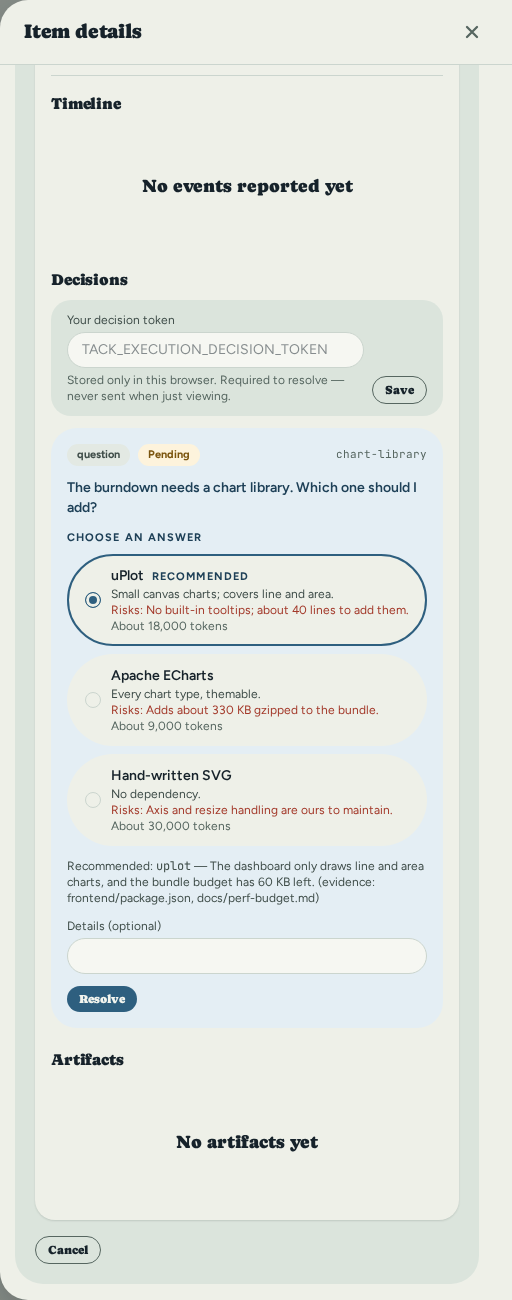
The question appears in the attempt's decision inbox, in the same item view as the run's
timeline and artifacts. Answering it needs TACK_EXECUTION_DECISION_TOKEN, a secret
separate from the ordinary API token. A question nobody answers before the attempt's
deadline is answered with its own deny option. It is never left open and never defaults
to allow.
Each question shows its kind, so a tool permission reads differently from a choice the agent wants you to make. An option can carry a short description, the risks of choosing it and a rough token cost. When the agent has a preferred answer, that option is preselected and marked Recommended, with the reason and any evidence beneath it; nothing is applied until you press Resolve, and you can pick any option. The first time someone opens a pending question, the board records that it was seen.
Checking a machine
Run tack runner doctor on the machine that will actually run the harness before
trusting anything above about your own install — it probes every harness this build has
an adapter for, with no runner enrollment and nothing written to the board. For each
harness it prints whether the binary was found and its version, one line on how it
authenticates, and whether it accepts an operator-chosen model verbatim
(model_passthrough) or only a declared list (model_combinations). Condensed from a
real run on a machine with all four installed:
codex
  status:      present
  version:     0.149.1
  credentials: Codex authenticates itself (its own CLI login, or an API key it reads
               from its own config)...
  model_combinations: (none reported)
  model_passthrough: supported — requested_model_id is forwarded verbatim via --model...

claude-code
  status:      present
  version:     2.1.273
  ...

docket
  status:      present
  version:     0.2.0b1
  ...

opencode
  status:      present
  version:     1.18.30
  ...

Runner-wide capabilities (apply identically to every harness above):
  cancel     advisory    — a process-group signal cannot reach a detached descendant unless the harness reports its process groups; see each harness's own cancel capability
  resume     unsupported — no resumable session contract
  decisions  supported   — at least one harness adapter opens a decision; see each harness's own decisions capability for which one
  artifacts  advisory    — uploaded when an adapter stages one; best-effort, not replayed on restart
  usage      advisory    — usage is reported only when a harness emits it

Secret store (resolves `secret_reference` environment entries):
  backend: keychain
  ...

Provider endpoint (vercel_ai_gateway):
  reaches: codex, claude-code, docket, opencode
  status:  not configured

Provider endpoint (anthropic):
  reaches: claude-code
  status:  not configured

verify: disabled
The last line reports the runner's verifier: disabled, or enabled with the program, whether
it was found on PATH, its arguments and its timeout. See
After a succeeded attempt.
A harness absent from your machine prints status: absent and names every directory it
searched, instead of the fields above — see
Where Tack looks for a harness binary below.
The runner-wide capabilities block is a single, deliberately conservative statement
that applies to every harness alike — it is not where claude-code's ability to pause and
ask shows up. decisions: supported here only means the protocol path exists on this
runner at all; which harness can actually use it is a per-harness fact, set by that
request's own permission_policy.approvals and recorded in the attempt's own capability
snapshot at claim time, not in this enrollment-time summary. Reading decisions: supported here does not mean every harness can pause; see the table above for which
one actually does.
How a provider's endpoint and credential are configured — the TACK_RUNNER_PROVIDER_*
variables, which secret-store entry each one reads, and the embedded runner's own key
field — is the single authority in docs/CONFIG.md, not restated here.
Running an item with an agent
There are four ways to turn a board item into an execution request. All four produce
the identical POST /api/executions record underneath — none is more "real" than
another. For a UI-only user the fastest path to a working setup is the Agents
page (/agents) first — turn execution on, confirm a harness is detected, paste a
provider key if you're using one, and choose a project default model — then the
"Run with agent" modal on any item, which reads that configuration back and needs
no hand-typed identifiers once it's done. The worked example below still uses the CLI,
because every field it sends is visible on the command line; see
Quick Start for the UI-first walkthrough.
| Entry point | Where | Notes |
|---|---|---|
| The "Run with agent" modal | Item detail drawer, web UI | Lays the run out top to bottom (see below), auto-selects the runner when exactly one is active, offers the target's own declared models plus "Project default", and blocks with a named reason (and, where one exists, a link to fix it) instead of submitting a request that would queue forever. |
tack execution create | CLI | Scriptable; every field the API accepts is a flag. Used for the worked example below. |
POST /api/executions | Raw HTTP | Same JSON body the CLI sends. See API Reference for a worked request/response pair. |
MCP create_execution | tack mcp, for an agent driving Tack itself | Same required fields as the REST call. See the MCP guide. |
The Run with agent dialog
The dialog reads as the whole flow, top to bottom, in four groups:
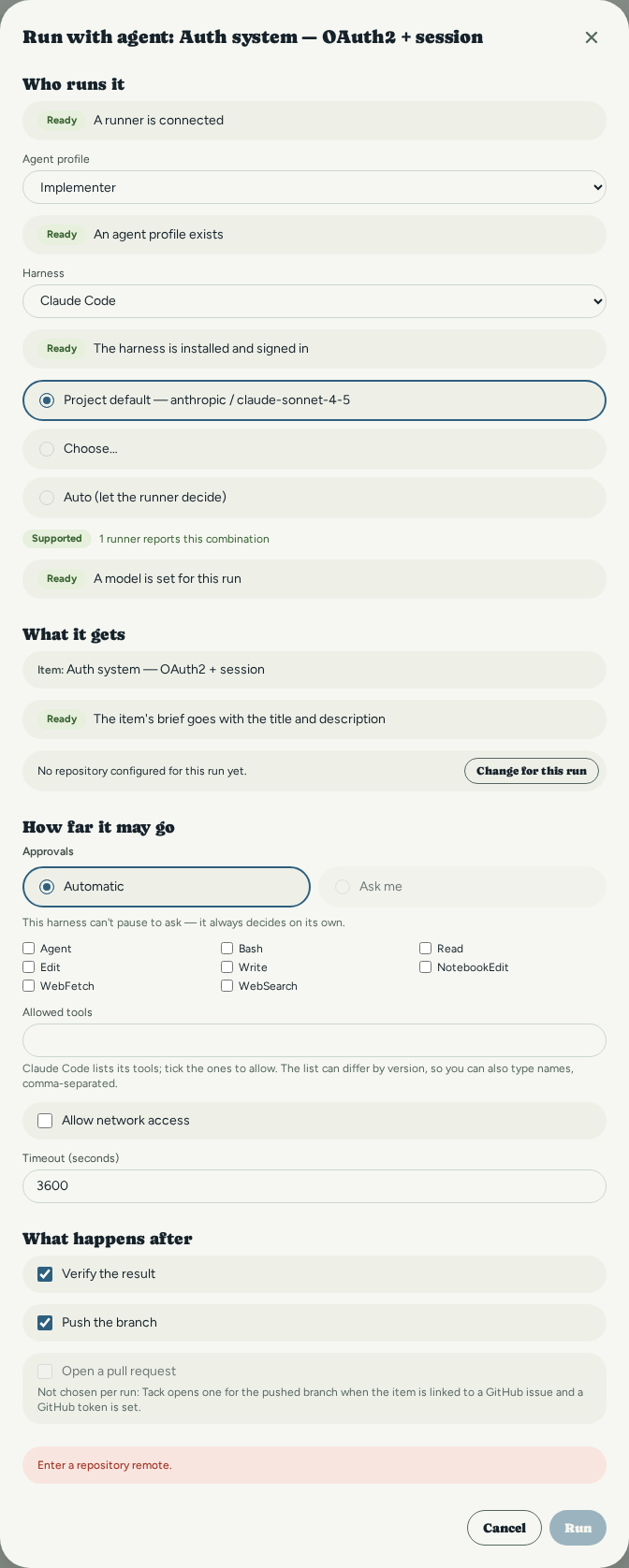
- Who runs it — the machine or group, the agent profile, the harness and the model.
- What it gets — the item, and its brief when it has one (an item without one says so and the agent gets its title and description), plus the repository to check out.
- How far it may go — approvals (Automatic or Ask me), the allowed tools, and the timeout. Claude Code's tools are offered as a checklist beside the free-text field; for codex, opencode and docket the field is free text, because none of them exposes a list of its tools.
- What happens after — Verify the result, Push the branch and Open a pull request.
A step that something is missing for shows a link to the page that fixes it (the Agents page for a runner, a harness or a model) and Run stays disabled until it is fixed. A step that is not available is never hidden: it is shown disabled with the reason beside it. "Ask me" is disabled for a harness that cannot pause to ask. Verify the result and Push the branch become checkboxes when the selected runner has a verifier or branch push turned on (see After a succeeded attempt); otherwise they are disabled and say which section of its TOML config turns them on. Unticking one declines it for this run only. Open a pull request is always disabled in the dialog: a pull request is opened for you once a pushed branch's item is linked to a GitHub issue, not chosen per run.
The rest of this section is one complete run through the CLI path, executed against a
real tack serve --with-runner with a stand-in claude binary standing in for a real,
authenticated install (so it costs nothing and never leaves the machine) — every id and
every line of output below is copied from that run, not constructed from the schema.
Swap the stand-in for a real, logged-in harness and the same commands reach the same
place against real work.
Before this: a project and an item exist (tack init, tack add), and either a
real enrolled runner is polling (see Enrolling a runner below) or
an embedded one is running (tack serve --with-runner — see
Standalone mode below). POST /api/executions requires all thirteen fields shown below; the CLI fills in an
idempotency_key (a fresh UUID) and empty objects for budgets/environment/metadata
if you omit them, so five of the thirteen are effectively optional in practice.
Create an agent profile — its instructions and limits are snapshotted into every request created against it:
tack agent-profile create "demo-profile" \
  --instructions "Print the single word DONE and exit. Do not modify any files."
Created agent profile: demo-profile (ap_91b4e)
  id: ap_91b4ea76-9f1a-4725-8a58-21a57d92572c
Find the runner to target. An embedded runner self-provisions under a name starting
local-; there is no tack runner list CLI subcommand today (see
Enrolling a runner), so read it back over the API:
curl -s http://127.0.0.1:3210/api/runners | jq -r '.data[].runner_id'
runr_8fa0dfb9-638f-492d-b278-ee06a789ad04
Now the full request, all thirteen required fields:
tack execution create <ITEM_ID> \
  --idempotency-key "release-notes-001" \
  --runner runr_8fa0dfb9-638f-492d-b278-ee06a789ad04 \
  --agent-profile ap_91b4ea76-9f1a-4725-8a58-21a57d92572c \
  --harness claude-code \
  --model-provider anthropic \
  --model-id claude-sonnet-4-5 \
  --agent-profile-snapshot '{"name":"demo-profile","instructions":"Print the single word DONE and exit. Do not modify any files.","tool_policy":{},"timeout_seconds":120,"budgets":{}}' \
  --repository '{"kind":"git","remote":"/path/to/local/repo","base_revision":"ce38796ef4f70db35eeb8d6d8b8e86477e1a883c","subdirectory":null}' \
  --permission-policy '{"tools":[],"network":false}' \
  --timeout-seconds 120
Created execution request: exec_0fe
  state: queued
  id:    exec_0fe7252989f5f3d40a056c1da45b035039e4a8247ad89e5222cf9280134ec5d1
Poll for the terminal state — a fresh embedded runner claims and completes an attempt against a stand-in harness in well under a second:
tack execution get exec_0fe7252989f5f3d40a056c1da45b035039e4a8247ad89e5222cf9280134ec5d1
Execution request exec_0fe7252989f5f3d40a056c1da45b035039e4a8247ad89e5222cf9280134ec5d1
  item:    e1d5e03d-4610-45c2-b5f1-835e69f148a7
  state:   succeeded (done)
  created: 2026-09-03T19:00:16.697646760+00:00
That is a completed attempt, reached with the commands above and no browser. For the
attempt-level detail tack execution get does not surface — fencing token, workspace
id, the staged artifact, the harness's own capability report at claim time — use
GET /api/executions/{request_id}/attempts:
curl -s http://127.0.0.1:3210/api/executions/exec_0fe7252989.../attempts | jq '.data[0]'
{
  "attempt_id": "att_fea7528f-853b-4c3c-a2d6-d1cf1b904e48",
  "state": "succeeded",
  "fencing_token": 1,
  "workspace_id": "ws_6174745f66656137353238662d383533622d346333632d613264362d643163663162393034653438",
  "actual_execution": {
    "harness_kind": "claude-code",
    "model_provider": "anthropic",
    "model_id": "unknown",
    "model_observation_source": "not_observed"
  },
  "terminal_reason": {
    "exit": "Exited(0)",
    "reason": "no structured result envelope was produced; inferred success from exit code 0",
    "artifact": { "kind": "log", "name": "claude-code-run.log", "size_bytes": 52 }
  }
}
Two things in that real output are worth reading closely rather than past: model_id
came back "unknown" with source not_observed — the stand-in binary used for this
page never echoes a model id the way a real harness does, and Tack reports that
honestly rather than assuming the requested id was actually the one that ran (the same
"not measured, never a fabricated value" rule as
usage economics, applied to model identity instead
of cost). And terminal_reason.reason came from an inferred exit code, not a
structured result — a real harness's own structured output, when it produces one, is
read instead; see What actually runs today.
Choosing a model and a provider
Two rules sit next to each other, on purpose, because conflating them is what causes
confusion: the board never holds a provider
credential — no TACK_* variable configures a vendor API key, and the API server
itself never proxies a model call (ADR 0050, ADR 0058) — and the runner can hold
one, on its own machine, in its own secret store, and use it to reach a model
provider on the board's behalf. The two statements are about different halves of the
product: see Local credential handling below and
docs/CONFIG.md's "Embedded runner" section, "Vendor/provider credentials" bullet, for
exactly where a credential may and may not live (ADR 0061 draws that line and bounds it).
Separately, and independently of where a credential lives, Tack routes the model
choice: which (provider, model_id) pair reaches the harness for a given request is
resolved server-side, deterministically, before the request is ever offered to a
runner. Routing a choice and holding a secret are different things — this section's
four-tier precedence below is the routing rule; the runner-side gateway path (the
fastest UI-only route to a working key) is in
Local credential handling.
The four-tier precedence
crates/tack-orch/src/model_policy resolves a request's model in this order, most
specific first, stopping at the first tier that has a value:
- Request override —
requested_model_provider/requested_model_idon the request itself (--model-provider/--model-idon the CLI, thePOST /api/executionsbody fields of the same name). Set by an explicit CLI flag, a raw API caller, or the modal's model picker when it isn't left on "Auto". - Agent-profile default — a
{"default_model": {"provider": "...", "model_id": "..."}}object inside the agent profile's ownlimitsfield (POST /api/agent-profiles --limits '...'ortack agent-profile create --limits '...'). Live-verified: creating a profile with this default and a request that omits--model-provider/--model-identirely still resolves and completes:
the resulting attempt'stack agent-profile create "sonnet-profile" \ --instructions "..." \ --limits '{"default_model":{"provider":"anthropic","model_id":"claude-sonnet-4-5"}}' # then tack execution create <item> --agent-profile ap_6e5649b8... --harness claude-code ... (no --model-provider/--model-id)actual_execution.model_providercame back"anthropic"— resolved server-side from the profile, never supplied on the request. - Project default —
projects.default_model(migration 062), the same{"default_model": {"provider": ..., "model_id": ...}}(or literal"auto") convention as the other tiers, set from the Agents page's "Default model" step orPATCH /api/projects/{id}.resolve_request_model_policyreads it as this tier — the only one with a settings UI at all, which is why the "Run with agent" modal's own submit gate points its "set a default model" fix link here (crates/tack-orch/src/model_policy/wiring.rs). - Fleet default — the same
{"default_model": {...}}convention, insideagent_fleets.default_policy(tack fleet create --policy '...'). Applies only to a request that targets the fleet itself (selector_kind: "fleet") — anexact_runner-targeted request never consults any fleet's policy, since it never names one. Live-verified the same way as tier 2: a fleet created with--policy '{"default_model":{"provider":"anthropic","model_id":"claude-opus-4-1"}}', a request targeting--fleet <that fleet>with an agent profile that has no default of its own, resolved toactual_execution.model_provider: "anthropic". - Auto-select — what happens when every tier above is empty. This is not a fallback that quietly picks something: see the next section.
All four tiers are resolved once, server-side, at request-creation time
(crates/tack-api/src/handlers/executions.rs, immediately before the request is
stored) — only when the caller supplied neither requested_model_provider nor
requested_model_id; an explicit pair (even a deliberately wrong one) is never
second-guessed by a lower tier.
Auto-select does not schedule today
Leaving every tier empty is a real, acceptable-looking state to reach — the modal's
model picker defaults to "Auto (let the runner decide)", and a request created that way
is accepted and stored as queued with no error. But no runner-v1 capability field
attests that a harness safely accepts an unspecified model, so the scheduler rejects
every candidate for an auto-select request with AutoSelectNotVerified
(crates/tack-orch/src/scheduler/select.rs) rather than guess. Live-verified: a
request created with requested_model_provider/requested_model_id both null and no
tier above resolving to a value stayed queued, with zero attempts, indefinitely — no
needs_operator, no error surfaced anywhere an operator would see it. The only fix
today is to supply an explicit model somewhere in the four tiers above; there is
currently no operator-visible signal that distinguishes a genuinely queued request from
one that can never be scheduled.
What a runner will actually accept
An explicit (provider, model_id) pair is eligible to schedule when either the target
harness's capability snapshot declares that exact pairing in model_combinations,
or the harness attests model_passthrough: supported (the adapter forwards the
operator's opaque model id verbatim and the harness validates it at its own run time).
model_passthrough: advisory is treated as unverified and rejected exactly like
unsupported — a capability claim below supported is not load-bearing
(crates/tack-orch/src/scheduler/select.rs). Run tack runner doctor on the actual
runner host to see this for real rather than trusting a stale copy of this page — the
full command and its unabridged output are in the CLI reference, and
what the rest of its output means is in
Choosing a harness. Condensed from a real run on a machine with
all four harnesses installed:
| Harness | model_combinations | model_passthrough |
|---|---|---|
codex | (none reported) | supported |
claude-code | (none reported) | supported |
docket | (none reported) | supported |
opencode | (none reported) | supported |
None of the four has a list-models command to probe, so every one declares zero
combinations and relies entirely on passthrough — any operator-specified model is accepted
pre-spawn and only the harness itself validates it at run time. A harness that can
enumerate its own installed/configured models would declare them instead and refuse
passthrough — rejecting an undeclared model before any process spawns rather than after
— but no adapter in this tree does that today.
Enrolling a runner
Enrollment is operator-initiated and two-step: the operator creates a pending runner and gets a one-time token; the runner (or whoever configures it) redeems that token.
tack runner enroll my-first-runner \
  --total-capacity 2 \
  --available-capacity 2
Enrolled runner: my-first-runner (runr_d91da686-...)
  token id:   ent_da7943b1-...
  expires at: 2026-08-19T16:17:51Z
  enrollment token: enr_57cd3592-...
  (shown once — copy it into the runner's TACK_RUNNER_ENROLLMENT_TOKEN now;
   it cannot be retrieved again)
The raw enrollment_token is generated by the server in this one response and is
never stored anywhere retrievable again — only its SHA-256 hash is kept
(crates/tack-api/src/handlers/runner_admin.rs). If you lose it, revoke the token
(tack runner revoke-token <runner-id> <token-id>) and enroll again. Pass --out <path> to write the response straight to an owner-only file instead of printing the
token to the terminal — useful when handing enrollment off to a provisioning script:
tack runner enroll ci-runner-1 --total-capacity 1 --available-capacity 1 \
  --out /secure/place/ci-runner-1.enrollment.json
Verified: tack runner enroll against a live server returns a runner_id,
token_id, and one-time enrollment_token, and a subsequent
GET /api/runners shows the runner in pending_enrollment state (there is no
tack runner list CLI subcommand today — only enroll/revoke/revoke-token; use
curl or the Agents page to list runners) — reproduced by hand for this page and
pinned by crates/tack-api/tests/handlers/production_router.rs and the runner-lifecycle handler tests
in crates/tack-api/src/handlers/runner_admin.rs.
Redeeming the token (the runner side)
The runner process exchanges the enrollment token for a durable credential the first time it starts:
export TACK_RUNNER_API_URL=https://tack.example.com/api/runner/v1
export TACK_RUNNER_ID=runr_d91da686-...
export TACK_RUNNER_STATE_DIR=/var/lib/tack-runner
export TACK_RUNNER_ENROLLMENT_TOKEN=enr_57cd3592-...
tack-runner
Prefer the environment variable over --enrollment-token: the flag exists but the CLI
help deliberately notes the env var keeps the secret out of shell history and process
listings. RunnerConfig::require_enrollment_credential() fails closed with a typed
error before any filesystem or network side effect if no credential is configured —
crates/tack-runner/src/config.rs.
Revoking a runner
tack runner revoke runr_d91da686-...
Revocation is immediate: the runner's hashed credential stops authenticating on the
next request. It does not retroactively invalidate an already-issued lease's fencing
token — a mid-flight attempt still needs the ordinary lease/lifecycle machinery (see
the recovery runbook) to reach a terminal or needs_operator
state. Revoke an unredeemed enrollment token without touching the runner record with
tack runner revoke-token <runner-id> <token-id>.
Standalone mode: tack serve --with-runner
Everything above assumes two processes: an operator running tack serve, and a
separate tack-runner process enrolled against it by hand. tack serve --with-runner
(or TACK_LOCAL_RUNNER_ENABLE=1) collapses that to one binary and one command — the
common case of one developer running an agent against their own board. It is off by
default; the full configuration reference (gate, state directory, provider-credential
story per harness) is docs/CONFIG.md, section "Embedded runner". This section covers
what changes about the enrollment/credential story above when you use it.
- Not a shortcut. The embedded runner runs as a task inside the server's own
process, but speaks runner-v1 over loopback HTTP exactly like a remote runner — the
same client, the same server-side path, the same contract fixtures. See
docs/adr/0058-standalone-single-binary-runner.md. - Zero-touch enrollment on a fresh state directory. The first start with no stored
session self-provisions: it creates its own pending-runner row and redeems its own
one-time token in-process. No
tack runner enrollcall is needed, and no token is ever printed, copied, or configured by hand. A second start against the same state directory reuses the stored credential on disk instead of provisioning a second runner — no second pending-runner row, no second token. - Loopback-only, refused before anything opens.
TACK_HOSTmust be a loopback address for--with-runnerto start at all; a non-loopback bind is refused as a startup error — before any socket or database is opened — never downgraded to a runner-less server. Verified bycrates/tack-cli/src/local_runner.rs'sembedded_runner_refuses_non_loopback_bindtest and, live, byscripts/smoke.shstep 12: a real attempt to bind non-loopback with--with-runnerexits non-zero naming "loopback", and no listener is ever opened on the refused port. - Off by default. Plain
tack serve— no flag, no environment variable — starts no runner at all. Verified live byscripts/smoke.shstep 11, which queriesGET /api/runnersdirectly after a settle window and finds it empty, not merely the absence of a log line. - Proven end to end.
scripts/smoke.shstep 10 drivestack serve --with-runneron a fresh state directory with no token, through self-provisioning, an active runner, and a real completed attempt, using the same fake-harness shim pattern the rest of the smoke script uses. - Log visibility. The embedded runner's own log lines are silent under default
logging (a pre-existing tracing-filter gap, not specific to this mode) — see
docs/CONFIG.md's "Embedded runner" section for the exactRUST_LOGsetting that surfaces them.
Everything else on this page — the capability matrix, workspace/artifact storage,
needs_operator recovery, version compatibility — applies identically whether the
runner is embedded or a separate process; the wire contract does not know the
difference.
Where Tack looks for a harness binary
The Agents page's "harness detected" check, and the runner's own startup probe, resolve
codex, claude, docket and opencode the same way: the runner process's own PATH
first, exactly as a shell would find it. If that search comes up empty, the runner then
checks a fixed list of
per-user install locations that a shell-launched terminal usually has on PATH but a
desktop launcher (a .desktop entry, Finder, the Start menu) or tack service under
systemd's user manager usually does not, since both start from a minimal session
PATH:
~/.local/bin~/.cargo/bin~/.bun/bin~/.npm-global/binand~/.npm/bin- every installed Node version's own bin directory under
~/.nvm/versions/node/ /opt/homebrew/binand/usr/local/bin(Homebrew)- on Windows,
%APPDATA%\npmand%LOCALAPPDATA%\nvm
This list is fixed, not configurable — there is no TACK_* variable for it. A machine
whose shell can already see the install is unaffected: PATH is always searched first,
and the first match wins. If neither search finds the binary, the reported error names
every directory it actually checked, so "not installed" always comes with a way to
confirm it — install the harness anywhere on that list, or make sure it is on the
PATH the runner process actually inherits.
Local credential handling
- The enrollment token is a bearer secret; the durable credential the runner receives after redeeming it is a second, longer-lived bearer secret. Both are hashed at rest — the server never stores either in a form it could hand back to you.
EnrollmentCredential'sDebugandDisplayimplementations are hardcoded to print[REDACTED]— this is structural, not a logging convention that a futureprintln!could bypass by accident (crates/tack-runner/src/config.rs).- The runner's on-disk state directory (
TACK_RUNNER_STATE_DIR, default.tack-runner) holds the attempt journal (below) and, since ADR 0061, a runner-local secret store for a configured provider's key — the platform keychain where one answers, an owner-only file otherwise, neverapp_metaor any other server-visible table. Set a value withtack runner secret set <name>(readsTACK_RUNNER_SECRET_VALUEor, failing that, stdin — never a CLI argument, which/procwould make world-readable), or, when the runner is embedded in the same process as the board (tack serve --with-runner), from the Agents page's own key field. A harness's own vendor login (Claude Max,codex login, ...) needs none of this — it is still the runner operator's own local environment, unmanaged by Tack either way. In every case, Tack's API and database never see, store, or forward a credential value — only the runner's own store resolves one, at spawn time, into the one subprocess that needs it. - Logs never carry the credential value. Redaction is tested with a positive control:
the redaction tests capture real
tracingoutput and assert the secret marker never appears and that an id does appear, ruling out "the capture rig just isn't observing anything."
Workspace and artifact storage
Each execution attempt gets one isolated workspace — a dedicated worktree, never
shared across attempts or requests (crates/tack-runner/src/workspace.rs). The
WorktreeProvisioner trait is the only boundary allowed to create it; tests inject a
fake so unit tests never touch a real git checkout.
On the runner side, before any harness process is allowed to start, an owner-only
journal record is written to TACK_RUNNER_STATE_DIR describing the workspace path and
base revision (crates/tack-runner/src/journal.rs). This durability-before-spawn
ordering is what makes crash recovery possible — see the
recovery runbook.
On the server side, verified artifacts a runner uploads (logs, diffs, generated
files — anything the harness produced worth keeping) are streamed to
<TACK_STORAGE_DIR>/execution-artifacts, a dedicated subtree kept apart from ordinary
item attachments (<TACK_STORAGE_DIR> itself) so the retention sweep documented below
can never touch the wrong directory
(crates/tack-api/src/router.rs, with_artifact_storage_root). Download is
GET /api/executions/{request_id}/attempts/{n}/artifacts/{artifact_id}/content, under
ordinary operator auth. GET .../attempts/{n}/artifacts and GET .../attempts/{n}/decisions
list what an attempt produced without a caller already knowing an id — the UI's
artifact panel and decision inbox both read these lists directly now.
Content integrity is checksum-verified end to end:
execution-attempt-detail.spec.ts uploads real content through a real runner
credential, computes its own sha256, downloads it back through the UI via a real
Playwright download event, and asserts the downloaded bytes equal the uploaded bytes
exactly.
Capability matrix
Every runner reports a capability snapshot at enrollment and refresh time —
protocol version, concurrency, installed harness versions, and per-feature support for
cancel, resume, decisions, artifacts, and usage, each as
unsupported | advisory | supported with an optional reason
(docs/contracts/runner-v1/capabilities.json). The scheduler and UI are required to
read this snapshot rather than assume a feature works.
The one enforced rule: an adapter may claim cancel: supported only if its harness
announces the process groups its shell tool starts. AdapterRegistry::register_probe rejects
any other probe that does, at registration time, before any attempt can reference it —
crates/tack-runner/src/harness/mod.rs, proved by
harness::tests::registering_a_probe_overclaiming_cancel_support_is_rejected. The reason is
structural: a harness's own shell tool spawns its subprocess in a new session outside the
runner's process group, so without being told the group the runner cannot promise it stopped
(confirmed with ps against each real harness installation; see each harness's own
fixtures/<kind>/README.md). Only docket announces its bash calls' process groups
(process_started / process_exited), and only when its negotiated contract is 1.1, so
cancel is supported for docket on 1.1 and advisory otherwise and for the other three
harnesses. On a cancellation the runner stops the main group, then sends SIGTERM and, after the
grace period, SIGKILL to each announced group still live. The cancellation evidence carries
details.groups as {tracked, killed, survived}. A harness that announces nothing always shows
tracked: 0, which means nothing was reported, not that nothing was left.
| Feature | Ceiling in this build | Why |
|---|---|---|
cancel | supported for docket on contract 1.1, advisory for everything else | Only a harness that announces its process groups can be held to stopping them — AdapterRegistry::register_probe rejects a stronger claim from any other, before any attempt can reference it |
resume | adapter-reported | No harness in this build declares a resumable session contract |
decisions | adapter-reported | Runner-driven bounded decisions (POST .../decisions) work when the harness supports them — claude-code, codex and opencode, and docket when the installed one accepts answers, and only when the request asks for it; see Asking before acting |
artifacts | supported for docket when it reports the files a run wrote, advisory otherwise | The other harnesses cannot guarantee artifact discovery; downgraded from an earlier supported claim |
usage | advisory | Token totals may be absent from harness output; see usage economics |
needs_operator and recovery
needs_operator is an explicit, non-automatically-retryable state for an attempt
whose ownership after a crash or network split cannot be proven safe. Tack never
blindly launches a second process against the same workspace. Full mechanics —
including exactly which recovery observations lead where — are in the
Recovery Runbook; the short version:
- A restarted runner reads its own journal and reports what it actually observed —
ProcessStopped,ProcessRunning, orAmbiguous(POST /api/runner/v1/attempts/{id}/recovery-observation). - The server computes a disposition:
SafePreSpawnRequeue(nothing had started yet — automatically safe),NeedsOperator(anything else), orAlreadyTerminal. - An operator resolves a
needs_operatorrequest explicitly, with an audited reason:
tack execution reconcile <request-id> \
  --recovery-key <key> \
  --reason "confirmed process was killed via ps on the runner host"
This calls POST /api/executions/{id}/requeue, which only succeeds for a request the
server itself authoritatively recovered — an unresolved or already-queued request
returns 409 invalid_transition with the current state named in details, never a
silent no-op. Verified by hand against a live server (an unresolvable request returns
{"code":"invalid_transition","details":{"from":"unknown","to":"queued"}}) and pinned
by crates/tack-cli/tests/e6_scheduler_e2e_test.rs.
Version compatibility
Every runner-v1 request body carries "protocol_version": 1. The server rejects
anything else outright — check_protocol_version in
crates/tack-api/src/handlers/runner_protocol.rs returns unsupported-protocol
(docs/contracts/runner-v1/errors/unsupported-protocol.json) for any value other than
the literal integer 1, on every one of the 13 runner-protocol operations. There is
no negotiated fallback: a v2 protocol, if it ever exists, is a new contract revision,
not a version range this server tries to interpolate.
Separately, each runner reports its own runner_version (a free-form string in the
capability snapshot) and each harness reports its installed_version — both are
informational, logged and stored, never used to gate behavior today.
Docket compatibility
Docket is reached the same way as any other coding agent: as a harness
(--harness docket) on a runner-v1 execution request, through the API and
CLI surface described on this page — see Choosing a harness for
what it needs installed and what it can and can't do. The earlier, separate Docket
control-plane bridge — a standing background poller with its own dispatch,
approval and budget routes — has been retired; Docket carries no special
scheduling path or API surface of its own anymore.
Non-loopback and security posture
Runner-protocol routes (/api/runner/v1/*) are mounted as a structural sibling of
the operator /api router, not nested inside it — they never traverse
require_token (the operator bearer-token gate) at all, and each handler
authenticates its own hashed runner credential independently
(crates/tack-api/src/handlers/runner_protocol/runner_auth.rs). This is deliberate:
a future edit that widens the operator auth exemption list cannot accidentally loosen
runner auth, because runner auth was never implemented as an exemption in the first
place.
For everything else about exposing Tack beyond 127.0.0.1 — TLS termination behind a
reverse proxy, TACK_ALLOWED_ORIGINS, TACK_API_TOKEN, request body limits — see
Administration and Security, which applies identically whether or
not any runner is enrolled. The one addition specific to this domain:
TACK_EXECUTION_DECISION_TOKEN is a separate, higher-privilege secret layered on
top of TACK_API_TOKEN, fail-closed when unset (the route rejects rather than silently
falling back to the ordinary operator token) and never logged. See docs/CONFIG.md for every TACK_* variable in this
domain.
tack serve --with-runner (see "Standalone mode" above) adds a second, stricter
loopback requirement on top of all of this: an embedded runner executes arbitrary
coding-agent processes on the same host serving the UI, so --with-runner itself
refuses to start unless TACK_HOST is a loopback address — independent of, and checked
before, whichever TACK_API_TOKEN/TACK_API_ALLOW_UNAUTHENTICATED_NONLOOPBACK posture
the server would otherwise apply.
After a succeeded attempt
What a runner does once an attempt has succeeded, and before its workspace is deleted. Every
step below is the runner's, on its machine; the board never runs a program or pushes a branch.
None of them can change the attempt's outcome: if one fails, the attempt is still succeeded and
the failure is recorded as an event on its timeline.
Evidence. For every harness, and also for a cancelled attempt, the runner records what the
attempt changed against the revision it started from. Three artifacts are uploaded:
changes.patch (the full diff, cut at 8 MiB with a flag in the manifest when it is longer),
files.json (each path and whether it was added, modified, deleted or renamed) and
evidence.json (the manifest: the base and head commits, the patch's checksum and size, the
files, the terminal reason and the usage). When the request carried a brief, brief.json is
kept beside them. If git cannot read the workspace, only evidence.json is written and it says
why. The shape is docs/contracts/evidence-v1/.
Verification. A runner with a [verify] section enabled in its TOML config runs a program
of yours over that evidence and uploads the merge-readiness pack it writes as one more artifact.
It is off by default. A failing, missing or timed-out verifier records attempt.verify_failed
and nothing more. The pack is what you read under
Reviewing a merge-readiness pack. The section is described in
docs/CONFIG.md; tack runner doctor reports whether it is on and whether the program is found.
Branch push. A runner with push_branches = true under [git] commits what the harness left
uncommitted onto a branch named <prefix><item short id>-a<attempt number> and pushes it to the
remote the repository was fetched from, using your own git credentials. It is off by default. A
failed push records attempt.push_failed. Turn it on only for agents you would trust with those
credentials; docs/CONFIG.md says what the push does and does not guard against.
Pull request. When the attempt pushed a branch, its item is linked to a GitHub issue and a GitHub token is configured, the server opens a pull request from that branch, with the merge-readiness pack as its body. The attempt then shows a PR #n link and a badge: open, merged, closed or reverted. The state follows GitHub on the sync poll; see GitHub sync. An item with no link, or no token, gets no pull request and nothing else changes.
Moving the item. A request can carry a status policy: done_on_success moves the item to
its workflow's first Done status when the attempt succeeds, and done_on_mrp_accepted moves it
when you accept the attempt's merge-readiness pack. Without one the item's status is never
touched. Set it with tack execution create --status-map-policy or status_map_policy_id in the
API and MCP; the Run with agent dialog does not offer it. The move goes through the workflow's
ordinary rules and open boards are told, like any edit.
Reviewing a merge-readiness pack
When a verifier checks an attempt, it leaves a merge-readiness pack. Open the attempt's details on the Execution tab and the pack appears under "Merge-readiness pack".
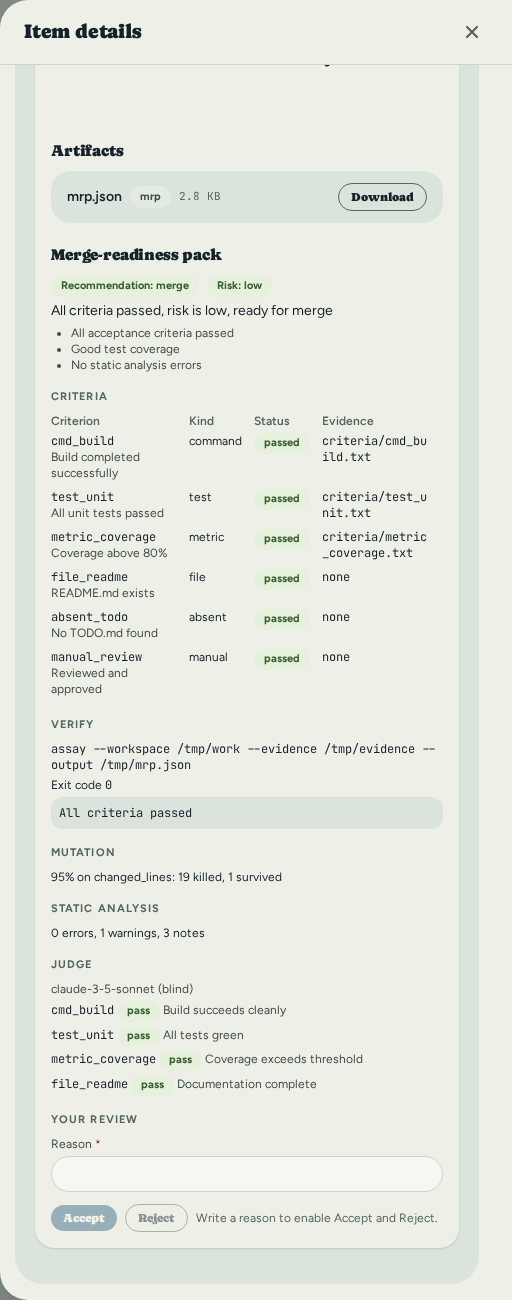
From top to bottom it shows the verifier's recommendation and the risk level with its reasons, then one row per criterion from the brief (id, kind, status, evidence), the verify command with its exit code and output, mutation results, static-analysis counts and the judge's verdict on each criterion.
A section the verifier did not run says Not run. That is not a pass: nothing was checked.
To record your verdict, write a reason, then choose Accept or Reject. Both stay
disabled until the reason has text. The first review is final; a second one is refused.
If the run was created with the done_on_mrp_accepted status policy, accepting also moves
the item to its workflow's first Done status.
Usage economics and "Not measured"
usage_economics.runner_time_cost.cost_usd_estimated is always
{value: null, source: "not_measured"} in production — no runner infra cost-rate is
stored anywhere in this schema, so there is nothing honest to compute it from. The UI
renders the literal string Not measured, never $0.00: rendering zero would claim
the run was free, which is not known to be true.
attemptFormat.test.ts#formatUsdMeasurement asserts the exact string, that it does
not contain $0, and — as a positive control — that a real
{value: 0, source: "measured"} renders the genuinely different "$0.00 (measured)",
proving the two cases are distinguished rather than both collapsing to one string.
Token usage, when the harness reports it, is measured. When it doesn't, it is
not_measured — never a structural zero standing in for "unknown."
Factory metrics
The Factory metrics page (Factory metrics in the project's sidebar, at
/projects/<id>/factory; GET /api/projects/{id}/metrics/factory for the same numbers) shows one card per metric from an aggregated summary of all
attempts, decisions, and verification activity for a project. The page covers all time; the endpoint takes an optional since
(RFC 3339) to start the window later. Each card displays the
computed ratio or value (when it can be measured), or "Not measured" with its reason when
measurement is not possible.
| Metric | Definition | Source |
|---|---|---|
| Escalation rate | Decisions ÷ Attempts | execution_decisions ÷ execution_attempts in the window |
| Human minutes per decision | Median and p90 of the time a decision waits for an answer | From when someone first opened the decision (or from when it was raised, if nobody opened it first) to its resolution; execution_decisions in the window |
| Human minutes per pack review | Median and p90 of the time a merge-readiness pack waits for its verdict | From when someone first opened the pack (or from when it was uploaded, if nobody opened it before the verdict) to the review; mrp_reviews in the window |
| Verification tax (tokens) | (Verification + Rework) ÷ Implementation | Implementation = tokens from each request's first attempt; Rework = tokens from later attempts plus requests marked as rework; Verification = the tokens each verifier reported spending in its pack |
| Pack acceptance rate | Accepted ÷ Reviewed | Counts from mrp_reviews; also shows unreviewed and produced packs |
| Outcomes | Pull requests opened, merged, closed, reverted | Data from pull_requests; also shows PQC (pull request quality: merged and not reverted) |
When a metric has nothing to count, the card says "Not measured" and why, never 0. No
card shows money: token counts only. When timing data has no resolved samples in the window, it shows "Not
measured" rather than zero minutes. The source column for each metric shows which table
it reads and, for time-based metrics, whether resolution time started from viewed_at
(human first opened it) or created_at (never viewed before resolution).
Known gaps
These are documented rather than papered over, per this project's "unsupported is typed, unknown is explicit" rule:
execution_requestshas no realprioritycolumn. Ametadata-convention stopgap exists, documented as non-binding.- A docket run that times out is not cancelled. Cancelling stops every process group docket announced; a timeout stops only docket's main process group, so a command docket started in its own group can outlive the attempt.
tack runner doctordoes not print each harness'sartifactsandpermission_policysupport in its readable output; for docket those are decided when the runner starts.- The branch push runs git in the attempt's workspace, which the agent could have
reconfigured while it worked. Hooks are disabled; see
docs/CONFIG.md.
What actually runs today
Read this section before treating any earlier claim on this page as a promise about a live, end-to-end run.
Proven end-to-end against the real production router (build_router, no
card-local test scaffolding): creating an execution request, scheduling it to an exact
runner or a fleet, the full runner-v1 protocol surface (enroll → claim → heartbeat →
accept → start → events → decisions → artifacts → completion), cancellation and
recovery-observation handling, the decision-resolve and artifact-download routes, and
the retention/expiry sweeps — see crates/tack-api/tests/handlers/production_router.rs,
crates/tack-orch/tests/runner_contract.rs (byte-pins all 46 frozen fixtures), and the
integrator test files referenced throughout this page.
The tack-runner binary's own network transport is wired and proven.
tack_runner::bootstrap::build_runtime (the one composition root both the standalone
tack-runner binary and the embedded
tack serve --with-runner/tack runner start paths call — see "Standalone mode"
above) wires the real HttpPullProtocol, not UnavailableProtocolClient.
UnavailableProtocolClient still exists in the crate as an explicit no-client
fallback — reachable only if something constructs a runtime without attaching a
protocol client — and stays pinned by
runtime::tests::unavailable_protocol_is_a_typed_failure_not_success precisely so that
path fails as a typed RunnerError::ProtocolUnavailable rather than a silent success;
it is not what a real tack-runner startup wires today.
Live, end-to-end proof of the real client: crates/tack-runner/tests/ bootstrap_entrypoint.rs proves the composition root itself is reachable and
shutdown-controllable from outside the crate against a real (mocked) HTTP enrollment
exchange. Every run of scripts/smoke.sh exercises the real client against a real
server: steps 6-9 enroll a separate tack-runner process and drive a real attempt
through claim → checkout → harness → completion, restart recovery included; step 10
does the same inside a single tack serve --with-runner process. A fresh-machine
operator today can enroll a runner and point a real tack-runner process (standalone
or embedded) at a real server and watch it enroll, claim, and complete real work.
Recovery Runbook
What to do when a tack-runner process, its host, or the harness subprocess it
launched dies mid-attempt, and how Tack decides whether it's safe to retry
automatically or requires you to look.
The governing rule, stated once so nothing below contradicts it: Tack does not
claim exactly-once harness execution. A database transaction can prevent two valid
leases at once, but a runner or network crash after a process has actually launched
can leave ownership genuinely ambiguous — nothing server-side can prove the process is
dead. The contract is narrower and honest: at most one valid active lease at a
time, a monotonically increasing fencing token per attempt, a local runner journal
written before any process spawn, idempotent completion reports, and needs_operator
whenever safe retry cannot be proven. A lease expiring never, by itself, launches a
second process against the same workspace.
The lifecycle states involved
leased ──▶ preparing ──▶ running ──▶ waiting_decision
   │            │            │              │
   └────────────┴────────────┴──────────────┘
                       │  (recovery service observes)
                       ▼
              lost  or  needs_operator
lost— the recovery machinery is convinced no process was ever actually running for this attempt (it crashed or the runner restarted before spawning anything). Automatically safe to requeue.needs_operator— anything less certain than that. Not automatically retryable. Requires an explicit, audited operator decision.
Only two actors can move an attempt into either state:
(Leased | Preparing | Running | WaitingDecision) → (Lost | NeedsOperator), and only
the recovery service (never the scheduler, never a bare lease-owner heartbeat
timeout) may make that transition —
crates/tack-orch/src/execution/lifecycle.rs::validate_transition. There is no
background sweep that ages out a stale lease into lost on a timer; recovery is
observation-driven, described next.
How recovery starts: the runner reports what it saw
When a tack-runner process restarts (after a crash, a host reboot, or an operator
kill), it reads its own local journal — written to TACK_RUNNER_STATE_DIR before
any harness process was ever allowed to spawn
(crates/tack-runner/src/journal.rs) — and reports one of three observations to
POST /api/runner/v1/attempts/{id}/recovery-observation:
| Observation | What it means |
|---|---|
process_stopped | The runner found no live process for this attempt (checked by PID/process-group, not merely "the runner restarted") |
process_running | The runner found the harness process still alive and reattached to it |
ambiguous | The runner could not determine either way — e.g. the process table is inconclusive, or the journal itself was corrupt/incomplete |
The server decides the disposition from the observation and the journal state it
already had on file for that attempt (crates/tack-db/src/repo/execution.rs,
recover_attempt):
safe_pre_spawn_requeue— granted only when the observation isprocess_stopped, the attempt'sstarted_atwas never set, and the last known journal state wasprepared(the harness process itself was never spawned in the first place). This is the one case narrow enough to resolve automatically: nothing ever ran, so there is nothing ambiguous to reconcile. The attempt moves tolost, the request moves back toqueued, no operator involved.needs_operator— every other combination:process_running(a live process exists but the runner that owned it just changed identity across a restart — no safe way to hand it back into scheduling from here),ambiguous, orprocess_stoppedafter the process had actually started (it may have made side effects — a partial commit, a half-written file — that a blind requeue would duplicate).already_terminal— the attempt had already reachedsucceeded/failed/cancelledbefore the observation arrived; the observation is recorded for audit but changes nothing.
Recovery observations are idempotent, scoped by a caller-supplied recovery_key: a
second call with the byte-identical request replays the same response
(RecoveryObservationResult::Replayed); a second call with a different body under
the same key returns 409 idempotency_conflict rather than silently overwriting the
first audit record.
Resolving a needs_operator attempt
This is the only path back to queued for anything other than the narrow
safe_pre_spawn_requeue case. It requires a human decision and an audit trail —
there is no API shortcut that skips the reason field.
-
Investigate. Check the runner host directly: is the harness process actually still running? Did it leave a partial workspace/worktree behind (
TACK_RUNNER_STATE_DIR, and the attempt's worktree path recorded in the journal)? Check the execution's event timeline (GET /api/executions/{id}/attempts/{n}/ events) for the last thing the runner reported before contact was lost. -
Decide and record why. Once you're confident it's safe — the process is confirmed dead, or you've manually cleaned up any side effects — requeue with an explicit reason:
tack execution reconcile <request-id> \
  --recovery-key "ops-2026-08-19-host-restart" \
  --reason "confirmed via ps on runner-3 that the codex process is gone; \
no uncommitted worktree changes found"
This calls
POST /api/executions/{id}/requeue(crates/tack-api/src/handlers/executions.rs::requeue_needs_operator), which:- succeeds only for a request the recovery service itself already
authoritatively marked
needs_operator— it is not a general-purpose "force requeue anything" escape hatch; - is idempotent on
recovery_key: replaying the identical call returnsreplayed: trueinstead of double-queuing; - returns
409 conflict(idempotency_conflict) if the same key is reused with a different confirmation, and409 invalid_transition— naming the actual current state indetails.from— for any request that isn't in an authoritatively recoveredneeds_operatorstate.
Verified against a live server for this page: requeuing a request that was never put into
needs_operatorin the first place returns exactly{"code":"invalid_transition","details":{"from":"unknown","to":"queued"}}, never a silent success. Reused incrates/tack-cli/tests/e6_scheduler_e2e_test.rs. - succeeds only for a request the recovery service itself already
authoritatively marked
-
Confirm.
tack execution get <request-id>showsqueued(or, if the reason field described something unrecoverable, resolve tofailedby other means — the requeue path only ever re-queues, it does not force a terminal state).
Cancellation is a request, not a guarantee
POST /api/executions/{id}/cancel records a request for cancellation; the runner
observes and reports the actual outcome via
POST /api/runner/v1/attempts/{id}/cancellation-observation. This mirrors the
recovery split deliberately: Tack cannot itself kill a process running on a runner's
host, so it never pretends to. See the capability matrix
for which harnesses can promise that a cancelled run's processes actually stop. Most
cannot: a harness's own shell tool starts its subprocess in a new session outside the
runner's process group, and the runner has no way to find it. A harness that reports each
process group its tools start (docket does) is the exception, and its cancellation
stops those groups too.
The cancellation observation carries what happened, in details. details.process_outcome
says how the harness's own process stopped (stopped, killed, or signal_failed when the
stop signal could not be delivered, which leaves the observation ambiguous). details.groups
counts the process groups the harness reported and had not reported finished: tracked were
running when the cancellation began, killed are gone afterwards, and survived are still
running and need stopping by hand on the runner's host. A harness that reports no process
groups always shows tracked: 0. That means nothing was reported, not that nothing was left
behind.
A cancellation observation on an attempt that already reached a terminal state returns
409 invalid_transition with the actual terminal state named, not a false success.
What this runbook does not cover
- Database or migration recovery (a crashed migration, a corrupted
.dbfile) — see Backup and Restore anddocs/adr/0008-transactional- migration-rebuild-recovery.md. - Adversarial proof of these boundaries — duplicated or revoked runner
credentials, a stale fence retried against every attempt-scoped route, corrupt or
truncated runner journals, oversized or path-traversal artifact uploads, and
reordered/replayed event batches — is in
crates/tack-api/tests/security/chaos_recovery.rsandcrates/tack-runner/tests/g2_journal_corruption_test.rs, both run against the real production router and a real runner journal, not this page. Killing the API process at each protocol step is covered separately bycrates/tack-runner/tests/crash_matrix.rs. Disk-full/ENOSPCmid-write has no existing test harness in this repository and remains unverified. - Chaos/adversarial proof of the runner's own recovery path against a live
server beyond what
scripts/smoke.sh's restart-recovery step (step 9) already covers — see the Agent Runners page. The runner binary's network transport is wired to the server (tack_runner::bootstrap::build_runtimeattaches the realHttpPullProtocol, not a stub), and a runner can report a recovery observation over a live connection today.
Troubleshooting and FAQ
This page covers the problems you are most likely to hit while running Tack, and answers common questions about how it stores and protects your data. Tack is a single self-hosted binary backed by a local SQLite database, so most issues come down to the server process, the database file, or a few environment variables.
Troubleshooting
Work through the matrix below first, then read the detailed sections for the commands and SQL you need.
| Symptom | Likely cause | Fix |
|---|---|---|
| Server exits immediately on start | Port 3210 already in use | Change TACK_PORT or stop the conflicting process |
database is locked errors | Another process is holding tack.db | Run a single server; close other connections |
| Errors mentioning a failed migration | Interrupted/partial migration | Inspect _migrations; restore or restage a backup |
| Board or UI never loads | API server not running | Check GET /api/health |
401 Unauthorized on every request | TACK_API_TOKEN set, but no/wrong Authorization header | Send Authorization: Bearer <token> |
| Browser console shows CORS errors | Origin not in the allow-list | Add it to TACK_ALLOWED_ORIGINS |
Uploads rejected (413 / too large) | File over the size limit | Stay under 50 MB; raise TACK_MAX_BODY_SIZE for non-attachments |
| Search returns nothing | SQLite built without FTS5 | Use a SQLite/binary with FTS5 enabled |
| Vocabulary or theme "didn't change" | Stale page state | Refresh; theme/palette live in localStorage |
Server won't start / "port already in use"
Cause. By default the server binds to 127.0.0.1:3210. If another process (often a previous Tack instance that did not exit) already holds that port, startup fails.
Fix. Either free the port or run Tack on a different one. The port comes from TACK_PORT (default 3210); the bind address comes from TACK_HOST (default 127.0.0.1).
# See what is using the default port
lsof -i :3210        # macOS / Linux

# Start on a different port
TACK_PORT=4000 tack serve
Open the UI at the host and port you started with, for example http://127.0.0.1:4000. See Configuration for the full list of variables.
"Database is locked"
Cause. SQLite allows only one writer at a time. This error means another process already has tack.db open for writing — usually a second tack serve instance, an open sqlite3 shell, or a database GUI.
Fix. Run exactly one Tack server against a given database file. Close any other process that has the file open (other tack instances, sqlite3 sessions, DB browsers). The default connection string already uses read-write-create mode (sqlite:tack.db?mode=rwc), so you should not need to change it.
If you genuinely need a second instance, point it at a different database with TACK_DATABASE_URL.
Migrations failed on startup
Cause. Tack runs its schema migrations automatically when the server starts and records each applied migration in the _migrations table. If the process is killed mid-migration, or the database file is from an incompatible build, startup can fail with a migration error.
Fix. Inspect which migrations were recorded:
sqlite3 tack.db
SELECT * FROM _migrations;
If a migration is recorded as applied but the schema is clearly incomplete, the safest recovery is to restore a known-good backup rather than hand-editing the schema. See Backup and Restore. For the full upgrade path — what runs automatically, when Tack takes its own pre-upgrade snapshot, and how to safely enable the Part III runner-fleet execution features — see docs/MIGRATION-GUIDE.md.
How staged restore interacts with this. A restore is staged, not applied live: Tack writes the uploaded database next to the live file as <db>.restore and tells you to restart. On the next startup, before opening the database, Tack swaps the files atomically:
- the current database is moved aside to
<db>.bak, - the staged
<db>.restorebecomes the live database.
So after a restore your previous database is preserved as tack.db.bak. If a restore leaves you worse off, stop the server and move tack.db.bak back to tack.db to return to the prior state.
Board or UI won't load
Cause. The web UI is served by the same binary as the API. If the page is blank, stuck on a skeleton loader, or shows network errors, the API server is almost always down or unreachable.
Fix. Confirm the server is up with the health endpoint:
curl http://127.0.0.1:3210/api/health
A healthy server responds with 200 OK. If the request hangs or is refused, the server is not running on that host/port — start it with tack serve and check the console for errors. If you changed TACK_HOST/TACK_PORT, query the address you actually bound to.
The /api/health endpoint is intentionally exempt from the API-token gate, so it always works even when TACK_API_TOKEN is set — making it a reliable liveness check.
401 Unauthorized / "token rejected"
Cause. When TACK_API_TOKEN is set on the server, every /api/* route except /api/health requires a matching Bearer token. A 401 means the header is missing, malformed, or does not match the configured token.
Fix. Send the token on every request:
curl -H "Authorization: Bearer <token>" http://127.0.0.1:3210/api/projects
The header value must be exactly Bearer followed by the same string you set in TACK_API_TOKEN. If you are using the web UI behind a token, make sure the UI is configured with the same token. If you did not intend to require a token, unset TACK_API_TOKEN and restart. See Administration & Security.
CORS errors in the browser console
Cause. The browser blocks requests from an origin that the server has not allow-listed. Tack's CORS allow-list defaults to local origins only:
http://localhost:8080
http://127.0.0.1:8080
http://localhost:3210
http://127.0.0.1:3210
https://tack.test
If you serve the UI from a different host, port, or scheme, the browser reports a CORS failure.
Fix. Add your origin to TACK_ALLOWED_ORIGINS (comma-separated) and restart:
TACK_ALLOWED_ORIGINS="https://tack.example.com,http://127.0.0.1:8080" tack serve
Use the exact scheme, host, and port the browser sends — http:// and https://, and a non-default port, are all distinct origins.
Uploads failing
Cause. There are two separate limits. File attachments have a fixed maximum of 50 MB. All other (non-attachment) request bodies are capped by TACK_MAX_BODY_SIZE, which defaults to 2 MB (2097152 bytes). A request over its limit is rejected (typically 413 Payload Too Large).
Fix. For attachments, keep individual files under 50 MB. For large JSON imports or other big non-attachment payloads, raise the global limit and restart:
# Allow 10 MB request bodies for non-attachment endpoints
TACK_MAX_BODY_SIZE=10485760 tack serve
Note that raising TACK_MAX_BODY_SIZE does not change the 50 MB attachment ceiling.
Search / FTS5 not working
Cause. Full-text search is built on SQLite's FTS5 extension. If your SQLite library was compiled without FTS5, the search index cannot be created or queried.
Fix. Verify FTS5 is available in the SQLite your environment uses:
sqlite3 tack.db "PRAGMA compile_options;" | grep FTS5
If ENABLE_FTS5 is not listed, use a SQLite build (or a Tack binary) with FTS5 enabled. The official Tack binaries ship with FTS5 support.
Vocabulary or theme change "didn't apply"
Cause. Two different things are at play. Display preferences — the light/dark mode and the colour palette — are stored in your browser's localStorage, not on the server, so they are per-browser and persist locally. Vocabulary changes are saved server-side per project, but an already-open tab may still show cached labels.
Fix. Refresh the page (a hard refresh if needed). Theme and palette will reload from localStorage; vocabulary labels will reload from the server. If a theme looks wrong only in one browser, clearing that browser's site data resets it to defaults. See Appearance and Vocabulary.
An agent attempt succeeded, but there is no pull request, pack or branch
Cause. Everything after a succeeded attempt is opt-in and best-effort, and none of it changes the attempt's outcome. Look at the attempt's event timeline: attempt.verify_skipped, attempt.verify_failed, attempt.push_skipped and attempt.push_failed each say why a step did not happen. The usual reasons are that the runner has no [verify] section enabled or no [git] push_branches = true, the verifier program is not on the runner's PATH, git has no credentials for the remote, or the item is not linked to a GitHub issue or no GitHub token is configured (a pull request needs both).
Fix. Run tack runner doctor on the runner's machine: its last lines report whether the verifier is enabled and found. Set the sections as described in docs/CONFIG.md, link the item to its issue and set TACK_GITHUB_TOKEN, then run the item again. See After a succeeded attempt.
FAQ
Is my data sent anywhere?
No. Tack is fully self-hosted. All your projects, items, and comments live in a local SQLite database on the machine you run it on. Nothing is sent to Anthropic or to any Tack-operated service. Outbound traffic only happens for features you explicitly configure — for example a webhook URL, a GitHub/Linear import, or an S3-compatible cloud backup you set up yourself.
Can I use Tack offline?
Yes, in the local-first sense. Tack runs entirely on your own machine or LAN, with no dependency on an external service. The one requirement is that the Tack server process is running: the web UI and CLI both talk to it over HTTP. As long as the server is up on your machine (or a machine on your network), you can work without any internet connection.
Where is my data stored?
In two places, both local:
- Database — a single SQLite file. By default
TACK_DATABASE_URLissqlite:tack.db?mode=rwc, i.e. atack.dbfile in the directory you run the server from. - Attachments — uploaded files live under
TACK_STORAGE_DIR, which defaults to./storage, organised by item.
To relocate either, set the corresponding variable (see Configuration) and restart.
How do I back up my data?
Use Tack's backup features rather than copying the live database while the server is running. You can download a local backup, or push a copy to an S3-compatible cloud store, and stage a restore that applies on the next restart. See Backup and Restore for the full workflow.
Is Tack for a single user or a team?
Both, with a focus on solo developers and small teams. Multiple people can work against the same server, and board changes propagate live to all connected clients over a WebSocket connection, so updates appear without manual refreshes.
Which platforms does it run on?
Tack ships as a single self-contained binary for Linux, macOS, and Windows. There is no separate runtime to install; the web UI can be embedded in the binary so one file serves both the API and the SPA.
How do I secure Tack on a network?
Tack defaults to 127.0.0.1 for local-only use. Before exposing it beyond your machine:
- Require a token. Set
TACK_API_TOKENso all/api/*routes (except/api/health) demandAuthorization: Bearer <token>. - Restrict origins. Set
TACK_ALLOWED_ORIGINSto only the hostnames that should reach the UI. - Terminate TLS at a reverse proxy. Tack itself serves plain HTTP; put it behind a reverse proxy (such as Caddy or nginx) that provides HTTPS, and bind Tack to a private address.
See Administration & Security for step-by-step setup.
Does Tack integrate with GitHub or Linear?
Yes. You can import issues from GitHub and from Linear into a project. GitHub integration also keeps linked issues and items in sync in both directions when a GitHub token is configured, and opens a pull request for an agent's pushed branch. See Import and Export for setup, filters, and token requirements.
Architecture Overview
They are separate because they scale and fail differently. One board, many runners: a board on a small VPS dispatches to runners on ten developers' machines, each with its own agent, model and capacity. A runner that dies mid-run cannot corrupt the board — its lease expires and its fencing token stops writing. A board that restarts cannot lose a run — the runner's journal knows what it started. One developer runs both in one process with one command, on the same contract, with the same recovery.
You have read the quick-start and can run the server. This document explains why the code is structured the way it is — the reasoning behind each layer, how a request actually travels through the system, and where the interesting domain logic lives.
This page is a narrative walkthrough, not a reference. For the condensed crate-boundary table, the full API endpoint list, the database schema, and troubleshooting, see
docs/ARCHITECTURE.md— the authority on any fact the two disagree on.
1. The Layering Rule
Tack enforces a strict one-way dependency graph across the workspace's six crates:
tack-core  ←  tack-db  ←  tack-orch  ←  tack-api  ←  tack-cli

tack-runner  (a separate binary, sibling to this graph — talks to tack-api
              over the runner-v1 HTTP contract, not through any Rust dependency)
Each arrow means "depends on". No reverse arrows are allowed. A seventh crate,
tack-desktop, is deliberately excluded from this workspace (its own Cargo.toml
and lockfile) because Tauri drags GTK/WebKit/glib into whatever workspace holds it —
see the Crate Tour for how it supervises tack instead
of linking against it.
What this means in practice:
tack-corehas zero I/O. It cannot open a file, touch a database, or make a network call. It only contains pure Rust structs, enums, and functions. You can run every test in it without a database process.tack-dbknows abouttack-core(it persists those structs), but it knows nothing about HTTP, routing, or config files.tack-orchknows abouttack-coreandtack-dbbut nothing about HTTP — it is the neutral runner-v1 execution domain, usable without Axum. See Crate Tour.tack-apiis the only place where HTTP concerns (status codes, request extraction, CORS) and database concerns meet. It depends ontack-orchto run the scheduler/retention/observability tasks and expose the execution routes.tack-cliis the singletackbinary. It depends ontack-apiso thattack servecan start the server in-process, but its client commands only talk to a running server over HTTP — they never open the database directly. This means the CLI works whether the server is local or on a remote machine.tack-runneris a separate binary entirely. It never depends on any of the crates above; it speaks the runner-v1 protocol totack-apiover loopback or the network, the same way a remote runner would.
Why bother? The layering prevents the kind of "everything knows about everything" entanglement that makes codebases brittle. It also means:
- Workflow rules are always consistent. Because all validation lives in
tack-core, neither a direct DB call nor an API call nor a CLI command can bypass it. - Tests are fast. Core tests are pure function calls — no test database, no async runtime, no cleanup.
- The domain model can be reused. If a future project needs the same workflow engine, it can depend on
tack-corewithout dragging in SQLite or Axum.
2. The Universal Item Model
Every piece of work in Tack — whether it is called a task, an epic, a bug, a work order, or an assignment — is stored as an Item. There is one table, one struct, one set of repository functions.
The Item struct in tack-core/src/models.rs carries an item_type field that records what kind of thing it is (Task, Epic, Bug, Feature, Subtask, Requirement, or a Custom(String) for anything else). The vocabulary system then translates that type name into whatever label the project uses.
Think of it like a spreadsheet: every row has the same columns. The header labels change depending on who is looking at the sheet. A construction project relabels task as Work Order and sprint as Phase, but the underlying row structure is identical.
Benefits:
- One migration path. Adding a new field to items (say, a
story_pointscolumn) means one migration, one struct update, one set of repository functions — not separate migrations per item type. - Hierarchy is free. Because every item can have a
parent_idpointing to another item, the tree structure (epic → feature → task → subtask) falls out naturally without a separate parent-type/child-type mapping. - Filtering is uniform. The same
ItemFilterstruct handles filtering byitem_type,status,priority,assignee, or tag regardless of project type.
The tradeoff is that the item_type field carries less compile-time enforcement than a proper type hierarchy. This is intentional — the flexibility outweighs the constraint for a tool meant to work across very different domains.
3. How a Request Flows Through the System
Here is a concrete walk-through of PATCH /api/items/{id} — the endpoint that moves an item to a new status.
HTTP client
    │
    ▼
Axum router (tack-api/src/router.rs)
    │  Extracts: Path(item_id), State(AppState), Json(UpdateItem)
    ▼
Handler: update_item (tack-api/src/handlers/items.rs)
    │  1. Calls repo.get_item(id) to load current item
    │  2. Calls repo.get_project(project_id) to load workflow
    │  3. Calls workflow.validate_transition(old_status, new_status)  ← pure, no I/O
    │  4. Calls workflow.check_wip_limit(new_status, current_count)  ← pure, no I/O
    │  5. Calls repo.update_item(id, patch)  ← writes to DB
    │  6. Calls repo.check_and_update_parent_status(...)  ← best-effort parent cascade
    │  7. Calls broadcast_event(ItemUpdated { ... })  ← fires WebSocket event
    ▼
Repository (tack-db/src/repo/items.rs)
    │  Runs parameterised SQL via sqlx
    ▼
SQLite
    │
    ◀── Result<Item, sqlx::Error>
    │
Handler maps error → ApiError → HTTP response
    │
    ▼
HTTP client receives JSON
A few things worth noting:
- Steps 3 and 4 call pure functions in
tack-core. No database round-trip is needed to validate the transition — the entire workflow config was loaded with the project in step 2, and it lives in memory as aWorkflowConfigstruct. - The handler owns the orchestration. It decides the order of validation, persistence, and notification. The repository and the core crate do not know about each other.
- Errors propagate upward via Rust's
?operator. TheApiErrortype (intack-api/src/error.rs) implementsIntoResponse, mapping eachCoreErrorvariant to the appropriate HTTP status code.
4. How Workflow Validation Works
The workflow for a project is a WorkflowConfig struct stored as JSON in the projects table. When the server loads a project, it deserialises that JSON back into the struct — no extra tables, no joins.
The WorkflowConfig holds:
- A list of
StatusDefentries (name, category, optional WIP limit, sort order). - An optional list of
Transitionpairs (from,to).
validate_transition(from, to) does two things:
- Checks that both
fromandtoexist in the status list. - If an explicit transition list exists, checks that the pair is in it.
If the transition list is absent (None), any move between two valid statuses is allowed. This is the Scrum and Kanban default. The construction workflow, by contrast, defines an explicit list — you cannot skip from Permit to Handover.
Why is this in tack-core and not in the database layer?
Because it is a business rule, not a storage rule. The database does not know what statuses are valid — that is configuration data stored in a JSON column. Only tack-core knows how to interpret that configuration and enforce the rules. Putting the validation in the repository would mean the repository would need to import workflow logic, violating the layer boundary. Putting it in the handler (without core) would scatter the logic and make it untestable without a running server.
By living in tack-core, the validation is:
- Testable with zero dependencies (73 unit tests, none of which touch a database).
- Reusable by any layer that loads a
WorkflowConfig. - Independent of how the config was persisted.
5. How Real-Time Updates Work
The real-time board feature uses a Tokio broadcast channel. Here is the architecture:
AppState
  └── broadcast_tx: broadcast::Sender<BoardEvent>   (capacity: 100)

On any mutating API call:
  handler calls broadcast_event(&state, BoardEvent::ItemUpdated { ... })
    └── state.broadcast_tx.send(event)  ← non-blocking, drops if no subscribers

On WebSocket connection (GET /api/projects/{id}/boards/live):
  handler upgrades the connection
  spawns two tasks:
    send_task:  rx.recv() in a loop → filter by project_id → send JSON to client
    recv_task:  reads messages from client (handles Close, Ping)
  tokio::select! on both tasks — whichever ends first, the other is aborted
The broadcast channel is the pub/sub backbone. Every handler that modifies data calls broadcast_event(); every WebSocket connection subscribes to the channel and filters events by project_id before forwarding them to the client.
Important properties:
- Fire and forget.
broadcast_tx.send()returns immediately whether or not there are subscribers. If nobody is listening, the event is dropped. This keeps the write path fast. - Per-project filtering happens in the send task. The channel carries events for all projects; each WebSocket connection only forwards events that match its
project_id. This keeps the channel logic simple while allowing one channel to serve many concurrent connections. - No persistence. Events are not stored. A client that disconnects and reconnects will not receive missed events — it will simply see the current board state on the next page load.
6. Directory Map
.
├── crates/
│   ├── tack-core/         Pure domain logic; no I/O
│   │   └── src/
│   │       ├── models.rs    All domain structs and DTOs
│   │       ├── workflow.rs  WorkflowConfig, validation, presets
│   │       ├── vocabulary.rs VocabularyMap, resolve(), presets
│   │       ├── dependency.rs DependencyGraph, cycle detection
│   │       ├── error.rs     CoreError enum
│   │       └── lib.rs       Re-exports
│   │
│   ├── tack-db/           SQLite persistence layer
│   │   └── src/
│   │       ├── lib.rs       init_pool() — WAL mode, foreign keys on
│   │       ├── migrations.rs Ordered migrations as embedded SQL strings
│   │       ├── repo.rs      Repository struct — delegates to submodules
│   │       └── repo/        One file per entity (items, projects, sprints, …)
│   │
│   ├── tack-orch/         The runner-v1 execution domain
│   │   └── src/
│   │       ├── lib.rs       Module declarations, OrchError
│   │       ├── execution/   Lifecycle validation, fencing/idempotency types
│   │       ├── scheduler/   Deterministic runner selection
│   │       ├── model_policy/ Deterministic model-selection precedence
│   │       ├── execution_retention.rs Cancellable retention sweep
│   │       ├── execution_observability.rs Fleet health snapshots
│   │       └── usage_provenance.rs Requested-vs-actual model + usage economics
│   │
│   ├── tack-api/          Axum HTTP server + WebSocket
│   │   └── src/
│   │       ├── main.rs      Startup: config, pool, migrations, listen
│   │       ├── router.rs    All routes + AppState + middleware wiring
│   │       ├── config.rs    AppConfig — TOML / env var loading
│   │       ├── error.rs     ApiError → HTTP status code mapping
│   │       ├── debug.rs     /api/health, /api/debug/* endpoints
│   │       ├── middleware.rs Bearer token gate
│   │       └── handlers/    One file per entity group + websocket.rs
│   │
│   ├── tack-cli/          CLI (clap), talks to API over HTTP
│   │   └── src/
│   │       ├── main.rs      Command tree + implementation functions
│   │       ├── client.rs    TackClient — thin reqwest wrapper
│   │       ├── config.rs    ~/.tackrc reader/writer
│   │       ├── service.rs   `tack service` — systemd/launchd unit management
│   │       └── vocab.rs     Fetch and cache project vocabulary
│   │
│   ├── tack-runner/       Separate binary; pull-based execution runner
│   │   └── src/
│   │       ├── main.rs      Startup, config, registry
│   │       ├── engine.rs    Claim → prepare → run → report loop
│   │       ├── harness/     Adapters per coding agent (codex, claude_code, docket, opencode)
│   │       ├── journal.rs   Local attempt journal for crash recovery
│   │       └── workspace.rs Per-attempt working directory + credentials
│   │
│   └── tack-desktop/      Tauri shell; excluded from the workspace above
│       └── src/            Supervises `tack` as a bundled sidecar process
│
├── frontend/                SolidJS + TypeScript + Tailwind v4
│   └── src/
│       ├── app/             Router, layout, route definitions
│       ├── features/        One directory per feature (board, projects, …)
│       ├── shared/          Reusable UI components, state helpers
│       └── types/           TypeScript type definitions (mirrors API shapes)
│
└── docs/book/               mdBook developer documentation
Crate Tour
This chapter walks through each of the six Rust crates in the main workspace in depth: what it owns, what it deliberately does not own, the key files, and the patterns worth understanding. tack-core, tack-db, tack-api, and tack-cli predate the Part III runner-fleet cycle; tack-orch and tack-runner were added by it. A seventh crate, tack-desktop, sits outside that workspace by design — its own section at the end of this chapter says why.
The SolidJS web UI in
frontend/is covered separately in Frontend & Design System — structure, the design-token system, and theshared/uicomponent kit.This chapter is a per-file walkthrough, not a reference. For crate boundaries stated as a condensed table, design patterns, the DB schema, the full API endpoint list, and troubleshooting, see
docs/ARCHITECTURE.md— the authority when the two disagree on a fact rather than depth.
tack-core
Lives in: crates/tack-core/src/
Owns: domain models, workflow engine, vocabulary system, dependency DAG, typed error enum, and the two contracts Tack reads and writes as plain data: an item's brief (brief.rs: the types, their validation and a Markdown rendering for the harness) and the merge-readiness pack (mrp.rs: the mrp-v1 types and their pull-request rendering).
Does not own: anything that performs I/O. No sqlx, no reqwest, no file operations, no tokio. This is enforced by the Cargo.toml — the crate has no async runtime dependency at all.
models.rs
The single source of truth for every domain struct. Notable types:
Item— the universal work unit. Fields includeitem_type: ItemType,status: String,parent_id: Option<Uuid>,tags: Vec<String>. Thestatusfield is a plain string rather than an enum because valid statuses are project-specific configuration, not compile-time constants.Project— carries theworkflow: WorkflowConfigandvocabulary: VocabularyMapinline. Both are serialised to JSON when stored in SQLite.ItemType— an enum withEpic,Feature,Task,Subtask,Bug,Requirement, andCustom(String). TheCustomvariant allows ad-hoc item types without a code change.CreateItem,UpdateItem,CreateProject,UpdateProject, etc. — all DTOs used for both API deserialization and repository function parameters. Keeping them intack-coremeans the API and CLI reference the same validated shapes.
Validation constraints (length, range) are expressed via the validator crate's derive macros directly on the DTO structs. The API handlers call .validate()? before doing anything with the data.
workflow.rs
Defines WorkflowConfig, which is what gets stored as JSON per project.
#![allow(unused)]
fn main() {
pub struct WorkflowConfig {
    pub workflow_type: WorkflowType,
    pub statuses: Vec<StatusDef>,
    pub transitions: Option<Vec<Transition>>,
}
}
Each StatusDef has a name, a category (Todo, InProgress, or Done), an optional wip_limit, and an order integer for display sorting.
validate_transition(from, to) is the central enforcement function. It:
- Checks that both names exist in the status list.
- If
transitionsisSome(list), checks that the pair appears in the list. - Returns
Ok(())orErr(CoreError::InvalidTransition { from, to }).
If transitions is None, any move between two known statuses is allowed. This is the default for Scrum and Kanban workflows.
check_wip_limit(status, current_count) looks up the StatusDef for the target column and returns Err(CoreError::WipLimitExceeded { ... }) if current_count >= limit.
Preset functions produce ready-made configs for each domain:
| Function | Type | Statuses | Transitions |
|---|---|---|---|
scrum_workflow() | Scrum | Backlog, To Do, In Progress (WIP 5), In Review (WIP 3), Done | None (open) |
kanban_workflow() | Kanban | Queue, In Progress (WIP 3), Review (WIP 2), Done | None (open) |
simple_workflow() | Simple | To Do, Doing, Done | None (open) |
construction_workflow() | Construction | Permit, Procurement, Build, Inspect, Handover | Explicit linear list |
workflow_for_type(project_type) maps each ProjectType to the right preset. Adding a new project type means adding a variant to the ProjectType enum, a preset function, and a match arm here.
The test suite in this file covers initial status selection, transition validation for open and constrained workflows, WIP limit edge cases, done-status detection, and parent-completion logic — all without any database or async runtime.
vocabulary.rs
VocabularyMap is a type alias for HashMap<String, String>. It maps canonical keys (like "task", "sprint", "epic") to their display labels for a given project.
resolve(vocab, key) looks up a key in the project's vocabulary, falls back to the default vocabulary, and finally falls back to the key itself. This means partial vocabularies work fine — a construction project only needs to override the terms it cares about.
vocabulary_for_type(project_type) provides preset vocabularies. The construction preset, for example, maps:
"task"→"Work Order""sprint"→"Phase""epic"→"Building""bug"→"Defect"
validate(vocab) ensures that all keys in a user-supplied vocabulary are from the recognised list (VOCABULARY_KEYS). Unknown keys return Err(CoreError::InvalidVocabularyKey(...)) — this prevents typos from silently creating orphaned entries.
dependency.rs
DependencyGraph is an adjacency-list representation of item dependencies:
#![allow(unused)]
fn main() {
pub struct DependencyGraph {
    edges: HashMap<Uuid, Vec<(Uuid, DependencyType)>>,   // item → items it blocks
    reverse_edges: HashMap<Uuid, Vec<(Uuid, DependencyType)>>,  // item → items that block it
}
}
DependencyGraph::from_edges(edges) builds the graph from a slice of DependencyEdge values. The API handler loads all existing dependencies for the involved items, builds the graph, then calls validate_new_edge(source, target) before inserting.
would_create_cycle(source, target) runs a depth-first search starting from target, following the edges adjacency list. If it ever reaches source, adding source → target would close a cycle and the function returns true. The check is O(V + E) over the existing graph.
validate_new_edge wraps the check in a Result, also catching the self-reference case (source == target).
error.rs
CoreError is a thiserror-derived enum that covers every domain-level failure:
ItemNotFound(Uuid),ProjectNotFound(Uuid),SprintNotFound(Uuid),RoleNotFound(Uuid)— map to HTTP 404.InvalidTransition { from, to },WipLimitExceeded { column, limit, current },DependencyCycle(Uuid),DuplicateDependency { ... },InvalidVocabularyKey(String),EmptyWorkflow,HasChildren(Uuid, usize),Validation(String)— map to HTTP 400.
The mapping from CoreError to HTTP status codes lives in tack-api/src/error.rs, keeping the core crate free of HTTP knowledge.
tack-db
Lives in: crates/tack-db/src/
Owns: SQLite connection pool initialisation, migration runner, repository pattern over all entities.
Does not own: HTTP concerns, config loading, or business rule enforcement. The repository functions are thin: they translate between Rust structs and SQL rows.
lib.rs
init_pool(database_url) creates a SqlitePool using SqlitePoolOptions with a max of 5 connections, then immediately runs two PRAGMA statements:
PRAGMA journal_mode=WAL— enables Write-Ahead Logging for better concurrent read performance.PRAGMA foreign_keys=ON— SQLite does not enforce foreign keys by default; this enables them.
migrations.rs
Contains every migration (check GET /api/health's migrations_applied field for
the current count rather than trusting a hand-written number here) as const arrays
of SQL strings. Each entry is (&str name, &[&str] statements). The runner:
- Creates
_migrationstable if absent. - For each migration, checks if the name is already recorded.
- Executes each SQL statement in order.
- Records the migration name on success.
Migrations are idempotent — running them on an existing database is safe. Notable migrations:
004_items— creates theitemstable with indexes onproject_id,status,priority,parent_id, andsprint_id.010_fts— creates the FTS5 virtual tableitems_ftsand three triggers (after_item_insert,after_item_update,after_item_delete) that keep the FTS index in sync with theitemstable.012_custom_fields—custom_field_definitionsandcustom_field_valuestables.016_perf_indexes— additional composite indexes added after profiling.039–048— the ten neutral runner-v1 execution-domain tables (execution requests, attempts, events, decisions and artifacts; agent profiles; runner fleets and their members; model profiles).049+ refine execution replay, recovery and attempt-start facts.078–081— item briefs, the decision pack columns (options' details and risks, the recommendation, when a decision was first seen), merge-readiness pack reviews and pull requests.
Each ordinary migration runs in its own transaction with the _migrations record
inserted at commit; a failing statement rolls the whole migration back. Applied
migrations are checked at every startup against the binary's own ordered list by name
and a deterministic checksum — an edited or reordered history refuses to boot
rather than running silently. A small subset (037/038, a table
copy/verify/swap rebuild predating Part III) additionally takes an automatic
VACUUM INTO snapshot before its first attempt. See docs/MIGRATION-GUIDE.md for the
operator-facing version of this and docs/adr/0008-transactional-migration-rebuild-recovery.md
for the design rationale.
repo.rs and repo/
repo.rs declares the Repository struct, which holds a SqlitePool, and re-exports a method for each database operation by delegating to the appropriate submodule:
#![allow(unused)]
fn main() {
pub struct Repository {
    pool: SqlitePool,
}

impl Repository {
    pub async fn create_item(&self, ...) -> Result<Item, sqlx::Error> {
        items::create_item(self.pool(), ...).await
    }
    // ...
}
}
This design gives callers a single repo value to pass around while keeping each entity's SQL in its own file.
Per-entity submodules (items.rs, projects.rs, sprints.rs, roles.rs, comments.rs, dependencies.rs, attachments.rs, boards.rs, templates.rs, custom_fields.rs, briefs.rs, pull_requests.rs, metrics.rs, github_links.rs, execution.rs):
- Functions take
&SqlitePool(or&selffor the struct-based submodules) and returnResult<T, sqlx::Error>orResult<T, DependencyError>. - Queries use
sqlx::query/sqlx::query_aswith positional?parameters. - UUIDs are stored as
TEXT— bound as.bind(id.to_string())and parsed back from the row. - JSON fields (
workflow,vocabulary,tags) are serialised to/from strings withserde_json. - Timestamps are stored as RFC 3339 strings and parsed via
chrono::DateTime<Utc>.
Notable function: check_and_update_parent_status (in items.rs). After an item is moved to a Done-category status, the handler calls this function with the item's parent_id. It queries whether all sibling items are also in a done status, and if so, updates the parent. The WorkflowConfig::should_complete_parent(all_siblings_done) call in tack-core provides the decision logic — the repository only handles the data queries.
tack-orch
Lives in: crates/tack-orch/src/
Owns: the neutral runner-v1 execution domain (execution/): lifecycle
validation, fencing/idempotency types, and the pure state-machine rules that both
tack-api's handlers and tack-runner's protocol implementation must agree on, plus
the scheduler, model-policy resolver, and the execution domain's own
retention/observability/provenance background modules.
Does not own: HTTP handling or SQL. Depends only on tack-core and tack-db; the
dependency points inward deliberately — tack-api depends on this crate (to run the
scheduler/retention/observability tasks and expose the execution routes), never the
reverse. This boundary is load-bearing: it's what lets tack-runner's tests exercise
the same lifecycle rules as the server without linking Axum.
execution/lifecycle.rs
validate_transition(from, to, actor) is the single authority for every legal
execution-attempt state change. States: queued | leased | preparing | running | waiting_decision | succeeded | failed | cancelled | lost | needs_operator. Each
transition is validated against both the state pair and which TransitionActor
(Scheduler, Operator, LeaseOwner, RecoveryService) is allowed to request it —
for example, only RecoveryService may move an attempt into lost or
needs_operator; a lease owner reporting the same crash cannot self-authorize it. See
the Recovery Runbook for what drives those
transitions operationally.
execution/types.rs
Wire-shape-adjacent types shared by both the server and (once wired) the runner:
AgentProfileSnapshot { name, instructions, tool_policy, timeout_seconds, budgets },
RepositorySnapshot { kind, remote, base_revision }, PermissionPolicy { tools, network }, and EnvironmentValue { value, secret_reference } — the last one is why
execution requests never store a raw secret: every environment entry is either a
literal non-secret value or an opaque reference the runner resolves locally.
scheduler/
The deterministic fleet scheduler: given a candidate set of runners (health,
capacity, labels, declared harness and model support) and a request (exact runner or
fleet selector, required harness, optional provider/model, priority), it decides
which runner gets the work, or a typed reason none qualify. Two entry points:
select::select_runner for one request against a candidate pool, and batch::schedule
for several requests sharing one pool, ordered by priority then FIFO fairness. Both
are pure and synchronous — no database, no network client — and neither grants the
authoritative lease; only the repository's fenced claim
(docs/contracts/runner-v1/) can do that. wiring::choose_request_for_runner is the
live bridge: it loads real agent_runners / agent_fleet_members /
execution_requests rows and calls into the pure core above, called ahead of the
naive ORDER BY created_at LIMIT 1 match in tack-db's claim query. The only
production caller is the claim handler in tack-api's runner protocol.
model_policy/
Deterministic model-selection precedence: request override → agent-profile default →
project default → fleet default → nothing configured, meaning auto-select.
resolve_model_policy is pure; wiring is the tack-db-backed caller that fetches
each tier's configured default and hands the result in, mirroring the scheduler's own
pure-core/live-wiring split. Every resolved value is still a request, whichever tier
supplied it — intersecting it against a runner's declared capability is the
scheduler's job, not this module's; and a resolved value is never conflated with the
actual model an attempt reports back, which usage_provenance compares separately.
execution_retention.rs and execution_observability.rs
Two sibling background tasks — not submodules of execution/, which is deliberately
I/O-free — because both are persistence-bearing work that runs on a timer. Retention
sweeps stale terminal-attempt event rows out of execution_events on an injectable
clock (RetentionClock, so tests never depend on wall time) with a cancellation
signal raced against its inter-sweep sleep; there is no daily roll-up table for
execution_events yet, so this purges rows outright rather than aggregating them,
and says so rather than calling itself a "roll up". Observability computes a periodic,
id-free snapshot of runner/queue/lease/
event counts and logs alerts from it — keyed only by the domain's two small, closed
state vocabularies (agent_runners.state, execution_requests.state), never by
attempt/request/runner id, so the label set stays bounded regardless of fleet size.
usage_provenance.rs
Two independent pure concerns, neither performing I/O. compare_model_provenance
checks the request's resolved model (or "no model requested") against the attempt's
actual, observed execution — visible as a mismatch, never silently reconciled.
build_usage_economics keeps runner-observed wall-clock time cost structurally
separate from the harness/vendor's own self-reported token or dollar usage, never
summed into one opaque number. Every dollar-valued field in this crate is named
*_usd_estimated, never *_usd alone, and absent usage is a Measurement with
source: NotMeasured, never a fabricated 0.
tack-api
Lives in: crates/tack-api/src/
Owns: HTTP server startup, route registration, request/response handling, configuration, WebSocket management, error mapping.
Does not own: SQL queries (those are in tack-db) or business rules (those are in tack-core). Handlers orchestrate calls to both.
This crate is a library only — it does not produce its own binary. The single
tack binary (in tack-cli) calls tack_api::serve() to start the server.
server.rs
Exposes pub async fn serve(), the server entry point. It does these things in order:
- Loads
AppConfig(TOML file or environment variables). - Initialises the
tracingsubscriber (plain text or JSON depending on config). - Applies any staged database restore (rename
.restorefile into place). - Calls
init_pool()andmigrations::run_all(). - Ensures a default workspace row exists (creates one if the table is empty).
- Builds
AppState, callsbuild_router(state), and startsaxum::servewith graceful shutdown onCTRL+C.
tack-cli builds a Tokio runtime and calls serve() when you run tack with no
subcommand (or tack serve).
router.rs
AppState is the shared state cloned into every handler:
#![allow(unused)]
fn main() {
pub struct AppState {
    pub repo: Repository,
    pub config: AppConfig,
    pub workspace_id: Uuid,
    pub broadcast_tx: broadcast::Sender<BoardEvent>,
}
}
build_router(state) assembles the Axum Router. Routes are grouped by entity and nested under /api. The file also wires up:
- CORS — reads
config.allowed_origins, constructs atower_http::cors::CorsLayer. - Body limit —
DefaultBodyLimit::max(config.max_body_size_bytes)globally; the attachment upload route overrides this to 50 MB. - Security headers —
X-Content-Type-Options: nosniff,Referrer-Policy: same-origin,X-Frame-Options: DENYviaSetResponseHeaderLayer. - Request tracing —
TraceLayerlogs every request with method and URI. - Token gate —
middleware::from_fn_with_state(state, require_token)wraps all/apiroutes. - embed-spa feature — when compiled with
--features embed-spa, a fallback handler serves the bundled SPA.
handlers/
One file per entity group. The agent-work ones: executions.rs and attempt_lists.rs (requests, and the attempts with their pull request), decisions.rs, briefs.rs (/items/{id}/brief), mrp.rs (an attempt's merge-readiness pack, its viewed mark and its review), metrics.rs (/projects/{id}/metrics/factory) and runner_protocol/ (the runner's own surface).
A typical handler follows this shape:
#![allow(unused)]
fn main() {
pub async fn update_item(
    State(state): State<AppState>,
    Path(id): Path<Uuid>,
    Json(input): Json<UpdateItem>,
) -> ApiResult<Json<Item>> {
    input.validate().map_err(|e| ApiError::BadRequest(e.to_string()))?;
    // load, validate, persist, broadcast
}
}
Handlers return ApiResult<Json<T>>, which is Result<Json<T>, ApiError>. The ApiError type implements IntoResponse, so Axum converts errors to JSON automatically.
websocket.rs is somewhat different from other handler files — see the Architecture Overview for a full walkthrough of the connection lifecycle. The key public API it exposes to other handlers is:
#![allow(unused)]
fn main() {
pub fn broadcast_event(state: &AppState, event: BoardEvent) { ... }
}
Any handler that mutates data calls this after a successful write.
config.rs
AppConfig::load() tries to read tack.toml from the current directory. If that fails, it reads environment variables (TACK_HOST, TACK_PORT, TACK_DATABASE_URL, etc.) over a Default::default() base. There is no figment or other config framework — the logic is a straightforward chain of if let Ok(v) = std::env::var(...) assignments.
The API token is never logged. The only place it appears in logs is a boolean "token configured: true/false" in the startup message.
error.rs
ApiError is the unified error type for all handlers. It implements IntoResponse with this mapping:
ApiError variant | HTTP status |
|---|---|
NotFound | 404 |
BadRequest | 400 |
Conflict | 409 |
Core(CoreError::*NotFound*) | 404 |
Core(CoreError::InvalidTransition | WipLimitExceeded | …) | 400 |
Database | 500 |
Internal | 500 |
The response body is always { "error": { "status": <code>, "message": "<text>" } }.
tack-runner
Lives in: crates/tack-runner/src/
Owns: its own binary (tack-runner, entirely separate from tack) — local
enrollment/credential handling, the isolated per-attempt workspace, the owner-only
attempt journal, the harness adapter layer, and the steps that follow a succeeded attempt (evidence.rs, verify.rs and the branch push in git.rs). Does not own anything the API
must not touch: vendor credentials, workspace contents, and the harness subprocess
never leave this crate. See Agent Runners & Fleet Execution
for the operator-facing view of everything below.
config.rs
RunnerConfig::from_sources layers defaults → TOML file → environment
(TACK_RUNNER_API_URL, TACK_RUNNER_ID, TACK_RUNNER_STATE_DIR,
TACK_RUNNER_ENROLLMENT_TOKEN) → CLI flags. EnrollmentCredential's Debug/
Display are hardcoded to print [REDACTED] — redaction here is structural, not a
convention a future println! could accidentally bypass.
journal.rs and workspace.rs
A WorkspaceJournal record is written to TACK_RUNNER_STATE_DIR before any
harness process is allowed to spawn — this ordering is what makes crash recovery
possible (see the Recovery Runbook).
JournalState tracks Prepared → ProcessObservedRunning → ... → Reported; a restart
finds this file and reports what it actually observed rather than guessing.
WorktreeProvisioner is the sole trait allowed to create a workspace's git worktree —
tests inject a fake so unit tests never touch a real checkout.
client.rs — RunnerProtocolClient
Defines the trait the runner's runtime loop drives: enroll, refresh, claim,
heartbeat, and per-attempt accept/start/events/decisions/artifacts/
completion/cancellation/recovery-observation. The HTTP-backed implementation is
transport::HttpPullProtocol, which bootstrap::build_runtime wires for both the
standalone binary and the embedded runner. UnavailableProtocolClient remains only as
the typed RunnerError::ProtocolUnavailable fallback for a runtime built without a
client — see
What actually runs today.
evidence.rs, verify.rs and the push in git.rs
What the engine does between a terminal outcome and deleting the workspace. evidence.rs
reads the attempt's change out of the workspace for every harness (changes.patch,
files.json, evidence.json, plus brief.json when the request carried one; the shape is
docs/contracts/evidence-v1/). verify.rs runs the operator's [verify] program over that
evidence and stages the merge-readiness pack it writes. git.rs also holds the branch push
([git] push_branches). None of the three can change the attempt's outcome: a failure is an
event (attempt.verify_failed, attempt.push_failed) and the attempt still completes.
harness/
The adapter layer: process.rs (bounded output capture, timeouts, process-group
cancellation), event_sink.rs (backpressure), redact.rs, artifact.rs, and
local_process.rs — the one lifecycle every local CLI harness shares: locating the
binary, the version probe, the request policy, environment and secrets, provider
injection, spawn, cancel, reconcile, log staging and the outcome. A harness adds a
HarnessDescriptor (data) and a four-method HarnessGrammar (its command line, how its
output is read, what it supports, and optionally how it drives a conversation so a run can pause and ask): codex.rs, claude_code.rs, docket.rs, opencode.rs. docket's contract and flags are probed when the runner starts, never assumed from its version. Adding one is a module
plus a line in harness::DESCRIPTORS and one in harness::discover. The harness
vocabulary itself stays open (HarnessKind::Other(String)). Two engine-facing
traits:
HarnessAdapter (per-attempt lifecycle: validate/start/cancel/wait/
reconcile) and HarnessProbe (version/capability discovery). AdapterRegistry
implements HarnessAdapter by dispatching on harness kind and refuses to register
any probe claiming cancel: supported unless its harness announces the process groups
its tools start (only docket on contract 1.1 does) — every other harness's own shell tool
spawns its subprocess in a new session outside the runner's process group, confirmed
against the real binaries with ps. Live harness
tests are #[ignore]d and never required in CI; harness/fixtures/fake_harness.sh,
driven by TACK_FAKE_HARNESS_MODE, is the always-runnable path every required test
uses instead.
tack-cli
Lives in: crates/tack-cli/src/
Owns: the single tack binary — both starting the server and the command-line client (parsing, human-readable output, HTTP calls to the API).
Does not own: any tack-core or tack-db types directly. The client commands work entirely through the HTTP API — they serialise to JSON for requests and deserialise from serde_json::Value for responses (no strongly-typed response structs). This keeps the CLI decoupled from internal model changes that do not affect the API contract. (To run the server it depends on tack-api and calls tack_api::serve().)
main.rs
Uses clap's derive API. The top-level Cli struct has two global flags (--api-url, --token) and an optional Commands enum. Run tack --help for the authoritative, current list; as of this writing it is:
- Board basics:
serve,init,projects,add,list,move,board,branch,search,sprint,config,completions - Backup/restore:
backup,backups,restore - Project setup:
template,role,comment,field - Agent onboarding and the runner-fleet surface:
mcp(MCP server over stdio),execution(create/list/cancel/reconcile execution requests),fleet(runner fleets),runner(enroll/revoke execution runners),service(runtackas a systemd/launchd background service),agent-profile(instructions, tool policy, limits)
Running tack with no subcommand — or tack serve — starts the server + web UI: run_server() builds a Tokio runtime and calls tack_api::serve(). This is the primary, UI-first entry point. Everything else is the CLI client.
Three cases (serve, config, and completions) are handled before the TackClient is constructed, since they do not need a live connection.
All other commands instantiate a TackClient, call the appropriate method, and then either print raw JSON (with --json) or format a human-readable table. The table formatter (print_table_row) pads and truncates columns to fixed widths, which keeps the output readable in standard terminals.
The add and list commands fetch the project's vocabulary via vocab::fetch() and translate item_type strings through it before printing — so a construction project shows Work Order rather than task in the output.
client.rs
TackClient wraps reqwest::blocking::Client. All methods prepend /api to the supplied path and attach the Authorization: Bearer <token> header when a token is configured.
Public methods:
get(path)→serde_json::Valuepost(path, body)→serde_json::Valuepatch(path, body)→serde_json::Valuedelete(path)→()get_bytes(path)→Vec<u8>— used for backup downloadpost_bytes(path, data)→serde_json::Value— used for restore upload
Error handling: the extract() helper parses the response body regardless of status code, then returns the body on success or extracts the error.message field and surfaces it as an anyhow::Error on failure.
config.rs
Config::load(base_url_override, token_override) applies a precedence chain:
- CLI flag value (passed as
Option<String>) - Environment variable (
TACK_API_URL,TACK_API_TOKEN) ~/.tackrc— a TOML file withbase_urland optionaltokenfields- Default:
http://127.0.0.1:3210
config::save(base_url, token) writes ~/.tackrc. This is what tack config --url <url> does.
tack-desktop
Lives in: crates/tack-desktop/src/
Owns: the Tauri shell — a window, a system tray icon, and the supervisor that either attaches to a tack serve already answering on the configured port or starts one itself as a bundled sidecar. Built with make desktop; excluded from the root workspace (see the crate map in the top-level CLAUDE.md) so a contributor without Tauri's system dependencies (GTK, WebKit) still builds every other crate with a plain cargo build --workspace. Its own Cargo.lock, CI job, and Dependabot entry follow from that same exclusion.
Does not own: the server. It never opens the database or reimplements anything tack-api already does — only starts, attaches to, and supervises the tack binary as a child process, and only ever stops a server it started itself.
main.rs
Builds the Tauri app and calls attach_or_start before creating the window — the window exists only on Ok. Of the ways that call can fail, two render a dialog naming the reason before exiting (a port already held by something that isn't Tack; an attached server older than the bundle), and a catch-all arm covers everything else. The window opens at 1200x800 (WebviewWindowBuilder::inner_size).
supervisor.rs
attach_or_start probes the configured port for a Tack server already answering at a compatible version and attaches to it instead of spawning a second one; otherwise it spawns the bundled sidecar binary and waits up to a fixed health timeout for /api/health to answer. A server this process did not start is never signalled to stop, on any exit path.
first_run.rs
ensure_settings runs before the supervisor does: on an empty data root it shows a first-run dialog (database path, port) and writes the answer to settings.json before anything tries to reach a server. The dialog call itself runs off the main thread — Tauri's dialog plugin deadlocks the event loop if it doesn't.
tray.rs
Builds the tray icon and its menu: Open Tack (show or refocus the window), a disabled agent execution status line, a checked Launch at login toggle (on by default the first time), and Quit. The status line polls GET /api/local-runner every three seconds — at the port this app's own settings.json names, falling back to the default — and renders one of six typed labels: on, off, turning on…, turning off… (the persisted preference and the runtime state disagreeing while a toggle takes effect), waiting for the server… (nothing answering yet), and status unavailable (request failed). It is a status line and not a switch: it never writes, and a server that has not answered is never rendered as off. Closing the window only hides it — the server keeps running; Quit is the action that actually stops it.
Frontend & Design System
The web UI is a SolidJS single-page app in frontend/,
built with Vite and Tailwind v4. It talks to the API over fetch and a WebSocket,
and is embedded into the tack binary at release time via the embed-spa feature.
This page covers how the frontend is organized and, in particular, the design token system every component relies on.
Layout
frontend/src/
├── app/          App shell — Router, Layout (sidebar + top bar), routes
├── features/     One folder per surface: board, list, table, calendar,
│                 timeline, sprints, item-detail (incl. the Brief tab),
│                 dashboard (Overview and Factory metrics), projects,
│                 settings, templates, agents
├── shared/
│   ├── ui/       The component kit (Button, Badge, Modal, Drawer, Tabs,
│   │             CommandPalette, SearchBar, Sidebar, ToastContainer …) plus
│   │             redesign primitives: Avatar/AvatarStack, TypeBadge,
│   │             PriorityDot, WipChip, KbdHint, and the icon set (icons.tsx)
│   ├── state/    Context stores + signals (project, items, theme, palette,
│   │             commandPalette, optimistic updates, toasts)
│   ├── api/      Typed fetch client (api.*), one module per resource
│   ├── realtime/ Reconnecting board WebSocket
│   ├── runWithAgent/ The run dialog (RunFlow), attempt list with its pull-request
│   │             badge, decision inbox, merge-readiness panel, event timeline
│   ├── execution/, agents/ Execution types and API calls; the Agents page's pieces
│   ├── vocab/    Per-project terminology resolution (useVocab)
│   └── types/    DTOs mirroring the backend
└── index.css     The design tokens (see below)
Module boundary
Features are isolated: a features/* file may import from shared/*, never from
another feature. This is enforced by frontend/src/architecture.test.ts — a
failing import shows up as a unit-test failure. Anything two features need goes in
shared/.
Design tokens
All colour, surface, and shadow values live as CSS custom properties in
frontend/src/index.css.
Components consume only these --color-* tokens (via inline style), never raw
hex or Tailwind colour literals. That single indirection is what lets one attribute
flip restyle the entire app.
The system has two axes:
- Mode — a
.darkclass on<html>(managed byshared/state/theme.ts).:rootholds the light values;.darkoverrides only what differs. - Palette — a
data-palette="harbor|clay|graphite"attribute on<html>(managed byshared/state/palette.ts). Harbor is the default the app applies; no attribute = the Teal base values in:root.
So the cascade is :root → .dark → :root[data-palette="…"] →
.dark[data-palette="…"]. Each block redefines only the primitive values
(backgrounds, text tiers, the accent, semantic solids); everything derived (the
primary ramp, hover/active surfaces, inverse text, focus ring) is expressed once as
var() aliases that re-resolve against whichever palette is active. Adding another
palette means adding one primitives block — nothing else changes.
A Tailwind @theme inline block re-exposes the runtime tokens under utility names
(bg-surface, text-content, border-line, bg-brand-*, …) for the places that
use classes instead of inline styles.
Accessibility constraint
Token values are tuned to WCAG 2.1 AA (4.5:1 text contrast) and verified by an
axe scan in the E2E suite (frontend/e2e/a11y.spec.ts). When changing a colour,
keep white-on-accent and faint-text-on-surface above 4.5:1 — the CI a11y job will
fail otherwise.
Typography
Three self-hosted fonts (via @fontsource, so they work offline):
- Caprasimo — the display face: headings, step numbers, buttons
(
--font-heading, utilityfont-heading). One weight; never bold it. - Figtree — the UI body (
--font-body, also--font-sans). - JetBrains Mono — ids, estimates, and keycaps (
--font-mono).
Shape
The shape language is over-rounded. Controls — buttons, inputs, tags, tab
pills, banners — are pills (--radius-pill). Containers such as board columns
and settings cards take --radius-card (28px) on the --color-bg-panel fill,
and the items inside them take --radius-item (20px) back on the page ground.
Adding a UI component
- Build it in
shared/ui/as a small Solid component. Style it with inline token styles —style={{ 'background-color': 'var(--color-bg-base)' }}— so it re-themes for free. Reuse existing primitives (Avatar,TypeBadge,PriorityDot,WipChip,KbdHint) rather than re-inlining markup. - Export it from
shared/ui/index.ts. - If it has pure logic (a colour map, a formatter), put that in a co-located
*.tsand unit-test it (shared/ui/primitives.test.tsis the pattern). - Consume it from a feature — never reach into another feature.
Design source
The current visual language was imported from a Claude Design project
(Tack.dc.html) and implemented onto the token system above. The design is a
reference; the source of truth is index.css plus the shared/ui kit.
Running it
cd frontend
npm install
npm run dev          # http://localhost:5173, proxies /api to :3210
npm run type-check
npm test             # Vitest unit tests
npm run build
Start the API (cargo run -p tack-cli -- serve) before the dev server. See
Testing for the Playwright E2E setup.
Adding Features
This chapter describes the three most common extension patterns: adding a new entity, adding a new workflow preset, and extending the workflow engine. Each section includes a concrete example and explains the reasoning behind the step order.
Adding a New Entity
Example: Milestone
A Milestone is a date-anchored checkpoint associated with a project. It has a name, an optional description, a target date, and a status.
Step 1: Define the model in tack-core
Open crates/tack-core/src/models.rs and add the struct and any associated DTOs:
#![allow(unused)]
fn main() {
// ─── Milestone ────────────────────────────────────────────────

#[derive(Debug, Clone, Serialize, Deserialize)]
pub struct Milestone {
    pub id: Uuid,
    pub project_id: Uuid,
    pub name: String,
    pub description: Option<String>,
    pub target_date: Option<DateTime<Utc>>,
    pub completed_at: Option<DateTime<Utc>>,
    pub created_at: DateTime<Utc>,
    pub updated_at: DateTime<Utc>,
}

#[derive(Debug, Deserialize, Validate)]
pub struct CreateMilestone {
    #[validate(length(min = 1, max = 200))]
    pub name: String,
    pub description: Option<String>,
    pub target_date: Option<DateTime<Utc>>,
}

#[derive(Debug, Deserialize, Validate)]
pub struct UpdateMilestone {
    #[validate(length(min = 1, max = 200))]
    pub name: Option<String>,
    pub description: Option<String>,
    pub target_date: Option<DateTime<Utc>>,
    pub completed_at: Option<DateTime<Utc>>,
}
}
tack-core is the right home for these types because it is the layer all other crates share. The API crate uses CreateMilestone for deserialization; the DB crate uses it as the input to the repository function. Keeping them in one place avoids duplication.
Step 2: Add the migration in tack-db
Open crates/tack-db/src/migrations.rs. Migration names are numbered sequentially and
never reused — find the highest number already in all_migrations() (grep -o '"[0-9]\{3\}_[a-zA-Z0-9_]*"' crates/tack-db/src/migrations.rs | sort -u | tail -1) and
pick the next one. As of this writing that's 081, so the new migration is 082. Find
the migrations vec in all_migrations() and append:
#![allow(unused)]
fn main() {
("082_milestones", &MIGRATION_082[..]),
}
Then add the constant near the end of the file:
#![allow(unused)]
fn main() {
const MIGRATION_082: [&str; 2] = [
    "CREATE TABLE IF NOT EXISTS milestones (
        id TEXT PRIMARY KEY NOT NULL,
        project_id TEXT NOT NULL REFERENCES projects(id) ON DELETE CASCADE,
        name TEXT NOT NULL,
        description TEXT,
        target_date TEXT,
        completed_at TEXT,
        created_at TEXT NOT NULL DEFAULT (datetime('now')),
        updated_at TEXT NOT NULL DEFAULT (datetime('now'))
    )",
    "CREATE INDEX IF NOT EXISTS idx_milestones_project ON milestones(project_id)",
];
}
Migrations are append-only and run in order. Never edit an existing migration — if you need to change the schema, add a new one.
Step 3: Create the repository module
Create crates/tack-db/src/repo/milestones.rs. Follow the same pattern as other repository files: functions take &SqlitePool, bind parameters, run the query, and return the struct.
#![allow(unused)]
fn main() {
use chrono::Utc;
use uuid::Uuid;
use sqlx::SqlitePool;
use tack_core::models::{CreateMilestone, Milestone, UpdateMilestone};

pub async fn create_milestone(
    pool: &SqlitePool,
    project_id: Uuid,
    input: CreateMilestone,
) -> Result<Milestone, sqlx::Error> {
    let id = Uuid::new_v4();
    let now = Utc::now();
    sqlx::query(
        "INSERT INTO milestones (id, project_id, name, description, target_date, created_at, updated_at)
         VALUES (?, ?, ?, ?, ?, ?, ?)"
    )
    .bind(id.to_string())
    .bind(project_id.to_string())
    .bind(&input.name)
    .bind(&input.description)
    .bind(input.target_date.map(|d| d.to_rfc3339()))
    .bind(now.to_rfc3339())
    .bind(now.to_rfc3339())
    .execute(pool)
    .await?;

    Ok(Milestone {
        id,
        project_id,
        name: input.name,
        description: input.description,
        target_date: input.target_date,
        completed_at: None,
        created_at: now,
        updated_at: now,
    })
}

// add get_milestone, list_milestones, update_milestone, delete_milestone
}
Step 4: Register in repo/mod.rs
Open crates/tack-db/src/repo.rs and add:
#![allow(unused)]
fn main() {
pub mod milestones;
}
Then add delegating methods to the Repository impl:
#![allow(unused)]
fn main() {
pub async fn create_milestone(
    &self,
    project_id: Uuid,
    data: CreateMilestone,
) -> Result<Milestone, sqlx::Error> {
    milestones::create_milestone(self.pool(), project_id, data).await
}

pub async fn list_milestones(&self, project_id: Uuid) -> Result<Vec<Milestone>, sqlx::Error> {
    milestones::list_milestones(self.pool(), project_id).await
}

// get, update, delete …
}
This pattern — thin delegating methods on Repository — keeps the struct as the single entry point callers interact with while keeping each entity's SQL isolated in its own file.
Step 5: Create the handler
Create crates/tack-api/src/handlers/milestones.rs:
#![allow(unused)]
fn main() {
use axum::{
    extract::{Path, State},
    http::StatusCode,
    response::Json,
};
use uuid::Uuid;
use validator::Validate;

use tack_core::models::{CreateMilestone, Milestone, UpdateMilestone};

use crate::{error::{ApiError, ApiResult}, router::AppState};

pub async fn create_milestone(
    State(state): State<AppState>,
    Path(project_id): Path<Uuid>,
    Json(input): Json<CreateMilestone>,
) -> ApiResult<(StatusCode, Json<Milestone>)> {
    input.validate().map_err(|e| ApiError::BadRequest(e.to_string()))?;
    // Verify project exists
    state.repo.get_project(project_id).await?
        .ok_or_else(|| ApiError::NotFound(format!("Project {project_id} not found")))?;
    let milestone = state.repo.create_milestone(project_id, input).await?;
    Ok((StatusCode::CREATED, Json(milestone)))
}

pub async fn list_milestones(
    State(state): State<AppState>,
    Path(project_id): Path<Uuid>,
) -> ApiResult<Json<Vec<Milestone>>> {
    let milestones = state.repo.list_milestones(project_id).await?;
    Ok(Json(milestones))
}

// get_milestone, update_milestone, delete_milestone …
}
Step 6: Register routes in router.rs
Open crates/tack-api/src/router.rs. Add the import:
#![allow(unused)]
fn main() {
use crate::handlers::milestones;
}
Then add the routes in the api router builder:
#![allow(unused)]
fn main() {
// ─── Milestones ───────────────────────────────────────────────────────────
.route("/projects/{project_id}/milestones", post(milestones::create_milestone))
.route("/projects/{project_id}/milestones", get(milestones::list_milestones))
.route("/milestones/{id}", get(milestones::get_milestone))
.route("/milestones/{id}", patch(milestones::update_milestone))
.route("/milestones/{id}", delete(milestones::delete_milestone))
}
At this point the feature is complete. Run cargo nextest run --workspace to verify nothing is broken, then add repository tests in crates/tack-db/tests/repository.rs and handler tests in crates/tack-api/tests/handlers.rs — each test file is its own binary, so add to the file whose subject fits rather than creating a new one (see Testing).
Adding a New Workflow Preset
Example: education_workflow for an online-course project type
Step 1: Add the preset function in tack-core
Open crates/tack-core/src/workflow.rs and add the function after the existing presets:
#![allow(unused)]
fn main() {
pub fn education_workflow() -> WorkflowConfig {
    WorkflowConfig {
        workflow_type: WorkflowType::Custom,
        statuses: vec![
            StatusDef {
                name: "Not Started".into(),
                category: StatusCategory::Todo,
                wip_limit: None,
                order: 0,
            },
            StatusDef {
                name: "In Progress".into(),
                category: StatusCategory::InProgress,
                wip_limit: None,
                order: 1,
            },
            StatusDef {
                name: "Under Review".into(),
                category: StatusCategory::InProgress,
                wip_limit: None,
                order: 2,
            },
            StatusDef {
                name: "Completed".into(),
                category: StatusCategory::Done,
                wip_limit: None,
                order: 3,
            },
        ],
        transitions: None,
    }
}
}
Step 2: Write unit tests
Add tests in the #[cfg(test)] module in the same file:
#![allow(unused)]
fn main() {
#[test]
fn education_initial_status_is_not_started() {
    assert_eq!(education_workflow().initial_status().unwrap(), "Not Started");
}

#[test]
fn education_allows_in_progress_to_completed() {
    let wf = education_workflow();
    assert!(wf.validate_transition("In Progress", "Completed").is_ok());
}
}
Unit testing presets here is valuable because these tests run without any database or runtime — they are essentially free to run and will catch any mistake in the status list.
Step 3: Add the ProjectType variant
Open crates/tack-core/src/models.rs and add Education to the ProjectType enum. The
enum is exhaustive — every match on it must add an arm — so this is the full current
list, not an excerpt:
#![allow(unused)]
fn main() {
pub enum ProjectType {
    Software,
    Web,
    Mobile,
    Construction,
    Personal,
    Homework,
    Maintenance,
    Legal,
    Research,
    Event,
    Education,  // ← new
    Custom,
}
}
Also update the Display impl:
#![allow(unused)]
fn main() {
Self::Education => write!(f, "education"),
}
Step 4: Update workflow_for_type
In workflow.rs, add the new arm to the match in workflow_for_type:
#![allow(unused)]
fn main() {
pub fn workflow_for_type(project_type: &ProjectType) -> WorkflowConfig {
    match project_type {
        ProjectType::Software | ProjectType::Web | ProjectType::Mobile => scrum_workflow(),
        ProjectType::Construction => construction_workflow(),
        ProjectType::Personal | ProjectType::Homework => simple_workflow(),
        ProjectType::Maintenance => kanban_workflow(),
        ProjectType::Legal => legal_workflow(),
        ProjectType::Research => research_workflow(),
        ProjectType::Event => event_workflow(),
        ProjectType::Education => education_workflow(),  // ← new
        ProjectType::Custom => simple_workflow(),
    }
}
}
Step 5: Add a vocabulary preset
Open crates/tack-core/src/vocabulary.rs and add a case to vocabulary_for_type:
#![allow(unused)]
fn main() {
ProjectType::Education => HashMap::from([
    ("epic".into(), "Course".into()),
    ("feature".into(), "Module".into()),
    ("task".into(), "Lesson".into()),
    ("subtask".into(), "Exercise".into()),
    ("bug".into(), "Correction".into()),
    ("sprint".into(), "Week".into()),
    ("milestone".into(), "Exam".into()),
    // … other terms
]),
}
At this point POST /api/projects with "project_type": "education" will auto-select the new workflow and vocabulary.
Extending the Workflow Engine
Sometimes you need new logic in the workflow engine itself — for example, a rule that prevents moving an item to Done if any of its dependencies are still incomplete.
Step 1: Add the function to tack-core
Open crates/tack-core/src/workflow.rs. Add a pure function:
#![allow(unused)]
fn main() {
impl WorkflowConfig {
    /// Return an error if attempting to mark `item_id` done when it has
    /// unresolved blocking dependencies.
    pub fn check_dependencies_resolved(
        item_id: Uuid,
        blockers: &[(Uuid, DependencyType)],
        target_status: &str,
    ) -> Result<(), CoreError> {
        if self.is_done_status(target_status) && !blockers.is_empty() {
            return Err(CoreError::Validation(format!(
                "Item {item_id} has {} unresolved blocker(s)",
                blockers.len()
            )));
        }
        Ok(())
    }
}
}
Note that this function takes its inputs as parameters — it does not query the database. The caller (the handler) is responsible for loading the blocker list and passing it in.
Step 2: Write unit tests
Add tests in the #[cfg(test)] block in the same file. Test both the passing case (no blockers, or target not Done) and the failing case (blockers present, target is Done).
Unit tests for workflow logic are intentionally cheap to write here because there is no I/O to mock — you just call the function with constructed data.
Step 3: Update the handler
Open crates/tack-api/src/handlers/items.rs. In update_item, after loading the project and before calling repo.update_item, add the new check:
#![allow(unused)]
fn main() {
if let Some(new_status) = &input.status {
    let project = state.repo.get_project(item.project_id).await? ...;
    project.workflow.validate_transition(&item.status, new_status)?;
    project.workflow.check_wip_limit(new_status, current_count)?;

    // New check: load blockers and verify they are resolved
    let all_deps = state.repo.list_dependencies(item.id).await?;
    let graph = DependencyGraph::from_edges(&all_deps);
    let blockers = graph.blockers_of(item.id);
    project.workflow.check_dependencies_resolved(item.id, &blockers, new_status)?;
}
}
What not to change
No migration is needed. The workflow engine is pure logic — it reads from a WorkflowConfig struct that is already stored as JSON. Adding a new method to WorkflowConfig does not require any database schema change.
Anti-Patterns to Avoid
The crate layering is the project's load-bearing constraint. Most review feedback on new features comes down to one of these:
- Don't put I/O in
tack-core. No file access, no HTTP calls, nosqlx, notokioruntime needs. Core is pure, synchronous domain logic so it stays trivially testable. If a rule needs data, take it as a function parameter and let the handler load it (as in the dependency check above). - Don't scatter validation across handlers. Transition rules, WIP limits, cycle checks, and field validation belong in
tack-core, called from the handler. Duplicating a rule inline in a handler means the CLI, API, and MCP server can disagree about what's valid. - Don't reach past the repository layer. Handlers call
Repositorymethods; they never build SQL or touch the pool directly. New queries go in the matchingrepo/<entity>.rsmodule. - Don't let
tack-cliimporttack-db. The CLI is an HTTP client — all data access goes through the API so workflow rules are enforced server-side. The same applies to the MCP server. - Don't edit an existing migration. Migrations are append-only and idempotent. Changing a shipped migration corrupts databases that already applied it. Add a new numbered migration and wire it into
all_migrations(). - Don't hardcode colors in the frontend. Components consume
--color-*design tokens via inlinestyle, never raw hex, so the theme/palette system keeps working. See Frontend & Design System. - Don't add an endpoint without a handler test. Every new route gets at least a success-path and an error-path test in
crates/tack-api/tests/handlers.rs(or the file matching the route's subject — see Testing).
When a change feels like it needs to break one of these, that's usually a sign the logic belongs in a different layer — move it rather than bending the boundary.
If the new logic requires new configuration (for example, a per-project flag to enable or disable dependency-blocking), then you would add a field to WorkflowConfig, update the struct, and add a migration to handle existing rows that do not have that field (SQLite will use the column default).
Configuration Reference
The user-facing Configuration page covers loading order and a worked
tack.tomlexample. This page is the book's rendering of the complete, authoritativeTACK_*variable table — server, embedded runner, standalone runner, backup, orchestration, and the execution domain. Editdocs/CONFIG.md, not this file.
Configuration Reference
The complete environment/TOML configuration for the API server and the runner. Moved from CLAUDE.md (2026-08-19) so agent context stays lean; this file is the single authority for these tables — update it, not CLAUDE.md, when adding a variable.
The API server loads configuration from tack.toml (if present) or environment variables:
| Variable | Default | Description |
|---|---|---|
TACK_HOST | 127.0.0.1 | Server bind address |
TACK_PORT | 3210 | Server port |
TACK_DATABASE_URL | sqlite:tack.db?mode=rwc | SQLite database path |
TACK_LOG_LEVEL | info | trace, debug, info, warn, error |
TACK_LOG_JSON | false | Structured JSON logging |
TACK_LOG_FILE | (none) | Write logs to this file in addition to stdout, in the same format TACK_LOG_JSON selects. Missing parent directories are created; if the directory cannot be created the server logs to stdout only rather than refusing to start. tack service install and the desktop app both set this so logs survive without a service manager attached |
TACK_STORAGE_DIR | ./storage | Attachment storage directory |
TACK_API_TOKEN | (none) | Optional Bearer token — requires Authorization: Bearer <token> on all API requests |
TACK_API_ALLOW_UNAUTHENTICATED_NONLOOPBACK | false | Explicit opt-out for the startup refusal to bind a non-loopback address with no TACK_API_TOKEN set (see docs/adr/0059-single-operator-identity-posture.md). Loopback binds are unaffected either way. Off by default — this widens who can reach an unauthenticated API, so it must be a deliberate choice, never a fallback the code takes on its own |
TACK_ALLOWED_ORIGINS | http://localhost:8080,http://127.0.0.1:8080,http://localhost:3210,http://127.0.0.1:3210,https://tack.test | Comma-separated allow-list of browser origins. Setting it replaces the default list. It gates CORS, and it gates the board's live WebSocket upgrade for any request whose Origin is not a loopback host — a bind to a loopback address (the default) additionally authorizes any loopback-hosted Origin on its own, so a local UI on any port (Vite's 5173 dev server included) receives live events with no configuration; a non-loopback bind, or a UI served from a non-loopback origin, still needs its origin listed here or the handshake is refused before it completes |
TACK_MAX_BODY_SIZE | 2097152 | Global request body limit in bytes (default 2 MB; upload endpoint is always 50 MB) |
TACK_WEBHOOK_URL | (none) | Outbound webhook URL — when set, POSTs JSON events on item create/update/delete, sprint status changes, and due-soon alerts |
TACK_WEBHOOK_SECRET | (none) | HMAC-SHA256 signing secret; adds X-Tack-Signature: sha256=<hex> to each delivery |
TACK_GITHUB_TOKEN | (none) | GitHub PAT (repo scope). When set, item status changes are pushed back to linked GitHub issues (item done ⇄ issue closed), and the inbound poll below can start. Never logged. See docs/GITHUB-SYNC.md |
TACK_GITHUB_API_BASE | https://api.github.com | GitHub API root — override for GitHub Enterprise or to point tests at a mock. Used by import, push-back, and the inbound poll |
TACK_GITHUB_POLL_SECONDS | 0 | Inbound poll interval in seconds; 0 is off. Also requires TACK_GITHUB_TOKEN. Moves a linked item through its project's ordinary workflow on a GitHub issue close/reopen — see docs/GITHUB-SYNC.md |
TACK_BACKUP_ENDPOINT | (none) | S3-compatible endpoint URL (e.g. https://<acct>.r2.cloudflarestorage.com); omit for AWS S3 |
TACK_BACKUP_BUCKET | (none) | Bucket name — required to enable remote backup |
TACK_BACKUP_REGION | auto | AWS/S3 region; Cloudflare R2 uses auto |
TACK_BACKUP_ACCESS_KEY | (none) | S3 access key ID — required to enable remote backup |
TACK_BACKUP_SECRET_KEY | (none) | S3 secret access key — required; never logged |
TACK_BACKUP_PREFIX | tack | Object key prefix inside the bucket |
TACK_BACKUP_INTERVAL_SECS | (none) | Auto-backup interval in seconds; omit for manual-only. Values below 60 are raised to 60 with a warning — a tighter loop copies the database more often than it can change |
TACK_BACKUP_RETENTION | 10 | Number of remote backups to keep after each upload |
TACK_LOCAL_RUNNER_ENABLE | false | Startup default for whether the embedded runner runs — the same gate tack serve --with-runner sets; either satisfies it. 1 or true (case-insensitive) turn it on; anything else, including unset, is off. Read into AppConfig::local_runner_enable; a PUT /api/local-runner from the UI (ADR 0061 decisions 2 and 6) overrides it at runtime in app_meta — see Embedded runner below. Off by default and refused outright (never silently downgraded) on a non-loopback bind |
TACK_EXECUTION_RETENTION_ENABLE | false | Enables the execution-domain retention sweep. Off by default (crates/tack-api/src/config.rs#default_execution_retention_enable) — this sweep deletes rows and on-disk blobs, so data deletion must be an explicit operator opt-in. Covers four things, across two runtime tasks: (a) replay/idempotency bookkeeping and (b) terminal execution_events purge (tack-orch), plus (c) execution_artifacts rows and their TACK_STORAGE_DIR/execution-artifacts blobs and (d) overdue-decision expiry (pending → expired). Artifact blobs are typically the largest consumer in this domain. Decision expiry deliberately shares this one gate rather than running always-on — a test pins that posture so changing it is a reviewed diff |
TACK_EXECUTION_RETENTION_DAYS | 90 | Days of history kept before the sweep purges it — applies to all four categories above (replay/idempotency bookkeeping, terminal execution_events, execution_artifacts rows and blobs, and decision expiry deadlines) |
TACK_EXECUTION_RETENTION_INTERVAL_SECS | 3600 | Interval, in seconds, between execution-retention sweeps |
TACK_EXECUTION_HEALTH_ENABLE | true | Enables the execution-domain health watch (runner/queue/lease/event counts; logs a warn! on stale-lease/needs_operator onset). On by default, unlike retention above — this reads and logs only, deletes nothing |
TACK_EXECUTION_HEALTH_INTERVAL_SECS | 60 | Interval, in seconds, between execution health-watch checks |
TACK_EXECUTION_DECISION_TOKEN | (none) | Separate shared secret required to resolve a scoped execution decision via POST /api/attempts/{attempt_id}/decisions/{decision_id}/resolve. Distinct from TACK_API_TOKEN, fail-closed when unset (the route rejects rather than falling back to the operator token). Never logged |
The tack CLI client — every subcommand other than serve — talks to a running server
over HTTP and never opens the database. It resolves the server's base URL from
--base-url, then TACK_API_URL, then ~/.tackrc, then http://127.0.0.1:3210.
| Variable | Default | Description |
|---|---|---|
TACK_API_URL | http://127.0.0.1:3210 | Base URL of the server the CLI talks to, unless --base-url overrides it |
TACK_API_TOKEN | (none) | Bearer token the CLI sends, when the server it talks to requires one. Same variable the server reads to require a token — one value, two ends of the same connection |
The tack-runner binary is configured separately (defaults → TOML → environment → CLI flags,
in that order):
| Variable | Description |
|---|---|
TACK_RUNNER_API_URL | Tack API base URL the runner polls |
TACK_RUNNER_ENROLLMENT_TOKEN | One-time operator-issued token; exchanged for a durable credential and never persisted |
TACK_RUNNER_ID | Runner identity once enrolled |
TACK_RUNNER_STATE_DIR | Owner-only directory for the journal and credential |
TACK_RUNNER_SECRET_VALUE | Value tack runner secret set stores; when unset it reads the value from stdin instead. Never a command-line argument, which would be visible in ps and shell history. Read once, not persisted by the variable — the store keeps it (OS keychain, or an owner-only file where none answers within PLATFORM_STORE_TIMEOUT; tack runner doctor reports which backend a given boot picked) |
TACK_RUNNER_PROVIDER_VERCEL_AI_GATEWAY_ENABLED | Turns on the vercel_ai_gateway provider endpoint ([provider.vercel_ai_gateway] in the TOML config). 1 or true (case-insensitive) enable it; default false. Off by default — this points a harness at a network endpoint and needs a credential, so it is a deliberate opt-in, never a fallback the runner takes on its own |
TACK_RUNNER_PROVIDER_VERCEL_AI_GATEWAY_SECRET | Secret-store entry name the provider's credential is resolved from. Default vercel-ai-gateway/default — SecretStore::resolve does not append /default on its own, so a bare vercel-ai-gateway here resolves nothing |
TACK_RUNNER_VERCEL_AI_GATEWAY_TEST_BASE_URL | Test-only, not a real deployment knob. scripts/smoke.sh step 13's only intended setter. When set to a loopback URL (http://127.0.0.1:*, http://localhost:*, or http://[::1]:*), rebases the catalog fetch and both per-harness endpoints under it instead of the real ai-gateway.vercel.sh, so a smoke run can prove key → catalog → spawn → actual-model against a local fake shim with a fake key, never a real vendor call. This redirects wherever fetch_catalog's bearer_auth sends the resolved credential — it is not inert with respect to the secret, only with respect to whether the real vendor is ever reached. A non-loopback value is ignored outright (treated as unset), a cheap guard against an accidental redirect of a real key to a non-loopback host; it is not a defense against a process whose environment an attacker already controls, since that attacker could read the same credential directly out of the secret store this same process has open. Unset in every real deployment |
TACK_RUNNER_PROVIDER_ANTHROPIC_ENABLED | Turns on Anthropic's own API as a provider endpoint ([provider.anthropic] in the TOML config) — a runner-held key pointed at api.anthropic.com directly, distinct from claude-code's own subscription login. Same on/off convention and off-by-default posture as the Vercel entry above |
TACK_RUNNER_PROVIDER_ANTHROPIC_SECRET | Secret-store entry name this provider's credential is resolved from. Default anthropic/default |
Runner credentials are redacted in every log, Debug impl and error — the redaction is
structural (RunnerCredential's Debug/Display are hardcoded to [REDACTED]), not
convention.
The TACK_BACKUP_* values are defaults. Cloud-backup settings (endpoint, bucket, region, access/secret key, prefix, retention) can also be edited at runtime from the UI (Settings → Cloud Backup) and are stored in the app_meta table; UI values override the env defaults. TACK_BACKUP_INTERVAL_SECS (automatic scheduling) remains env-only and takes effect at startup. The secret key is write-only over the API — never returned to clients.
Embedded runner (tack serve --with-runner)
tack serve --with-runner (or TACK_LOCAL_RUNNER_ENABLE=1) runs the runner role as a
task inside the same process as the server, speaking runner-v1 over loopback HTTP
exactly like a remote runner would — see
docs/adr/0058-standalone-single-binary-runner.md
for why that HTTP hop is kept rather than shortcut. This is the fewest-steps way to see
a real agent attempt run against your own board: no second binary, no tack runner enroll call, no token to copy anywhere.
-
Gate. Off by default.
TACK_LOCAL_RUNNER_ENABLE(table above) and--with-runnerare equivalent; either turns it on. Refused outright — before any socket or database is opened — when the server is not bound to loopback (TACK_HOSTother than127.0.0.1/localhost/an equivalent loopback address); this is a startup error, never a silent downgrade to a runner-less server, because an embedded runner executes arbitrary coding-agent processes on the host serving the UI. -
UI toggle (ADR 0061 decisions 2 and 6).
GET/PUT /api/local-runnerlet a loopback-only UI turn the embedded runner on/off aftertack serveis already up, with no restart — aPUTpersists the choice toapp_meta(overridingTACK_LOCAL_RUNNER_ENABLEfrom then on) and starts or stops the runner task to match.PUT/GET/DELETE /api/local-runner/secrets(/{name})hand the runner a provider key the same way — write-only, never echoed, stored in whichever backendtack runner secret setwould have used. Every one of these routes is absent (a plain 404, not a gate that refuses) on any non-loopback bind, or when the process embedding the server never wired an embedded runner in at all (a bare library caller oftack_api::serve()). -
First run. A fresh state directory with no stored session self-provisions: it creates its own pending-runner row and redeems its own one-time enrollment token in-process, so no token is ever printed, copied, or configured by hand. A later start against the same state directory reuses the credential already on disk instead of provisioning a second runner.
-
State directory. Defaults to
<TACK_STORAGE_DIR>/runner— scoped to the same configuration as the database, so a server started against a differentTACK_DATABASE_URL(paired, as every other per-install artifact in this crate already assumes, with its ownTACK_STORAGE_DIR) never resolves to another server's runner state.TACK_RUNNER_STATE_DIRstill overrides this default when set, exactly as it does for the standalonetack-runnerbinary (whose own default remains the bare, cwd-relative.tack-runner— it has no database orstorage_dirto scope against). Holds the runner's credential (session.json) and its attempt journal, both written owner-only (session.jsonmode0600; the directory itself and journal entries0700/0600) — confirmed withstat -c '%a'against a real run, not assumed from the write path. An install upgrading from before this default existed has its already- enrolled state moved there automatically, once, the first time the new directory is found missing and the old one is not — never the reverse, and never once the new directory already exists. -
Vendor/provider credentials — Tack is never a model gateway. Each harness authenticates itself using its own mechanism; Tack does not read, store, forward, or proxy any of it, embedded or standalone.
tack runner doctorreports exactly what this machine's own harnesses declare — run it yourself rather than trusting a stale copy in this file. The two harnesses with a login of their own, mirrored from a realtack runner doctorrun on a machine with both installed — the harness vocabulary itself is open (a runner may report any kind string);docketandopencodealways need a configured endpoint and are described in the book's Choosing a harness:Harness How it authenticates Gateway-routed variant ( [provider.vercel_ai_gateway])codexIts own CLI login flow or an API key it reads from its own environment/config ( codex --help). This adapter forwards no ambient host environment into a run — only entries explicitly set on the execution request's ownenvironmentfield ever reach the process.When a request's provider names the configured endpoint: per-invocation -c model_provider=…/model_providers.<key>.*flags plusAI_GATEWAY_API_KEYin the spawned environment — never a write to~/.codex/config.toml. A request for a direct model receives none of it.claude-codeTypically an OAuth session under $HOME/.claudefrom its own login flow, or an API key from its own environment. This adapter forwardsHOMEandPATHfrom the runner process's own environment so the installed CLI can find its existing session.ANTHROPIC_BASE_URLandANTHROPIC_AUTH_TOKEN(plus a defensive emptyANTHROPIC_API_KEY) in the spawned environment, only when the request's provider names the configured endpoint. A request for a direct model receives none of it.OpenRouter access and local-model endpoints (llama.cpp and similar) are configured the same way: through the harness's own configuration or environment. No
TACK_*variable on the API server names a model provider or endpoint, and the API server itself never holds, forwards, or proxies a provider credential. The runner is not under that restriction: it may hold a provider key in its own owner-only state directory, and a loopback-only, embedded-runner-only route hands one to that store without the key ever touchingtack.db, a log line, or the operator API otherwise — seedocs/adr/0061-provider-credentials-at-the-runner-boundary.mdfor what a runner may hold, how a key reaches it, and how a gateway's model catalog is fetched. Seedocs/adr/0050-runner-control-plane.md("the Tack API never starts a coding harness and never becomes a model proxy") anddocs/adr/0058-standalone-single-binary-runner.md("Vendor credentials remain outside Tack") for the decisions this one bounds. -
Model selection is a separate question from credentials, and it is answered. Which
(provider, model_id)reaches the harness for a given execution request is resolved server-side through a four-tier precedence (request override → agent-profile default → project default (projects.default_model, set from the Agents page orPATCH /api/projects/{id}) → fleet default → auto-select), live-verified end to end and fully documented in Choosing a model and a provider — including why an auto-select request accepts today but never schedules. NoTACK_*variable is involved on either side of this: routing the choice and holding the credential are different operations, and this file's table above has no row for a model provider or endpoint by design. -
Log visibility. The embedded runner's own log lines (self-provisioning, enrollment, claim, completion — anything logged by
tack_runner::*or by thetackbinary's ownlocal_runner/local_enrollmentmodules) do not appear under default logging.init_tracing's default filter (tack_api={level},tack_db={level},tack_core={level},tower_http=debug) only ever namestack_api,tack_dbandtack_core—TACK_LOG_LEVELchanges{level}for those three crates but cannot add a target the filter string never mentions, so this is not fixable by raisingTACK_LOG_LEVELalone. SetRUST_LOGexplicitly to include the runner's own targets:RUST_LOG=tack=info,tack_runner=info,tack_api=info,tack_db=info,tack_core=info \ tack serve --with-runnerVerified on a fresh state directory: under default logging,
tack_runner::*andtack::local_enrollment/tack::local_runnerproduced zero log lines while the embedded runner enrolled and ran a real attempt; with theRUST_LOGoverride above, the same run showedtack::local_enrollment: self-provisioned a local runner for the embedded runner to redeem ...,tack_runner::runtime: runner runtime started ...andtack_runner::client::transport: runner enrolled .... Server-side handler logs (e.g.tack_api::handlers::runner_protocol's ownrunner enrolled runner_id=...line) are visible either way, sincetack_apiis already in the default filter — only the runner's own log lines were missing.
Runner verifier ([verify])
A runner can run a program of your choosing over each attempt that succeeded, after the attempt's changes are captured and before its workspace is deleted. The program reads the captured evidence and writes a merge-readiness pack; the runner uploads that pack as one more artifact on the attempt. The runner runs it, on your machine: the board never runs it.
[verify]
enabled = false          # off by default; there is no environment variable for it
program = "assay"        # looked up on PATH
args = ["verify"]        # placed before the flags the runner adds
timeout_seconds = 1800
The runner appends --evidence <dir> --workspace <dir> --output <dir>/mrp.json to args
and starts the program with an environment of PATH only. A program that exits non-zero,
times out, is not on PATH, or writes a pack that does not parse never changes the
attempt's outcome: the attempt still completes succeeded and records an
attempt.verify_failed event carrying the exit code and the start of the program's error
output. With enabled = false, nothing is started. A run request can decline the verifier for
one run (the run dialog's "Verify the result" box); it can never turn on a verifier the runner has
off. A request that asks for one from a runner without it changes nothing, and the attempt records
an attempt.verify_skipped event saying why. A program that is not on PATH is
logged as a warning when the runner starts.
Pushing the attempt's branch ([git])
A runner can push the work of each succeeded attempt to the remote it fetched the repository from, so the result is a branch you can open, review and merge. The runner pushes it, on your machine, with your git credentials (your credential helper or SSH agent): Tack stores no git credential, and the board never pushes.
[git]
push_branches = false    # off by default; there is no environment variable for it
branch_prefix = "tack/"
author = "Tack Runner <tack-runner@localhost>"
When push_branches = true and an attempt succeeded with a non-empty change, the runner creates
the branch <branch_prefix><item short id>-a<attempt number>, commits what the harness left
uncommitted (with author as the commit author; the message names the attempt and the item,
never the item's description) and runs git push origin <branch>. Git hooks in the workspace
do not run. The branch, its head commit and whether it was pushed are recorded in the attempt's
evidence and its completion report. A push that fails (no credentials, a rejected branch, an
unreachable remote) never changes the attempt's outcome: the attempt still completes
succeeded and records an attempt.push_failed event. With push_branches = false, nothing
is committed or pushed.
Turn it on only for agents you would trust with your git credentials. The push runs git in the attempt's workspace, which the agent could write to while it worked: hooks are disabled, but the repository's own git configuration there (an SSH command or a URL rewrite, for example) is whatever the agent left.
As with the verifier, a run request can decline the push for one run but never enable it; asking
for a push from a runner with push_branches = false changes nothing and the attempt records an
attempt.push_skipped event.
Debugging
# Debug logging
TACK_LOG_LEVEL=debug cargo run -p tack-cli -- serve

# Trace SQL queries
RUST_LOG=tack_db=trace,tack_api=debug cargo run -p tack-cli -- serve

# JSON logs (for log aggregators)
TACK_LOG_JSON=true cargo run -p tack-cli -- serve

# See the embedded runner's own log lines under `--with-runner` (see
# "Embedded runner" above — off by default, silent by default)
RUST_LOG=tack=info,tack_runner=info,tack_api=info,tack_db=info,tack_core=info \
  cargo run -p tack-cli -- serve --with-runner
MCP Server
This page is the book's rendering of the MCP server's design notes and usage. Edit
docs/MCP.md, not this file.
Tack MCP Server
tack mcp exposes a Tack instance to AI agents (Claude Code, Codex, etc.) via the
Model Context Protocol. An agent can list
projects, search and read items, and create/update/move items and add comments —
all through the same HTTP API the CLI uses, so workflow validation, WIP limits,
and parent-auto-completion still apply and the live board updates over WebSocket.
Transport decision
Two options were considered:
| Option | How | Verdict |
|---|---|---|
(a) stdio sidecar — tack mcp | A subcommand spawned per-agent; speaks JSON-RPC 2.0 over stdin/stdout; reaches tack serve over HTTP using the existing CLI client. | Chosen for v1. |
(b) HTTP/SSE endpoint in tack serve | Mount an MCP transport inside the server. | Deferred — adds an auth surface and SSE plumbing to the server for no v1 benefit. |
Decision: ship the stdio sidecar. It is the simplest thing to wire into
Claude Code's MCP config, adds no new server-side attack surface, and reuses the
blocking reqwest client already in tack-cli. The protocol layer is a thin,
hand-rolled JSON-RPC 2.0 loop (newline-delimited messages per the MCP stdio
transport) — no heavyweight async MCP SDK is pulled into the otherwise-blocking
CLI, keeping the single binary small.
If a remote/multi-agent HTTP transport is needed later, option (b) can be added without changing the tool definitions.
Usage
tack mcp reads JSON-RPC from stdin and writes responses to stdout. It needs a
running Tack server; point it at one with the same flags/env as any CLI command:
# Defaults to http://127.0.0.1:3210, no token
tack mcp

# Explicit server + token
TACK_API_URL=http://127.0.0.1:3210 TACK_API_TOKEN=secret tack mcp
stdout is the protocol channel — the MCP server prints only JSON-RPC. Do not pipe anything else into its stdin or expect human-readable output.
Wiring into Claude Code
Add Tack to your project's .mcp.json (or the global Claude Code MCP config):
{
  "mcpServers": {
    "tack": {
      "command": "tack",
      "args": ["mcp"],
      "env": {
        "TACK_API_URL": "http://127.0.0.1:3210",
        "TACK_API_TOKEN": "your-token-if-set"
      }
    }
  }
}
Then start the Tack server (tack serve) and the agent can call the tools below.
Tools
| Tool | Kind | Arguments | Maps to |
|---|---|---|---|
list_projects | read | — | GET /api/projects |
list_items | read | project_id*, status, item_type, assignee | GET /api/projects/{id}/items |
get_item | read | id* | GET /api/items/{id} |
search_items | read | query*, project_id | GET /api/search or /projects/{id}/search |
create_item | write | project_id, title, item_type, priority, parent_id, assignee | POST /api/projects/{id}/items |
update_item | write | id*, title, description, priority, assignee, status, due_date | PATCH /api/items/{id} |
move_item | write | id, status | PATCH /api/items/{id} |
add_comment | write | item_id, content, author | POST /api/items/{id}/comments |
* = required. Read tools return a compact projection (id, title, type, status,
priority, assignee) to keep agent context small; get_item returns full detail.
Execution/fleet/profile tools (Part III, card E5)
Runs a Tack item through the agent-fleet execution surface — the same
/api/executions, /api/runner-fleets, and /api/agent-profiles operator
routes the tack execution|fleet|agent-profile CLI commands use, via the
exact same request-body builders (see crates/tack-cli/src/execution.rs),
so an agent-issued create_execution call can never diverge in shape from
what the CLI (or, once it ships, the web UI) would send for the same
operation.
| Tool | Kind | Arguments | Maps to |
|---|---|---|---|
list_fleets | read | — | GET /api/runner-fleets |
list_agent_profiles | read | — | GET /api/agent-profiles |
list_executions | read | — | GET /api/executions |
get_execution | read | request_id* | GET /api/executions/{id} |
cancel_execution | write | request_id* | POST /api/executions/{id}/cancel |
create_execution | write | item_id, one of runner_id/fleet_id, agent_profile_id, harness, agent_profile_snapshot* (object), repository* (object), permission_policy* (object), timeout_seconds*, model_provider, model_id, budgets, environment, metadata, status_map_policy_id, idempotency_key | POST /api/executions |
status_map_policy_id is done_on_success (the item moves to its first Done status when the attempt succeeds) or done_on_mrp_accepted (when its merge-readiness pack is accepted); omit it to leave the item's status untouched.
Use the two list_* tools first to discover valid fleet_id/agent_profile_id
values before calling create_execution. get_execution's state can be
needs_operator or lost — an ambiguous outcome, not just another in-progress
value; the tool description says so explicitly so an agent surfaces it to the
human rather than treating it like queued/running.
Deliberately CLI-only, not exposed as MCP tools: tack runner enroll/revoke
(enrollment returns a one-time secret — keeping it off the MCP surface means that
secret can never land in an agent's tool-call transcript; see
crates/tack-cli/src/secure_fs.rs), tack fleet create, tack agent-profile create (admin-ish setup, in the same spirit as
backup/restore/template/role/field never having been exposed here), and
tack execution reconcile (an operator's explicit, audited recovery decision
after reviewing an ambiguous needs_operator state — not something an agent
should be able to trigger on its own say-so).
Security
The MCP server inherits the CLI's TACK_API_TOKEN. It has the same access as
any API client — there is no per-tool scoping in v1. Run it against a server you
control, and treat the token as a secret in the MCP config. Writes are validated
server-side, so an agent cannot bypass workflow rules, but it can create and
modify items within the projects the token can reach. The same holds for the
execution/fleet/profile tools above: an agent with this token can create
executions and cancel them but cannot enroll or revoke runners, create fleets or
profiles, or reconcile a needs_operator request — those remain CLI-only.
API Reference
Generated from docs/openapi.json (84 paths, 119 operations) by scripts/gen-api-reference.py — do not hand-edit. Regenerate with ./scripts/regen-generated.sh after the spec changes.
This page lists every path, method, parameter and request/response schema name. It does not inline schema bodies — load docs/openapi.json into an OpenAPI viewer (Redocly, Scalar, Swagger Editor) for the full definitions, or read them directly in the spec file.
Two authentication surfaces, the WebSocket endpoint (not in this spec), and worked examples are in docs/API-REFERENCE.md.
System
Health and debug probes.
GET /api/debug/db-stats
Database statistics
| Status | Meaning | Schema |
|---|---|---|
| 200 | Per-table row counts | — |
GET /api/debug/info
System info (only in debug builds)
| Status | Meaning | Schema |
|---|---|---|
| 200 | Build, version, database size, and non-sensitive config | — |
GET /api/health
Liveness + readiness check
| Status | Meaning | Schema |
|---|---|---|
| 200 | Service is live; reports version and applied migration count | — |
Projects
Projects: the top-level container for work.
GET /api/projects
| Status | Meaning | Schema |
|---|---|---|
| 200 | All projects in the workspace | Project[] |
POST /api/projects
Request body: CreateProject
| Status | Meaning | Schema |
|---|---|---|
| 200 | Project created | Project |
| 400 | Validation error | ErrorEnvelope |
DELETE /api/projects/{id}
| Param | In | Type | Required | Description |
|---|---|---|---|---|
id | path | string | yes | Project ID |
| Status | Meaning | Schema |
|---|---|---|
| 200 | Deleted | — |
| 404 | Project not found | ErrorEnvelope |
GET /api/projects/{id}
| Param | In | Type | Required | Description |
|---|---|---|---|---|
id | path | string | yes | Project ID |
| Status | Meaning | Schema |
|---|---|---|
| 200 | The project | Project |
| 404 | Project not found | ErrorEnvelope |
PATCH /api/projects/{id}
| Param | In | Type | Required | Description |
|---|---|---|---|---|
id | path | string | yes | Project ID |
Request body: UpdateProject
| Status | Meaning | Schema |
|---|---|---|
| 200 | Updated project | Project |
| 400 | Validation error | ErrorEnvelope |
| 404 | Project not found | ErrorEnvelope |
Items
Items: the universal work unit (epics, tasks, bugs, …).
DELETE /api/items/{id}
| Param | In | Type | Required | Description |
|---|---|---|---|---|
id | path | string | yes | Item ID |
| Status | Meaning | Schema |
|---|---|---|
| 200 | Deleted | — |
| 404 | Item not found | ErrorEnvelope |
GET /api/items/{id}
| Param | In | Type | Required | Description |
|---|---|---|---|---|
id | path | string | yes | Item ID |
| Status | Meaning | Schema |
|---|---|---|
| 200 | Item with roles and dependencies; carries an ETag header for a later conditional PATCH | ItemDetail |
| 404 | Item not found | ErrorEnvelope |
PATCH /api/items/{id}
| Param | In | Type | Required | Description |
|---|---|---|---|---|
id | path | string | yes | Item ID |
If-Match | header | ['string', 'null'] | no | Optional ETag from GET /api/items/{id}; a stale or malformed value returns 412 and writes nothing |
Request body: UpdateItem
| Status | Meaning | Schema |
|---|---|---|
| 200 | Updated item; carries the ETag for the exact returned snapshot | Item |
| 400 | Invalid transition / validation error | ErrorEnvelope |
| 404 | Item not found | ErrorEnvelope |
| 412 | If-Match did not match the current item version — nothing was written | ErrorEnvelope |
DELETE /api/items/{id}/github-link
Removes an item's manual (or imported) GitHub link. 204 even when the
| Param | In | Type | Required | Description |
|---|---|---|---|---|
id | path | string | yes | Item ID |
| Status | Meaning | Schema |
|---|---|---|
| 204 | Unlinked (or was already unlinked) | — |
| 404 | Item not found | ErrorEnvelope |
GET /api/items/{id}/github-link
| Param | In | Type | Required | Description |
|---|---|---|---|---|
id | path | string | yes | Item ID |
| Status | Meaning | Schema |
|---|---|---|
| 200 | The item's current GitHub link | GithubLinkBody |
| 404 | Item not found, or not linked | ErrorEnvelope |
PUT /api/items/{id}/github-link
Manually links an item to a GitHub issue so status and comments sync both ways — the
| Param | In | Type | Required | Description |
|---|---|---|---|---|
id | path | string | yes | Item ID |
Request body: GithubLinkBody
| Status | Meaning | Schema |
|---|---|---|
| 204 | Linked | — |
| 400 | Invalid repo or issue number | ErrorEnvelope |
| 404 | Item not found | ErrorEnvelope |
GET /api/projects/{project_id}/items
| Param | In | Type | Required | Description |
|---|---|---|---|---|
project_id | path | string | yes | Project ID |
status | path | ['string', 'null'] | yes | |
item_type | path | — | yes | |
priority | path | — | yes | |
sprint_id | path | ['string', 'null'] | yes | |
parent_id | path | ['string', 'null'] | yes | |
assignee | path | ['string', 'null'] | yes | |
tag | path | ['string', 'null'] | yes | |
search | path | ['string', 'null'] | yes | |
page | path | ['integer', 'null'] | yes | |
per_page | path | ['integer', 'null'] | yes |
| Status | Meaning | Schema |
|---|---|---|
| 200 | Paginated items | PaginatedItems |
POST /api/projects/{project_id}/items
| Param | In | Type | Required | Description |
|---|---|---|---|---|
project_id | path | string | yes | Project ID |
Request body: CreateItem
| Status | Meaning | Schema |
|---|---|---|
| 200 | Item created | Item |
| 400 | Validation error | ErrorEnvelope |
| 404 | Project not found | ErrorEnvelope |
GET /api/projects/{project_id}/items/tree
| Param | In | Type | Required | Description |
|---|---|---|---|---|
project_id | path | string | yes | Project ID |
| Status | Meaning | Schema |
|---|---|---|
| 200 | Item hierarchy (parents with nested children) | Item[] |
Sprints
Sprints / iterations within a project.
GET /api/projects/{project_id}/sprints
| Param | In | Type | Required | Description |
|---|---|---|---|---|
project_id | path | string | yes | Project ID |
| Status | Meaning | Schema |
|---|---|---|
| 200 | Sprints for the project | Sprint[] |
POST /api/projects/{project_id}/sprints
| Param | In | Type | Required | Description |
|---|---|---|---|---|
project_id | path | string | yes | Project ID |
Request body: CreateSprint
| Status | Meaning | Schema |
|---|---|---|
| 200 | Sprint created | Sprint |
| 400 | Validation error | ErrorEnvelope |
GET /api/sprints/{id}
| Param | In | Type | Required | Description |
|---|---|---|---|---|
id | path | string | yes | Sprint ID |
| Status | Meaning | Schema |
|---|---|---|
| 200 | The sprint | Sprint |
| 404 | Sprint not found | ErrorEnvelope |
PATCH /api/sprints/{id}
| Param | In | Type | Required | Description |
|---|---|---|---|---|
id | path | string | yes | Sprint ID |
Request body: UpdateSprint
| Status | Meaning | Schema |
|---|---|---|
| 200 | The updated sprint | Sprint |
| 400 | Validation error | ErrorEnvelope |
| 404 | Sprint not found | ErrorEnvelope |
PATCH /api/sprints/{id}/status
| Param | In | Type | Required | Description |
|---|---|---|---|---|
id | path | string | yes | Sprint ID |
Request body: UpdateSprintStatus
| Status | Meaning | Schema |
|---|---|---|
| 200 | Status updated | — |
| 400 | Validation error | ErrorEnvelope |
| 404 | Sprint not found | ErrorEnvelope |
Roles
Roles / specialties and their assignment to items.
DELETE /api/items/{item_id}/roles/{role_id}
| Param | In | Type | Required | Description |
|---|---|---|---|---|
item_id | path | string | yes | Item ID |
role_id | path | string | yes | Role ID |
| Status | Meaning | Schema |
|---|---|---|
| 200 | Role removed from item | — |
PUT /api/items/{item_id}/roles/{role_id}
| Param | In | Type | Required | Description |
|---|---|---|---|---|
item_id | path | string | yes | Item ID |
role_id | path | string | yes | Role ID |
| Status | Meaning | Schema |
|---|---|---|
| 200 | Role assigned to item | — |
GET /api/projects/{project_id}/roles
| Param | In | Type | Required | Description |
|---|---|---|---|---|
project_id | path | string | yes | Project ID |
| Status | Meaning | Schema |
|---|---|---|
| 200 | Roles for the project | Role[] |
POST /api/projects/{project_id}/roles
| Param | In | Type | Required | Description |
|---|---|---|---|---|
project_id | path | string | yes | Project ID |
Request body: CreateRole
| Status | Meaning | Schema |
|---|---|---|
| 200 | Role created | Role |
| 400 | Validation error | ErrorEnvelope |
DELETE /api/roles/{id}
| Param | In | Type | Required | Description |
|---|---|---|---|---|
id | path | string | yes | Role ID |
| Status | Meaning | Schema |
|---|---|---|
| 200 | Deleted | — |
| 404 | Role not found | ErrorEnvelope |
Mrp
An attempt's Merge-Readiness Pack and the human verdict on it.
GET /api/executions/{request_id}/attempts/{attempt_number}/mrp
GET /api/executions/:request_id/attempts/:attempt_number/mrp
| Param | In | Type | Required | Description |
|---|---|---|---|---|
request_id | path | string | yes | Execution request ID |
attempt_number | path | integer | yes | 1-based attempt number |
| Status | Meaning | Schema |
|---|---|---|
| 200 | The parsed pack and its review record | MrpResponse |
| 404 | No pack for this attempt | ErrorEnvelope |
POST /api/executions/{request_id}/attempts/{attempt_number}/mrp/review
POST /api/executions/:request_id/attempts/:attempt_number/mrp/review
| Param | In | Type | Required | Description |
|---|---|---|---|---|
request_id | path | string | yes | Execution request ID |
attempt_number | path | integer | yes | 1-based attempt number |
Request body: MrpReviewRequest
| Status | Meaning | Schema |
|---|---|---|
| 200 | The recorded review | object |
| 400 | Blank reason | ErrorEnvelope |
| 404 | No pack for this attempt | ErrorEnvelope |
| 409 | The pack was already reviewed | ErrorEnvelope |
POST /api/executions/{request_id}/attempts/{attempt_number}/mrp/viewed
POST /api/executions/:request_id/attempts/:attempt_number/mrp/viewed
| Param | In | Type | Required | Description |
|---|---|---|---|---|
request_id | path | string | yes | Execution request ID |
attempt_number | path | integer | yes | 1-based attempt number |
| Status | Meaning | Schema |
|---|---|---|
| 200 | The review record, with viewed_at stamped once | object |
| 404 | No pack for this attempt | ErrorEnvelope |
Metrics
Factory metrics measured from a project's rows.
GET /api/projects/{id}/metrics/factory
GET /api/projects/:id/metrics/factory
| Param | In | Type | Required | Description |
|---|---|---|---|---|
id | path | string | yes | Project ID |
since | query | string | no | Start of the window (RFC 3339); absent means all time. |
| Status | Meaning | Schema |
|---|---|---|
| 200 | Factory metrics measured from the project's rows | FactoryMetrics |
| 400 | since is not RFC 3339 | ErrorEnvelope |
| 404 | Project not found | ErrorEnvelope |
Briefs
An item's brief: acceptance criteria, constraints, definition of done.
DELETE /api/items/{item_id}/brief
DELETE /api/items/:item_id/brief
| Param | In | Type | Required | Description |
|---|---|---|---|---|
item_id | path | string | yes | Item ID |
| Status | Meaning | Schema |
|---|---|---|
| 204 | Brief deleted | — |
| 404 | Item not found, or it has no brief | ErrorEnvelope |
GET /api/items/{item_id}/brief
GET /api/items/:item_id/brief
| Param | In | Type | Required | Description |
|---|---|---|---|---|
item_id | path | string | yes | Item ID |
| Status | Meaning | Schema |
|---|---|---|
| 200 | The item's brief | ItemBrief |
| 404 | Item not found, or it has no brief | ErrorEnvelope |
PUT /api/items/{item_id}/brief
PUT /api/items/:item_id/brief
| Param | In | Type | Required | Description |
|---|---|---|---|---|
item_id | path | string | yes | Item ID |
Request body: UpsertItemBrief
| Status | Meaning | Schema |
|---|---|---|
| 200 | The brief as stored | ItemBrief |
| 400 | Validation error | ErrorEnvelope |
| 404 | Item not found | ErrorEnvelope |
Comments
Comments on items.
GET /api/items/{item_id}/comments
| Param | In | Type | Required | Description |
|---|---|---|---|---|
item_id | path | string | yes | Item ID |
| Status | Meaning | Schema |
|---|---|---|
| 200 | Comments on the item | Comment[] |
POST /api/items/{item_id}/comments
| Param | In | Type | Required | Description |
|---|---|---|---|---|
item_id | path | string | yes | Item ID |
Request body: CreateComment
| Status | Meaning | Schema |
|---|---|---|
| 200 | Comment created | Comment |
| 400 | Validation error | ErrorEnvelope |
Dependencies
Directed dependency edges between items.
GET /api/items/{item_id}/dependencies
| Param | In | Type | Required | Description |
|---|---|---|---|---|
item_id | path | string | yes | Item ID |
| Status | Meaning | Schema |
|---|---|---|
| 200 | Dependency edges for the item | Dependency[] |
POST /api/items/{item_id}/dependencies
| Param | In | Type | Required | Description |
|---|---|---|---|---|
item_id | path | string | yes | Source item ID |
Request body: CreateDependency
| Status | Meaning | Schema |
|---|---|---|
| 200 | Dependency created | Dependency |
| 400 | Cycle detected or duplicate | ErrorEnvelope |
DELETE /api/items/{item_id}/dependencies/{dep_id}
| Param | In | Type | Required | Description |
|---|---|---|---|---|
item_id | path | string | yes | Item ID |
dep_id | path | string | yes | Dependency ID |
| Status | Meaning | Schema |
|---|---|---|
| 200 | Deleted | — |
| 404 | Dependency not found | ErrorEnvelope |
Attachments
File attachments on items.
DELETE /api/attachments/{id}
DELETE /api/attachments/:id
| Param | In | Type | Required | Description |
|---|---|---|---|---|
id | path | string | yes | Attachment ID |
| Status | Meaning | Schema |
|---|---|---|
| 204 | Attachment deleted | — |
| 404 | Attachment not found | ErrorEnvelope |
GET /api/attachments/{id}
GET /api/attachments/:id
| Param | In | Type | Required | Description |
|---|---|---|---|---|
id | path | string | yes | Attachment ID |
| Status | Meaning | Schema |
|---|---|---|
| 200 | Attachment file bytes | — |
| 404 | Attachment not found | ErrorEnvelope |
GET /api/items/{item_id}/attachments
GET /api/items/:id/attachments
| Param | In | Type | Required | Description |
|---|---|---|---|---|
item_id | path | string | yes | Item ID |
| Status | Meaning | Schema |
|---|---|---|
| 200 | Attachments on the item | array |
| 404 | Item not found | ErrorEnvelope |
POST /api/items/{item_id}/attachments
POST /api/items/:id/attachments
| Param | In | Type | Required | Description |
|---|---|---|---|---|
item_id | path | string | yes | Item ID |
Request body: string
| Status | Meaning | Schema |
|---|---|---|
| 200 | Attachment metadata | — |
| 400 | Missing/oversized file | ErrorEnvelope |
| 404 | Item not found | ErrorEnvelope |
Boards
Saved board views and their grouped item layout.
DELETE /api/boards/{id}
Delete a board
| Param | In | Type | Required | Description |
|---|---|---|---|---|
id | path | string | yes | Board ID |
| Status | Meaning | Schema |
|---|---|---|
| 204 | Board deleted | — |
GET /api/boards/{id}
Get a specific board
| Param | In | Type | Required | Description |
|---|---|---|---|---|
id | path | string | yes | Board ID |
| Status | Meaning | Schema |
|---|---|---|
| 200 | The board | Board |
| 404 | Board not found | ErrorEnvelope |
PATCH /api/boards/{id}
Update a board
| Param | In | Type | Required | Description |
|---|---|---|---|---|
id | path | string | yes | Board ID |
Request body: UpdateBoard
| Status | Meaning | Schema |
|---|---|---|
| 200 | Updated board | Board |
| 422 | Validation error | ErrorEnvelope |
GET /api/boards/{id}/view
Get board state with items grouped and filtered
| Param | In | Type | Required | Description |
|---|---|---|---|---|
id | path | string | yes | Board ID |
| Status | Meaning | Schema |
|---|---|---|
| 200 | Board with items grouped into columns | BoardViewResponse |
| 404 | Board not found | ErrorEnvelope |
GET /api/projects/{project_id}/boards
List all boards for a project
| Param | In | Type | Required | Description |
|---|---|---|---|---|
project_id | path | string | yes | Project ID |
| Status | Meaning | Schema |
|---|---|---|
| 200 | Boards for the project | Board[] |
POST /api/projects/{project_id}/boards
Create a new board for a project
| Param | In | Type | Required | Description |
|---|---|---|---|---|
project_id | path | string | yes | Project ID |
Request body: CreateBoard
| Status | Meaning | Schema |
|---|---|---|
| 200 | Board created | Board |
| 404 | Project not found | ErrorEnvelope |
| 422 | Validation error | ErrorEnvelope |
Custom Fields
Per-project custom field definitions and values.
DELETE /api/custom-fields/{id}
Delete a custom field
| Param | In | Type | Required | Description |
|---|---|---|---|---|
id | path | string | yes | Custom field ID |
| Status | Meaning | Schema |
|---|---|---|
| 204 | Field deleted | — |
GET /api/custom-fields/{id}
Get a specific custom field
| Param | In | Type | Required | Description |
|---|---|---|---|---|
id | path | string | yes | Custom field ID |
| Status | Meaning | Schema |
|---|---|---|
| 200 | The field definition | CustomFieldDefinition |
| 404 | Field not found | ErrorEnvelope |
PATCH /api/custom-fields/{id}
Update a custom field
| Param | In | Type | Required | Description |
|---|---|---|---|---|
id | path | string | yes | Custom field ID |
Request body: UpdateCustomField
| Status | Meaning | Schema |
|---|---|---|
| 200 | Updated field | CustomFieldDefinition |
| 500 | Update failed | ErrorEnvelope |
GET /api/items/{item_id}/custom-fields
Get all custom field values for an item
| Param | In | Type | Required | Description |
|---|---|---|---|---|
item_id | path | string | yes | Item ID |
| Status | Meaning | Schema |
|---|---|---|
| 200 | All custom field values for the item | CustomFieldValue[] |
DELETE /api/items/{item_id}/custom-fields/{field_id}
Delete a custom field value
| Param | In | Type | Required | Description |
|---|---|---|---|---|
item_id | path | string | yes | Item ID |
field_id | path | string | yes | Custom field ID |
| Status | Meaning | Schema |
|---|---|---|
| 204 | Value deleted | — |
GET /api/items/{item_id}/custom-fields/{field_id}
Get a specific custom field value
| Param | In | Type | Required | Description |
|---|---|---|---|---|
item_id | path | string | yes | Item ID |
field_id | path | string | yes | Custom field ID |
| Status | Meaning | Schema |
|---|---|---|
| 200 | The field value | CustomFieldValue |
| 404 | Value not found | ErrorEnvelope |
PUT /api/items/{item_id}/custom-fields/{field_id}
Set a custom field value for an item
| Param | In | Type | Required | Description |
|---|---|---|---|---|
item_id | path | string | yes | Item ID |
field_id | path | string | yes | Custom field ID |
| Status | Meaning | Schema |
|---|---|---|
| 200 | Value set | CustomFieldValue |
| 404 | Item or field not found | ErrorEnvelope |
| 422 | Value failed field validation | ErrorEnvelope |
GET /api/projects/{project_id}/custom-fields
List all custom fields for a project
| Param | In | Type | Required | Description |
|---|---|---|---|---|
project_id | path | string | yes | Project ID |
| Status | Meaning | Schema |
|---|---|---|
| 200 | Custom field definitions | CustomFieldDefinition[] |
POST /api/projects/{project_id}/custom-fields
Create a custom field for a project
| Param | In | Type | Required | Description |
|---|---|---|---|---|
project_id | path | string | yes | Project ID |
Request body: CreateCustomField
| Status | Meaning | Schema |
|---|---|---|
| 200 | Field created | CustomFieldDefinition |
| 404 | Project not found | ErrorEnvelope |
Templates
Reusable project templates.
POST /api/projects/from-template/{id}
Create a project from a template
| Param | In | Type | Required | Description |
|---|---|---|---|---|
id | path | string | yes | Template ID |
Request body: CreateProjectFromTemplate
| Status | Meaning | Schema |
|---|---|---|
| 200 | Project created from template | Project |
| 404 | Template not found | ErrorEnvelope |
| 422 | Validation error | ErrorEnvelope |
POST /api/projects/{project_id}/save-as-template
Snapshot a project's configuration as a reusable template
| Param | In | Type | Required | Description |
|---|---|---|---|---|
project_id | path | string | yes | Project ID |
Request body: SaveAsTemplateRequest
| Status | Meaning | Schema |
|---|---|---|
| 200 | Template snapshot created | ProjectTemplate |
| 404 | Project not found | ErrorEnvelope |
GET /api/templates
List all project templates
| Param | In | Type | Required | Description |
|---|---|---|---|---|
project_type | query | ProjectType | no |
| Status | Meaning | Schema |
|---|---|---|
| 200 | Templates (optionally filtered by project type) | ProjectTemplate[] |
POST /api/templates
Create a new project template
Request body: CreateProjectTemplate
| Status | Meaning | Schema |
|---|---|---|
| 200 | Template created | ProjectTemplate |
| 422 | Validation error (workflow shape, custom field options) | ErrorEnvelope |
DELETE /api/templates/{id}
Delete a template (user-created only)
| Param | In | Type | Required | Description |
|---|---|---|---|---|
id | path | string | yes | Template ID |
| Status | Meaning | Schema |
|---|---|---|
| 204 | Template deleted | — |
GET /api/templates/{id}
Get a specific template
| Param | In | Type | Required | Description |
|---|---|---|---|---|
id | path | string | yes | Template ID |
| Status | Meaning | Schema |
|---|---|---|
| 200 | The template | ProjectTemplate |
| 404 | Template not found | ErrorEnvelope |
Import
Import from JSON/YAML/CSV, GitHub Issues, and Linear.
POST /api/projects/import
POST /api/projects/import
| Status | Meaning | Schema |
|---|---|---|
| 200 | Import result with the new project and stats | — |
| 400 | Invalid import payload | ErrorEnvelope |
POST /api/projects/{id}/import-csv
csv
| Param | In | Type | Required | Description |
|---|---|---|---|---|
id | path | string | yes | Project ID |
Request body: string
| Status | Meaning | Schema |
|---|---|---|
| 200 | Counts of created and skipped rows | — |
| 400 | Malformed CSV | ErrorEnvelope |
| 404 | Project not found | ErrorEnvelope |
POST /api/projects/{id}/import-github
github
| Param | In | Type | Required | Description |
|---|---|---|---|---|
id | path | string | yes | Project ID |
Request body: GitHubImportRequest
| Status | Meaning | Schema |
|---|---|---|
| 200 | Counts of created/skipped issues and rate-limit remaining | — |
| 400 | Bad repo, token, or rate limit | ErrorEnvelope |
| 404 | Project or repo not found | ErrorEnvelope |
POST /api/projects/{id}/import-linear
linear
| Param | In | Type | Required | Description |
|---|---|---|---|---|
id | path | string | yes | Project ID |
Request body: LinearImportRequest
| Status | Meaning | Schema |
|---|---|---|
| 200 | Counts of created and skipped issues | — |
| 400 | Bad API key, filter, or rate limit | ErrorEnvelope |
| 404 | Project not found | ErrorEnvelope |
Export
Project export to JSON / YAML / CSV.
GET /api/projects/{id}/export
GET /api/projects/:id/export
| Param | In | Type | Required | Description |
|---|---|---|---|---|
id | path | string | yes | Project ID |
format | query | string | no |
| Status | Meaning | Schema |
|---|---|---|
| 200 | Export file (JSON, YAML, or CSV per the format query) | — |
| 400 | Unsupported format | ErrorEnvelope |
| 404 | Project not found | ErrorEnvelope |
Search
Full-text search within a project or globally.
GET /api/projects/{project_id}/search
| Param | In | Type | Required | Description |
|---|---|---|---|---|
project_id | path | string | yes | Project ID |
q | query | string | yes |
| Status | Meaning | Schema |
|---|---|---|
| 200 | Matching items | Item[] |
GET /api/search
| Param | In | Type | Required | Description |
|---|---|---|---|---|
q | query | string | yes |
| Status | Meaning | Schema |
|---|---|---|
| 200 | Matching items across all projects | Item[] |
Backup
Local and S3-compatible cloud backup / restore.
GET /api/backup
VACUUM INTO snapshot streamed as application/octet-stream.
| Status | Meaning | Schema |
|---|---|---|
| 200 | SQLite snapshot (secrets scrubbed) | — |
| 400 | Not a file-based database | ErrorEnvelope |
GET /api/backup/remote
list remote backups newest-first.
| Status | Meaning | Schema |
|---|---|---|
| 200 | Remote backup manifests, newest first | — |
| 409 | Remote backup not configured | ErrorEnvelope |
POST /api/backup/remote
create a bundle and upload it to the configured S3
| Status | Meaning | Schema |
|---|---|---|
| 200 | Backup manifest | — |
| 409 | Not configured, or another device has newer work | ErrorEnvelope |
POST /api/backup/remote/restore
download a bundle and stage it for next restart.
Request body: RestoreRemoteRequest
| Status | Meaning | Schema |
|---|---|---|
| 200 | Restore staged for next restart | — |
| 404 | No remote backups found | ErrorEnvelope |
| 409 | Not configured, or restore would lose newer work | ErrorEnvelope |
POST /api/backup/remote/verify
download a bundle and validate it (sha256 +
Request body: RestoreRemoteRequest
| Status | Meaning | Schema |
|---|---|---|
| 200 | Verification verdict plus the manifest | — |
| 404 | No remote backups found | ErrorEnvelope |
| 409 | Remote backup not configured | ErrorEnvelope |
POST /api/restore
Validate a SQLite backup and stage it for the next restart.
| Status | Meaning | Schema |
|---|---|---|
| 200 | Restore staged for next restart | — |
| 400 | Not a valid SQLite file | ErrorEnvelope |
| 409 | Uploaded schema is newer than this binary | ErrorEnvelope |
Settings
Runtime-editable server settings (cloud backup).
GET /api/settings/backup
current cloud-backup configuration (secret masked).
| Status | Meaning | Schema |
|---|---|---|
| 200 | Cloud-backup config (secret masked as secret_key_set) | — |
PUT /api/settings/backup
save cloud-backup configuration.
Request body: UpdateBackupSettings
| Status | Meaning | Schema |
|---|---|---|
| 200 | Updated config (secret masked) | — |
| 422 | Validation error | ErrorEnvelope |
Execution Operator
Harness-agnostic runner fleet (Part III): PM-side execution-request/fleet/runner-enrollment/agent-profile management. Authenticated the same way as the rest of this API (operator session or API token); scopes idempotency and audit actor to the server-derived x-tack-principal, which a client cannot set (see crate::middleware::inject_operator_principal).
GET /api/agent-profiles
| Status | Meaning | Schema |
|---|---|---|
| 200 | Every agent profile, by name | AgentProfileListResponse |
POST /api/agent-profiles
Request body: CreateProfile
| Status | Meaning | Schema |
|---|---|---|
| 200 | Agent profile created | CreateProfileResponse |
| 409 | conflict (name already exists) | RunnerV1ErrorEnvelope |
POST /api/attempts/{attempt_id}/decisions/{decision_id}/resolve
Resolve a pending decision with an operator-supplied answer
| Param | In | Type | Required | Description |
|---|---|---|---|---|
attempt_id | path | string | yes | Attempt ID the decision belongs to (opaque) |
decision_id | path | string | yes | Decision ID, scoped to attempt_id: a decision_id that exists but belongs to a different attempt resolves as 404 not_found, indistinguishable from one that never existed at all — an attacker guessing another attempt's decision_id learns nothing. |
x-tack-decision-token | header | string | yes | TACK_EXECUTION_DECISION_TOKEN — a second, independent operator credential on top of the ordinary operator auth every other /api route uses (never a substitute for it). Fail-closed: every call is rejected with 403 whenever the server has not configured TACK_EXECUTION_DECISION_TOKEN at all — there is no "no secret configured, allow everything" fallback the way the plain Bearer gate has for an unset TACK_API_TOKEN. |
Request body: ResolveDecisionRequest
| Status | Meaning | Schema |
|---|---|---|
| 200 | Decision resolved — either a fresh write or a byte-identical idempotent replay of one (replayed distinguishes the two). | ResolveDecisionResponseSchema |
| 400 | invalid_request (missing/malformed answer, or answer.option_id is not one of this decision's own recorded options) | RunnerV1ErrorEnvelope |
| 401 | unauthorized — no x-tack-principal; a runner bearer credential never satisfies this, by construction | RunnerV1ErrorEnvelope |
| 403 | forbidden — x-tack-decision-token missing, unconfigured server-side, or mismatched (details.required_scope = "operator:decisions") | RunnerV1ErrorEnvelope |
| 404 | not_found — no decision exists for this exact (attempt_id, decision_id) pair | RunnerV1ErrorEnvelope |
| 409 | decision_expired / idempotency_conflict | RunnerV1ErrorEnvelope |
| 413 | payload_too_large (answer exceeds decision_answer_bytes_max, 32768 bytes) | RunnerV1ErrorEnvelope |
GET /api/executions
| Param | In | Type | Required | Description |
|---|---|---|---|---|
item_id | query | string | no | |
item_ids | query | string | no | Comma-separated item ids — returns exactly one row per id, its own |
limit | query | integer | no |
| Status | Meaning | Schema |
|---|---|---|
| 200 | Execution requests, newest first. item_ids present: exactly one row per id that has at least one execution, the batch's own most recent one. Else scoped to one item when item_id is given, otherwise every request the install has recorded up to limit | ExecutionListResponse |
| 400 | invalid_request (a malformed item_ids entry, or more ids than the route's cap) | RunnerV1ErrorEnvelope |
POST /api/executions
Request body: CreateExecution
| Status | Meaning | Schema |
|---|---|---|
| 200 | Execution request created or idempotently replayed | CreateExecutionResponse |
| 400 | invalid_request | RunnerV1ErrorEnvelope |
| 404 | not_found (item does not exist) | RunnerV1ErrorEnvelope |
| 409 | conflict / idempotency_conflict / runner_revoked | RunnerV1ErrorEnvelope |
GET /api/executions/{request_id}
| Param | In | Type | Required | Description |
|---|---|---|---|---|
request_id | path | string | yes | Execution request ID (opaque) |
| Status | Meaning | Schema |
|---|---|---|
| 200 | Execution request detail | ExecutionDetailResponse |
| 404 | not_found | RunnerV1ErrorEnvelope |
GET /api/executions/{request_id}/attempts
the operator read path
| Param | In | Type | Required | Description |
|---|---|---|---|---|
request_id | path | string | yes | Execution request ID (opaque) |
| Status | Meaning | Schema |
|---|---|---|
| 200 | Every attempt made against this request, oldest first (may be empty) | AttemptListResponse |
| 404 | not_found | RunnerV1ErrorEnvelope |
GET /api/executions/{request_id}/attempts/{attempt_number}/artifacts
| Param | In | Type | Required | Description |
|---|---|---|---|---|
request_id | path | string | yes | Execution request ID (opaque) |
attempt_number | path | integer | yes | 1-based attempt number |
| Status | Meaning | Schema |
|---|---|---|
| 200 | Every artifact manifested for this attempt, oldest first (may be empty) | ArtifactListResponse |
| 404 | not_found (execution_request or execution_attempt) | RunnerV1ErrorEnvelope |
GET /api/executions/{request_id}/attempts/{attempt_number}/artifacts/{artifact_id}/content
Download a verified artifact's raw content
| Param | In | Type | Required | Description |
|---|---|---|---|---|
request_id | path | string | yes | Execution request ID (opaque) |
attempt_number | path | integer | yes | 1-based attempt number within the execution request |
artifact_id | path | string | yes | Artifact ID, scoped to the attempt that reported it (opaque) |
| Status | Meaning | Schema |
|---|---|---|
| 200 | The artifact's raw bytes. Content-Type is the artifact's declared media_type, or application/octet-stream when none was declared. | string |
| 401 | unauthorized — no authenticated operator principal | RunnerV1ErrorEnvelope |
| 404 | not_found (details.artifact_id) — no artifact manifest matches this (request_id, attempt_number, artifact_id) triple | RunnerV1ErrorEnvelope |
| 409 | conflict (details.artifact_id) — the artifact manifest exists but its content has not been verified yet; distinct from not_found, never silently treated as "gone" or zero bytes | RunnerV1ErrorEnvelope |
GET /api/executions/{request_id}/attempts/{attempt_number}/decisions
| Param | In | Type | Required | Description |
|---|---|---|---|---|
request_id | path | string | yes | Execution request ID (opaque) |
attempt_number | path | integer | yes | 1-based attempt number |
| Status | Meaning | Schema |
|---|---|---|
| 200 | Every decision raised against this attempt, oldest first (may be empty) | DecisionListResponse |
| 404 | not_found (execution_request or execution_attempt) | RunnerV1ErrorEnvelope |
GET /api/executions/{request_id}/attempts/{attempt_number}/events
| Param | In | Type | Required | Description |
|---|---|---|---|---|
request_id | path | string | yes | Execution request ID (opaque) |
attempt_number | path | integer | yes | 1-based attempt number |
| Status | Meaning | Schema |
|---|---|---|
| 200 | Every event this attempt has reported, oldest first (may be empty) | EventListResponse |
| 404 | not_found (execution_request or execution_attempt) | RunnerV1ErrorEnvelope |
POST /api/executions/{request_id}/cancel
| Param | In | Type | Required | Description |
|---|---|---|---|---|
request_id | path | string | yes | Execution request ID (opaque) |
| Status | Meaning | Schema |
|---|---|---|
| 200 | Cancellation requested — not yet terminal | CancellationRequestedResponse |
| 404 | not_found | RunnerV1ErrorEnvelope |
| 409 | conflict (already terminal) | RunnerV1ErrorEnvelope |
POST /api/executions/{request_id}/requeue
| Param | In | Type | Required | Description |
|---|---|---|---|---|
request_id | path | string | yes | Execution request ID (opaque) |
Request body: RecoveryConfirmation
| Status | Meaning | Schema |
|---|---|---|
| 200 | Requeued (or replayed) after an audited recovery decision | RequeueResponse |
| 409 | conflict / idempotency_conflict / invalid_transition | RunnerV1ErrorEnvelope |
GET /api/runner-fleets
| Status | Meaning | Schema |
|---|---|---|
| 200 | Every runner fleet, by name | FleetListResponse |
POST /api/runner-fleets
Request body: CreateFleet
| Status | Meaning | Schema |
|---|---|---|
| 200 | Fleet created | CreateFleetResponse |
| 409 | conflict (name already exists) | RunnerV1ErrorEnvelope |
POST /api/runner-fleets/{fleet_id}/members
| Param | In | Type | Required | Description |
|---|---|---|---|---|
fleet_id | path | string | yes | Fleet ID (opaque) |
Request body: AddFleetMember
| Status | Meaning | Schema |
|---|---|---|
| 200 | Runner is now (or already was) a member of the fleet | FleetMemberResponse |
| 404 | not_found (fleet or runner does not exist) | RunnerV1ErrorEnvelope |
DELETE /api/runner-fleets/{fleet_id}/members/{runner_id}
| Param | In | Type | Required | Description |
|---|---|---|---|---|
fleet_id | path | string | yes | Fleet ID (opaque) |
runner_id | path | string | yes | Runner ID (opaque) |
| Status | Meaning | Schema |
|---|---|---|
| 200 | Runner removed from the fleet | FleetMemberResponse |
| 404 | not_found (runner was not a member of this fleet) | RunnerV1ErrorEnvelope |
GET /api/runners
the read path for agent_runners
| Param | In | Type | Required | Description |
|---|---|---|---|---|
fleet_id | path | ['string', 'null'] | yes | Optional roster filter — a runner is included only if it is a |
| Status | Meaning | Schema |
|---|---|---|
| 200 | Every enrolled runner (optionally filtered to one fleet's roster) | RunnerListResponse |
POST /api/runners/enrollment
Creates a pending runner and stores only a SHA-256 enrollment-token hash.
Request body: CreatePendingRunner
| Status | Meaning | Schema |
|---|---|---|
| 200 | Pending runner created; the raw enrollment token is returned exactly once | CreatePendingRunnerResponse |
| 400 | invalid_request | RunnerV1ErrorEnvelope |
| 409 | conflict (name already exists) | RunnerV1ErrorEnvelope |
POST /api/runners/{runner_id}/enrollment-tokens/{token_id}/revoke
| Param | In | Type | Required | Description |
|---|---|---|---|---|
runner_id | path | string | yes | Runner ID (opaque) |
token_id | path | string | yes | Enrollment token ID (opaque) |
| Status | Meaning | Schema |
|---|---|---|
| 200 | Token revoked | RevokeEnrollmentTokenResponse |
| 404 | not_found | RunnerV1ErrorEnvelope |
| 409 | conflict (already consumed) | RunnerV1ErrorEnvelope |
POST /api/runners/{runner_id}/revoke
| Param | In | Type | Required | Description |
|---|---|---|---|---|
runner_id | path | string | yes | Runner ID (opaque) |
| Status | Meaning | Schema |
|---|---|---|
| 200 | Runner revoked | RevokeRunnerResponse |
| 404 | not_found | RunnerV1ErrorEnvelope |
Runner Protocol V1
Harness-agnostic runner fleet (Part III): the pull protocol a tack-runner process speaks at /api/runner/v1 (enroll, claim, heartbeat, report). Authenticated by a distinct, per-runner hashed bearer credential — never the operator token, and never substitutable for it (docs/contracts/runner-v1/protocol.json: credentials_are_not_substitutable). Every wire shape is frozen by docs/contracts/runner-v1/, not independently re-specified here.
POST /api/runner/v1/attempts/{attempt_id}/accept
Report the attempt entering preparing
| Param | In | Type | Required | Description |
|---|---|---|---|---|
attempt_id | path | string | yes | Attempt ID, issued at claim time (opaque) |
| Status | Meaning | Schema |
|---|---|---|
| 200 | Transition accepted or replayed | — |
| 400 | invalid_request | RunnerV1ErrorEnvelope |
| 401 | unauthorized | RunnerV1ErrorEnvelope |
| 403 | forbidden / runner_revoked | RunnerV1ErrorEnvelope |
| 404 | not_found | RunnerV1ErrorEnvelope |
| 409 | conflict / idempotency_conflict / invalid_transition / stale_lease | RunnerV1ErrorEnvelope |
POST /api/runner/v1/attempts/{attempt_id}/artifacts
Submit an artifact manifest (content upload is the separate PUT .../artifacts/{artifact_id}/content operation below; content download is a distinct, operator-facing route — see execution-operator's "Download a verified artifact's raw content")
| Param | In | Type | Required | Description |
|---|---|---|---|---|
attempt_id | path | string | yes | Attempt ID, issued at claim time (opaque) |
| Status | Meaning | Schema |
|---|---|---|
| 200 | Manifest accepted; per-artifact upload URLs issued | — |
| 400 | invalid_request | RunnerV1ErrorEnvelope |
| 401 | unauthorized | RunnerV1ErrorEnvelope |
| 403 | forbidden / runner_revoked | RunnerV1ErrorEnvelope |
| 404 | not_found | RunnerV1ErrorEnvelope |
| 409 | conflict / idempotency_conflict / invalid_transition / stale_lease | RunnerV1ErrorEnvelope |
PUT /api/runner/v1/attempts/{attempt_id}/artifacts/{artifact_id}/content
Upload one manifested artifact's verified raw content
| Param | In | Type | Required | Description |
|---|---|---|---|---|
attempt_id | path | string | yes | Attempt ID, issued at claim time (opaque) |
artifact_id | path | string | yes | Artifact ID from this attempt's prior manifest submission (POST .../artifacts, opaque) |
x-tack-fencing-token | header | string | yes | The attempt's current fencing token. The request body is raw bytes, so — unlike every other runner-protocol write — the fencing token cannot travel inside a JSON body, so it travels as a header instead. docs/contracts/runner-v1/ fixes the manifest exchange's payload shape, not this upload URL (see this fragment's own doc comment). |
| Status | Meaning | Schema |
|---|---|---|
| 200 | Content verified and committed: {protocol_version, attempt_id, artifact_id, state: "content_verified", size_bytes, sha256} | — |
| 400 | invalid_request (Content-Type mismatch, or the upload stream ended early) | RunnerV1ErrorEnvelope |
| 401 | unauthorized | RunnerV1ErrorEnvelope |
| 403 | forbidden / runner_revoked | RunnerV1ErrorEnvelope |
| 409 | conflict (content already recorded and is immutable; or the attempt is not currently running/waiting_decision) / artifact_checksum_mismatch / stale_lease | RunnerV1ErrorEnvelope |
| 413 | payload_too_large (artifact_content_bytes_max) | RunnerV1ErrorEnvelope |
POST /api/runner/v1/attempts/{attempt_id}/cancellation-observation
Report the observed effect of a requested cancellation
| Param | In | Type | Required | Description |
|---|---|---|---|---|
attempt_id | path | string | yes | Attempt ID, issued at claim time (opaque) |
| Status | Meaning | Schema |
|---|---|---|
| 200 | Cancellation observation committed or replayed | — |
| 400 | invalid_request | RunnerV1ErrorEnvelope |
| 401 | unauthorized | RunnerV1ErrorEnvelope |
| 403 | forbidden / runner_revoked | RunnerV1ErrorEnvelope |
| 404 | not_found | RunnerV1ErrorEnvelope |
| 409 | conflict / idempotency_conflict / invalid_transition / stale_lease | RunnerV1ErrorEnvelope |
POST /api/runner/v1/attempts/{attempt_id}/completion
Report the attempt's terminal outcome
| Param | In | Type | Required | Description |
|---|---|---|---|---|
attempt_id | path | string | yes | Attempt ID, issued at claim time (opaque) |
| Status | Meaning | Schema |
|---|---|---|
| 200 | Completion committed or replayed | — |
| 400 | invalid_request | RunnerV1ErrorEnvelope |
| 401 | unauthorized | RunnerV1ErrorEnvelope |
| 403 | forbidden / runner_revoked | RunnerV1ErrorEnvelope |
| 404 | not_found | RunnerV1ErrorEnvelope |
| 409 | conflict / idempotency_conflict / invalid_transition / stale_lease | RunnerV1ErrorEnvelope |
POST /api/runner/v1/attempts/{attempt_id}/decisions
Create a decision for later out-of-band operator resolution
| Param | In | Type | Required | Description |
|---|---|---|---|---|
attempt_id | path | string | yes | Attempt ID, issued at claim time (opaque) |
| Status | Meaning | Schema |
|---|---|---|
| 200 | Decision recorded | — |
| 400 | invalid_request | RunnerV1ErrorEnvelope |
| 401 | unauthorized | RunnerV1ErrorEnvelope |
| 403 | forbidden / runner_revoked | RunnerV1ErrorEnvelope |
| 404 | not_found | RunnerV1ErrorEnvelope |
| 409 | conflict / idempotency_conflict / invalid_transition / stale_lease | RunnerV1ErrorEnvelope |
POST /api/runner/v1/attempts/{attempt_id}/decisions/poll
Poll for decision resolutions since a given timestamp
| Param | In | Type | Required | Description |
|---|---|---|---|---|
attempt_id | path | string | yes | Attempt ID, issued at claim time (opaque) |
| Status | Meaning | Schema |
|---|---|---|
| 200 | Resolved decisions since after, plus the new next_after cursor | — |
| 400 | invalid_request | RunnerV1ErrorEnvelope |
| 401 | unauthorized | RunnerV1ErrorEnvelope |
| 403 | forbidden / runner_revoked | RunnerV1ErrorEnvelope |
| 404 | not_found | RunnerV1ErrorEnvelope |
| 409 | conflict / idempotency_conflict / invalid_transition / stale_lease | RunnerV1ErrorEnvelope |
POST /api/runner/v1/attempts/{attempt_id}/events
Append a fenced, checkpointed batch of execution events
| Param | In | Type | Required | Description |
|---|---|---|---|---|
attempt_id | path | string | yes | Attempt ID, issued at claim time (opaque) |
| Status | Meaning | Schema |
|---|---|---|
| 200 | Batch committed (accepted/duplicate event ids, committed checkpoint) | — |
| 400 | invalid_request | RunnerV1ErrorEnvelope |
| 401 | unauthorized | RunnerV1ErrorEnvelope |
| 403 | forbidden / runner_revoked | RunnerV1ErrorEnvelope |
| 404 | not_found | RunnerV1ErrorEnvelope |
| 409 | conflict / idempotency_conflict / invalid_transition / stale_lease | RunnerV1ErrorEnvelope |
POST /api/runner/v1/attempts/{attempt_id}/recovery-observation
Report a post-restart recovery observation for an attempt (additive v1 operation; exact path fixed by protocol.json)
| Param | In | Type | Required | Description |
|---|---|---|---|---|
attempt_id | path | string | yes | Attempt ID, issued at claim time (opaque) |
| Status | Meaning | Schema |
|---|---|---|
| 200 | Recovery observation committed or replayed; server-authoritative disposition returned | — |
| 400 | invalid_request | RunnerV1ErrorEnvelope |
| 401 | unauthorized | RunnerV1ErrorEnvelope |
| 403 | forbidden / runner_revoked | RunnerV1ErrorEnvelope |
| 404 | not_found | RunnerV1ErrorEnvelope |
| 409 | conflict / idempotency_conflict / invalid_transition / stale_lease | RunnerV1ErrorEnvelope |
POST /api/runner/v1/attempts/{attempt_id}/start
Report the attempt entering running
| Param | In | Type | Required | Description |
|---|---|---|---|---|
attempt_id | path | string | yes | Attempt ID, issued at claim time (opaque) |
| Status | Meaning | Schema |
|---|---|---|
| 200 | Transition accepted or replayed | — |
| 400 | invalid_request | RunnerV1ErrorEnvelope |
| 401 | unauthorized | RunnerV1ErrorEnvelope |
| 403 | forbidden / runner_revoked | RunnerV1ErrorEnvelope |
| 404 | not_found | RunnerV1ErrorEnvelope |
| 409 | conflict / idempotency_conflict / invalid_transition / stale_lease | RunnerV1ErrorEnvelope |
POST /api/runner/v1/claim
Claim the next eligible execution request for this runner or its fleet
| Status | Meaning | Schema |
|---|---|---|
| 200 | A fenced lease and the immutable request snapshot, or no_eligible_work | — |
| 400 | invalid_request | RunnerV1ErrorEnvelope |
| 401 | unauthorized | RunnerV1ErrorEnvelope |
| 403 | forbidden / runner_revoked | RunnerV1ErrorEnvelope |
| 404 | not_found | RunnerV1ErrorEnvelope |
| 409 | conflict / idempotency_conflict / invalid_transition / stale_lease | RunnerV1ErrorEnvelope |
POST /api/runner/v1/enroll
Exchange a single-use enrollment token for a runner identity and bearer credential
| Status | Meaning | Schema |
|---|---|---|
| 200 | Runner enrolled; the raw bearer credential is returned exactly once | — |
| 400 | invalid_request | RunnerV1ErrorEnvelope |
| 401 | unauthorized | RunnerV1ErrorEnvelope |
| 403 | forbidden / runner_revoked | RunnerV1ErrorEnvelope |
| 404 | not_found | RunnerV1ErrorEnvelope |
| 409 | conflict / idempotency_conflict / invalid_transition / stale_lease | RunnerV1ErrorEnvelope |
POST /api/runner/v1/heartbeat
Report liveness, capacity, and active-attempt state in one fenced batch
| Status | Meaning | Schema |
|---|---|---|
| 200 | Renewed lease facts per reported attempt | — |
| 400 | invalid_request | RunnerV1ErrorEnvelope |
| 401 | unauthorized | RunnerV1ErrorEnvelope |
| 403 | forbidden / runner_revoked | RunnerV1ErrorEnvelope |
| 404 | not_found | RunnerV1ErrorEnvelope |
| 409 | conflict / idempotency_conflict / invalid_transition / stale_lease | RunnerV1ErrorEnvelope |
POST /api/runner/v1/refresh
Refresh reported capabilities and optionally rotate the runner's bearer credential
| Status | Meaning | Schema |
|---|---|---|
| 200 | Capabilities accepted; a rotated credential, if requested, is returned exactly once | — |
| 400 | invalid_request | RunnerV1ErrorEnvelope |
| 401 | unauthorized | RunnerV1ErrorEnvelope |
| 403 | forbidden / runner_revoked | RunnerV1ErrorEnvelope |
| 404 | not_found | RunnerV1ErrorEnvelope |
| 409 | conflict / idempotency_conflict / invalid_transition / stale_lease | RunnerV1ErrorEnvelope |
Local Runner
GET /api/local-runner
the persisted preference, the live runtime
| Status | Meaning | Schema |
|---|---|---|
| 200 | Embedded-runner preference, runtime state, and provider catalog | — |
PUT /api/local-runner
save the preference and start/stop the embedded
Request body: UpdateLocalRunner
| Status | Meaning | Schema |
|---|---|---|
| 204 | Preference saved and the runtime reconciled to match | — |
GET /api/local-runner/secrets
names and set-at timestamps only.
| Status | Meaning | Schema |
|---|---|---|
| 200 | Stored secret names and set-at timestamps, never values | — |
DELETE /api/local-runner/secrets/{name}
not an error if already absent.
| Status | Meaning | Schema |
|---|---|---|
| 204 | Removed (or already absent) | — |
PUT /api/local-runner/secrets/{name}
store a value. Never echoes it
Request body: SetLocalRunnerSecret
| Status | Meaning | Schema |
|---|---|---|
| 204 | Stored; the value is never echoed back | — |
Testing
This chapter is the book's rendering of the repository's one testing guide — there is no second copy to keep in sync. Edit
docs/TESTING.md, not this file.
Tack Testing Guide
Every Rust test runs with one command and needs no external service:
cargo nextest run --workspace
The summary line says how many ran — N tests run: N passed, M skipped. The skipped ones
are #[ignore]d on purpose: the perf test and the live-harness runner tests, which bill a
real agent account. cargo nextest is not part of cargo; install it once with
cargo install cargo-nextest --locked, or take the prebuilt from https://get.nexte.st.
tack-desktop is a workspace of its own:
cargo nextest run --manifest-path crates/tack-desktop/Cargo.toml.
Frontend: cd frontend && npm test (Vitest). Browser E2E: make e2e.
A count appears in this guide only next to the command that produces it, and — like any load-bearing number quoted anywhere in this repository — gets re-measured before it is repeated rather than copied from the last time someone ran it. A number that drops between two runs on the same branch is a finding — a suite silently stopped running — even when everything passes.
Quick start
cargo nextest run --workspace                                   # everything — ~15 s to execute on a warm build
cargo nextest run --workspace -E 'package(tack-db)'             # one crate
cargo nextest run --workspace -E 'binary(runner_contract)'        # one test binary
cargo nextest run --workspace -E 'test(/fencing/)'              # tests whose name matches a regex
cargo nextest run --workspace --no-capture -E 'test(<name>)'    # see println!/tracing output (runs serially)
cargo nextest run --workspace --run-ignored ignored-only -E 'package(tack-db)'   # the perf test (50k items, p95 < 100 ms)
cargo nextest list --workspace                                  # what would run, without running it
Filtersets: cargo nextest run --help and https://nexte.st/docs/filtersets/.
Two rules, and the measurements behind them
Always --workspace; select with -E, never with -p. cargo test -p tack-api and
cargo test --workspace resolve dependency features differently, so target/ keeps two
copies of every tack crate and each source change is compiled once per form you use.
Measured 2026-09-05 on a warm cache: switching from --workspace to -p tack-api with no
source change recompiled tack-core, tack-db, tack-orch and tack-api — 13 s. The -E
filter selects what runs; the build is the workspace's either way, and that is the point.
Reproduce: cargo test --workspace --no-run && cargo test -p tack-api --no-run and count the
Compiling lines of the second.
Never read a green run's output. .config/nextest.toml prints failures and one summary
line — a green run is ~8 lines. cargo test --workspace prints one line per passing test:
~2,700 lines, ~84k tokens for a reader that is a language model, to learn the word "ok".
Reproduce: cargo test --workspace 2>&1 | wc -c against cargo nextest run --workspace 2>&1 | wc -c.
cargo test still works — nothing forbids it — but it is not what CI, make test or the
/gate skill call, and nothing in this repository should tell anyone to run it.
A test's temporary paths come from a guard. Ask tempfile for the directory and hold
the guard; never build a path with env::temp_dir().join(...):
#![allow(unused)]
fn main() {
let dir = tempfile::tempdir().expect("temporary directory");
let db_path = dir.path().join("subject.db");   // -wal, -shm and the migration
                                               // runner's snapshot land beside it
}
Both failure modes of the hand-built form are gone: the guard removes the directory when it
drops, so a panicking test cleans up too, and it removes everything inside, so nothing has
to be named — the reason the old form leaked was that no test knew the migration runner
writes a .before-037_orch_runs_rebuild.sqlite next to any file-backed database. Measured
2026-09-05: one green run left 83 entries in /tmp before, 0 after; 4,499 had
accumulated. Reproduce: touch /tmp/mark && cargo nextest run --workspace && find /tmp -maxdepth 1 -newer /tmp/mark | wc -l.
The one thing the compiler will not catch: a helper that builds the directory and returns
only a path deletes it as it returns. Return the guard alongside — (Repository, TempDir) —
or take the directory as a parameter. clippy.toml's disallowed-methods rejects a bare
std::env::temp_dir() anywhere in the workspace, test or production; production code that
legitimately needs the OS temp directory carries its own #[allow(clippy::disallowed_methods)]
with a one-line reason instead of being exempted by scope.
Where the tests live, and how each crate is tested
A behaviour is tested once, at the lowest layer that can express it (ADR 0068 decisions 5
and 6): pure unit tests in tack-core, repository tests against SQLite in tack-db, one
HTTP test per route outcome in tack-api, contract tests for runner-v1 and the OpenAPI
spec, fake-harness tests in the runner, Playwright for critical journeys. An invariant is
pinned at its lowest layer plus at most one test through the HTTP API, besides the contract
fixtures. A test that proves how a change was built rather than what the product does — a
narrative test asserting several unrelated claims, a test of a private helper, a near-copy
of another layer's test — is deleted once its real claim has a home elsewhere.
| Crate | Where | Harness | What belongs here |
|---|---|---|---|
tack-core | #[cfg(test)] next to the code, or <module>/tests.rs past 150 lines | plain #[test]; the crate has no I/O | business rules — a rule that can be tested without a database is tested here, not above |
tack-db | crates/tack-db/tests/ | common::setup_test_db(): a fresh sqlite::memory: pool with every migration applied, per test | repository round-trips, migrations, FTS, cascades. Locking claims need a file-backed DB — the in-memory harness masks races |
tack-orch | #[cfg(test)] (or <module>/tests.rs) and crates/tack-orch/tests/ | runner_contract byte-pins docs/contracts/runner-v1/ | the runner-v1 execution domain: capability negotiation, request/attempt lifecycle, scheduling, model policy, usage provenance. docs/contracts/runner-v1/ fixtures outrank any Rust/TS type — a fixture edit updates the pin table in tests/runner_contract.rs in the same change |
tack-api | crates/tack-api/tests/ | common::test_app(), test_app_with_config(), test_app_with_file_db(): a wired router over an in-memory DB, driven with tower::ServiceExt::oneshot — no port | status codes, response shapes, auth surfaces, wiring that proves a handler is reachable |
tack-runner | mostly #[cfg(test)] (or <module>/tests.rs); crates/tack-runner/tests/ | src/harness/fixtures/fake_harness.sh, captured vendor transcripts under fixtures/<kind>/<version>/, the crash matrix | credential handling, journal, subprocess boundary. The harness lifecycle is proved once, in harness/local_process/tests.rs, through a grammar that adds nothing: spawn, environment, secrets, redaction, probe, cancel and reconcile against fixtures/fake_harness.sh. A harness's own tests are pure — a request in, a command line out; a captured transcript in, a report out — and never spawn a process to re-prove the core. The one exception, per open-wire harness, is a single test that runs the real binary against a fake model server on loopback: it proves the vendor's contract, is not billed, and returns early when the binary is absent. Vendor output is a file under fixtures/<kind>/<version>/, its provenance (captured or constructed) stated in that directory's README. A rule that binds requests goes in the core so it binds every harness; a policy a harness cannot enforce is declared in its permission_policy capability, never silently ignored. Shape and rules for docket and opencode: docs/closed-cycles/plans/harnesses.md (archived); what each harness can still gain is a task in docs/plans/phase-65.md. Live-harness tests are #[ignore] and billed |
tack-cli | crates/tack-cli/tests/ | wiremock stubs the API; the scheduler E2E spawns a real tack serve on a bind-then-drop port, so .config/nextest.toml runs each of its tests with nothing alongside | request shaping, error surfacing, the end-to-end scheduler path |
Each tests/*.rs file is its own binary — its own crate, its own full link, seconds of CPU
and tens of megabytes on disk per file. Add a test to the existing file whose subject
fits; do not add a file per feature. (ADR 0064 groups the existing files by subject.)
Where a test lives, and how big it may be
crates/<crate>/
  src/<module>.rs              production; a trailing `mod tests` of ≤ 150 lines may stay
  src/<module>/tests.rs        that module's unit tests once they outgrow 150 lines
                               (`#[cfg(test)] mod tests;` — `use super::*` still works)
  tests/common/mod.rs          the crate's shared fixtures — the only place a helper lives
  tests/<subject>.rs + dir     one binary per subject
  tests/contract/, tests/live/ byte-pinned fixtures; real binaries or billed runs, #[ignore]d
  tests/scratch_*.rs           gitignored: your local proof, never tracked
crates/tack-test-support/      fixtures for the layers below the API
An integration test imports the crate (use tack_api::handlers::decisions;). It never pulls
a source file in with #[path]: that compiles a second copy of the module into the test
binary, the tests pass against the copy, and coverage counts nothing for the real one.
Size rules are standard lints, not a custom ratchet (ADR 0068 decision 11): cargo clippy --workspace --all-targets -- -D warnings catches an oversized function against
clippy.toml's too-many-lines-threshold and a disallowed hand-built temp path; rustfmt
carries formatting. Review carries the rest — a test file, a name, a preamble that has grown
past what a reader can hold is a normal review comment, not a script's exit code:
| Convention | Guideline |
|---|---|
| One claim per test; variants are rows of a table-driven test | — |
| The name states the claim, no articles or narrative | short |
A trailing #[cfg(test)] mod tests in a production file | moves to <module>/tests.rs once it crowds the file |
| An invariant is pinned at the repository and at one router-level test, not a third time | 2 layers |
Fixed waits (sleep) in test code | 0 — poll with a bound, or pause time |
| A test that early-returns on an env var inside a unit module | 0 — it belongs under tests/live/, #[ignore]d |
Conventions that hold everywhere: assert_matches! for enum variants; #[tokio::test] for
async; a test of "writes nothing" or "rejects before X" asserts the absence directly (row
counts, an untouched checkpoint) and proves itself load-bearing by reverting the fix once; a
wait is a bounded poll on a condition, never a fixed sleep; a flaky test is recorded, never
retried into green (retries = 0 in the nextest config).
Example — a handler test with the shared harness:
#![allow(unused)]
fn main() {
#[tokio::test]
async fn health_returns_ok() {
    let (app, _workspace) = common::test_app().await;
    let res = app
        .oneshot(Request::builder().uri("/api/health").body(Body::empty()).unwrap())
        .await
        .unwrap();
    assert_eq!(res.status(), StatusCode::OK);
}
}
Contract and regeneration gates
Two tests guard artifacts that are committed rather than computed. They run inside the full suite; the first also rewrites the artifact when asked, and CI fails when that rewrite differs from what is committed:
UPDATE_OPENAPI=1 cargo nextest run --workspace -E 'binary(openapi_contract)' && git diff --exit-code docs/openapi.json
cargo nextest run --workspace -E 'binary(runner_contract)'   # never regenerated: the fixtures are the authority
Three more contracts under docs/contracts/ are held the same way, each by tests that read
its committed example: brief-v1 (crates/tack-core/src/brief/tests.rs), mrp-v1
(crates/tack-core/tests/mrp_contract.rs, with its four fixtures) and evidence-v1
(crates/tack-runner/tests/evidence_contract.rs, which also pins the example's bytes). Change
the example first, then the type.
docs/openapi.json and frontend/src/shared/api/schema.gen.ts are generated;
./scripts/regen-generated.sh does both plus the lockfiles. Never hand-edit or hand-merge
them.
With the embedded SPA
cd frontend && npm run build && cd ..
cargo nextest run -p tack-api --features embed-spa    # -p on purpose: a feature build is its own resolution anyway
Continuous integration
.github/workflows/ci.yml (ADR 0068 decision 9) runs in three tiers, by trigger, in the same
file — no separate workflow per tier:
| Tier | Trigger | Jobs |
|---|---|---|
| Pull request | every push (main, develop, claude/**) and every pull request | rust, coverage, frontend, docs, deny, security |
| Merge | push to develop or main | adds embed-spa, desktop, e2e (Chromium only) |
| Schedule | weekly cron, or by hand (workflow_dispatch runs every job in every tier) | msrv, mutants, e2e (all three browsers) |
| Job | What it runs |
|---|---|
rust | scripts/check-comments.sh → cargo fmt --check → cargo clippy --workspace --all-targets -- -D warnings → cargo doc --workspace --no-deps with RUSTDOCFLAGS="-D rustdoc::broken_intra_doc_links" → the OpenAPI regenerate-and-diff gate |
coverage | cargo llvm-cov nextest --workspace --lcov --output-path lcov.info --fail-under-lines 78.93 — the one run of the whole suite, instrumented; it replaces both the old rust job's plain test step and the five per-crate coverage builds. The floor (78.93%) is the workspace line total measured 2026-09-18 (75.81%, cargo llvm-cov report --summary-only) minus one point. On a pull request, diff-cover lcov.info --compare-branch=origin/<base> --fail-under=80 additionally requires 80% coverage of the lines the pull request itself changes; lcov.info is uploaded as an artifact either way |
frontend | schema drift, type-check, Vitest with coverage thresholds (70% lines/functions/statements, 60% branches — decision 7), token lint, build, entry-bundle budget |
docs | mdbook build + link check |
deny, security | licenses and duplicate versions; cargo audit + npm audit |
msrv | cargo build --workspace --locked on the pinned dependency floor |
mutants | cargo-mutants over tack-core and tack-db's repository layer. Report-only: surviving mutants are listed in the job summary and the mutants-* artifacts, and never fail the build. Read it when deciding where the next test goes — a survivor is a line a test runs but would not miss |
desktop | fmt, clippy, cargo test in the tack-desktop workspace |
embed-spa | release build with the SPA embedded, binary-size budget |
e2e | Playwright, a11y scan, API contract — Chromium only on a merge, all three browsers on the schedule run |
The suite runs exactly once per applicable trigger, in the coverage job's cargo llvm-cov nextest step. The rust job's last step does run one test a second time, deliberately:
the OpenAPI contract test is re-invoked with UPDATE_OPENAPI=1 through a targeted -E
filter, which makes it regenerate docs/openapi.json from the current code, and the step
then diffs that output against what's committed. This is a second pass over the same test
in generate mode to catch drift, not a second verdict from the first run. CARGO_INCREMENTAL=0
throughout: CI never reuses incremental state, and keeping it only inflates the cache.
main's branch-protection ruleset still names the ten job names this tiering replaced; it is
updated by the repository owner (gh api) from the pull-request tier's job list above, when
develop is next released — not by this file.
Pre-push hook
git config core.hooksPath .githooks activates it. It runs exactly three things:
cargo fmt --all --check for the root workspace and, separately, for
crates/tack-desktop (its own workspace, excluded from the root one — nothing else local
sees that crate at all), cargo clippy --workspace --all-targets -- -D warnings, and the
lockfile freshness check — not the test suite, on purpose: a hook that takes a minute is
a hook people bypass, and the suite is CI's job. The schema.gen.ts staleness check only
runs when frontend/node_modules exists, so a checkout that has never run npm install gets
no local protection against schema drift there — CI's frontend job still catches it. Run
cargo nextest run --workspace yourself before pushing anything you claim is green.
Coverage
make coverage # CI's coverage floors locally: one instrumented workspace run + Vitest thresholds
Floors make coverage and CI enforce: workspace line coverage ≥ 78.93 % (the total measured
by the command in ci.yml's coverage job, minus one point); frontend Vitest ≥ 70 %
lines/functions/statements and ≥ 60 % branches. On a pull request CI also requires 80 % of
the changed lines to be covered (diff-cover).
For an HTML report instead of the pass/fail gate:
cargo install cargo-llvm-cov
cargo llvm-cov nextest --workspace --html --output-dir coverage/
Manual smoke test
With the server running (cargo run -p tack-cli -- serve):
BASE=http://localhost:3210/api

# Health
curl -s $BASE/health | jq

# Create → add → move
PID=$(curl -s -X POST $BASE/projects \
  -H "Content-Type: application/json" \
  -d '{"name":"Smoke","project_type":"software"}' | jq -r '.id')

IID=$(curl -s -X POST $BASE/projects/$PID/items \
  -H "Content-Type: application/json" \
  -d '{"title":"Test task","item_type":"task"}' | jq -r '.id')

curl -s -X PATCH $BASE/items/$IID \
  -H "Content-Type: application/json" \
  -d '{"status":"In Progress"}' | jq .status

# WebSocket (requires websocat)
websocat "ws://localhost:3210/api/projects/$PID/boards/live"

# Search
curl -s "$BASE/projects/$PID/search?q=test" | jq

# GitHub import (requires a valid token for private repos)
curl -s -X POST $BASE/projects/$PID/import-github \
  -H "Content-Type: application/json" \
  -d '{"repo":"owner/repo","label_filter":["bug"]}' | jq

# Backup
curl -s $BASE/backup -o smoke-backup.db
file smoke-backup.db   # should say "SQLite 3.x database"

# Cleanup
curl -s -X DELETE $BASE/projects/$PID
End-to-end, accessibility & API-contract tests (Playwright)
Browser-level tests that drive the real app — the tack-api server plus
the Vite-served SPA — in Chromium, Firefox and WebKit. Playwright owns both
server lifecycles, so a single command is all that's needed; the API runs
against a throwaway e2e.db so your working database is never touched.
make e2e-install     # one-time: download the browser engines
make e2e             # run the whole suite (chromium + firefox + webkit)
make e2e-ui          # interactive runner for debugging
The database is reset every run, not just named "throwaway"
frontend/playwright.config.ts's API webServer entry deletes e2e.db* and
storage-e2e/ (in that order — see the config's own comment for why the
order matters) before it runs cargo run -p tack-cli -- serve, so every
invocation starts from an empty database and an empty storage dir. Before
this reset existed, nothing ever threw the file away: across one real
session it reached 383 enrolled runners, 100 projects, 277 execution
requests and 723 items, and the suite's own failure count tracked that
growth — different tests failing at each level, all passing when run alone.
A flake rate measured against this database means nothing unless the
database's starting state is stated with it.
The reset itself is not the expensive part. Measured directly against the
command the webServer entry runs (time (rm -rf storage-e2e && rm -f e2e.db*)): 2ms against a single run's leftovers (~900KB database, 40KB
storage dir) and 8ms against ~284 accumulated agent_runners rows
(~8.2MB database, 240KB storage dir) — rm unlinks, it doesn't read, so the
cost does not grow with what's being thrown away.
The expensive part, if you skip the reset, is everything downstream. Three
consecutive full chromium runs from a clean state (time npx playwright test --project=chromium --workers=2, CARGO_TARGET_DIR pointed at a warm
target) measured 58s, 33s, 34s (the first pays a one-time compile-check
cost the other two don't) with row counts identical at the end of every run:
agent_runners 15, projects 4, items 21, execution_requests 11. Left
to accumulate instead — a manually-run server reused across repeated
invocations, never reset — the same class of run slowed as agent_runners
climbed, on an otherwise idle machine: 17s at 0, 24s at 225. A later run
against a further-accumulated database (~285 agent_runners) took nearly
two minutes and failed 16 tests that pass at every other level measured
here, none of them the same test — but the machine was no longer idle by
then (an unrelated CPU load spike, not from this suite, was independently
confirmed via uptime and ps), so that number is directional corroboration,
not a clean measurement. It is nonetheless consistent with this cycle's
earlier report of 383 runners producing 9 failures where a clean database
produces none. Resetting every time is faster than not, not merely more
correct.
If you need to inspect what a run left behind — debugging a failure,
checking a migration — copy e2e.db/storage-e2e aside before the next
run reclaims them; there is no flag to skip the reset.
Running this suite while another instance is also running it
The API server binds a fixed port (3399) and the SPA a fixed port
(5199), the same for every checkout — there is nothing per-worktree or
per-process about them. Locally (never in CI), Playwright's
reuseExistingServer means a second invocation that finds something
already answering the health check on that port reuses it instead of
starting its own — and the reset above only ever runs in the codepath that
starts a fresh server. Reuse is silent: nothing reports that the server
answering your requests belongs to a different checkout, with a different
database, possibly mid-run itself.
This is not hypothetical — it is the concrete explanation for several irreconcilable flake-rate measurements produced across this codebase's history, each taken without realizing another process on the same machine was answering the same port. If a run reports failures that don't reproduce solo and don't match anything you changed, check for another instance before trusting the number:
pgrep -af "playwright|tack serve"   # any other run or leftover server
ss -ltnp | grep -E '3399|5199'      # who actually holds this suite's ports
A tack serve on a different port (3210 is the plain tack serve
default; an installed release build or another tool may sit there) is
unrelated and safe to ignore. One already on 3399 or 5199 is not — either
wait for it to finish or coordinate with whoever's running it; there is no
per-worktree isolation for these ports today.
E2E is for a journey that crosses surfaces — a click in the browser, the production
router, the database, and back to the screen without a reload. A rule one layer can state
(which runner may claim a request, what a route returns for bad input) is pinned in that
layer and not re-proved through a browser. The suite, in frontend/e2e/:
| Spec | Journey |
|---|---|
smoke.spec.ts | Every primary surface renders without a blank screen or a page error |
journey.spec.ts, table.spec.ts | An item is created, appears on the board and in the list, opens with its title, and an inline edit persists |
run-with-agent.spec.ts | "Run with agent" from the board, the item and the sprint: required fields block submit, a run is created and shows up without navigation, the project's model default is sent unchanged |
scheduler-e2e.spec.ts | A request made in the UI is claimed by a runner and the UI shows it live; a model no runner attests is blocked in the form |
execution-attempt-detail.spec.ts | An attempt's events, decisions and artifacts: a pending decision resolves through the UI, an artifact downloads, a poll tick never discards typed input |
agents-page.spec.ts, execution-toggle.spec.ts, provider-key-panel.spec.ts | Turning agent execution on and off, the installed agents it reveals, a test run reaching the timeline, and a saved provider key that never reaches the DOM |
board-websocket-subprotocol.spec.ts | A real browser WebSocket offering tack.v1 stays connected and receives a board event — only a browser enforces that handshake rule |
a11y.spec.ts | WCAG 2.0/2.1 A & AA scans via axe-core — new violations fail CI |
api.spec.ts | Wire-contract checks: health shape, hardening headers, response envelopes, 404s |
shared-project-identity.spec.ts | Guards the suite itself: the shared project keeps one identity while specs run concurrently |
helpers.ts is the single source of truth for API response shapes and setup calls.
Three more files in the directory are recorders, not tests — screenshots.spec.ts,
recovery-demo.spec.ts and agent-assets.spec.ts produce the README's images, each through
its own config and its own header recipe. The default config ignores them and CI never runs them.
A flaky E2E test. CI retries a failed test once, only to record a trace and a video; a
test that passes on the retry still fails the run (failOnFlakyTests). The same day, mark it
test.fixme() with a one-line comment that says what was seen and links the issue, so the
rest of the suite keeps gating. Within two weeks it is fixed or deleted. Never raise
retries or a timeout to get to green, and never wait a fixed time — poll a condition
with a bound, as expect(...).toBeVisible({ timeout }) does.
Config: frontend/playwright.config.ts. Cross-browser coverage is the projects
list; engine-independent specs (a11y, api) self-skip to chromium only.
Triaging existing a11y debt: add the axe rule id to KNOWN_ISSUES in
a11y.spec.ts with a tracking note instead of deleting the assertion, so the
gate keeps blocking new regressions.
Dependency vulnerability scanning
make audit # cargo audit (Rust) + npm audit --audit-level=high (frontend)
Runs in CI as the security job (cargo-audit via the RustSec advisory DB +
npm audit). Dependabot opens grouped monthly update PRs
for cargo, npm and GitHub Actions, and security updates as advisories appear.
npm audit exits 1 both for a finding and when npm's advisory endpoint is down. CI tries
three times; a finding fails the job, an outage that outlasts the tries is a warning on the
run, because no commit can fix it.
Known, justified Rust advisory exceptions live in
.cargo/audit.toml with a documented reason each — the
gate still fails on any new advisory. Re-review that list on every dep bump.
Known a11y debt: none currently. The
KNOWN_ISSUESlist ine2e/a11y.spec.tsis empty — the earliercolor-contrastandselect-namesuppressions have been fixed and removed, so the axe scan gates on a fully clean baseline. If a justified, hard-to-fix violation ever needs suppressing, add its axe rule id toKNOWN_ISSUESwith a tracking note rather than deleting the assertion, so the suite keeps blocking new classes of regression.
Load / performance testing (k6)
HTTP-level load test establishing the performance baseline. Not part of default CI (needs a running server, time-consuming) — run on demand.
# terminal 1: a server with a throwaway DB
TACK_DATABASE_URL='sqlite:load.db?mode=rwc' cargo run -p tack-cli --release -- serve
# terminal 2:
make load
Ramps to 50 VUs on the read hot path + a write path, asserting p95 latency and
error-rate thresholds. The write p95 threshold is where SQLite's single-writer
model shows up first. See tests/load/README.md.
Deployment
Tack is a single process with no external service dependencies. The deployment model is intentionally minimal: copy a binary, point it at a directory, run it.
This page is the book's rendering of the deployment guide — for the single-binary, systemd, Docker, reverse-proxy, backup, and troubleshooting models, see
docs/DEPLOYMENT-GUIDE.md, included below. Edit that file, not this one, except for the Local Development section, which is specific to this workspace and has no home there. For tokens, CORS, webhooks, and cloud backup configuration, see Administration & Security.
Local Development with Caddy (.test domain)
For local use behind the project's Caddyfile.local:
tack.test {
    reverse_proxy 127.0.0.1:3210
}
Import it from the global /home/ox/Sites/Caddyfile and reload:
sudo systemctl reload caddy
The app is then available at https://tack.test.
Tack Deployment Guide
This guide covers deploying Tack to production.
Tack is a single, self-contained binary (about 21 MiB — see Benchmarks) with the SolidJS SPA
embedded. One process serves the REST API (/api/*), the WebSocket, and the web
UI — same-origin, so there is no separate frontend service, no CORS to configure
for the bundled UI, and no static host to run. All state lives in one SQLite
file plus an attachments directory. Deployment is therefore "run one binary
behind a reverse proxy."
Table of Contents
- Get the binary
- Run it
- Systemd service (recommended)
- Per-user service (no root)
- Reverse proxy + HTTPS (Caddy)
- Reverse proxy (nginx)
- Docker
- Environment configuration
- Backups
- Monitoring & logging
- Security checklist
- Scaling considerations
- Troubleshooting
- Maintenance
Get the binary
Option A — download a release
Prebuilt binaries for Linux (x86_64), macOS (Intel + Apple Silicon), and Windows
are attached to each GitHub Release.
Each archive contains the single tack executable, LICENSE, README.md, and a
QUICKSTART.txt. From v0.1.0-beta.7 on, releases also ship a SHA256SUMS file,
build provenance attestations, and an SBOM — verify before deploying:
sha256sum -c SHA256SUMS            # checksums
gh attestation verify tack --repo yielab/tack   # provenance (optional)
Option B — one-line installer
curl -fsSL https://raw.githubusercontent.com/yielab/tack/main/install.sh | sh
Resolves the newest release asset for your platform and installs tack. It
verifies the archive against that release's own SHA256SUMS before extracting
anything, and refuses to install on a mismatch — Option A's manual check, done
for you. Releases before v0.1.0-beta.7 predate that file; installing one of
those needs TACK_SKIP_CHECKSUM=1, which is the only way to skip the check.
Option C — build from source
The SPA must be built first so --features embed-spa can embed it. The Makefile
does both steps:
git clone https://github.com/yielab/tack.git
cd tack
make build
# → npm --prefix frontend ci && npm --prefix frontend run build
#   cargo build -p tack-cli --release --features embed-spa
# Produces target/release/tack  (SPA embedded)
For a fully static Linux binary (no glibc dependency — ideal for minimal hosts and containers):
rustup target add x86_64-unknown-linux-musl
sudo apt-get install -y musl-tools
npm --prefix frontend ci && npm --prefix frontend run build
cargo build --release --target x86_64-unknown-linux-musl -p tack-cli --features embed-spa
# → target/x86_64-unknown-linux-musl/release/tack
Run it
# Bare `tack` (or `tack serve`) starts the server + web UI.
./tack

# Open http://127.0.0.1:3210 — the SPA loads and talks to /api same-origin.
By default Tack binds 127.0.0.1:3210, writes tack.db in the current directory,
and stores attachments in ./storage. Point those anywhere with env vars:
TACK_HOST=127.0.0.1 \
TACK_PORT=3210 \
TACK_DATABASE_URL="sqlite:/var/lib/tack/tack.db?mode=rwc" \
TACK_STORAGE_DIR="/var/lib/tack/storage" \
  ./tack
The same binary is also the CLI client (./tack --help, ./tack add,
./tack list, …) — it talks to a running server over HTTP, never the DB directly.
Security note: bind to
127.0.0.1and put a reverse proxy in front. If you must bind a non-loopback address (TACK_HOST=0.0.0.0), setTACK_API_TOKEN— otherwise the API (including the "download the whole database" endpoint) is open to anyone who can reach the port. In this exact configuration (non-loopback bind and noTACK_API_TOKEN), the server refuses to start: its security preflight rejects the configuration before any network resources open. SetTACK_API_ALLOW_UNAUTHENTICATED_NONLOOPBACK=1only to accept that risk deliberately (e.g. behind a trusted authenticating proxy). Seedocs/CONFIG.mdfor the fullTACK_*variable table.
Systemd service (recommended)
For a native Linux host, run Tack as a hardened systemd unit bound to loopback, with a reverse proxy terminating TLS.
# 1. Install the binary and create a service user + data dirs
sudo install -m 0755 tack /usr/local/bin/tack
sudo useradd --system --home /var/lib/tack --shell /usr/sbin/nologin tack
sudo mkdir -p /var/lib/tack/storage
sudo chown -R tack:tack /var/lib/tack

# 2. Write the unit
sudo tee /etc/systemd/system/tack.service >/dev/null <<'EOF'
[Unit]
Description=Tack project management
After=network-online.target
Wants=network-online.target

[Service]
Type=simple
User=tack
Group=tack
WorkingDirectory=/var/lib/tack
Environment=TACK_HOST=127.0.0.1
Environment=TACK_PORT=3210
Environment=TACK_DATABASE_URL=sqlite:/var/lib/tack/tack.db?mode=rwc
Environment=TACK_STORAGE_DIR=/var/lib/tack/storage
Environment=TACK_LOG_LEVEL=info
Environment=TACK_LOG_JSON=true
# Uncomment to require a bearer token on every API request:
# Environment=TACK_API_TOKEN=change-me-to-a-long-random-secret
ExecStart=/usr/local/bin/tack serve
Restart=always
RestartSec=5

# Hardening
NoNewPrivileges=true
ProtectSystem=strict
ProtectHome=true
PrivateTmp=true
ReadWritePaths=/var/lib/tack

[Install]
WantedBy=multi-user.target
EOF

# 3. Enable and start
sudo systemctl daemon-reload
sudo systemctl enable --now tack
sudo systemctl status tack
Logs go to the journal: sudo journalctl -u tack -f.
Per-user service (no root)
For a personal machine — no dedicated service account, no sudo — tack service
installs the same idea as a user unit instead of a system one: a systemd user unit
on Linux (~/.config/systemd/user/tack.service, systemctl --user), a launchd agent on
macOS. It uses this OS's own per-user application-data folder for the database, storage,
runner state, and log file, so nothing is written next to wherever the command was run.
Not supported on Windows; install the desktop app there instead.
tack service install     # writes the unit, then `systemctl --user enable --now tack`
tack service status       # prints the unit's state and the health URL
tack service uninstall    # stops and removes the unit; the data root is left untouched
See tack service for real output from all three
commands. Prefer the system-level unit above for a shared or internet-facing deployment —
this one runs as your own user and stops when your user session's systemd instance does
(loginctl enable-linger keeps it running across logouts).
Reverse proxy + HTTPS (Caddy)
Caddy terminates TLS (automatic Let's Encrypt), forwards everything to the single
Tack process, and transparently upgrades the WebSocket — no special block needed
in modern Caddy, reverse_proxy handles the upgrade automatically.
tack.example.com {
    encode gzip

    # One upstream serves the API, the WebSocket, and the SPA.
    reverse_proxy 127.0.0.1:3210

    header {
        Strict-Transport-Security "max-age=31536000; includeSubDomains; preload"
        X-Content-Type-Options    "nosniff"
        X-Frame-Options           "SAMEORIGIN"
        Referrer-Policy           "strict-origin-when-cross-origin"
    }

    log {
        output file /var/log/caddy/tack.log
    }
}
Reload Caddy after editing (sudo systemctl reload caddy). This project's own
local dev setup uses exactly this pattern — a single upstream behind a
systemd-managed Caddy (see Caddyfile.local and /home/ox/Sites/LOCAL-DOMAINS.md).
Reverse proxy (nginx)
server {
    listen 80;
    server_name tack.example.com;

    location / {
        proxy_pass http://127.0.0.1:3210;
        proxy_http_version 1.1;
        proxy_set_header Host $host;
        proxy_set_header X-Real-IP $remote_addr;
        proxy_set_header X-Forwarded-For $proxy_add_x_forwarded_for;
        proxy_set_header X-Forwarded-Proto $scheme;

        # WebSocket upgrade (board live-updates)
        proxy_set_header Upgrade $http_upgrade;
        proxy_set_header Connection "upgrade";
        proxy_read_timeout 86400;
    }
}
Add TLS with Certbot: sudo certbot --nginx -d tack.example.com.
Docker
A Dockerfile and docker-compose.yml ship at the repo root. The image is a
three-stage build (build SPA → compile a static musl binary that embeds it → copy
onto a distroless base) producing a shell-less image barely larger than the binary. There is a single
service and a single volume for the database and attachments.
# Build and run with compose
docker compose up -d
curl http://localhost:3210/api/health
docker compose logs -f

# Or plain docker
docker build -t tack:latest .
docker run -d --name tack -p 3210:3210 -v tack-data:/data tack:latest
The container binds 0.0.0.0 internally and stores everything under /data
(/data/tack.db + /data/storage), persisted by the named volume. If you
publish the port beyond localhost, set TACK_API_TOKEN in docker-compose.yml
(a commented example is included there). The distroless image has no shell, so
health-check the container from the host (curl .../api/health) or via a proxy.
Environment configuration
Tack reads config from tack.toml (if present) or environment variables. The
full table lives in the configuration reference and the
API reference; the deployment-relevant ones:
# Server
TACK_HOST=127.0.0.1                                  # bind address (loopback by default)
TACK_PORT=3210
TACK_DATABASE_URL=sqlite:/var/lib/tack/tack.db?mode=rwc
TACK_STORAGE_DIR=/var/lib/tack/storage               # attachments

# Auth & CORS
TACK_API_TOKEN=<long-random-secret>                  # require Authorization: Bearer <token>
TACK_ALLOWED_ORIGINS=https://tack.example.com        # comma-separated CORS allow-list

# Logging
TACK_LOG_LEVEL=info                                  # trace|debug|info|warn|error
TACK_LOG_JSON=true                                   # structured logs for aggregators
TACK_LOG_FILE=/var/log/tack/tack.log                 # optional file sink

# Body limits
TACK_MAX_BODY_SIZE=2097152                           # 2 MB default (upload endpoint is always 50 MB)
TACK_ALLOWED_ORIGINS is only relevant if you point a separate-origin browser
client at the API. The bundled SPA is same-origin and needs no CORS config. There
is no TACK_CORS_ORIGIN variable — the allow-list is TACK_ALLOWED_ORIGINS.
Optional integrations (outbound webhooks, GitHub sync, and S3-compatible
cloud backup) are configured with their own TACK_* variables — see CLAUDE.md.
Configuration file (tack.toml)
host = "127.0.0.1"
port = 3210
database_url = "sqlite:/var/lib/tack/tack.db?mode=rwc"
storage_dir = "/var/lib/tack/storage"
log_level = "info"
log_json = true
log_file = "/var/log/tack/tack.log"
allowed_origins = "https://tack.example.com"
Backups
Tack has built-in backup/restore — you do not need to reach into SQLite manually.
Built-in local backup
# Download a consistent snapshot (VACUUM INTO) over the API
curl -s http://127.0.0.1:3210/api/backup -o tack-backup.db

# Or via the CLI
tack backup > tack-backup.db          # writes a snapshot
tack restore tack-backup.db           # stages a restore (applied on next restart)
Restore is staged: the uploaded DB is written next to the live one and swapped in atomically on the next server start. Restart the service after restoring.
File-level backup (systemd host)
# Stop-free snapshot of the live DB (WAL-safe)
sqlite3 /var/lib/tack/tack.db ".backup /var/backups/tack/tack-$(date +%F).db"
# Attachments live on disk, back them up too:
tar czf /var/backups/tack/storage-$(date +%F).tar.gz -C /var/lib/tack storage
Automate with cron or a systemd timer, and prune old files with
find /var/backups/tack -mtime +30 -delete.
Cloud backup (S3-compatible)
Tack can back up the database plus attachments as one .tar.zst bundle to any
S3-compatible store (Cloudflare R2, Backblaze B2, AWS S3, self-hosted MinIO). Set
the TACK_BACKUP_* variables (see CLAUDE.md) or configure it at runtime under
Settings → Cloud Backup, then:
tack backup --remote        # upload a bundle now
tack backups                # list remote bundles (newest first)
tack restore --remote       # stage the latest remote bundle, then restart
Set TACK_BACKUP_INTERVAL_SECS to schedule automatic uploads. The secret key is
never logged and is write-only over the API.
Bundles carry a generation counter and an install ID: an upload that would
overwrite newer work from a different install is rejected (pass force to
override), and a restore that would clobber newer local work requires
confirmation. Restores verify the bundle's SHA-256 and schema version before
staging, snapshot the current state first, and roll back if the swap fails.
Encryption at rest is not implemented. Bundles are compressed but unencrypted in the bucket. Use a private bucket with encryption-at-rest enabled on the provider side, and scope the access key to that one bucket.
Monitoring & logging
Health check
curl http://127.0.0.1:3210/api/health
# {"status":"ok","version":"0.1.0-beta.7","migrations_applied":18}
Point uptime monitoring (Uptime Kuma, Healthchecks.io, a load-balancer probe) at
/api/health and alert on non-200 or a stalled migrations_applied count.
Logs
sudo journalctl -u tack -f                       # systemd
sudo journalctl -u tack --since "24 hours ago"   # export a window
docker compose logs -f                            # Docker
Set TACK_LOG_JSON=true for structured logs an aggregator can parse.
Debug endpoints
/api/debug/info and /api/debug/db-stats return build/config and per-table row
counts. They sit behind the same bearer-token gate as the rest of the API when
TACK_API_TOKEN is set — keep the token set on any exposed instance.
Security checklist
-
Bind
TACK_HOST=127.0.0.1; expose only through the reverse proxy. -
If binding non-loopback, set a long random
TACK_API_TOKEN. - Terminate TLS at Caddy/nginx (HSTS enabled).
-
Restrict
TACK_ALLOWED_ORIGINSif a separate-origin client uses the API. - Run under a dedicated, unprivileged service user (the systemd unit above).
- Firewall the raw app port so only the proxy can reach it.
- Automate backups and test a restore.
- Add rate limiting at the proxy if the instance is public.
-
Keep
TACK_LOG_LEVEL=infoorwarnin production;TACK_LOG_JSON=true.
Firewall (UFW)
sudo ufw allow 80/tcp
sudo ufw allow 443/tcp
sudo ufw deny  3210/tcp    # block direct app access; only the proxy reaches it
sudo ufw enable
Rate limiting (Caddy)
tack.example.com {
    rate_limit {
        zone tack {
            key    {remote_host}
            events 100
            window 1m
        }
    }
    reverse_proxy 127.0.0.1:3210
}
Scaling considerations
Tack is a single-writer SQLite application, designed for a solo developer or a small team. There is no horizontal write scaling — that is a deliberate design choice, not a gap. Practical guidance:
- Vertical: the binary is tiny (~12 MB idle RSS) and reads are sub-millisecond; a modest VM handles a small team comfortably.
- Write throughput: SQLite serializes writes. This is fine at small-team scale; it is the first thing you would feel under heavy concurrent writes.
- Concurrency: the DB runs in WAL mode for better read/write concurrency.
- Multi-user auth, per-user identity, and Postgres are explicitly out of scope for the current design (see the roadmap's "Future / Optional").
Troubleshooting
Service won't start — check logs:
sudo journalctl -u tack -n 50      # systemd
docker compose logs tack            # Docker
Common causes: port already in use (change TACK_PORT), the data directory is not
writable by the service user, or a migration failure (inspect the _migrations
table).
Database locked — SQLite allows one writer at a time. Make sure only one tack
process points at the DB file. Keep ?mode=rwc in the URL (the default).
FTS5 not found — search needs SQLite compiled with FTS5. The bundled/static builds include it; a system SQLite without FTS5 will fail migrations.
WebSocket not updating — ensure the proxy forwards the Upgrade/Connection
headers (Caddy does automatically; nginx needs the two proxy_set_header lines
above) and does not time the connection out (proxy_read_timeout 86400).
Database corruption — sqlite3 tack.db "PRAGMA integrity_check;", then restore
from a backup if needed.
Maintenance
Update procedure
# 1. Back up first
tack backup > /var/backups/tack/pre-upgrade-$(date +%F).db

# 2. Replace the binary (download a new release or rebuild)
sudo install -m 0755 tack /usr/local/bin/tack

# 3. Restart — migrations run forward automatically on startup
sudo systemctl restart tack
curl http://127.0.0.1:3210/api/health
Database vacuum
sqlite3 /var/lib/tack/tack.db "VACUUM;" # reclaim space; run occasionally
Log rotation (systemd host with a file sink)
sudo tee /etc/logrotate.d/tack >/dev/null <<'EOF'
/var/log/tack/*.log {
    daily
    rotate 14
    compress
    delaycompress
    notifempty
    create 0640 tack tack
    postrotate
        systemctl reload tack
    endscript
}
EOF
If you use journalctl (no TACK_LOG_FILE), systemd already rotates the journal.
Support
Learning Path
This section explains the Tack stack for developers coming from other backend and frontend backgrounds. It is not a comprehensive Rust or SolidJS tutorial — it is enough context to read, understand, and contribute to this specific codebase without drowning in language novelty.
You do not need to read all of it. Pick the chapters that match where you are.
Suggested reading order
Coming from Node.js / Express / TypeScript
Start with Rust for Backend Developers to understand the type system and ownership model. Then Async/Await in Rust — the concepts transfer directly, the mechanics differ slightly. Axum — HTTP Without Magic will feel familiar: it is close to Express in philosophy. Read The Data Layer last if you work on database queries or migrations. If you touch the frontend, SolidJS for Frontend Developers shows how SolidJS differs from React.
Coming from Python / Django / FastAPI
Start with Rust for Backend Developers — the ownership section is the most important thing to internalize. Async/Await in Rust is worth reading because Python's asyncio and Tokio have similar structure but different failure modes. Axum — HTTP Without Magic maps to FastAPI concepts well (both are typed, extractor-based). The Data Layer will feel very different from SQLAlchemy/Django ORM — read it carefully.
Coming from Java / Spring
Start with Rust for Backend Developers. The structs-and-traits model maps loosely to interfaces-and-classes, but the differences matter. Axum — HTTP Without Magic shows how Spring MVC concepts (controllers, dependency injection, request mapping) translate. Spring Boot does a lot more magic than Axum — the chapter explains what you have to do explicitly. The Data Layer maps to plain JDBC + a DAO layer, not Hibernate.
What each chapter covers
Rust for Backend Developers — Ownership, borrowing, structs, enums with data (Option, Result), traits, the module system, and error handling. Uses Tack models and error types as examples. This is the densest chapter; take it slow if ownership feels confusing.
Async/Await in Rust — How Rust's async model compares to JavaScript Promises, Python asyncio, and Java's CompletableFuture. Covers Tokio (the runtime Tack uses), spawning tasks, broadcast channels, and the patterns you will see in every Axum handler.
Axum — HTTP Without Magic — How Tack's HTTP layer works. Routing, extractors (how request data flows into handler functions), shared state (AppState), response types, error mapping, and middleware. Concrete before/after comparisons to Express and FastAPI.
The Data Layer (sqlx & Repository Pattern) — sqlx is not an ORM. It checks your SQL at compile time and maps rows to structs. Covers the Repository struct, migrations, JSON fields in SQLite, FTS5 search, and the auto-complete parent status logic.
SolidJS for Frontend Developers — For developers who know React (or Vue/Angular). SolidJS looks like React but never re-renders components. Covers signals, derived state, effects, control flow primitives (<Show>, <For>), context, routing, and what that means when reading Tack's frontend code.
What this section does not cover
These chapters do not replace a full language tutorial. If you want to go deeper:
- Rust: The Rust Book is the canonical reference
- Async Rust: Tokio's tutorial covers tasks, channels, and the runtime in detail
- Axum: the axum examples repo is the best reference
- SolidJS: the official tutorial is interactive and covers everything in under an hour
Rust for Backend Developers
This chapter covers the Rust concepts you will encounter repeatedly in Tack's codebase. It assumes you already know at least one backend language well. We are not starting from zero — we are translating.
The ownership model — no GC, no manual malloc
Rust manages memory without a garbage collector and without malloc/free. It does this through a compile-time rule: every value has exactly one owner. When the owner goes out of scope, the value is freed. The compiler enforces this at compile time, not at runtime.
Think of it like a library book checkout system. Only one person can hold a book at a time. You can lend it out temporarily (borrowing), but the person who checked it out is responsible for returning it. When they leave, the book goes back to the shelf automatically — no librarian (garbage collector) needed.
#![allow(unused)]
fn main() {
let x = String::from("hello"); // x owns the string
// memory is allocated here

// end of scope — x goes out of scope, string is freed
// no GC needed, no memory leak possible
}
Moving — ownership transfers:
#![allow(unused)]
fn main() {
let x = String::from("hello");
let y = x;  // y now owns the string; x is no longer valid
// println!("{}", x);  // this would not compile: x was moved
}
In JavaScript you would never think about this — both variables would point to the same string. In Rust, the compiler prevents you from using x after the move, which eliminates entire classes of bugs (use-after-free, double-free).
Borrowing — temporary access without taking ownership:
#![allow(unused)]
fn main() {
fn print_title(title: &str) {
    println!("{}", title);
}

let item_title = String::from("Build login page");
print_title(&item_title);  // borrow — print_title sees it, does not own it
println!("{}", item_title); // still valid — we only lent it
}
The & means "reference" (borrow). The function sees the value but does not take ownership. You will see &str, &Pool, &AppState constantly in Tack's handler code.
Why this matters practically: The compiler catches data races at compile time. If two async tasks could write to the same data simultaneously without synchronization, Rust will refuse to compile. This is why Tack's WebSocket broadcast channel (broadcast::Sender<BoardEvent>) uses a typed channel rather than shared mutable state — Rust's rules guide you toward the correct concurrency pattern.
Structs and impls — not classes, but similar
Rust does not have classes. It has structs (data) and impl blocks (behavior). The combination is equivalent to a class without inheritance.
#![allow(unused)]
fn main() {
// From crates/tack-core/src/models.rs

#[derive(Debug, Clone, Serialize, Deserialize)]
pub struct Item {
    pub id: Uuid,
    pub project_id: Uuid,
    pub parent_id: Option<Uuid>,
    pub title: String,
    pub description: Option<String>,
    pub item_type: ItemType,
    pub status: String,
    pub priority: Priority,
    pub estimate: Option<f64>,
    pub tags: Vec<String>,
    pub created_at: DateTime<Utc>,
    pub updated_at: DateTime<Utc>,
    // ...
}
}
Compare this to what you already know:
- Python: equivalent to a
@dataclassor Pydantic model - TypeScript: equivalent to an
interfacewith all fields required - Java: equivalent to a POJO record —
record Item(UUID id, UUID projectId, ...)
The #[derive(...)] line above the struct is a derive macro — the compiler auto-generates trait implementations for those capabilities. Serialize/Deserialize comes from serde and handles JSON automatically. Debug gives you {:?} formatting for logging. Clone lets you copy the value. You do not write any of this code — the #[derive] handles it.
Methods go in a separate impl block:
#![allow(unused)]
fn main() {
impl WorkflowConfig {
    pub fn validate_transition(&self, from: &str, to: &str) -> Result<(), CoreError> {
        // self is a reference to the WorkflowConfig instance
        let from_exists = self.statuses.iter().any(|s| s.name == from);
        // ...
    }
}
}
&self is like Python's self or Java's this. There is no new keyword — constructors are just associated functions that return Self:
#![allow(unused)]
fn main() {
impl Item {
    pub fn new(project_id: Uuid, title: String) -> Self {
        Item {
            id: Uuid::new_v4(),
            project_id,
            title,
            // ...
        }
    }
}
}
There is no inheritance. If two types share behavior, they share a trait (covered below). This forces composition over inheritance, which tends to produce simpler code for a codebase like Tack.
Enums with data — the Rust superpower
Rust enums are not Java enums. They can carry data, making them the most expressive type in the language.
Option<T> — nullable values:
#![allow(unused)]
fn main() {
pub parent_id: Option<Uuid>,   // Some(uuid) or None
pub description: Option<String>, // Some("text") or None
}
This is equivalent to T | null in TypeScript, Optional<T> in Java, or T | None in Python. The critical difference: you cannot accidentally use a None value as if it were Some. The compiler forces you to check:
#![allow(unused)]
fn main() {
// Wrong — won't compile:
let id: Option<Uuid> = item.parent_id;
let str = id.to_string(); // Error: Option<Uuid> has no to_string()

// Right:
if let Some(parent_id) = item.parent_id {
    // parent_id is a Uuid here, unwrapped
}

// Or:
let parent_str = item.parent_id.map(|id| id.to_string());
}
Result<T, E> — typed errors:
#![allow(unused)]
fn main() {
pub fn validate_transition(&self, from: &str, to: &str) -> Result<(), CoreError>
}
Result is either Ok(value) or Err(error). This is like a forced try/catch that is visible in the type signature. Compare to:
- TypeScript: similar to
Either<Error, T>from functional libraries - Java: like a checked exception that shows in the method signature
- Go: like
(T, error)return tuples
Pattern matching — exhaustive, compiler-enforced:
#![allow(unused)]
fn main() {
match item.priority {
    Priority::Critical => handle_urgent(item),
    Priority::High     => handle_high(item),
    Priority::Medium   => handle_normal(item),
    Priority::Low      => handle_low(item),
    Priority::None     => handle_no_priority(item),
    // If you add a new Priority variant and forget to handle it here,
    // the code will not compile. The compiler is your checklist.
}
}
You will see match throughout Tack's error handling and workflow code.
The ? operator — short-circuit error propagation:
#![allow(unused)]
fn main() {
pub async fn get_item(&self, id: Uuid) -> Result<Option<Item>, sqlx::Error> {
    let row = sqlx::query_as::<_, ItemRow>(/* ... */)
        .fetch_optional(self.pool())
        .await?;  // <-- the ? here

    Ok(row.map(|r| r.into_item()))
}
}
The ? means: "if this is Err(e), return Err(e) immediately from the current function; if it is Ok(value), unwrap it and continue." It is like a one-line try/catch that re-throws. Every handler in Tack uses this pattern — you will read it everywhere.
Traits — interfaces with superpowers
Traits define shared behavior. The closest analogies:
- Java: interfaces
- Go: interfaces (but explicit in Rust)
- Python: abstract base classes or protocols
- TypeScript: interfaces (structural typing)
The most important traits in Tack are auto-derived via #[derive]:
#![allow(unused)]
fn main() {
#[derive(Debug, Clone, Serialize, Deserialize)]
pub struct Project { ... }
}
| Trait | What it does | Analogy |
|---|---|---|
Debug | {:?} formatting for tracing::debug! | Python __repr__ |
Clone | .clone() to copy the value | Java .clone(), Python copy.copy() |
Serialize | Convert to JSON (via serde) | Jackson, json.dumps, JSON.stringify |
Deserialize | Parse from JSON (via serde) | Jackson, json.loads, JSON.parse |
PartialEq | == comparison | Java .equals(), Python __eq__ |
Default | A sensible zero value | Java default field values |
The Display trait controls how a type formats itself as a string (like Python's __str__). Tack uses this for enums so they serialize correctly:
#![allow(unused)]
fn main() {
impl std::fmt::Display for ProjectType {
    fn fmt(&self, f: &mut std::fmt::Formatter<'_>) -> std::fmt::Result {
        match self {
            Self::Software    => write!(f, "software"),
            Self::Construction => write!(f, "construction"),
            Self::Personal    => write!(f, "personal"),
            // ...
        }
    }
}
}
You implement IntoResponse from Axum on your error type to teach Axum how to turn it into an HTTP response — more on this in the Axum chapter.
The module system
Rust's module system works differently from Node's require / Python's import. The key rules:
#![allow(unused)]
fn main() {
mod items;          // includes crates/tack-db/src/repo/items.rs as a submodule
pub use items::*;   // re-export everything public from items
}
pub controls visibility — only pub items are accessible outside the module. Everything else is private by default (stricter than Python, similar to private in Java).
#![allow(unused)]
fn main() {
use tack_core::models::{Item, Project, ItemType};
use chrono::Utc;
use uuid::Uuid;
}
use is like Python's from x import y or TypeScript's import { y } from 'x'. It brings names into scope without needing to write the full path every time.
Crates are the compilation unit — analogous to npm packages, Python packages, or Maven artifacts. Tack's workspace has six crates, plus a runner binary and a desktop shell built separately (see the Architecture Overview and Crate Tour for the full picture); the four at the center of the layering rule are:
crates/
├── tack-core/   # pure business logic, zero I/O
├── tack-db/     # database access layer
├── tack-api/    # HTTP server
└── tack-cli/    # command-line tool
Each crate has its own Cargo.toml (equivalent to package.json or pom.xml). A crate can depend on other crates in the workspace. tack-api depends on tack-db and tack-core; tack-db depends on tack-core. This hard boundary enforces the architectural rule that HTTP concerns do not leak into database code, and database concerns do not leak into pure business logic.
Error handling in practice
Tack uses thiserror to define typed error enums, and anyhow in main/CLI code where any error is acceptable.
#![allow(unused)]
fn main() {
// From crates/tack-core/src/error.rs

#[derive(Debug, thiserror::Error)]
pub enum CoreError {
    #[error("Item not found: {0}")]
    ItemNotFound(Uuid),

    #[error("Invalid status transition from '{from}' to '{to}'")]
    InvalidTransition { from: String, to: String },

    #[error("WIP limit exceeded for column '{column}': limit is {limit}, current is {current}")]
    WipLimitExceeded { column: String, limit: usize, current: usize },

    #[error("Dependency cycle detected involving item {0}")]
    DependencyCycle(Uuid),
}
}
The #[error("...")] attribute generates the Display implementation — the string you see in logs and API responses. The {0}, {from}, {column} are interpolated from the enum variant's fields.
The ApiError type in tack-api wraps CoreError and implements IntoResponse to map each variant to the correct HTTP status code:
#![allow(unused)]
fn main() {
CoreError::ItemNotFound(_) => (StatusCode::NOT_FOUND, err.to_string()),
CoreError::InvalidTransition { .. } => (StatusCode::BAD_REQUEST, err.to_string()),
CoreError::WipLimitExceeded { .. }  => (StatusCode::BAD_REQUEST, err.to_string()),
}
This is exhaustive — if a new CoreError variant is added without handling it here, the code will not compile. That is the point.
The ? operator chains these cleanly:
#![allow(unused)]
fn main() {
pub async fn update_item(/* ... */) -> ApiResult<Json<serde_json::Value>> {
    let project = state.repo.get_project(project_id).await?;  // sqlx::Error → ApiError
    project.workflow.validate_transition(&old_status, &new_status)?;  // CoreError → ApiError
    // ...
}
}
Each ? uses the From trait conversions defined on ApiError to automatically convert from sqlx::Error or CoreError into ApiError, then return early. The net effect: error paths are explicit in the type signature and boilerplate-free in the body.
Async/Await in Rust
If you have written async code in JavaScript, Python, or Java, the concepts here transfer directly. The mechanics differ in ways that matter. This chapter covers what you need to know to read and write async code in Tack.
Same concept, explicit runtime
async fn and .await work the same way conceptually as in other languages. The key difference: Rust does not ship with an async runtime. You choose one.
| Language | Runtime | Your choice? |
|---|---|---|
| Node.js | libuv | No — it is baked in |
| Python | asyncio | No — it is in the stdlib |
| Java | ForkJoinPool / virtual threads | Somewhat — you configure it |
| Rust | none built in | Yes — Tack uses Tokio |
Tack uses Tokio, the most widely used async runtime in the Rust ecosystem. The entry point of the server annotates main with #[tokio::main]:
// crates/tack-api/src/main.rs

#[tokio::main]
async fn main() -> anyhow::Result<()> {
    let config = AppConfig::load();
    // ...
    let pool = init_pool(&config.database_url).await?;
    // ...
    axum::serve(listener, app)
        .with_graceful_shutdown(shutdown_signal())
        .await?;
    Ok(())
}
#[tokio::main] is a macro that wraps your function in a Tokio runtime initialization. Everything inside main runs on the Tokio executor. Without this annotation, calling .await anywhere would be a compile error.
Futures — Promises with a different name
An async fn returns a Future<Output = T>. The analogy to JavaScript is direct:
JS Promise<T>  ≈  Rust Future<Output = T>
async function ≈  async fn
await expr     ≈  expr.await
The one critical difference: Futures are lazy. In JavaScript, creating a Promise starts it running immediately. In Rust, a Future does nothing until you .await it (or pass it to an executor).
#![allow(unused)]
fn main() {
// This does nothing — the future is created but not driven:
let fut = sqlx::query("SELECT 1").execute(&pool);

// This actually runs it:
let fut = sqlx::query("SELECT 1").execute(&pool).await;
}
This laziness is a feature. It means you can construct, compose, and cancel futures before they run. In practice, you almost always just chain .await immediately, so this rarely catches you off guard.
Why this matters for Tack
Every interaction with the database or network is async. The sqlx queries do not block a thread while waiting for disk I/O — they yield control to Tokio, which runs other tasks in the meantime:
#![allow(unused)]
fn main() {
// This does not block a thread for the duration of the disk read:
let item = state.repo.get_item(id).await?;

// While SQLite is reading, Tokio can process other HTTP requests
// on the same thread pool.
}
The Axum HTTP server is also fully async. A server handling 1,000 concurrent connections does not need 1,000 threads — Tokio multiplexes them on a small thread pool (by default, one thread per CPU core).
The WebSocket handler in crates/tack-api/src/handlers/websocket.rs is the clearest example of the async model in action:
#![allow(unused)]
fn main() {
async fn handle_socket(socket: WebSocket, project_id: Uuid, state: AppState) {
    let (mut sender, mut receiver) = socket.split();

    // Subscribe to the broadcast channel
    let mut rx = state.broadcast_tx.subscribe();

    // Spawn one task to forward broadcast events to this client
    let mut send_task = tokio::spawn(async move {
        while let Ok(event) = rx.recv().await {
            if event_matches_project(&event, project_id) {
                let msg = serde_json::to_string(&event).unwrap();
                if sender.send(Message::Text(msg.into())).await.is_err() {
                    break;
                }
            }
        }
    });

    // Spawn another task to read messages from the client
    let mut recv_task = tokio::spawn(async move {
        while let Some(Ok(msg)) = receiver.next().await {
            // handle pings, close frames, etc.
        }
    });

    // Wait for either task to finish, then abort the other
    tokio::select! {
        _ = &mut send_task => { recv_task.abort(); }
        _ = &mut recv_task => { send_task.abort(); }
    }
}
}
Each WebSocket connection spawns two lightweight async tasks that run concurrently. There is no thread-per-connection overhead.
Spawning tasks
tokio::spawn runs a future concurrently, similar to asyncio.create_task() in Python or setTimeout(fn, 0) in JavaScript:
#![allow(unused)]
fn main() {
// Fire-and-forget background work
tokio::spawn(async move {
    let result = do_background_work().await;
    // ...
});
}
The spawned task runs independently of the caller. tokio::spawn returns a JoinHandle<T> that you can .await to get the result, or ignore if you do not care when it finishes. In Tack's WebSocket handler, tokio::select! waits for the first of two tasks to complete, then cleans up the other.
The broadcast channel
The real-time board updates use Tokio's broadcast channel:
#![allow(unused)]
fn main() {
// Created once at startup in main.rs:
let (broadcast_tx, _) = tokio::sync::broadcast::channel(100);

// Stored in AppState — every handler and WebSocket connection
// shares the same sender:
pub struct AppState {
    pub broadcast_tx: broadcast::Sender<BoardEvent>,
    // ...
}
}
broadcast::channel(100) creates a multi-producer, multi-consumer channel with a buffer of 100 messages. Any handler can send an event:
#![allow(unused)]
fn main() {
// In items.rs, after updating an item:
websocket::broadcast_event(
    &state,
    BoardEvent::ItemUpdated {
        project_id: item.project_id,
        item_id: item.id,
        old_status: Some(old_status),
        new_status: item.status.clone(),
    },
);
}
Each WebSocket connection calls state.broadcast_tx.subscribe() to get its own receiver. The event is delivered to every active subscriber. The filter in handle_socket discards events for other projects.
Common async patterns in this codebase
Handler signature:
#![allow(unused)]
fn main() {
#[instrument(skip(state))]
pub async fn create_item(
    State(state): State<AppState>,
    Path(project_id): Path<Uuid>,
    Json(input): Json<CreateItem>,
) -> ApiResult<Json<serde_json::Value>> {
    // ...
}
}
Every handler is async fn. The #[instrument(skip(state))] macro from tracing wraps the function in a tracing span — you get timing and structured logging automatically.
Awaiting a query:
#![allow(unused)]
fn main() {
let item = state
    .repo
    .get_item(id)
    .await?;   // await the future; ? propagates sqlx::Error → ApiError
}
Chained async operations with ?:
#![allow(unused)]
fn main() {
let project = state.repo.get_project(project_id).await?;
let initial_status = project.workflow.initial_status().map_err(ApiError::Core)?;
let item = state.repo.create_item(project_id, &initial_status, input).await?;
}
Each line can fail independently; ? short-circuits the entire function on the first error. This is cleaner than nested try/catch blocks and equivalent in safety.
The move keyword in async closures:
#![allow(unused)]
fn main() {
tokio::spawn(async move {
    while let Ok(event) = rx.recv().await { ... }
});
}
move means the closure takes ownership of the variables it captures (rx in this case). This is required when the closure outlives the current function — which is always true for spawned tasks, since the spawned task may run after the function that spawned it has returned.
Axum — HTTP Without Magic
Axum is the HTTP framework Tack uses for its API server. If you come from Express, FastAPI, or Spring MVC, the concepts map clearly — but the amount of "magic" is different in each case.
What Axum is (and is not)
Axum is a Rust HTTP framework built on Tokio (async runtime) and Tower (middleware stack). Its job is routing requests to handler functions. That is roughly where it stops.
Compare the scope:
| Framework | Routing | DI container | Validation | ORM | Auth | Templating |
|---|---|---|---|---|---|---|
| Spring Boot | Yes | Yes (full) | Yes | Yes | Yes | Yes |
| FastAPI | Yes | Partial | Yes (Pydantic) | No | No | No |
| Express | Yes | No | No | No | No | No |
| Axum | Yes | No | No | No | No | No |
Axum is closer to Express in philosophy: it gives you routing and a composable middleware system, then gets out of the way. Everything else you compose yourself. In Tack:
- Database access:
sqlx+ the Repository pattern - Validation:
validatorcrate on request DTOs - Auth: a custom
require_tokenmiddleware - JSON serialization:
serde_json
There is no hidden dependency injection container. Shared state is passed explicitly.
Routing
In Express:
app.get('/api/projects', listProjects)
app.post('/api/projects', createProject)
app.get('/api/projects/:id', getProject)
app.patch('/api/projects/:id', updateProject)
app.delete('/api/projects/:id', deleteProject)
In Axum (from crates/tack-api/src/router.rs):
#![allow(unused)]
fn main() {
Router::new()
    .route("/projects",     get(list_projects).post(create_project))
    .route("/projects/{id}", get(get_project).patch(update_project).delete(delete_project))
}
The method functions (get, post, patch, delete) are Axum's equivalents of Express's app.get, app.post, etc. Multiple methods on the same path chain with .method(handler).
Notice /projects/{id} uses curly braces — that is Axum's path parameter syntax. FastAPI also uses {id}; Express uses :id.
Routes are nested under /api using .nest("/api", api_router). This is equivalent to Express's app.use('/api', router) or Spring's @RequestMapping("/api") on a controller class.
Handlers and extractors
A handler is just an async fn. Its parameters are extractors — types that know how to pull information out of an incoming HTTP request.
#![allow(unused)]
fn main() {
// From crates/tack-api/src/handlers/items.rs

pub async fn create_item(
    State(state): State<AppState>,       // shared application state
    Path(project_id): Path<Uuid>,        // URL path parameter
    Json(input): Json<CreateItem>,       // request body, deserialized from JSON
) -> ApiResult<Json<serde_json::Value>> {
    // ...
}
}
Compare to the same handler in other frameworks:
Express:
async function createItem(req, res) {
    const state = req.app.locals;           // State
    const project_id = req.params.id;      // Path
    const input = req.body;                // Json (after body-parser middleware)
}
FastAPI:
async def create_item(
    project_id: UUID,                      # Path (from route)
    input: CreateItem,                     # Json (Pydantic model, auto-validated)
    db: Session = Depends(get_db),        # State (dependency injection)
):
Spring MVC:
@PostMapping("/projects/{id}/items")
public ResponseEntity<Item> createItem(
    @PathVariable UUID projectId,          // Path
    @RequestBody CreateItem input,         // Json
    // State typically injected via @Autowired at class level
) { }
The key Axum extractors you will see throughout Tack:
| Extractor | What it extracts | Analogy |
|---|---|---|
State(state): State<AppState> | Shared application state | Express req.app.locals, FastAPI Depends(get_state) |
Path(id): Path<Uuid> | URL path segment, parsed | Express req.params.id, FastAPI path parameter |
Json(body): Json<CreateItem> | Request body, deserialized from JSON | Express req.body, FastAPI @RequestBody |
Query(params): Query<ItemFilter> | Query string, deserialized | Express req.query, FastAPI query parameters |
If extraction fails (e.g. invalid JSON, missing required path parameter, body exceeds size limit), Axum rejects the request with 400 or 422 automatically before your handler code runs.
Responses
Handlers return impl IntoResponse — anything that implements the IntoResponse trait. The most common patterns:
#![allow(unused)]
fn main() {
// 200 OK with JSON body
Ok(Json(item))

// 201 Created with JSON body
Ok((StatusCode::CREATED, Json(item)))

// 204 No Content
Ok(StatusCode::NO_CONTENT)

// Error (handled by ApiError's IntoResponse implementation)
Err(ApiError::NotFound("Item 42 not found".into()))
}
ApiResult<T> is a type alias for Result<T, ApiError>. The ApiError type implements IntoResponse, which maps each error variant to the correct HTTP status:
#![allow(unused)]
fn main() {
// From crates/tack-api/src/error.rs

impl IntoResponse for ApiError {
    fn into_response(self) -> Response {
        let (status, message) = match &self {
            ApiError::NotFound(msg)  => (StatusCode::NOT_FOUND, msg.clone()),
            ApiError::BadRequest(msg) => (StatusCode::BAD_REQUEST, msg.clone()),
            ApiError::Core(err) => match err {
                CoreError::ItemNotFound(_)       => (StatusCode::NOT_FOUND, ...),
                CoreError::InvalidTransition {..} => (StatusCode::BAD_REQUEST, ...),
                CoreError::WipLimitExceeded {..}  => (StatusCode::BAD_REQUEST, ...),
                // ...
            },
            ApiError::Database(_) => (StatusCode::INTERNAL_SERVER_ERROR, ...),
        };

        let body = json!({ "error": { "status": status.as_u16(), "message": message } });
        (status, axum::Json(body)).into_response()
    }
}
}
This is the pattern that makes handlers clean: each handler returns ? on every fallible call, and the single IntoResponse impl handles the translation from domain errors to HTTP status codes.
Shared state — AppState
#![allow(unused)]
fn main() {
// From crates/tack-api/src/router.rs

#[derive(Clone)]
pub struct AppState {
    pub repo: Repository,
    pub config: AppConfig,
    pub workspace_id: Uuid,
    pub broadcast_tx: broadcast::Sender<BoardEvent>,
}
}
AppState is the equivalent of Express's app.locals (or a FastAPI app.state). It contains everything handlers need that is not in the request itself: the database connection pool, application config, and the WebSocket broadcast sender.
It is registered once at startup and then cloned into every handler call:
#![allow(unused)]
fn main() {
// main.rs — wire up state at startup:
let state = AppState { repo, config, workspace_id, broadcast_tx };
let app = build_router(state);

// build_router — attach state to the router:
outer.with_state(state)
}
Because AppState derives Clone, Axum clones it cheaply for each request. SqlitePool and broadcast::Sender are internally reference-counted, so cloning them is cheap (just incrementing a reference count) — they do not copy the underlying connection pool or channel.
Middleware
Axum uses Tower's middleware model: a stack of layers wrapping the router. Conceptually identical to Express middleware, Spring HandlerInterceptor, or FastAPI middleware — code that runs on every request before and/or after the handler.
Tack's middleware stack (bottom of build_router in router.rs):
#![allow(unused)]
fn main() {
outer
    .layer(DefaultBodyLimit::max(config.max_body_size_bytes))
    .layer(SetResponseHeaderLayer::overriding(/* security headers */))
    .layer(cors)
    .layer(TraceLayer::new_for_http().make_span_with(|req| {
        tracing::info_span!(
            "http_request",
            method = %req.method(),
            uri = %req.uri(),
        )
    }))
    .with_state(state)
}
Layers apply from bottom to top (the last .layer() call runs first on each request). In order of execution:
TraceLayer— creates a tracing span per request (structured logging + timing)CorsLayer— handles CORS headers and preflight OPTIONS requestsSetResponseHeaderLayer— appends security headers (X-Frame-Options,X-Content-Type-Options, etc.)DefaultBodyLimit— rejects request bodies exceedingmax_body_size_bytes
The auth middleware (require_token) is applied specifically to the /api sub-router before the global layers, so the health/debug endpoints remain public:
#![allow(unused)]
fn main() {
let api = Router::new()
    .route("/health", get(debug::health))
    // ...all protected routes...
    .layer(middleware::from_fn_with_state(state.clone(), require_token));
}
middleware::from_fn_with_state creates a Tower middleware from a plain async function, with access to AppState. The require_token function reads the Authorization: Bearer <token> header and returns 401 if it is missing or wrong.
Putting it together — a full request lifecycle
Here is what happens when PATCH /api/items/{id} is called:
- TraceLayer creates a span:
http_request{method=PATCH, uri=/api/items/abc-123} - CorsLayer checks the
Originheader; adds CORS response headers - DefaultBodyLimit checks the body size; rejects if over limit
- require_token checks
Authorization: Bearer ...; returns 401 if invalid - Axum router matches
/api/items/{id}→patch(items::update_item) - Extractors run:
Stateclones AppState;Pathparses the UUID;Jsondeserializes the body intoUpdateItem; if any extractor fails, request is rejected before reaching handler - update_item handler runs: fetches old item, validates workflow transition, checks WIP limit, calls
repo.update_item(), broadcasts WebSocket event, triggers parent auto-complete - Handler returns
Ok(Json(item))→ Axum serializes to JSON, setsContent-Type: application/json, returns 200 - If any step returned
Err(ApiError::...), IntoResponse converts it to the appropriate status + JSON error body
The Data Layer (sqlx & Repository Pattern)
Tack's data layer looks nothing like Sequelize, SQLAlchemy, Hibernate, or ActiveRecord. It uses sqlx, which is not an ORM. This chapter explains how it works and why it is structured the way it is.
sqlx is not an ORM
Traditional ORMs generate SQL from model definitions. sqlx goes the other direction: you write SQL, sqlx validates it and generates the type mapping.
#![allow(unused)]
fn main() {
// SQLAlchemy (Python) — ORM generates the SQL:
items = session.query(Item).filter(Item.project_id == project_id).all()

// Sequelize (Node) — ORM generates the SQL:
const items = await Item.findAll({ where: { projectId } })

// sqlx (Rust) — you write the SQL; sqlx validates it at compile time:
let rows = sqlx::query_as::<_, ItemRow>(
    "SELECT id, project_id, title, status FROM items WHERE project_id = ?"
)
.bind(project_id.to_string())
.fetch_all(pool)
.await?;
}
The key feature: sqlx checks your SQL against a real database at compile time. If the column does not exist, the type is wrong, or the parameter count is off, it will not compile. This is enforced by a cached database schema checked in at .sqlx/. If you add a column to a migration and forget to update a query that reads that table, cargo build fails with a clear error before you can ever run the broken code.
This comes at a cost: you write more SQL. The payoff: you have full SQL power — CTEs, WITH RECURSIVE, json_each, FTS5 MATCH, window functions — without fighting an ORM's abstraction layer.
The Repository pattern
All database operations live in crates/tack-db/src/repo/. The structure:
crates/tack-db/src/
├── lib.rs           # declares Repository struct; re-exports all repo modules
├── migrations.rs    # 18 migrations embedded as strings
└── repo/
    ├── items.rs
    ├── projects.rs
    ├── sprints.rs
    ├── boards.rs
    ├── comments.rs
    ├── dependencies.rs
    ├── roles.rs
    ├── attachments.rs
    └── ...
The Repository struct is a thin wrapper around SqlitePool:
#![allow(unused)]
fn main() {
pub struct Repository {
    pool: SqlitePool,
}

impl Repository {
    pub fn new(pool: SqlitePool) -> Self { Self { pool } }
    pub fn pool(&self) -> &SqlitePool { &self.pool }
}
}
All database functions are methods on Repository, defined in impl Repository blocks spread across the repo modules. There is no object instance with mutable state — the pool handles connection management internally.
Compare to patterns you know:
- Java/Spring: this is the DAO layer. Each
repo/module is a DAO class. The key difference: there are no singleton beans, no@Repositoryannotation, no dependency injection container — just methods on a struct. - Django: equivalent to Manager methods on a model (
Item.objects.filter(...)), but in a separate layer instead of on the model class. - Laravel: equivalent to a Repository class that the service layer injects.
A typical query
#![allow(unused)]
fn main() {
// From crates/tack-db/src/repo/items.rs

pub async fn get_item(&self, id: Uuid) -> Result<Option<Item>, sqlx::Error> {
    let row = sqlx::query_as::<_, ItemRow>(
        "SELECT id, project_id, parent_id, title, description, item_type,
                status, priority, estimate, estimate_unit, tags, sort_order,
                sprint_id, assignee, due_date, started_at, completed_at,
                created_at, updated_at
         FROM items WHERE id = ?"
    )
    .bind(id.to_string())
    .fetch_optional(self.pool())
    .await?;

    Ok(row.map(|r| r.into_item()))
}
}
Breaking this down:
sqlx::query_as::<_, ItemRow>(sql)— execute SQL and map each row toItemRow(a raw DB struct with string fields).bind(id.to_string())— bind the?placeholder; UUIDs are stored as TEXT in SQLite, so.to_string()converts before bindingfetch_optional— returnsOption<ItemRow>:Some(row)if found,Noneif not,Errif the query itself fails.await?— await the async operation;?propagatessqlx::Errorup to the caller.map(|r| r.into_item())— convert the raw DB row into the domainItemstruct
The three fetch methods:
| Method | Returns | Use when |
|---|---|---|
fetch_all | Vec<T> | Listing queries |
fetch_one | T | Exactly one row expected; errors if missing |
fetch_optional | Option<T> | Zero or one row; missing is a valid state |
UUIDs as TEXT: SQLite has no native UUID type. Tack stores them as TEXT (id.to_string() on write, Uuid::parse_str(&row.id) on read). The conversion is handled in the ItemRow::into_item() method that converts raw row strings into typed domain structs.
Dynamic query building
Some queries build SQL dynamically based on optional filters. The list_items query is a good example:
#![allow(unused)] fn main() { pub async fn list_items( &self, project_id: Uuid, filter: &ItemFilter, ) -> Result<Vec<Item>, sqlx::Error> { let mut query = String::from( "SELECT ... FROM items WHERE project_id = ?" ); let mut binds: Vec<String> = vec![project_id.to_string()]; if let Some(ref status) = filter.status { query.push_str(" AND status = ?"); binds.push(status.clone()); } if let Some(ref priority) = filter.priority { query.push_str(" AND priority = ?"); binds.push(priority.to_string()); } // ... more optional filters ... let per_page = filter.per_page.unwrap_or(100).min(500) as i64; let page = filter.page.unwrap_or(1).max(1) as i64; let offset = (page - 1) * per_page; query.push_str(&format!(" LIMIT {per_page} OFFSET {offset}")); let mut q = sqlx::query_as::<_, ItemRow>(&query); for bind in &binds { q = q.bind(bind); } let rows = q.fetch_all(self.pool()).await?; Ok(rows.into_iter().map(|r| r.into_item()).collect()) } }
This dynamic approach is necessary because sqlx's compile-time checking only works for static string literals. For dynamic queries you build the SQL string at runtime and fall back to runtime checking. The tradeoff is acceptable here — the base SQL is always fixed; only the WHERE clauses vary.
Migrations
Tack has 18 migrations, embedded as constant string arrays in crates/tack-db/src/migrations.rs. They run automatically on server startup via migrations::run_all(&pool).
#![allow(unused)] fn main() { // From crates/tack-db/src/migrations.rs pub async fn run_all(pool: &SqlitePool) -> Result<(), sqlx::Error> { // Create the tracking table if it does not exist sqlx::query( "CREATE TABLE IF NOT EXISTS _migrations ( id INTEGER PRIMARY KEY, name TEXT NOT NULL UNIQUE, applied_at TEXT NOT NULL DEFAULT (datetime('now')) )" ) .execute(pool).await?; let migrations: Vec<(&str, &[&str])> = vec![ ("001_workspaces", &MIGRATION_001[..]), ("002_projects", &MIGRATION_002[..]), ("003_sprints", &MIGRATION_003_SPRINTS[..]), ("004_items", &MIGRATION_004_ITEMS[..]), ("005_dependencies", &MIGRATION_005[..]), // ... ("010_fts", &MIGRATION_010[..]), // FTS5 virtual table + triggers // ... ("016_perf_indexes", &MIGRATION_016[..]), ]; for (name, statements) in migrations { let already_applied = /* check _migrations table */; if !already_applied { for statement in statements { sqlx::query(statement).execute(pool).await?; } // Record as applied } } } }
This is exactly the same concept as:
- Django's
python manage.py migrate(tracks indjango_migrations) - Flyway / Liquibase (tracks in
flyway_schema_history) - Knex / node-pg-migrate (tracks in
knex_migrations)
The tracking table is _migrations (not __django_migrations, but same idea). If a migration name is in the table, it is skipped. This makes startup idempotent — safe to call on every startup.
Each migration is an array of SQL statements because SQLite does not support multi-statement strings in all contexts. Migration 010 creates the FTS5 full-text search table and three triggers:
-- items_fts is a virtual table — SQLite handles the inverted index internally
CREATE VIRTUAL TABLE IF NOT EXISTS items_fts
USING fts5(title, description, tags, content='items', content_rowid='rowid');
-- Triggers keep the FTS index in sync with the items table
CREATE TRIGGER IF NOT EXISTS items_fts_insert
AFTER INSERT ON items BEGIN
INSERT INTO items_fts(rowid, title, description, tags)
VALUES (new.rowid, new.title, new.description, new.tags);
END;
The FTS search query that uses this:
#![allow(unused)] fn main() { // From repo/items.rs "SELECT i.* FROM items i JOIN items_fts fts ON i.rowid = fts.rowid WHERE i.project_id = ? AND items_fts MATCH ? ORDER BY rank LIMIT 50" }
MATCH is FTS5 syntax; rank orders by relevance. This is pure SQLite FTS5 — no search library needed.
JSON fields in SQLite
Some columns store structured data as JSON text. The main cases in Tack:
projects.workflow— aWorkflowConfigstruct, serialized to JSONprojects.vocabulary— aHashMap<String, String>, serialized to JSONitems.tags— aVec<String>, serialized to JSON
SQLite stores these as TEXT. sqlx reads them back as String, and the row conversion methods deserialize them:
#![allow(unused)] fn main() { // In ItemRow::into_item(): let tags: Vec<String> = serde_json::from_str(&row.tags).unwrap_or_default(); }
For projects, the workflow and vocabulary are deserialized from the TEXT column into typed structs:
#![allow(unused)] fn main() { let workflow: WorkflowConfig = serde_json::from_str(&row.workflow) .map_err(|e| sqlx::Error::Decode(Box::new(e)))?; }
If the JSON is malformed (e.g. a migration corrupted it), this returns a sqlx::Error::Decode — surfaced as a 500 from the API. In practice this should not happen because writes go through serde_json::to_string which is infallible for well-typed structs.
Auto-complete: check_and_update_parent_status
When an item moves to a Done status, Tack automatically checks if all siblings are also done. If so, the parent is updated to Done too. This logic lives in the data layer because it requires querying sibling state:
#![allow(unused)] fn main() { // From repo/items.rs pub async fn siblings_all_done( &self, parent_id: Uuid, done_status: &str, ) -> Result<bool, sqlx::Error> { let total: i64 = sqlx::query_scalar( "SELECT COUNT(*) FROM items WHERE parent_id = ?" ) .bind(parent_id.to_string()) .fetch_one(self.pool()).await?; if total == 0 { return Ok(false); } let not_done: i64 = sqlx::query_scalar( "SELECT COUNT(*) FROM items WHERE parent_id = ? AND status != ?" ) .bind(parent_id.to_string()) .bind(done_status) .fetch_one(self.pool()).await?; Ok(not_done == 0) } }
The handler in items.rs calls this after every successful status update:
#![allow(unused)] fn main() { // After update_item succeeds: if let Some(parent_id) = item.parent_id && item.status != old_status && proj.workflow.is_done_status(&item.status) && let Ok(all_done) = state.repo.siblings_all_done(parent_id, done_status).await && all_done { let _ = state.repo.check_and_update_parent_status(parent_id, done_status).await; } }
The let _ and the fact that errors are ignored (let _ = ...) is intentional — this is a best-effort feature. If the parent update fails for any reason, the primary operation (the child's status change) still succeeds. That is the correct tradeoff for an auto-complete feature.
Testing with in-memory SQLite
Because every repository function takes a pool as input (via &self where self contains the pool), you can swap in an in-memory SQLite database for tests:
#![allow(unused)] fn main() { // In test code: let pool = sqlx::SqlitePool::connect("sqlite::memory:").await?; migrations::run_all(&pool).await?; let repo = Repository::new(pool); // Now use repo exactly as production code does — no mocking needed let item = repo.create_item(project_id, "todo", input).await?; assert_eq!(item.title, "My test item"); }
There is no mocking framework involved. The in-memory database runs migrations, creates real tables, and the repository code runs against it unchanged. This makes integration tests both simple and high-confidence.
SolidJS for Frontend Developers
Tack's frontend uses SolidJS. If you know React, the JSX syntax will feel familiar — but the execution model is fundamentally different. This chapter explains what changes and why it matters when reading Tack code.
SolidJS is not React
The surface similarity is deceptive. React and SolidJS both use JSX and look similar in small examples. But:
- React re-renders components on state changes — the component function runs again, producing a new virtual DOM, which is diffed against the previous one.
- SolidJS runs component functions exactly once, on mount. DOM updates are surgical: only the specific DOM node that reads a changed value updates.
The mental model shift is from "what should render?" to "what will update?". Components are not render functions — they are setup functions that establish reactive bindings and return a DOM structure. After mount, the component function never runs again.
This has practical consequences for reading Tack code:
- Variables declared inside a component do not "reset" on re-render — there is no re-render
- Reactive values are signals, not state variables — you call them as functions to read them
- Control flow uses dedicated components, not ternaries and
.map()
Signals — useState, but reactive
// React
const [count, setCount] = useState(0)
// Reading count in JSX triggers a re-render of the whole component
<div>{count}</div>
// SolidJS
const [count, setCount] = createSignal(0)
// Reading count() in JSX creates a reactive binding at that exact DOM node
<div>{count()}</div> // only this text node updates when count changes
The key differences:
countin SolidJS is a getter function — you call it with()to read the current value. This is how SolidJS's reactivity system tracks which signals you read — it wraps reads in a subscription.- When
setCount(1)is called, SolidJS does not re-run the component function. It directly updates the DOM nodes that readcount()and nothing else.
You will see this throughout Tack's frontend. From Board.tsx:
const [isDragging, setIsDragging] = createSignal(false)
// In JSX:
classList={{ 'opacity-40': isDragging() }}
isDragging() — the parens are always there. If you see a function call in JSX without obvious arguments, it is almost certainly reading a signal.
createResource — async data fetching
createResource is SolidJS's built-in primitive for async data. It is similar to React Query's useQuery, but built into the framework:
// From Projects.tsx
const [projects, { refetch }] = createResource(() => api.projects.list())
projects()returnsundefinedwhile loading, the data when loadedprojects.loadingistruewhile the fetch is in progressprojects.errorholds the error if the fetch failedrefetch()triggers a new fetch
In projectContext.tsx, the active project is loaded once and shared across all views:
const [project, { refetch }] = createResource(
projectId, // source signal — re-fetches when projectId changes
(id) => (id ? api.projects.get(id) : null),
)
The first argument is a source signal. When projectId() changes (because the user navigated to a different project), the resource automatically refetches with the new ID. This replaces the useEffect(() => { fetch() }, [projectId]) pattern from React.
createMemo — derived state with no dependency array
// React — you must declare dependencies:
const doubled = useMemo(() => count * 2, [count])
// SolidJS — dependencies are tracked automatically:
const doubled = createMemo(() => count() * 2)
SolidJS tracks which signals are read inside createMemo. When any of them change, the memo recomputes. No dependency array to forget to update.
createMemo returns a read-only signal (called with doubled()). It caches the result and only recomputes when its dependencies change — equivalent to React's useMemo in behavior, but without manual dependency management.
createEffect — side effects with auto-tracking
// React — must list dependencies:
useEffect(() => {
document.title = `${count} items`
}, [count])
// SolidJS — tracks automatically:
createEffect(() => {
document.title = `${count()} items`
})
Like createMemo, effects track their signal reads automatically. The effect re-runs whenever any signal read inside it changes.
One important difference from React's useEffect: SolidJS effects run synchronously after DOM updates, not asynchronously in a microtask. In most cases this distinction does not matter, but it means you will not see the "stale closure" bugs that are common in React.
Control flow primitives — Show and For
SolidJS does not use JavaScript's native ternary operator or .map() for control flow in JSX. It uses components:
Conditional rendering — <Show>:
// React
{items.length > 0 ? <ItemList items={items} /> : <EmptyState />}
// SolidJS (from Projects.tsx)
<Show
when={projects() && projects()!.length > 0}
fallback={<div>No projects yet...</div>}
>
<div class="grid grid-cols-3 gap-6">
{/* children render only when `when` is truthy */}
</div>
</Show>
<Show> is cleaner than a ternary for the fallback case and also avoids React's famous 0 rendering bug (where {count && <Component />} renders 0 when count is 0).
List rendering — <For>:
// React
{items.map(item => <ItemCard key={item.id} item={item} />)}
// SolidJS (from Projects.tsx)
<For each={projects()}>
{(project) => (
<a href={`/projects/${project.id}/board`}>
{project.name}
</a>
)}
</For>
<For> is keyed by identity (the object reference). When the projects() array updates, only the DOM nodes for items that actually changed are updated. It is not a re-render of the whole list — it is a targeted reconciliation.
Loading states — the fallback prop:
// From Projects.tsx
<Show when={!projects.loading} fallback={<ProjectsGridSkeleton />}>
<Show when={projects()?.length > 0} fallback={<EmptyState />}>
<For each={projects()}>
{(project) => <ProjectCard project={project} />}
</For>
</Show>
</Show>
Three states, three <Show> components — no if/else chains in the JSX.
Context — same idea, signals inside
SolidJS context works the same way as React context conceptually:
// From frontend/src/shared/state/projectContext.tsx
const ProjectContext = createContext<ProjectContextValue>()
export const ProjectProvider: ParentComponent = (props) => {
const params = useParams()
const projectId = () => params.id as string | undefined
const [project, { refetch }] = createResource(
projectId,
(id) => (id ? api.projects.get(id) : null),
)
const value: ProjectContextValue = {
projectId,
project,
workflow: () => project()?.workflow,
vocabulary: () => project()?.vocabulary,
refetch: () => { void refetch() },
}
return (
<ProjectContext.Provider value={value}>
{props.children}
</ProjectContext.Provider>
)
}
export function useProject(): ProjectContextValue {
const ctx = useContext(ProjectContext)
if (!ctx) throw new Error('useProject must be used within a ProjectProvider')
return ctx
}
Notice that workflow and vocabulary are accessor functions — () => project()?.workflow. When a consumer calls workflow(), they are reading project() inside a reactive context, so any change to the project resource will automatically propagate to components that call workflow().
The vocabulary hook
The useVocab() hook builds on useProject() to provide reactive label translation:
// From frontend/src/shared/vocab/useVocab.ts
export function useVocab(): Vocab {
const { vocabulary } = useProject()
return {
t: (key: string) => resolveLabel(vocabulary(), key),
// ...
}
}
Usage in a component:
const vocab = useVocab()
// In JSX:
<label>{vocab.t('task')}</label>
// Renders "Task" for software projects, "Work Order" for construction, etc.
// Updates automatically the moment the project vocabulary is saved in Settings —
// no page reload, no manual refresh.
When vocabulary() changes (after a settings save), every component that calls vocab.t('...') inside a reactive context (JSX, createMemo, createEffect) will update automatically. This is the SolidJS reactivity model in practice — you did not write any subscription or effect code. The signal tracking handled it.
Routing with @solidjs/router
The mental model from React Router v6 transfers directly:
// Route definitions (from src/app/routes.tsx)
<Route path="/projects" component={Projects} />
<Route path="/projects/:id/board" component={Board} />
<Route path="/projects/:id/settings" component={Settings} />
Reading route parameters:
// useParams returns a reactive object — reading params.id inside JSX is reactive
const params = useParams()
const projectId = () => params.id // signal-like accessor
// Equivalent React Router:
const { id: projectId } = useParams()
Programmatic navigation:
const navigate = useNavigate()
navigate(`/projects/${project.id}/board`)
// Equivalent React Router:
const navigate = useNavigate()
navigate(`/projects/${project.id}/board`)
Linking:
// SolidJS
<A href="/projects">Projects</A>
// React Router
<Link to="/projects">Projects</Link>
What to keep in mind when reading Tack code
items()with parens — reading a signal. The value changes reactively; no re-render needed.- Component functions run once — anything in a component body runs at mount time, not on every update. If you want something to run reactively, it belongs in
createEffect,createMemo, or JSX. <Show>,<For>,<Switch>are the primary control flow constructs — not ternaries or.map().createResourceis the data-fetching primitive — covers loading/error/data states without a library.useProject()/useVocab()are signal-based context hooks — any component that reads from them updates automatically when the project data changes.- No
keyprop on<For>items — SolidJS tracks by identity, not by akeystring. If you see<For each={...}>, the identity tracking is implicit.
Roadmap
This file records intent, not status. What shipped is in
CHANGELOG.mdand the commit history; closed phases are archived underdocs/closed-cycles/boards/.
Tack is delivered through Phase 64. That covers the project-management core, the
harness-agnostic runner fleet, the single-binary embedded runner, adoption and
distribution, agent onboarding and provider choice, the desktop app with its background
service, and the codebase cleanup that retired the Docket control-plane bridge
(ControlPlane, tack orch, the Fleet/Approvals/Economics/Provision screens).
Phase 64 closed on 2026-09-19. Its plan and its chapter of this file are archived; what it left open is in Phase 65.
Phase 66 closed on 2026-10-05 and ships as v0.1.0-beta.10; what it left open and what
it parked are in its plan, docs/plans/phase-66.md. Phase 65's plan
holds the rest of its Wave 0, the maintainer's:
docs/plans/phase-65.md. It folds together what the roadmap,
the ADRs and the harness plan still owed — the release tag and docs/LAUNCH-CHECKLIST.md,
inbound GitHub sync, tack start, and the harness upgrades — as one ordered sequence of
tasks in four waves, with a "Decided" table so no task re-opens a settled decision and a
"Parked" list so nothing has to be re-inventoried.
Phase 65 — the release, and every open item in one sequence
Status: open 2026-09-20; Waves 1–4 landed 2026-09-21 and v0.1.0-beta.9 shipped the
same day — the first tag with the four-harness fleet and the desktop bundles
(.AppImage, .deb, two .dmg, .msi). What remains of Wave 0 is the publish list
and the platforms this machine cannot verify.
Plan: docs/plans/phase-65.md.
| Wave | What lands | Who |
|---|---|---|
| 0 | Ruleset required checks, branch and build-dir cleanup, the Dependabot decision, the repository description, the v0.1.0-beta.9 tag, the publish list, one macOS and one Windows install, the signing decision. | the user; refused to agents or costs money |
| 1 | Measurements of codex, opencode and docket's contract, each a captured fixture; tack start / tack open; inbound GitHub issue state by polling. | Sonnet agents |
| 2 | The capture cap leaves the harness descriptor; opencode's served model; GitHub comments both ways. | Sonnet agents |
| 3 | codex reads usage and the served model, then applies the permission policy; opencode attempts share one package cache; per-project GitHub token and manual issue link. | Sonnet agents |
| 4 | A run that asks before it acts on codex and opencode where the measurement allows it; docket cancel, artifacts and asking once docket ships harness-v1.1. | Sonnet agents |
What Waves 1–4 build ships as v0.1.0-beta.9. Nothing in the phase waits on a decision:
the two it needed — inbound sync polls rather than receiving webhooks; opencode attempts
share a package cache and nothing else — are taken in the plan and are one line each to
reverse.
Phase 66 — close the Level 3 loop: evidence, briefs, escalation packs, merge-readiness
Status: closed 2026-10-05; every task in the table below is built and merged, and ships as v0.1.0-beta.10. What is still open is listed under the table. Plan: docs/plans/phase-66.md.
ADRs: 0069 (the brief is an entity on the item and travels), 0070 (docket contract 1.1,
negotiated at boot; cancel becomes per-harness evidence), 0071 (evidence before deletion, the
verifier boundary, the pushed branch and its pull request), 0072 (the "Run with agent" flow).
After this phase every attempt leaves a patch, both commits and a file list; an item can carry a typed brief that reaches the harness and an independent verifier; a question arrives as a pack with options and a recommendation; a verifier's merge-readiness pack is rendered and accepted or rejected with a reason; a branch is pushed and its pull request followed to merged, closed or reverted; and one page shows escalation rate, human minutes, the verification tax in tokens and the acceptance rate. The verifier itself is a separate program Tack never contains.
The interface comes first. The "Run with agent" dialog shows the whole flow from the second wave on — who runs it, what it gets, how far it may go, what happens after — and a step whose integration has not landed is shown disabled with the reason, never hidden.
docket is a moving target by design. Tack negotiates the harness contract and probes each
optional flag when the runner starts, so one Tack build works with docket 0.2.0-beta.3, the
coming 0.2.0-beta.4 and what follows; each docket link below starts when docket's own board
merges the card it needs, not when docket cuts a release.
| Wave | What lands | Who |
|---|---|---|
| 0 | Decided 2026-10-03. | the maintainer |
| 1 | Evidence captured before the workspace is deleted; the phase's four migrations; status_map_policy_id moves the item; the mrp-v1 and brief-v1 contracts; each harness's tool list, measured; the README leads with the desktop app. | Sonnet and Haiku agents |
| 2 | The whole flow in the dialog, deferred steps disabled; the brief's routes and export; the consultation pack; the verifier step behind [verify]. | Sonnet agents |
| 3 | The brief travels to the harness and the evidence; the brief editor; the merge-readiness review record; the pack in the runner and the inbox. | Sonnet agents |
| 4–5 | The merge-readiness panel; the runner pushes the branch behind [git]; the pull request and its fate from the poll that already runs; verification and push become live controls in the dialog. | Sonnet agents |
| 6–7 | Factory metrics, endpoint then page; the pull-request badge. | Sonnet, then Haiku |
| A | docket in five links, following docket's Phase 35: negotiation and contract 1.1; process events and a proven cancel; asking over stdin; limits, policy and files; the recipe flag. | Sonnet; the last link Haiku |
Left open by the work, each listed in the
Agent Runners chapter's "Known gaps" or beside the feature it limits: a docket recipe run takes no token
budget (docket refuses one with --recipe) and a recipe with an Implementer step fails for
want of a verify command; a docket run that times out, rather than being cancelled, stops
only its main process group; the branch push runs git in a workspace the agent could have
reconfigured; on a docket that accepts a policy, a request must name docket's own tools; and
tack runner doctor does not yet print each harness's artifacts and permission_policy
lines. Opening a pull request as a choice in the "Run with agent" dialog is shown disabled:
a pull request is opened for a pushed branch whose item is linked to a GitHub issue.
Archived
- Phases 0–57 — the original engineering phases, the audit-driven cycle (26–32), the Agent-Factory Control Center (33–38), the Agnostic Control Plane (39–49), and the Harness-Agnostic Runner Fleet (50–57).
- Phases 58–63 — standalone single-binary packaging, the first public release, agent onboarding & provider UX, the desktop app and background service, and human maintainability.
Contributing
See CONTRIBUTING.md for code style, PR process, and how to add new features. The Adding Features guide walks through the three most common extension patterns.