docket documentation
docket — agent teams as configuration. Your rules, in YAML. A repository's .docket/
directory names the roles, the order they work in, the gates between them and the rules they
cannot cross; docket init turns it into a team of agents, each in its own workspace, docket pod <p> dispatch
runs it one real model turn per hop, and every gate decision lands in a hash-chained audit log.
docket is a Python CLI that owns the agent turn loop itself. It has no daemon and talks to any
OpenAI-compatible chat-completions endpoint, hosted or local.
[!WARNING] docket is early-stage / beta software. What these guides describe is implemented and automated-test-backed, but not QA-hardened in production. Expect rough edges and breaking changes between versions, and verify anything important against your own install. Every cost or dollar figure is an accounting estimate, never your provider's bill; see Known limits.
Start here
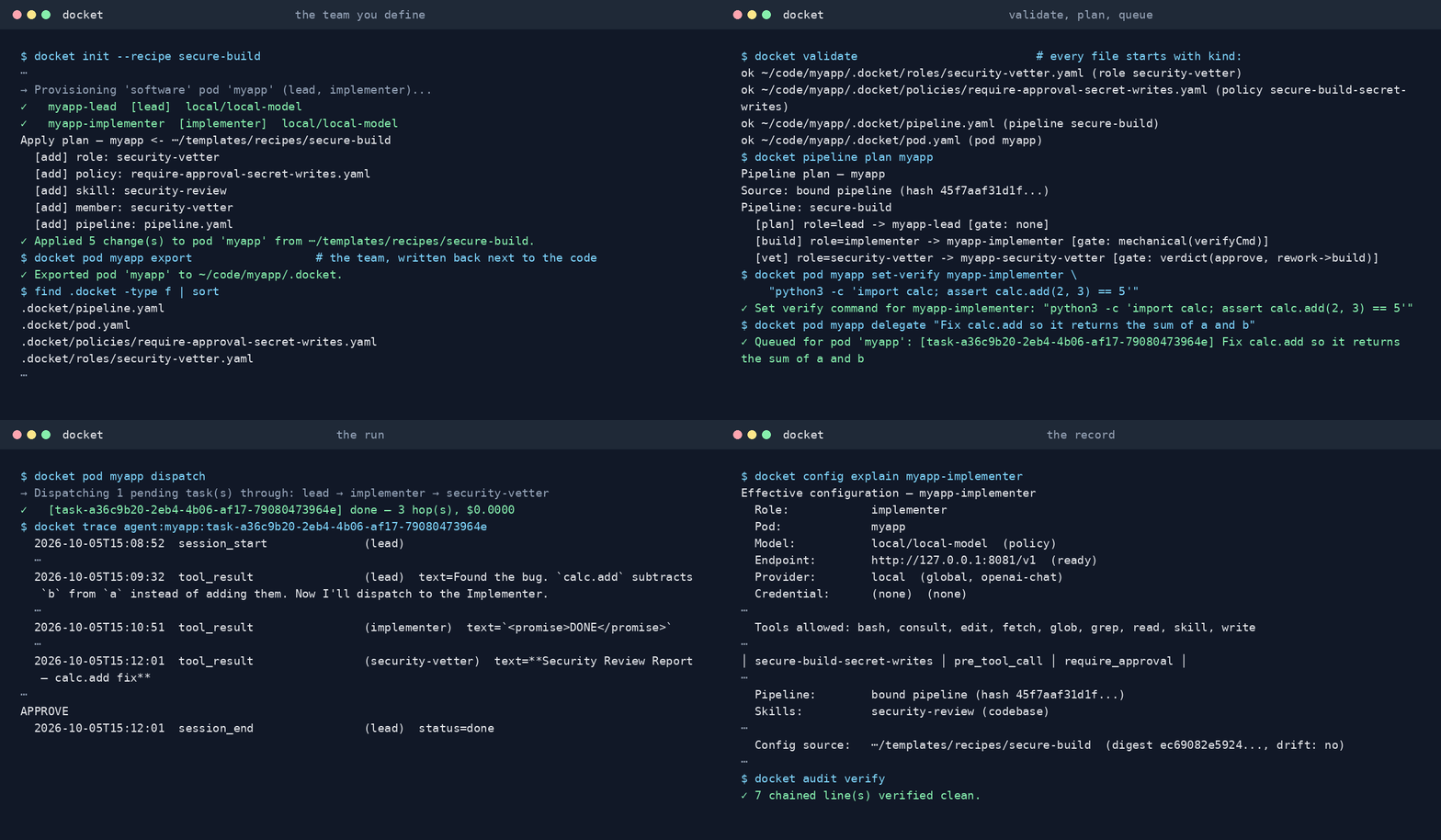
- Quick start: install, register a model, create the team from a recipe, run one governed task, read the record, then export the team and make it yours.
- Agent teams: the model behind it. Roles as data, pods per project, blueprints and recipes, and what each gate does during a dispatch.
- Configuration: every file docket creates, what reads it on the live path, and the customization recipes: models, instructions, roles, pipelines, policies, tools, unattended runs, and keeping the team in the repo.
Guides
| Doc | What it covers |
|---|---|
| Quick start | Ten minutes from install to a governed run, then the customization loop |
| Agent teams (pods) | The core model: org specialists vs project pods, the roles, blueprints, recipes and real pipeline dispatch |
| Configuration | Every file, globally and per project: what it controls, what reads it, and recipes for customizing agents, roles, pipelines, policies, tools and trace exporters |
| Workflow guide | End-to-end examples: a pod from init to committed code, custom pipelines, the run registry, schedules and webhooks |
| Recipe library | The eighteen shipped recipes (teams, policy packs, methodology pipelines, checks, a tool pack), what each brings and its README, generated from the recipes themselves |
| Command reference | Every command with syntax, options and examples, generated from the CLI |
| Models, gateways and harnesses | Hosted providers, OpenRouter and Vercel AI Gateway, other OpenAI-compatible endpoints, and what "compatible" does not promise |
| Security | The layered model: the always-on tool-call gate, policies, high-risk command classes, approvals, the audit log, and what trace export lets leave the host |
| Architecture (deep dive) | The cli/core/edges layering, the RuntimeDriver port, dispatch internals, durable state, harness mode |
| Adoption evidence | Reproducible governance and recovery results, with their limits |
| Troubleshooting | Common issues and fixes |
| Contributor harness | For people and agents working on docket's own codebase. Not docket harness run, which is the CLI's single-agent mode for an external caller |
| Decision records (ADRs) | One reasoned architectural decision per file |
| Cycles ended | The archive of closed waves and phases; verbatim, hash-verified, never a source of work |
Requirements live in ../specs/; the SSD workflow guide
explains how a feature is specified before it is built.
The commands you use most
# The team
docket init                                   # this directory -> a Lead + Implementer pod
docket recipes list                           # eighteen shipped recipes: teams, policies, methodologies, checks, tools
docket init --recipe secure-build             # ... plus a recipe (or your own under ~/.docket/recipes/)
docket validate                               # check every document under ./.docket/
docket pod myapp apply [--dry-run]            # apply ./.docket/ (or a recipe name/dir) onto the pod
docket pod myapp export                       # write the pod's own scope back to ./.docket/
docket roles list                             # every role: built-in, starter, yours

# Work
docket pod myapp delegate "<task>"            # queue a task
docket pipeline plan myapp                    # what would run, without running it
docket pod myapp dispatch                     # run the pipeline once, now
docket serve --dispatch                       # drain every pod's queue in the background

# What needs you
docket inbox                                  # every pod's waiting/blocked tasks and pending approvals
docket chat <task-id>                         # see and answer one task's parked question
docket channels enable desktop                # be told the moment something does (console alone tells nobody)
docket channels enable ntfy --set topic=t     # the same, on your phone
docket notify                                 # force one delivery sweep now

# The record
docket runs list                              # one row per dispatch
docket trace tail myapp                       # the latest session, step by step
docket audit && docket audit verify           # gate decisions, and the chain verifies
docket config explain myapp-implementer       # effective configuration with provenance
docket cost myapp-lead                        # measured tokens; no dollar figure it did not record
docket exporters list                         # trace destinations (OpenTelemetry, Langfuse): on/off, SHARES
docket exporters preview langfuse             # what one would receive, before anything is sent

# Models and keys
docket models provider add local http://127.0.0.1:8081/v1 --model m --ctx 16384 --max-tokens 4096
docket models preset local                    # or anthropic | openai | google | openrouter | ai-gateway
docket models set programmer <provider/model> # one role; `docket profile <id> <model>` pins one agent
docket keys add OPENROUTER_API_KEY            # stored once by name, never written into a workspace

# Health
docket status --all                           # every project at a glance
docket doctor [--fix]                         # workstation diagnostics and repairs
The full surface is in the command reference.
Where things live
Everything docket owns is under ~/.docket/ (DOCKET_HOME relocates it). The team itself lives
in your repository:
<your repo>/.docket/                  # the team's configuration of record (commit it)
├── pod.yaml                          # kind: pod — members to add, settings, optional pipeline file
├── roles/<name>.yaml + <name>.md     # kind: role — what a kind of agent is, and its instructions
├── pipeline.yaml                     # kind: pipeline — who works, in what order, behind which gates
├── policies/*.yaml                   # kind: policy — what is forbidden or needs a human
├── skills/<name>/SKILL.md            # Agent Skills: listed in the prompt, read on demand with the skill tool
└── .schemas/                         # JSON Schemas for editor autocompletion (export writes them)

~/.docket/
├── fleet.json                        # agent registration, channel bindings, isolation flag
├── docket-providers.json             # your kind: provider documents; fourteen ship built in
├── secrets.json                      # stored credentials (0600), referenced by name
├── docket-models.json                # role -> model policy and the default model
├── docket-roles.json                 # your global role overlay
├── policies/                         # global policies (most-restrictive wins with a pod's own)
├── plugins/                          # operator-scope predicate plugins (rare)
├── recipes/<name>/                   # your own recipes, addressable by name like the shipped ones
├── skills/<name>/SKILL.md            # global skills, every pod on this machine
├── docket-mcp-servers.json           # external MCP tool servers
├── docket-exporters.json             # your changes to the kind: exporter documents; five ship built in, all off
├── docket-channels.json              # your changes to the kind: channel documents; console is the only one on by default
├── notify-state.json                 # the last delivery sweep's dedupe snapshot (docket notify)
├── docket-runs.json  docket-schedules.json  docket-conversations.json
├── audit.log                         # hash-chained audit log (docket audit verify)
├── traces/  sessions/  approvals/    # per-session traces, durable history, pending approvals
└── workspaces/
    ├── manager/ knowledge/ security/ # the shared org specialists
    ├── pods/<project>/config/        # this pod's own overlay: roles.json, policies/, plugins/, skills/
    └── projects/<project>-<role>/    # one isolated workspace per pod member
        ├── SOUL.md  AGENTS.md  TOOLS.md  HEARTBEAT.md  MEMORY.md
        ├── INSTRUCTIONS.md           # yours; docket never writes it
        ├── .docket-meta.json         # role, codebase, model, verify command, pod settings (Lead)
        ├── tasks/<task-id>/          # one git worktree per task, on branch docket/<p>/<task-id>
        └── memory/                   # daily logs
Org specialists (manager, knowledge, security, and the opt-in portfolio-manager) have one
shared workspace each. Pod members each get an isolated one; no role is ever shared between
projects. Which of these files reach a model, and which only look like settings, is the subject
of Configuration §2.
Contributing to docs
- Accurate over comprehensive. Every example runs against the current CLI; the terminal output shown was captured from a real run.
- User-focused. Answer "how do I…" and link to the command reference for detail.
- One owner per fact. Adapter versions live in COMPATIBILITY.md,
requirements in
specs/, decisions inadr/.
Questions: docket help, or the Quick start.